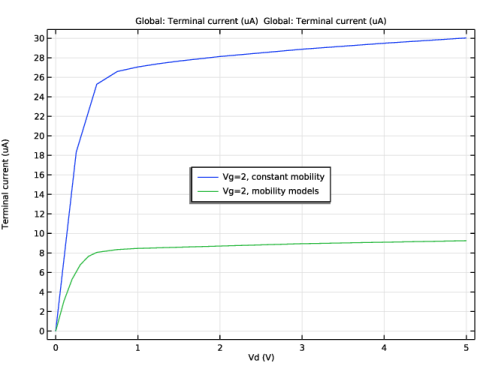
|
|
|
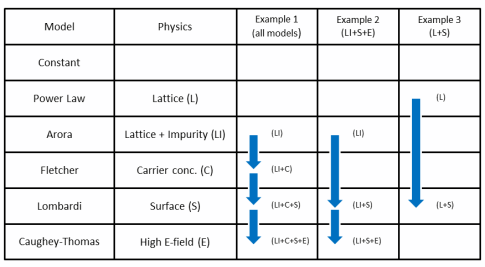
|
1
|
|
2
|
In the Application Libraries window, select Semiconductor Module > Transistors > mosfet in the tree.
|
|
3
|
Click
 Open. Open. |
|
1
|
|
1
|
|
2
|
In the Settings window for Lombardi Surface Mobility Model (S), locate the Input Mobilities section.
|
|
3
|
|
4
|
|
1
|
|
2
|
|
3
|
|
4
|
|
1
|
|
2
|
|
3
|
|
4
|
|
1
|
|
2
|
Go to the Add Study window.
|
|
3
|
|
4
|
Click the Add Study button in the window toolbar.
|
|
5
|
|
1
|
|
2
|
|
3
|
Select the Auxiliary sweep checkbox.
|
|
4
|
|
5
|
Click
 Add. Add. |
|
7
|
Click to expand the Values of Dependent Variables section. Find the Initial values of variables solved for subsection. From the Settings list, choose User controlled.
|
|
8
|
|
9
|
|
10
|
|
1
|
|
2
|
|
3
|
In the Model Builder window, expand the Study 3 - mobility models > Solver Configurations > Solution 3 (sol3) > Stationary Solver 1 > Segregated 1 node, then click Segregated Step 1.
|
|
4
|
|
5
|
|
1
|
|
2
|
|
3
|
|
4
|
|
5
|
|
1
|
|
2
|
|
3
|
|
4
|
|
5
|
|
1
|
|
2
|
|
3
|
|
5
|