PDF

MOSCAP 1D Small Signal
This tutorial uses a simple 1D model of a metal–oxide–silicon capacitor (MOSCAP) to illustrate the basic steps to set up and perform a semiconductor simulation with the COMSOL Semiconductor Module. The model employs the quasi-Fermi level formulation and the Semiconductor Equilibrium study step.
Introduction
The metal–silicon–oxide (MOS) structure is the fundamental building block for many silicon planar devices. Its capacitance measurements provide a wealth of insight into the working principles of such devices. This tutorial constructs a simple 1D model of a MOS capacitor (MOSCAP). Both the low- and high-frequency C–V curves are computed using the approach of small-signal analysis (the related model moscap_1d shows the transient approach). The model employs the quasi-Fermi level formulation and the Semiconductor Equilibrium study step. Two alternative methods to compute the differential capacitance are demonstrated, using either the gate terminal or the metal contact terminal, respectively.
Model Definition
This model simulates the behavior of the MOSCAP under an array of DC bias voltages between 2 and 1 V, plus a small-signal harmonic perturbation of 1 mV with frequencies of 102 Hz and 104 Hz for the low- and high- frequency cases, respectively. The modeled domain has a thickness of 10 um. The built-in Si material data is used.
The device is grounded at the right endpoint and the oxide–silicon interface is placed at the left endpoint, using the dedicated Thin Insulator Gate boundary condition with the Harmonic Perturbation subnode. A uniform doping and Shockley–Read–Hall recombination is applied to the entire modeling domain.
A user-controlled mesh is used to refine the mesh under the oxide–silicon interface. The small-signal analysis is done using a Semiconductor Equilibrium study step for the DC operating points, followed by a Frequency Domain Perturbation study step for the AC perturbation.
Results and Discussion
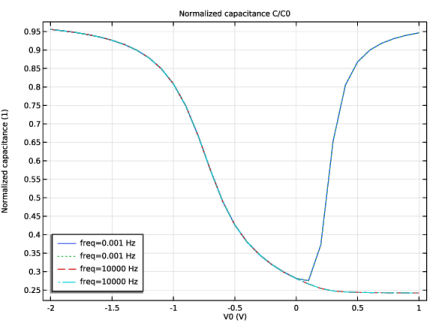
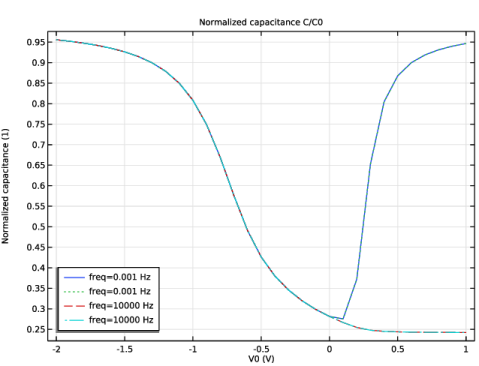
Figure 1shows the C–V curves for the low- and high-frequency cases. They exhibit the typical behavior seen in textbooks such as in Ref. 1.
.
Figure 1: C–V curves for the low- and high-frequency cases.
Reference
1. Sze and Ng, Physics of Semiconductor Devices, 3rd ed., John Wiley & Sons, Chap. 4.
Application Library path: Semiconductor_Module/Device_Building_Blocks/moscap_1d_small_signal
Modeling Instructions
From the File menu, choose New.
New
In the New window, click  Model Wizard.
Model Wizard
1
In the Model Wizard window, click  1D.
2
In the Select Physics tree, select Semiconductor > Semiconductor (semi).
3
Click Add.
In this tutorial we use the approach of small signal analysis to compute the values of the differential capacitance at an array of DC bias points. For these DC operating points, since there is no current flowing, it is best to use the Semiconductor Equilibrium study step.
4
Click  Study.
5
In the Select Study tree, select Preset Studies for Selected Physics Interfaces > Semiconductor Equilibrium.
6
Geometry 1
The Model Wizard starts the COMSOL Desktop with the Geometry node selected. We can take the opportunity to set the length unit to a more convenient one.
1
In the Model Builder window, under Component 1 (comp1) click Geometry 1.
2
In the Settings window for Geometry, locate the Units section.
3
From the Length unit list, choose µm.
The geometry is a simple line interval of length 10 um.
Interval 1 (i1)
1
Right-click Component 1 (comp1) > Geometry 1 and choose Interval.
2
In the Settings window for Interval, locate the Interval section.
3
Now import some global parameters from a text file.
Global Definitions
Parameters 1
1
In the Model Builder window, under Global Definitions click Parameters 1.
2
In the Settings window for Parameters, locate the Parameters section.
3
Click  Load from File.
4
Add built-in silicon material and close the Add Material pane when done.
Add Material
1
In the Home toolbar, click  Add Material to open the Add Material window.
2
Go to the Add Material window.
3
In the tree, select Semiconductors > Si - Silicon.
4
Click the Add to Component button in the window toolbar.
5
In the Home toolbar, click  Add Material to close the Add Material window.
Set up physics. We will demonstrate the quasi-Fermi level formulation.
Semiconductor (semi)
1
In the Settings window for Semiconductor, locate the Cross-Section Area section.
2
In the A text field, type area.
3
Locate the Model Properties section. From the Carrier statistics list, choose Fermi–Dirac.
4
Click to expand the Discretization section. From the Formulation list, choose Finite element quasi Fermi level (quadratic shape function).
Ground the device at the right endpoint.
Metal Contact 1
1
In the Physics toolbar, click  Boundaries and choose Metal Contact.
2
Click the  Zoom Extents button in the Graphics toolbar.
3
Place the oxide at the left endpoint, using the dedicated Thin Insulator Gate boundary condition.
Thin Insulator Gate 1
1
In the Physics toolbar, click  Boundaries and choose Thin Insulator Gate.
2
3
In the Settings window for Thin Insulator Gate, locate the Terminal section.
4
In the V0 text field, type V0.
5
Locate the Gate Contact section. In the εins text field, type epsrOx.
6
In the dins text field, type dOx.
Use the Harmonic Perturbation subnode to set up the small signal analysis.
Harmonic Perturbation 1
1
In the Physics toolbar, click  Attributes and choose Harmonic Perturbation.
2
In the Settings window for Harmonic Perturbation, locate the Terminal section.
3
In the V0 text field, type 1[mV].
Add doping and SRH recombination.
Analytic Doping Model 1
1
In the Physics toolbar, click  Domains and choose Analytic Doping Model.
2
In the Settings window for Analytic Doping Model, locate the Domain Selection section.
3
From the Selection list, choose All domains.
4
Locate the Impurity section. In the NA0 text field, type 1e15[1/cm^3].
Trap-Assisted Recombination 1
1
In the Physics toolbar, click  Domains and choose Trap-Assisted Recombination.
2
In the Settings window for Trap-Assisted Recombination, locate the Domain Selection section.
3
From the Selection list, choose All domains.
4
Locate the Shockley–Read–Hall Recombination section. From the τn list, choose User defined. In the associated text field, type 10[ns].
5
From the τp list, choose User defined. In the associated text field, type 10[ns].
Set up a user-defined mesh for a better compromise between discretization error and roundoff error.
Mesh 1
Edge 1
In the Mesh toolbar, click  Edge.
Distribution 1
1
Right-click Edge 1 and choose Distribution.
2
In the Settings window for Distribution, locate the Distribution section.
3
In the Number of elements text field, type 100.
Set up study: use Auxiliary sweep to set up the array of DC bias points.
Study 1
Step 1: Semiconductor Equilibrium
1
In the Model Builder window, under Study 1 click Step 1: Semiconductor Equilibrium.
2
In the Settings window for Semiconductor Equilibrium, click to expand the Study Extensions section.
3
Select the Auxiliary sweep checkbox.
4
5
Add a Frequency Domain Perturbation study step to perform the small signal analysis. Specify two values of frequency for the low- and high-frequency limiting behaviors. Use Auxiliary sweep to set up the same array of DC bias points as in the previous study step.
Step 2: Frequency-Domain Perturbation
1
In the Study toolbar, click  More Study Steps and choose Frequency Domain > Frequency-Domain Perturbation.
2
In the Settings window for Frequency-Domain Perturbation, locate the Study Settings section.
3
In the Frequencies text field, type 0.001 1e4.
4
Click to expand the Study Extensions section. Select the Auxiliary sweep checkbox.
5
6
Adjust the default solver settings for better solution accuracy.
7
Locate the Study Settings section. From the Tolerance list, choose User controlled.
8
In the Relative tolerance text field, type 1.0E-9.
9
In the Study toolbar, click  Compute.
Results
Energy Levels (semi)
The plots by default show the harmonic perturbation part of the solution. We can change them to show the DC operating points instead. Details near the silicon–oxide interface can be seen easily by setting the x-axis to log scale.
Conduction Band Energy Level
1
In the Model Builder window, expand the Energy Levels (semi) node, then click Conduction Band Energy Level.
2
In the Settings window for Line Graph, locate the y-Axis Data section.
3
From the Expression evaluated for list, choose Static solution.
Electron Quasi-Fermi Energy Level
1
In the Model Builder window, click Electron Quasi-Fermi Energy Level.
2
In the Settings window for Line Graph, locate the y-Axis Data section.
3
From the Expression evaluated for list, choose Static solution.
Hole Quasi-Fermi Energy Level
1
In the Model Builder window, click Hole Quasi-Fermi Energy Level.
2
In the Settings window for Line Graph, locate the y-Axis Data section.
3
From the Expression evaluated for list, choose Static solution.
Valence Band Energy Level
1
In the Model Builder window, click Valence Band Energy Level.
2
In the Settings window for Line Graph, locate the y-Axis Data section.
3
From the Expression evaluated for list, choose Static solution.
Energy Levels (semi)
1
In the Model Builder window, click Energy Levels (semi).
2
In the Settings window for 1D Plot Group, locate the Legend section.
3
Clear the Show legends checkbox.
4
Click the  x-Axis Log Scale button in the Graphics toolbar.
5
In the Energy Levels (semi) toolbar, click  Plot.
Carrier Concentrations (semi)
1
In the Model Builder window, click Carrier Concentrations (semi).
2
In the Settings window for 1D Plot Group, locate the Legend section.
3
Clear the Show legends checkbox.
Electron Concentration
1
In the Model Builder window, expand the Carrier Concentrations (semi) node, then click Electron Concentration.
2
In the Settings window for Line Graph, locate the y-Axis Data section.
3
From the Expression evaluated for list, choose Static solution.
Hole Concentration
1
In the Model Builder window, click Hole Concentration.
2
In the Settings window for Line Graph, locate the y-Axis Data section.
3
From the Expression evaluated for list, choose Static solution.
4
Click the  x-Axis Log Scale button in the Graphics toolbar.
5
In the Carrier Concentrations (semi) toolbar, click  Plot.
Line Graph 1
1
In the Model Builder window, expand the Electric Potential (semi) node, then click Line Graph 1.
2
In the Settings window for Line Graph, locate the y-Axis Data section.
3
From the Expression evaluated for list, choose Static solution.
4
Click the  x-Axis Log Scale button in the Graphics toolbar.
5
In the Electric Potential (semi) toolbar, click  Plot.
Net Dopant Concentration (semi)
The model has a uniform p-doping therefore, we remove the generated default plot, Net Dopant Concentration.
1
In the Model Builder window, under Results right-click Net Dopant Concentration (semi) and choose Delete.
Plot the C-V curves for the low- and high-frequency cases. In this model we show two alternative methods to compute the differential capacitance, using either the gate terminal or the metal contact terminal, respectively. The charge on the gate terminal is readily available as a built-in variable. There is no such variable on metal contacts, since usually there are conduction currents flowing through them. In situations where conduction is minimal and the main contribution to the terminal current is capacitive charging, such as in this model, we can integrate the metal contact current to obtain the charge. In frequency domain this is simply semi.I0_1/semi.iomega. There should also be an overall minus sign to account for the fact that the charges on the two terminals are opposite in sign.
Normalized capacitance C/C0
1
In the Results toolbar, click  1D Plot Group.
2
In the Settings window for 1D Plot Group, type Normalized capacitance C/C0 in the Label text field.
3
Click to expand the Title section. From the Title type list, choose Label.
4
Locate the Legend section. From the Position list, choose Lower left.
Global 1
1
Right-click Normalized capacitance C/C0 and choose Global.
2
In the Settings window for Global, locate the y-Axis Data section.
3
4
Click to expand the Coloring and Style section. Find the Line style subsection. From the Line list, choose Cycle.
When evaluating the result from a Frequency Domain Perturbation study step, it is important that the Compute differential checkbox is selected, so that COMSOL differentiates the solution at the linearization point when evaluating the expression, in order to correctly account for the nonlinearities in the equation system.
5
Locate the y-Axis Data section. Select the Compute differential checkbox.
6
Click to expand the Legends section. Find the Include subsection. Clear the Description checkbox.
7
In the Normalized capacitance C/C0 toolbar, click  Plot.