PDF

Fin Field-Effect Transistor
Introduction
A Fin Field-Effect Transistor, for short FinFET, is an advanced type of Field-Effect Transistor in a 3D structure. The name comes from the fin-shaped structure of the channel above the substrate. The gate electrode is placed around the channel on three sides, offering several advantages over planar structures. These include better control over current flow throughout the channel, lower leakage currents, and faster switching times. FinFETs are widely used in various applications, such as high-performance computing, biomedical electronics, and home electronic devices.
This example shows how to model the 3D structure of a FinFET.
Model Definition
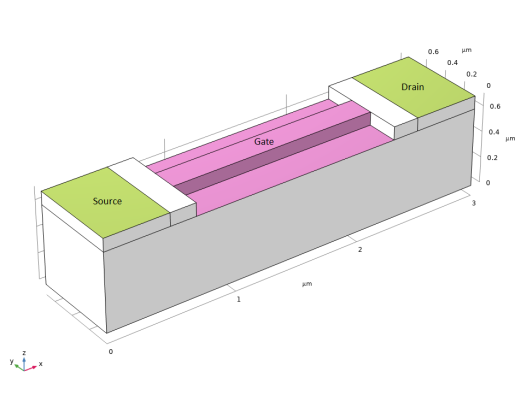
Figure 1 shows the model geometry, indicating the source, drain, and gate electrodes. The model configuration is defined as follows: source and drain electrodes are placed on the two sides of the device and the gate electrode surrounds the channel area. The dimensions of the device are 3 μm, 0.7 μm, and 0.7 μm in width, depth, and height, respectively.
Figure 1: Model geometry showing the source, drain, and gate electrodes.
The procedure of the implementation is described in detail in the Modeling Instructions section.
Results and Discussion
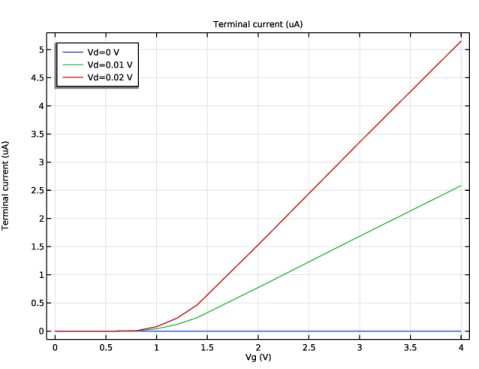
Figure 2 shows the drain current versus gate voltage curves for different values of the drain voltage.
Figure 2: Drain current versus gate voltage for fixed drain voltage.
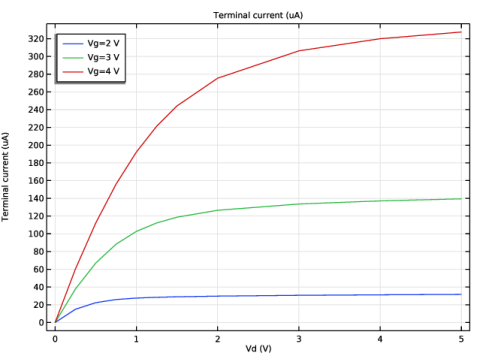
Figure 3 shows the drain current versus drain voltage for fixed gate voltages of 2, 3, and 4 V.
Figure 3: Drain current versus drain voltage curve.
Application Library path: Semiconductor_Module/Transistors/finfet
Modeling Instructions
From the File menu, choose New.
New
In the New window, click  Model Wizard.
Model Wizard
1
In the Model Wizard window, click  3D.
2
In the Select Physics tree, select Semiconductor > Semiconductor (semi).
3
Click Add.
4
Click  Study.
5
In the Select Study tree, select General Studies > Stationary.
6
Global Definitions
Parameters 1
1
In the Model Builder window, under Global Definitions click Parameters 1.
2
In the Settings window for Parameters, locate the Parameters section.
3
Geometry 1
1
In the Model Builder window, under Component 1 (comp1) click Geometry 1.
2
In the Settings window for Geometry, locate the Units section.
3
From the Length unit list, choose µm.
Block 1 (blk1)
1
In the Geometry toolbar, click  Block.
2
In the Settings window for Block, locate the Size and Shape section.
3
In the Width text field, type w_finfet.
4
In the Depth text field, type d_finfet.
5
In the Height text field, type h_finfet.
Block 2 (blk2)
1
Right-click Block 1 (blk1) and choose Duplicate.
2
In the Settings window for Block, locate the Size and Shape section.
3
In the Width text field, type w_source.
4
In the Height text field, type h_gate.
5
Locate the Position section. In the z text field, type h_finfet-h_gate.
Block 3 (blk3)
1
Right-click Block 2 (blk2) and choose Duplicate.
2
In the Settings window for Block, locate the Size and Shape section.
3
In the Width text field, type w_ins.
4
Locate the Position section. In the x text field, type w_source.
Block 4 (blk4)
1
Right-click Block 3 (blk3) and choose Duplicate.
2
In the Settings window for Block, locate the Size and Shape section.
3
In the Width text field, type w_gate.
4
In the Depth text field, type d_channel.
5
Locate the Position section. In the x text field, type w_source+w_ins.
6
In the y text field, type (d_finfet-d_channel)/2.
Block 5 (blk5)
1
Right-click Block 4 (blk4) and choose Duplicate.
2
In the Settings window for Block, locate the Size and Shape section.
3
In the Width text field, type w_ins.
4
In the Depth text field, type d_finfet.
5
Locate the Position section. In the x text field, type w_source+w_ins+w_gate.
6
In the y text field, type 0.
Block 6 (blk6)
1
Right-click Block 5 (blk5) and choose Duplicate.
2
In the Settings window for Block, locate the Size and Shape section.
3
In the Width text field, type w_drain.
4
Locate the Position section. In the x text field, type w_source+2*w_ins+w_gate.
Block 7 (blk7)
1
Right-click Block 6 (blk6) and choose Duplicate.
2
In the Settings window for Block, locate the Size and Shape section.
3
In the Width text field, type w_gate.
4
In the Depth text field, type (d_finfet-d_channel)/2.
5
Locate the Position section. In the x text field, type w_source+w_ins.
Block 8 (blk8)
1
Right-click Block 7 (blk7) and choose Duplicate.
2
In the Settings window for Block, locate the Position section.
3
In the y text field, type (d_finfet+d_channel)/2.
Difference 1 (dif1)
1
In the Geometry toolbar, click  Booleans and Partitions and choose Difference.
2
3
In the Settings window for Difference, locate the Difference section.
4
Click to select the  Activate Selection toggle button for Objects to subtract.
5
Select the objects blk7 and blk8 only.
6
Click  Build All Objects.
Add Material
1
In the Materials toolbar, click  Add Material to open the Add Material window.
2
Go to the Add Material window.
3
In the tree, select Semiconductors > Si - Silicon.
4
Click the Add to Component button in the window toolbar.
5
In the Materials toolbar, click  Add Material to close the Add Material window.
Semiconductor (semi)
Background p Doping
1
In the Physics toolbar, click  Domains and choose Analytic Doping Model.
2
In the Settings window for Analytic Doping Model, type Background p Doping in the Label text field.
3
Locate the Domain Selection section. From the Selection list, choose All domains.
4
Locate the Impurity section. In the NA0 text field, type 1e17[1/cm^3].
Source n Doping
1
Right-click Background p Doping and choose Duplicate.
2
In the Settings window for Analytic Doping Model, type Source n Doping in the Label text field.
3
Locate the Distribution section. From the list, choose Box.
4
Locate the Impurity section. From the Impurity type list, choose Donor doping (n-type).
5
In the ND0 text field, type 1e20[1/cm^3].
6
Locate the Uniform Region section. Specify the r0 vector as
7
In the W text field, type 0.6[um].
8
In the D text field, type 0.7[um].
9
In the H text field, type 0.1[um].
10
Locate the Profile section. Select the Specify different length scales for each direction checkbox.
11
Specify the dj vector as
12
From the Nb list, choose Acceptor concentration (semi/adm1).
Drain n Doping
1
Right-click Source n Doping and choose Duplicate.
2
In the Settings window for Analytic Doping Model, type Drain n Doping in the Label text field.
3
Locate the Uniform Region section. Specify the r0 vector as
Metal Contact Source
1
In the Physics toolbar, click  Boundaries and choose Metal Contact.
2
In the Settings window for Metal Contact, type Metal Contact Source in the Label text field.
3
Metal Contact Drain
1
Right-click Metal Contact Source and choose Duplicate.
2
In the Settings window for Metal Contact, type Metal Contact Drain in the Label text field.
3
Locate the Boundary Selection section. Click  Clear Selection.
4
5
Locate the Terminal section. In the V0 text field, type Vd.
Metal Contact Body
1
Right-click Metal Contact Drain and choose Duplicate.
2
In the Settings window for Metal Contact, type Metal Contact Body in the Label text field.
3
Locate the Boundary Selection section. Click  Clear Selection.
4
5
Locate the Terminal section. In the V0 text field, type 0.
Thin Insulator Gate 1
1
In the Physics toolbar, click  Boundaries and choose Thin Insulator Gate.
2
3
In the Settings window for Thin Insulator Gate, locate the Terminal section.
4
In the V0 text field, type Vg.
5
Locate the Gate Contact section. In the εins text field, type 4.5.
6
In the dins text field, type 30[nm].
Trap-Assisted Recombination 1
1
In the Physics toolbar, click  Domains and choose Trap-Assisted Recombination.
2
In the Settings window for Trap-Assisted Recombination, locate the Domain Selection section.
3
From the Selection list, choose All domains.
Mesh 1
Free Triangular 1
1
In the Mesh toolbar, click  More Generators and choose Free Triangular.
2
Size
1
In the Model Builder window, click Size.
2
In the Settings window for Size, locate the Element Size section.
3
From the Predefined list, choose Finer.
Swept 1
1
In the Mesh toolbar, click  Swept.
2
In the Settings window for Swept, locate the Domain Selection section.
3
From the Geometric entity level list, choose Domain.
4
Distribution 1
1
Right-click Swept 1 and choose Distribution.
2
In the Settings window for Distribution, locate the Distribution section.
3
From the Distribution type list, choose Predefined.
4
In the Number of elements text field, type 10.
Swept 2
1
In the Model Builder window, under Component 1 (comp1) > Mesh 1 right-click Swept 1 and choose Duplicate.
2
In the Settings window for Swept, locate the Domain Selection section.
3
Click  Clear Selection.
4
Distribution 1
1
In the Model Builder window, expand the Swept 2 node, then click Distribution 1.
2
In the Settings window for Distribution, locate the Distribution section.
3
In the Number of elements text field, type 20.
4
In the Element ratio text field, type 0.1.
5
Select the Reverse direction checkbox.
6
Click  Build All.
Study 1: Vg Sweep
1
In the Model Builder window, click Study 1.
2
In the Settings window for Study, type Study 1: Vg Sweep in the Label text field.
Step 1: Stationary
1
In the Model Builder window, under Study 1: Vg Sweep click Step 1: Stationary.
2
In the Settings window for Stationary, click to expand the Study Extensions section.
3
Select the Auxiliary sweep checkbox.
4
5
6
7
8
From the Sweep type list, choose All combinations.
9
In the Study toolbar, click  Compute.
Results
Id-Vg
1
In the Results toolbar, click  1D Plot Group.
2
In the Settings window for 1D Plot Group, type Id-Vg in the Label text field.
3
Locate the Legend section. From the Position list, choose Upper left.
Global 1
1
Right-click Id-Vg and choose Global.
2
In the Settings window for Global, click Replace Expression in the upper-right corner of the y-Axis Data section. From the menu, choose Component 1 (comp1) > Semiconductor > Terminals > semi.I0_2 - Terminal current - A.
3
Locate the y-Axis Data section. In the table, enter the following settings:
4
Click to expand the Legends section. Find the Include subsection. Clear the Description checkbox.
5
In the Id-Vg toolbar, click  Plot.
Add Study
1
In the Home toolbar, click  Add Study to open the Add Study window.
2
Go to the Add Study window.
3
Find the Studies subsection. In the Select Study tree, select General Studies > Stationary.
4
Click the Add Study button in the window toolbar.
5
In the Home toolbar, click  Add Study to close the Add Study window.
Study 2: Vd Sweep
1
In the Settings window for Study, type Study 2: Vd Sweep in the Label text field.
2
Locate the Study Settings section. Clear the Generate default plots checkbox.
Step 1: Stationary
1
In the Model Builder window, under Study 2: Vd Sweep click Step 1: Stationary.
2
In the Settings window for Stationary, click to expand the Values of Dependent Variables section.
3
Find the Initial values of variables solved for subsection. From the Settings list, choose User controlled.
4
From the Method list, choose Solution.
5
From the Study list, choose Study 1: Vg Sweep, Stationary.
6
From the Parameter value (Vg (V),Vd (V)) list, choose Manual.
7
In the Index text field, type 9.
8
Locate the Study Extensions section. Select the Auxiliary sweep checkbox.
9
10
11
12
13
From the Sweep type list, choose All combinations.
14
From the Reuse solution from previous step list, choose Auto.
15
In the Study toolbar, click  Compute.
Results
Id-Vd
1
In the Model Builder window, right-click Id-Vg and choose Duplicate.
2
In the Settings window for 1D Plot Group, type Id-Vd in the Label text field.
3
Locate the Data section. From the Dataset list, choose Study 2: Vd Sweep/Solution 2 (sol2).
4
In the Id-Vd toolbar, click  Plot.