|
|
|
|
1
|
|
2
|
In the Select Physics tree, select Structural Mechanics > Rotordynamics > Hydrodynamic Bearing (hdb).
|
|
3
|
Click Add.
|
|
4
|
Click
 Study. Study. |
|
5
|
|
6
|
Click
 Done. Done. |
|
1
|
|
2
|
|
3
|
Click
 Load from File. Load from File. |
|
4
|
Browse to the model’s Application Libraries folder and double-click the file step_thrust_bearing_topology_optimization_parameters.txt.
|
|
1
|
|
2
|
|
3
|
|
4
|
Click
 Build Selected. Build Selected. |
|
1
|
Right-click Component 1 (comp1) > Geometry 1 > Work Plane 1 (wp1) > Plane Geometry > Circle 1 (c1) and choose Duplicate.
|
|
2
|
|
3
|
|
1
|
|
2
|
Select the object c1 only.
|
|
3
|
|
4
|
|
5
|
Select the object c2 only.
|
|
6
|
Click
 Build Selected. Build Selected. |
|
1
|
|
2
|
On the object dif1, select Point 1 only.
|
|
3
|
|
4
|
|
5
|
On the object dif1, select Point 8 only.
|
|
6
|
Click
 Build Selected. Build Selected. |
|
1
|
|
2
|
Select the object dif1 only.
|
|
3
|
|
4
|
|
5
|
Select the object ls1 only.
|
|
6
|
Click
 Build Selected. Build Selected. |
|
1
|
|
2
|
|
3
|
Select the Resulting objects selection checkbox.
|
|
1
|
|
2
|
|
3
|
|
4
|
Click
 Add. Add. |
|
5
|
|
6
|
Click OK.
|
|
7
|
|
8
|
|
9
|
|
10
|
Select the Interior edges checkbox.
|
|
11
|
|
1
|
|
2
|
In the Settings window for Complement Selection, type Circumferential Edges in the Label text field.
|
|
3
|
|
4
|
|
5
|
|
6
|
Click OK.
|
|
1
|
|
2
|
In the Show More Options dialog, in the tree, select the checkbox for the node Physics > Advanced Physics Options.
|
|
3
|
Click OK.
|
|
4
|
|
5
|
|
1
|
|
2
|
|
1
|
|
2
|
|
3
|
|
4
|
|
5
|
|
6
|
|
7
|
|
8
|
|
9
|
Locate the Control Variable Initial Value section. In the θ0 text field, type if(initUniform,volfrac,0.5+0.5*sin(N*atan2(Yg,Xg))).
|
|
1
|
|
2
|
|
3
|
|
4
|
Locate the Reference Surface Properties section. From the Reference normal orientation list, choose Opposite direction to geometry normal.
|
|
5
|
|
6
|
|
7
|
|
8
|
|
9
|
|
1
|
|
2
|
|
3
|
|
4
|
Specify the V vector as
|
|
1
|
|
2
|
|
3
|
|
1
|
|
2
|
|
3
|
|
4
|
Click
 Build All. Build All. |
|
5
|
Click the Custom button.
|
|
6
|
|
7
|
|
8
|
Click
 Build All. Build All. |
|
1
|
|
2
|
|
3
|
|
1
|
|
2
|
|
3
|
Click
 Add twice. Add twice. |
|
1
|
|
2
|
In the Settings window for Topology Optimization, click Replace Expression in the upper-right corner of the Objective Function section. From the menu, choose Component 1 (comp1) > Hydrodynamic Bearing > Fluid loads > Fluid load on collar - N > comp1.hdb.htb1.Fcz - Fluid load on collar, z-component.
|
|
3
|
Locate the Objective Function section. Find the Objective settings subsection. From the Objective scaling list, choose Initial solution based.
|
|
4
|
|
5
|
|
1
|
In the Model Builder window, expand the Topology Optimization node, then click Output material volume factor.
|
|
2
|
|
3
|
|
4
|
|
1
|
|
2
|
|
3
|
Select the Plot checkbox.
|
|
5
|
|
1
|
|
2
|
|
3
|
|
4
|
|
1
|
|
2
|
|
1
|
|
2
|
|
3
|
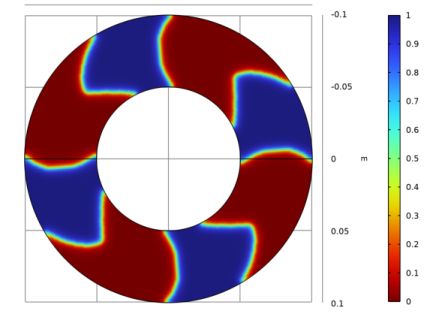
From the Color table transformation list, choose Reverse, so that the thicker oil layer becomes blue.
|
|
1
|
|
2
|
|
3
|
|
4
|
From the Parameter value (N,initUniform) list, choose 3: N=4, initUniform=0 to show the best design.
|
|
5
|
|
6
|
From the Dataset list, choose Study: Sweep Initial Condition/Solution 1 (sol1), so that the plot still updates while optimizing.
|
|
1
|
|
2
|
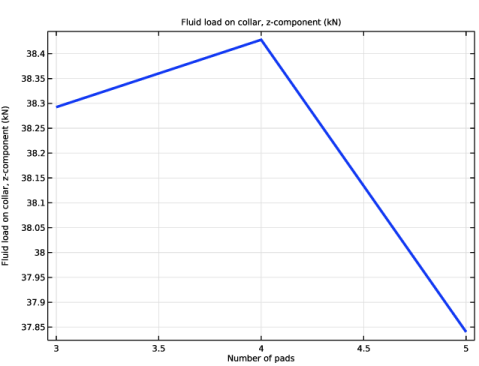
In the Settings window for 1D Plot Group, type Bearing Capacity vs. Number of Pads in the Label text field.
|
|
3
|
Locate the Data section. From the Dataset list, choose Study: Sweep Initial Condition/Parametric Solutions 1 (sol2).
|
|
4
|
|
5
|
In the Parameter values (N,initUniform) list, choose 2: N=3, initUniform=0, 3: N=4, initUniform=0, and 4: N=5, initUniform=0.
|
|
1
|
|
2
|
In the Settings window for Global, click Replace Expression in the upper-right corner of the y-Axis Data section. From the menu, choose Component 1 (comp1) > Hydrodynamic Bearing > Fluid loads > Fluid load on collar - N > hdb.htb1.Fcz - Fluid load on collar, z-component.
|
|
3
|
Locate the y-Axis Data section. In the table, enter the following settings:
|
|
4
|
|
5
|
|
6
|
|
1
|
|
2
|
|
3
|
|
1
|
|
2
|
|
3
|
|
4
|
|
1
|
|
2
|
|
3
|
Click Import.
|
|
1
|
|
2
|
|
1
|
|
2
|
|
3
|
|
4
|
|
1
|
|
2
|
|
3
|
|
4
|
|
5
|
|
6
|
Clear the Form solids from surface objects checkbox.
|
|
7
|
Click to expand the Selections of Resulting Entities section. Select the Resulting objects selection checkbox.
|
|
8
|
|
1
|
|
2
|
|
3
|
|
4
|
|
5
|
Click
 Build Selected. Build Selected. |
|
1
|
|
2
|
|
3
|
|
4
|
|
5
|
|
6
|
Click OK.
|
|
1
|
In the Model Builder window, under Component 2: Verification (comp2) right-click Definitions and choose Variables.
|
|
2
|
|
3
|
Locate the Geometric Entity Selection section. From the Geometric entity level list, choose Boundary.
|
|
4
|
|
5
|
Locate the Variables section. In the table, enter the following settings:
|
|
1
|
|
2
|
|
3
|
|
4
|
Locate the Variables section. In the table, enter the following settings:
|
|
1
|
In the Model Builder window, right-click Component 2: Verification (comp2) and choose Paste Hydrodynamic Bearing.
|
|
2
|
|
1
|
In the Model Builder window, expand the Hydrodynamic Bearing (hdb2) node, then click Hydrodynamic Thrust Bearing 1.
|
|
2
|
|
3
|
|
1
|
|
2
|
|
3
|
|
1
|
|
2
|
|
3
|
|
1
|
|
2
|
|
3
|
|
4
|
|
5
|
|
6
|
Click
 Build All. Build All. |
|
1
|
|
2
|
Go to the Add Study window.
|
|
3
|
|
4
|
Click the Add Study button in the window toolbar.
|
|
5
|
|
1
|
|
2
|
In the Solve for column of the table, under Component 1: Optimization (comp1), clear the checkboxes for Hydrodynamic Bearing (hdb) and Topology Optimization.
|
|
1
|
In the Model Builder window, expand the Study: Sweep Initial Condition node, then click Step 1: Stationary.
|
|
2
|
|
3
|
In the Solve for column of the table, under Component 2: Verification (comp2), clear the checkbox for Hydrodynamic Bearing (hdb2).
|
|
1
|
|
2
|
|
3
|
|
1
|
|
2
|
|
1
|
|
2
|
In the Settings window for Global Evaluation, click Add Expression in the upper-right corner of the Expressions section. From the menu, choose Component 1 (comp1) > Hydrodynamic Bearing > Fluid loads > Fluid load on collar - N > hdb.htb1.Fcz - Fluid load on collar, z-component.
|
|
1
|
|
2
|
|
3
|
|
4
|
Click Replace Expression in the upper-right corner of the Expressions section. From the menu, choose Component 2: Verification (comp2) > Hydrodynamic Bearing > Fluid loads > Fluid load on collar - N > hdb2.htb1.Fcz - Fluid load on collar, z-component.
|
|
5
|