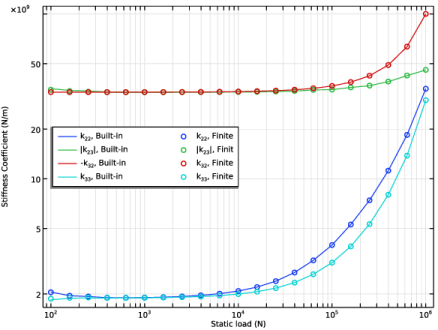
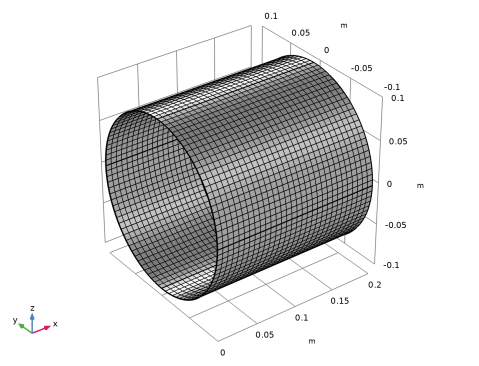
|
|
|


|
mPa⋅s
|
||
|
GPa-1
|
||
|
kg/m3
|


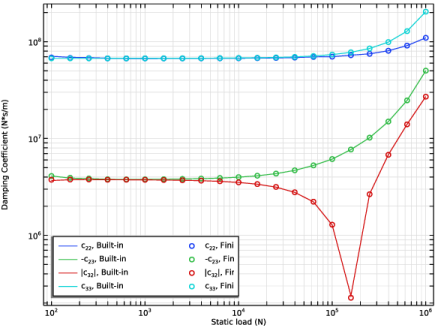
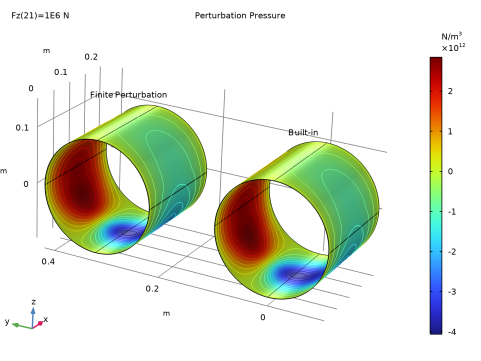
|
1
|
|
2
|
In the Select Physics tree, select Structural Mechanics > Rotordynamics > Hydrodynamic Bearing (hdb).
|
|
3
|
Click Add.
|
|
4
|
Click
 Study. Study. |
|
5
|
|
6
|
Click
 Done. Done. |
|
1
|
|
2
|
|
3
|
Locate the Parameters section. In the table, enter the following settings:
|
|
1
|
|
2
|
|
3
|
Locate the Parameters section. In the table, enter the following settings:
|
|
4
|
|
5
|
|
6
|
Locate the Parameters section. In the table, enter the following settings:
|
|
7
|
|
8
|
|
9
|
Locate the Parameters section. In the table, enter the following settings:
|
|
10
|
|
11
|
|
12
|
Locate the Parameters section. In the table, enter the following settings:
|
|
13
|
|
14
|
|
15
|
Locate the Parameters section. In the table, enter the following settings:
|
|
16
|
|
17
|
|
1
|
|
2
|
|
3
|
|
4
|
|
5
|
|
6
|
|
1
|
In the Model Builder window, under Component 1 (comp1) right-click Materials and choose Blank Material.
|
|
2
|
|
3
|
Locate the Material Contents section. In the table, enter the following settings:
|
|
1
|
|
2
|
|
3
|
Select the Calculate dynamic coefficients checkbox.
|
|
1
|
In the Model Builder window, under Component 1 (comp1) > Hydrodynamic Bearing (hdb) click Hydrodynamic Journal Bearing 1.
|
|
2
|
|
3
|
|
4
|
|
5
|
|
6
|
|
7
|
|
1
|
|
2
|
|
3
|
|
1
|
|
3
|
|
4
|
|
1
|
|
3
|
|
4
|
|
5
|
Click
 Build All. Build All. |
|
1
|
|
2
|
|
1
|
|
2
|
|
3
|
Select the Auxiliary sweep checkbox.
|
|
4
|
Click
 Add. Add. |
|
6
|
|
1
|
|
2
|
|
3
|
Locate the Plot Settings section.
|
|
4
|
|
5
|
|
6
|
|
1
|
|
2
|
|
4
|
|
5
|
|
6
|
|
7
|
|
1
|
|
2
|
|
3
|
|
4
|
|
5
|
|
6
|
|
1
|
|
2
|
|
3
|
Locate the y-Axis Data section. In the table, enter the following settings:
|
|
4
|
|
5
|
|
6
|
|
1
|
|
2
|
|
3
|
Clear the Calculate dynamic coefficients checkbox.
|
|
1
|
In the Model Builder window, under Component 1 (comp1) > Hydrodynamic Bearing (hdb) right-click Hydrodynamic Journal Bearing 1 and choose Duplicate.
|
|
2
|
|
3
|
|
4
|
|
5
|
|
6
|
|
1
|
|
2
|
Go to the Add Study window.
|
|
3
|
|
4
|
Click the Add Study button in the window toolbar.
|
|
5
|
|
1
|
|
2
|
Select the Modify model configuration for study step checkbox.
|
|
3
|
In the tree, select Component 1 (comp1) > Hydrodynamic Bearing (hdb) > Hydrodynamic Journal Bearing 2.
|
|
4
|
Click
 Disable. Disable. |
|
1
|
|
2
|
|
3
|
|
1
|
|
2
|
|
3
|
Select the Auxiliary sweep checkbox.
|
|
4
|
Click
 Add. Add. |
|
1
|
|
2
|
|
3
|
|
4
|
Click
 Add. Add. |
|
6
|
|
1
|
|
2
|
In the Settings window for Evaluation Group, type Stiffness Coefficient, k22 (Finite Perturbation) in the Label text field.
|
|
3
|
Locate the Data section. From the Dataset list, choose Study: Finite Perturbation/Solution 2 (sol2).
|
|
1
|
|
2
|
|
1
|
|
2
|
|
3
|
|
4
|
|
5
|
|
1
|
|
2
|
|
3
|
|
4
|
|
5
|
|
6
|
|
1
|
|
2
|
In the Settings window for Evaluation Group, type Stiffness Coefficient, k23 (Finite Perturbation) in the Label text field.
|
|
3
|
|
4
|
|
1
|
In the Model Builder window, expand the Stiffness Coefficient, k23 (Finite Perturbation) node, then click Global Evaluation 2.
|
|
2
|
|
3
|
|
4
|
|
1
|
In the Model Builder window, right-click Stiffness Coefficient, k22 (Finite Perturbation) and choose Duplicate.
|
|
2
|
|
3
|
In the Settings window for Evaluation Group, type Stiffness Coefficient, k32 (Finite Perturbation) in the Label text field.
|
|
4
|
|
5
|
|
1
|
|
2
|
|
1
|
|
2
|
|
4
|
|
1
|
In the Model Builder window, right-click Stiffness Coefficient, k23 (Finite Perturbation) and choose Duplicate.
|
|
2
|
In the Settings window for Evaluation Group, type Stiffness Coefficient, k33 (Finite Perturbation) in the Label text field.
|
|
3
|
|
4
|
|
1
|
In the Model Builder window, expand the Stiffness Coefficient, k33 (Finite Perturbation) node, then click Global Evaluation 1.
|
|
2
|
|
1
|
|
2
|
|
4
|
|
1
|
|
2
|
|
3
|
|
1
|
|
2
|
|
3
|
|
4
|
|
5
|
Locate the Coloring and Style section. Find the Line style subsection. From the Line list, choose None.
|
|
6
|
|
7
|
|
8
|
|
9
|
|
1
|
|
2
|
|
3
|
|
4
|
|
5
|
|
1
|
|
2
|
|
3
|
|
4
|
|
1
|
|
2
|
|
3
|
|
4
|
|
5
|
|
1
|
In the Model Builder window, right-click Stiffness Coefficient, k22 (Finite Perturbation) and choose Duplicate.
|
|
2
|
In the Settings window for Evaluation Group, type Damping Coefficient, c22 (Finite Perturbation) in the Label text field.
|
|
3
|
|
4
|
|
1
|
In the Model Builder window, expand the Damping Coefficient, c22 (Finite Perturbation) node, then click Global Evaluation 2.
|
|
2
|
|
3
|
|
4
|
|
1
|
In the Model Builder window, right-click Stiffness Coefficient, k23 (Finite Perturbation) and choose Duplicate.
|
|
2
|
In the Settings window for Evaluation Group, type Damping Coefficient, c23 (Finite Perturbation) in the Label text field.
|
|
3
|
|
4
|
|
1
|
In the Model Builder window, expand the Damping Coefficient, c23 (Finite Perturbation) node, then click Global Evaluation 2.
|
|
2
|
|
3
|
|
4
|
|
1
|
In the Model Builder window, right-click Stiffness Coefficient, k32 (Finite Perturbation) and choose Duplicate.
|
|
2
|
In the Settings window for Evaluation Group, type Damping Coefficient, c32 (Finite Perturbation) in the Label text field.
|
|
3
|
|
4
|
|
1
|
In the Model Builder window, expand the Damping Coefficient, c32 (Finite Perturbation) node, then click Global Evaluation 2.
|
|
2
|
|
3
|
|
4
|
|
1
|
In the Model Builder window, right-click Stiffness Coefficient, k33 (Finite Perturbation) and choose Duplicate.
|
|
2
|
In the Settings window for Evaluation Group, type Damping Coefficient, c33 (Finite Perturbation) in the Label text field.
|
|
3
|
|
4
|
|
1
|
In the Model Builder window, expand the Damping Coefficient, c33 (Finite Perturbation) node, then click Global Evaluation 2.
|
|
2
|
|
3
|
|
4
|
|
1
|
In the Model Builder window, under Results, Ctrl-click to select Stiffness Coefficient, k22 (Finite Perturbation), Stiffness Coefficient, k23 (Finite Perturbation), Stiffness Coefficient, k32 (Finite Perturbation), Stiffness Coefficient, k33 (Finite Perturbation), Damping Coefficient, c22 (Finite Perturbation), Damping Coefficient, c23 (Finite Perturbation), Damping Coefficient, c32 (Finite Perturbation), and Damping Coefficient, c33 (Finite Perturbation).
|
|
2
|
Right-click and choose Group.
|
|
1
|
In the Settings window for Group, type Evaluation Groups (Dynamic Coefficients) in the Label text field.
|
|
2
|
|
1
|
|
2
|
|
3
|
|
1
|
|
2
|
|
3
|
|
4
|
|
5
|
Locate the Coloring and Style section. Find the Line style subsection. From the Line list, choose None.
|
|
6
|
|
7
|
|
8
|
|
1
|
|
2
|
|
3
|
Locate the Data section. From the Evaluation group list, choose Damping Coefficient, c23 (Finite Perturbation).
|
|
4
|
|
1
|
|
2
|
|
3
|
Locate the Data section. From the Evaluation group list, choose Damping Coefficient, c32 (Finite Perturbation).
|
|
1
|
|
2
|
|
3
|
Locate the Data section. From the Evaluation group list, choose Damping Coefficient, c33 (Finite Perturbation).
|
|
4
|
|
1
|
|
2
|
In the Settings window for Join, type Join: Perturbation Pressure (Displacement Z) in the Label text field.
|
|
3
|
Locate the Data 1 section. From the Data list, choose Study: Finite Perturbation/Parametric Solutions 1 (sol3).
|
|
4
|
|
5
|
|
6
|
Locate the Data 2 section. From the Data list, choose Study: Finite Perturbation/Parametric Solutions 1 (sol3).
|
|
7
|
|
8
|
|
9
|
|
1
|
|
2
|
|
3
|
|
4
|
|
5
|
|
6
|
|
7
|
|
1
|
|
2
|
|
1
|
|
2
|
|
3
|
|
4
|
|
5
|
|
6
|
|
1
|
|
2
|
Locate the Data section. From the Dataset list, choose Join: Perturbation Pressure (Displacement Z).
|
|
3
|
|
1
|
|
2
|
|
3
|
Locate the Data section. From the Dataset list, choose Join: Perturbation Pressure (Displacement Z).
|
|
4
|
|
5
|
|
6
|
|
7
|
|
1
|
|
2
|
|
3
|
|
4
|
|
5
|
|
6
|
|
7
|
|
8
|
|
1
|
|
2
|
|
3
|
|
4
|
|
5
|