|
|
|

 and
and  , respectively, and O is the focus. The following angles are defined:


|
•
|
f (SI unit: W/(m2 steradian)) is the radiant intensity
|
|
•
|
Ω denotes surface integration over the collector surface
|
|
•
|
|
•
|
|
•
|



 (SI unit: rad) is the surface slope error1.
|
1
|
|
2
|
|
3
|
Click Add.
|
|
4
|
Click
 Study. Study. |
|
5
|
|
6
|
Click
 Done. Done. |
|
1
|
|
2
|
|
1
|
|
2
|
|
3
|
|
4
|
|
5
|
Click
 Build All Objects. Build All Objects. |
|
1
|
|
2
|
|
3
|
In the Part Libraries window, select Ray Optics Module > 3D > Mirrors > paraboloidal_reflector_shell_3d in the tree.
|
|
4
|
Click
 Add to Geometry. Add to Geometry. |
|
5
|
|
6
|
Click OK.
|
|
1
|
In the Model Builder window, under Component 1 (comp1) > Geometry 1 click Paraboloidal Reflector Shell 3D 1 (pi1).
|
|
2
|
|
4
|
Locate the Position and Orientation of Output section. Find the Displacement subsection. In the zwi text field, type -f.
|
|
5
|
|
1
|
|
2
|
|
3
|
|
4
|
|
1
|
|
2
|
|
3
|
|
4
|
Click
 Browse. Browse. |
|
5
|
Browse to the model’s Application Libraries folder and double-click the file solar_dish_receiver_reference.txt.
|
|
6
|
Click
 Import. Import. |
|
7
|
|
8
|
In the Function table, enter the following settings:
|
|
1
|
|
2
|
|
3
|
|
1
|
|
2
|
|
3
|
Click
 Load from File. Load from File. |
|
4
|
Browse to the model’s Application Libraries folder and double-click the file solar_dish_receiver_variables.txt.
|
|
1
|
|
2
|
|
3
|
|
4
|
|
5
|
|
6
|
|
7
|
|
8
|
|
9
|
|
1
|
|
2
|
|
3
|
Click
 Clear Selection. Clear Selection. |
|
4
|
Locate the Intensity Computation section. From the Intensity computation list, choose Compute power.
|
|
5
|
Locate the Ray Release and Propagation section. In the Maximum number of secondary rays text field, type 0.
|
|
1
|
|
2
|
In the Settings window for Illuminated Surface, type Ideal Illuminated Surface in the Label text field.
|
|
3
|
Locate the Boundary Selection section. From the Selection list, choose All (Paraboloidal Reflector Shell 3D 1).
|
|
4
|
|
5
|
|
6
|
|
7
|
Locate the Angular Perturbations section. From the Corrections for finite source diameter list, choose Sample from conical distribution.
|
|
8
|
|
9
|
|
1
|
|
2
|
In the Settings window for Illuminated Surface, type Real Illuminated Surface in the Label text field.
|
|
3
|
Locate the Boundary Selection section. From the Selection list, choose All (Paraboloidal Reflector Shell 3D 1).
|
|
4
|
|
5
|
|
6
|
|
7
|
|
8
|
Locate the Angular Perturbations section. From the Corrections for finite source diameter list, choose Sample from conical distribution.
|
|
9
|
|
10
|
|
11
|
Select the Include surface roughness checkbox.
|
|
12
|
|
13
|
|
14
|
Locate the Incident Ray Polarization section. From the Initial polarization type list, choose Unpolarized.
|
|
1
|
|
2
|
|
3
|
|
4
|
|
1
|
|
2
|
|
1
|
|
2
|
|
3
|
|
4
|
|
1
|
|
2
|
|
3
|
Click
 Clear Selection. Clear Selection. |
|
5
|
|
6
|
Locate the Element Size Parameters section.
|
|
7
|
|
8
|
|
9
|
|
10
|
|
1
|
|
2
|
|
3
|
|
4
|
|
5
|
Locate the Physics and Variables Selection section. Select the Modify model configuration for study step checkbox.
|
|
6
|
|
7
|
Right-click and choose Disable.
|
|
1
|
|
2
|
|
3
|
|
4
|
|
5
|
|
6
|
|
7
|
|
1
|
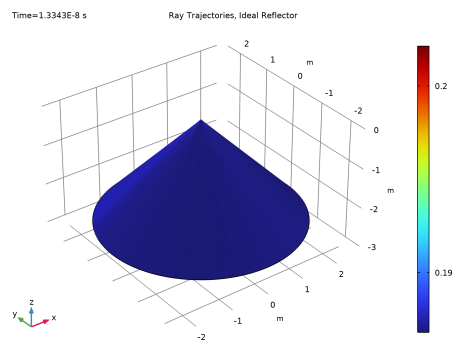
In the Settings window for 3D Plot Group, type Ray Trajectories, Ideal Reflector in the Label text field.
|
|
2
|
|
3
|
|
4
|
|
1
|
In the Model Builder window, expand the Results > Ray Trajectories, Ideal Reflector > Ray Trajectories 1 node, then click Color Expression 1.
|
|
2
|
In the Settings window for Color Expression, click Replace Expression in the upper-right corner of the Expression section. From the menu, choose Component 1 (comp1) > Geometrical Optics > Intensity and polarization > gop.Q - Ray power - W.
|
|
3
|
|
1
|
|
2
|
|
3
|
|
4
|
|
5
|
|
1
|
|
2
|
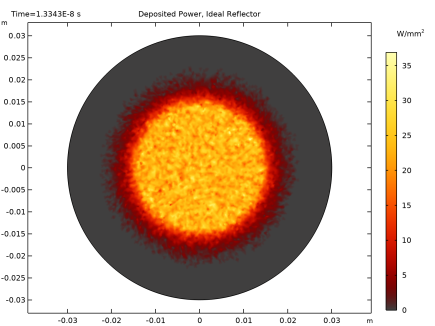
In the Settings window for 2D Plot Group, type Deposited Power, Ideal Reflector in the Label text field.
|
|
3
|
|
4
|
|
5
|
|
6
|
|
1
|
|
2
|
In the Settings window for Surface, click Replace Expression in the upper-right corner of the Expression section. From the menu, choose Component 1 (comp1) > Geometrical Optics > Accumulated variables > Boundary heat source comp1.gop.wall1.bsrc1.Qp > gop.wall1.bsrc1.Qp - Boundary heat source - W/m².
|
|
3
|
|
4
|
|
5
|
|
6
|
|
7
|
|
1
|
|
2
|
|
3
|
|
4
|
|
5
|
|
1
|
|
2
|
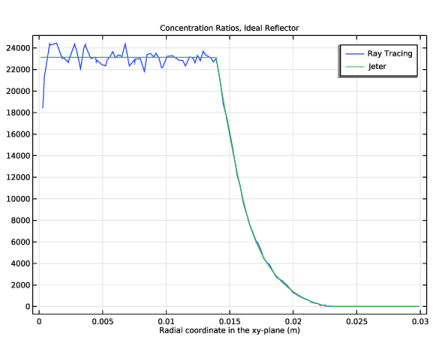
In the Settings window for 1D Plot Group, type Concentration Ratios, Ideal Reflector in the Label text field.
|
|
3
|
|
4
|
|
5
|
|
6
|
|
1
|
|
2
|
|
3
|
|
4
|
|
5
|
|
6
|
|
7
|
|
8
|
|
9
|
|
11
|
|
1
|
|
2
|
|
3
|
|
4
|
|
5
|
Locate the Legends section. In the table, enter the following settings:
|
|
6
|
|
1
|
|
2
|
Go to the Add Study window.
|
|
3
|
Find the Studies subsection. In the Select Study tree, select Preset Studies for Selected Physics Interfaces > Ray Tracing.
|
|
4
|
Click the Add Study button in the window toolbar.
|
|
5
|
|
1
|
|
2
|
|
3
|
|
4
|
Locate the Physics and Variables Selection section. Select the Modify model configuration for study step checkbox.
|
|
5
|
|
6
|
Right-click and choose Disable.
|
|
1
|
|
2
|
|
3
|
|
4
|
|
5
|
|
6
|
|
7
|
|
1
|
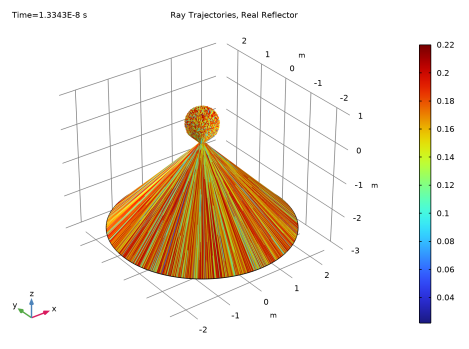
In the Settings window for 3D Plot Group, type Ray Trajectories, Real Reflector in the Label text field.
|
|
2
|
|
3
|
|
4
|
|
1
|
In the Model Builder window, expand the Results > Ray Trajectories, Real Reflector > Ray Trajectories 1 node, then click Color Expression 1.
|
|
2
|
|
3
|
|
4
|
|
5
|
|
1
|
|
2
|
|
3
|
|
1
|
In the Model Builder window, under Results > Datasets right-click Cut Line 3D 1 and choose Duplicate.
|
|
2
|
|
3
|
|
1
|
|
2
|
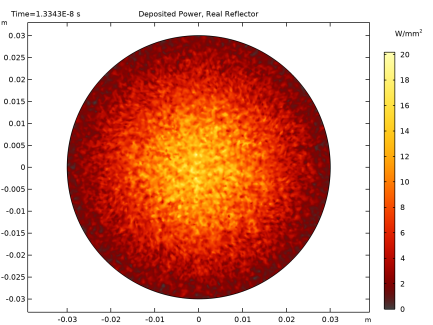
In the Settings window for 2D Plot Group, type Deposited Power, Real Reflector in the Label text field.
|
|
3
|
|
4
|
|
5
|
|
1
|
In the Model Builder window, right-click Concentration Ratios, Ideal Reflector and choose Duplicate.
|
|
2
|
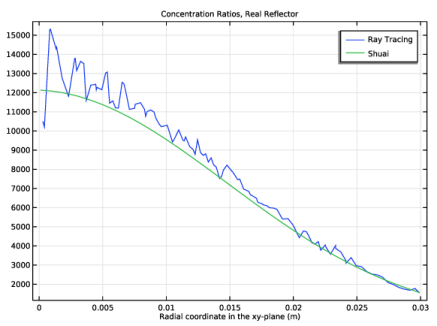
In the Settings window for 1D Plot Group, type Concentration Ratios, Real Reflector in the Label text field.
|
|
3
|
|
4
|
|
1
|
In the Model Builder window, expand the Concentration Ratios, Real Reflector node, then click Line Graph 1.
|
|
2
|
|
1
|
|
2
|
|
3
|
|
4
|
Locate the Legends section. In the table, enter the following settings:
|
|
5
|
|
1
|
|
2
|
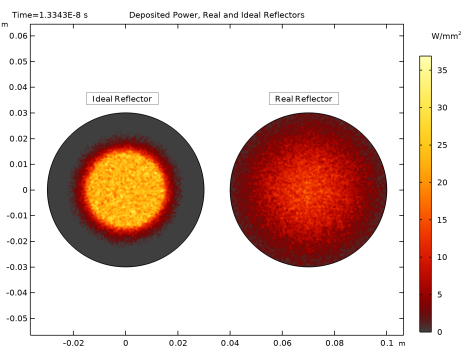
In the Settings window for 2D Plot Group, type Deposited Power, Real and Ideal Reflectors in the Label text field.
|
|
3
|
|
1
|
|
2
|
|
1
|
|
2
|
|
3
|
|
4
|
|
5
|
|
1
|
|
2
|
|
3
|
|
4
|
|
1
|
In the Model Builder window, right-click Deposited Power, Real and Ideal Reflectors and choose Annotation.
|
|
2
|
|
3
|
|
4
|
|
5
|
|
6
|
|
7
|
Select the Show frame checkbox.
|
|
1
|
|
2
|
|
3
|
|
4
|
|
5
|
|
6
|
|
7
|
Select the Show frame checkbox.
|
|
8
|