|
|
|
 ,
, ,
, is the reduced Planck constant, e is the electron charge, T is the temperature, EF is the Fermi energy, τ is the relaxation time, and ω = 2πf is the angular frequency. The function H(Ω) is given by
  .
. using an infinite sum of azimuthal modes with mode number m. The expansion in cylindrical coordinates yields

 ,
,
|
1
|
|
2
|
|
3
|
Click Add.
|
|
4
|
Click
 Study. Study. |
|
5
|
|
6
|
Click
 Done. Done. |
|
1
|
|
2
|
|
3
|
|
1
|
|
2
|
|
1
|
|
2
|
|
3
|
|
4
|
|
5
|
|
1
|
|
2
|
|
3
|
|
4
|
|
5
|
|
6
|
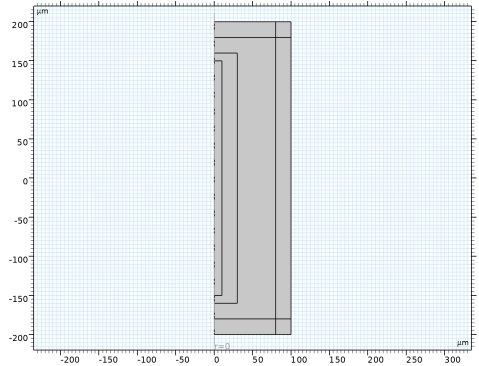
Click to expand the Layers section. In the table, enter the following settings:
|
|
7
|
Select the Layers to the right checkbox.
|
|
8
|
Select the Layers on top checkbox.
|
|
1
|
|
2
|
|
3
|
|
4
|
|
5
|
|
6
|
Click
 Build All Objects. Build All Objects. |
|
7
|
|
1
|
|
2
|
|
3
|
|
4
|
|
1
|
|
2
|
|
3
|
Locate the Definition section. In the Expression text field, type sinh(hbar_const*x/(k_B_const*T))/(cosh(hbar_const*x/(k_B_const*T))+cosh(Ef/(k_B_const*T))).
|
|
4
|
Locate the Units section. In the table, enter the following settings:
|
|
5
|
Locate the Plot Parameters section. In the table, enter the following settings:
|
|
1
|
|
2
|
|
1
|
|
3
|
|
4
|
|
1
|
|
3
|
|
1
|
In the Model Builder window, under Component 1 (comp1) right-click Materials and choose Blank Material.
|
|
2
|
|
3
|
Locate the Material Contents section. In the table, enter the following settings:
|
|
1
|
|
2
|
|
4
|
Locate the Material Contents section. In the table, enter the following settings:
|
|
1
|
In the Model Builder window, under Component 1 (comp1) click Electromagnetic Waves, Frequency Domain (emw).
|
|
2
|
|
3
|
From the list, choose Scattered field.
|
|
4
|
|
5
|
|
6
|
In the Highest mode number text field, type 5. This is sufficient for a scatterer whose size is comparable to the wavelength, where only a few terms in the expansion are needed to obtain an accurate result.
|
|
7
|
|
8
|
Click Set up Sweep. This generates two parameters: modeNum and highestMode. It also adds an auxiliary sweep in Study 1 that sweeps modeNum from -highestMode to highestMode.
|
|
1
|
|
2
|
In the Settings window for Transition Boundary Condition, locate the Transition Boundary Condition section.
|
|
3
|
|
5
|
From the εr list, choose User defined. From the μr list, choose User defined. From the σ list, choose User defined. In the associated text field, type sigma/d_eff.
|
|
6
|
|
1
|
|
2
|
|
3
|
|
1
|
|
2
|
|
3
|
|
4
|
|
1
|
|
2
|
Go to the Add Study window.
|
|
3
|
|
4
|
Click the Add Study button in the window toolbar.
|
|
5
|
|
1
|
|
2
|
Select the Modify model configuration for study step checkbox.
|
|
3
|
In the tree, select Component 1 (comp1) > Electromagnetic Waves, Frequency Domain (emw) > Transition Boundary Condition 1.
|
|
4
|
Right-click and choose Disable.
|
|
5
|
|
6
|
|
7
|
|
8
|
Click
 Add. Add. |
 Compute.
|
1
|
|
2
|
|
3
|
|
4
|
|
1
|
|
2
|
|
3
|
|
4
|
|
1
|
|
2
|
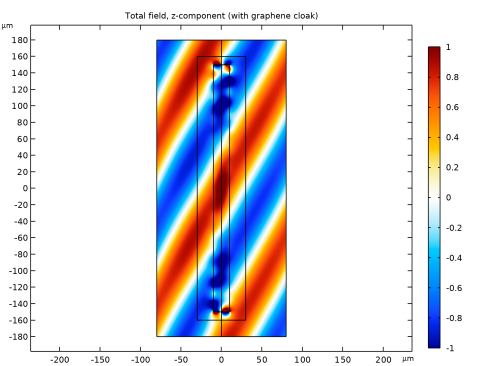
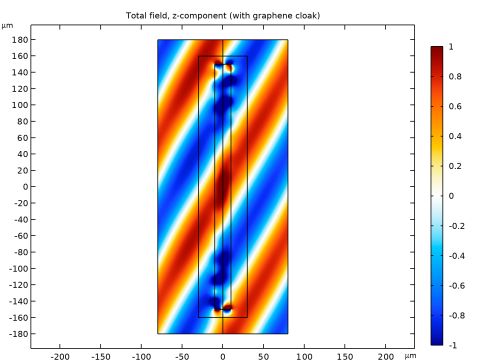
In the Settings window for 2D Plot Group, type Total Field (With Graphene Cloak) in the Label text field.
|
|
3
|
|
4
|
|
5
|
|
6
|
|
7
|
Clear the Parameter indicator text field.
|
|
1
|
|
2
|
|
3
|
In the Expression text field, type sum(withsol('sol1',emw.Ez,setval(freq,freq),setind(modeNum,index)),index,1,2*highestMode+1).
|
|
4
|
|
5
|
|
6
|
|
7
|
|
1
|
|
2
|
|
3
|
|
1
|
|
2
|
|
3
|
In the Expression text field, type sum(withsol('sol1',emw.Ez*exp(-j*modeNum*pi),setval(freq,freq),setind(modeNum,index)),index,1,2*highestMode+1).
|
|
4
|
|
5
|
|
1
|
|
2
|
|
3
|
|
4
|
|
1
|
|
2
|
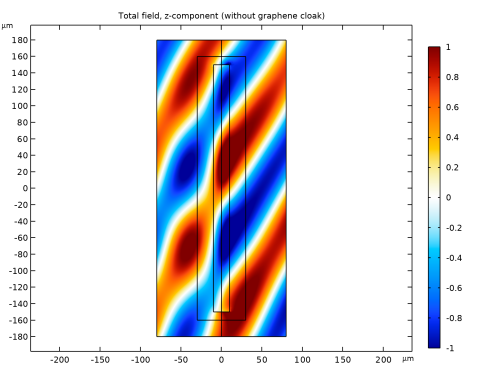
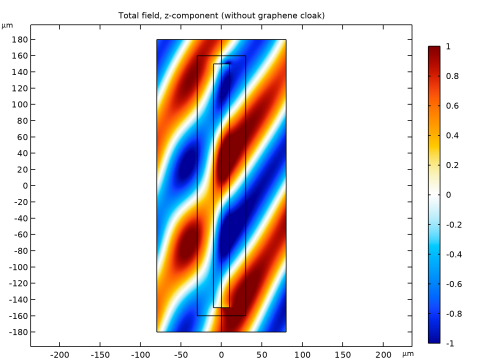
In the Settings window for 2D Plot Group, type Total Field (Without Graphene Cloak) in the Label text field.
|
|
3
|
|
4
|
|
5
|
|
6
|
|
7
|
Clear the Parameter indicator text field.
|
|
1
|
|
2
|
|
3
|
In the Expression text field, type sum(withsol('sol2',emw.Ez,setval(freq,freq),setind(modeNum,index)),index,1,2*highestMode+1).
|
|
4
|
|
5
|
|
6
|
|
7
|
|
1
|
|
2
|
|
3
|
|
1
|
|
2
|
|
3
|
In the Expression text field, type sum(withsol('sol2',emw.Ez*exp(-j*modeNum*pi),setval(freq,freq),setind(modeNum,index)),index,1,2*highestMode+1).
|
|
4
|
|
5
|
|
1
|
|
2
|
|
3
|
|
4
|
|
1
|
|
2
|
|
3
|
|
4
|
Locate the Plot Settings section.
|
|
5
|
|
6
|
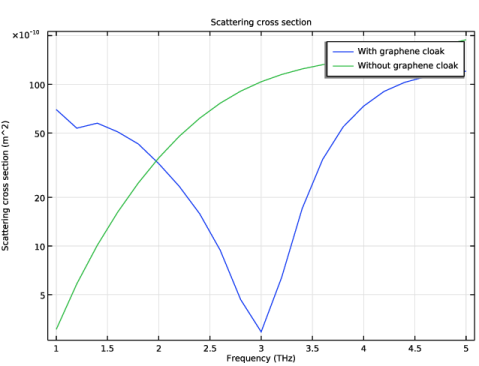
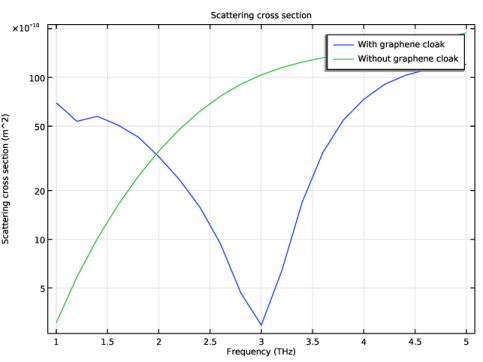
Select the y-axis label checkbox. In the associated text field, type Scattering cross section (m^2).
|
|
7
|
|
8
|
|
1
|
|
2
|
|
4
|
|
5
|
|
7
|
|
8
|
|
1
|
|
2
|
|
3
|
|
1
|
|
2
|
|
3
|
|
4
|
|
1
|
|
2
|
|
3
|
|
1
|
|
2
|
|
3
|
|
4
|
|
1
|
|
2
|
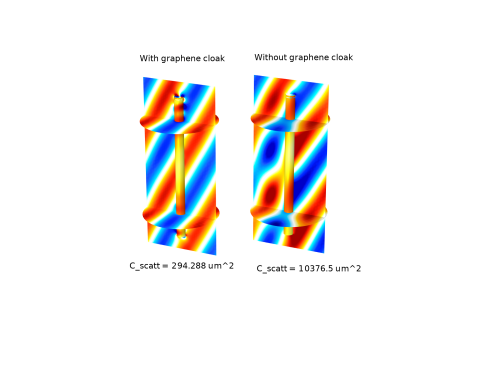
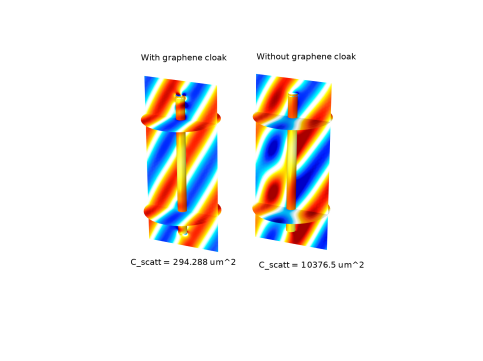
In the Settings window for 3D Plot Group, type Comparison of the Total Field in 3D in the Label text field.
|
|
3
|
|
4
|
|
5
|
|
6
|
|
1
|
|
2
|
|
3
|
In the Expression text field, type sum(withsol('sol1',emw.Ez*exp(-j*modeNum*rev1phi),setval(freq,freq),setind(modeNum,index)),index,1,2*highestMode+1).
|
|
4
|
|
5
|
|
6
|
|
7
|
|
8
|
|
9
|
|
1
|
|
2
|
|
3
|
|
4
|
|
5
|
|
1
|
|
2
|
|
3
|
In the Expression text field, type sum(withsol('sol1',emw.Ez*exp(-j*modeNum*rev1phi),setval(freq,freq),setind(modeNum,index)),index,1,2*highestMode+1).
|
|
4
|
Click to expand the Range section. Locate the Coloring and Style section. From the Color table list, choose Thermal.
|
|
1
|
|
2
|
|
3
|
In the Logical expression for inclusion text field, type sqrt(rev1x^2+rev1y^2)<D/2 && abs(rev1z)<L/2.
|
|
1
|
|
2
|
|
3
|
|
1
|
|
2
|
|
3
|
|
4
|
|
5
|
Locate the Expression section. In the Expression text field, type sum(withsol('sol2',emw.Ez*exp(-j*modeNum*rev2phi),setval(freq,freq),setind(modeNum,index)),index,1,2*highestMode+1).
|
|
6
|
|
7
|
|
8
|
|
1
|
|
2
|
|
3
|
|
4
|
|
1
|
|
2
|
|
3
|
|
4
|
|
5
|
Locate the Expression section. In the Expression text field, type sum(withsol('sol2',emw.Ez*exp(-j*modeNum*rev2phi),setval(freq,freq),setind(modeNum,index)),index,1,2*highestMode+1).
|
|
6
|
|
7
|
|
8
|
|
1
|
|
2
|
|
3
|
|
4
|
|
1
|
|
2
|
|
3
|
|
4
|
|
5
|
Locate the Expression section. In the Expression text field, type sum(withsol('sol2',emw.Ez*exp(-j*modeNum*rev2phi),setval(freq,freq),setind(modeNum,index)),index,1,2*highestMode+1).
|
|
6
|
|
1
|
|
2
|
|
3
|
|
4
|
|
1
|
|
2
|
|
3
|
In the Logical expression for inclusion text field, type sqrt(rev2x^2+rev2y^2)<D/2 && abs(rev2z)<L/2.
|
|
1
|
|
2
|
|
3
|
|
4
|
|
5
|
|
6
|
|
1
|
|
2
|
|
3
|
|
4
|
|
5
|
|
1
|
|
2
|
|
3
|
In the Text text field, type C_scatt = eval(sum(withsol('sol1',C_scatt,setval(freq,freq),setind(modeNum,index)),index,1,2*highestMode+1), um^2) um^2.
|
|
4
|
|
5
|
|
6
|
|
1
|
|
2
|
|
3
|
|
4
|
|
5
|
|
1
|
In the Model Builder window, under Results > Comparison of the Total Field in 3D click Annotation 4.
|
|
2
|
|
3
|
In the Text text field, type C_scatt = eval(sum(withsol('sol2',C_scatt,setval(freq,3[THz]),setind(modeNum,index)),index,1,2*highestMode+1), um^2) um^2.
|
|
1
|
|
2
|
|
3
|
|
4
|
|
5
|
|
6
|
|
7
|
|
8
|