PDF

Pasta Extrusion
Introduction
The pasta extrusion process consists of several steps. After mixing semolina and water, the hydrated semolina is discharged into an extrusion barrel. In the first part of the extruder, the compression and homogenization sections, the dough is in a granular state. In the next section, the metering zone of the extruder, the material is fully melted and the domain is fully filled with the melt.
This example shows how to simulate the nonisothermal flow of the dough in the metering zone of the pasta extruder taking into account temperature dependent material properties of the hydrated semolina dough.
Model Definition
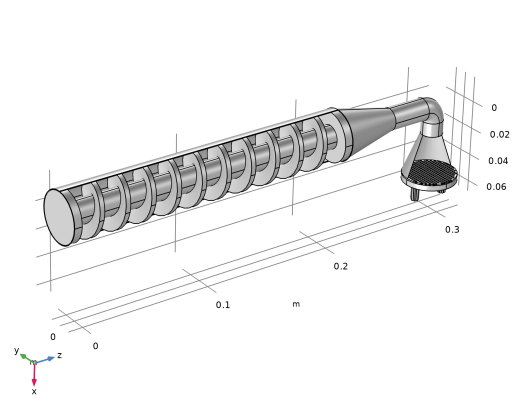
This model is inspired by Ref. 1, and it consist of a screw that feeds the dough through the extrusion bell toward the extrusion holes, where the spaghetti is made. The screw consist of 10 turns. In the bell, the dough is pressed through a screen with 1-mm holes and further into two outlets with 7 spaghetti strands in each one. The material swelling after the dough exits the extrusion holes is neglected in this model. The geometry is shown in Figure 1.
Since the viscosity of the melt is high, the Reynolds number, which describes the ratio of inertia to viscous forces, is low. At low Reynolds numbers, viscous forces dominate over inertia forces. Thus, the latter may be neglected in the Navier–Stokes equations and the Creeping Flow interface can be used.
The dough exhibits shear thinning (pseudoplastic) behavior. The power-law model is a common choice for modeling the flow of a dough. To avoid an unphysical infinite viscosity at zero shear rate, COMSOL Multiphysics implements the power-law model as,
(1)
where m is the fluid consistency coefficient, n is flow behavior index, denotes a reference shear rate, and is a lower shear rate limit.
Figure 1: Geometry of a pasta screw extruder similar to the one presented in Ref. 1.
Because of viscous heating inside the barrel, the temperature variations during the extrusion operation can be significant. The viscosity of the dough decreases with temperature. To adequately describe the flow, temperature dependent material properties should be used. Rheology experiments (Ref. 1) show that the viscosity is also moisture dependent. The viscosity of the dough decreases with increasing moisture content. As moisture content rises, the influence of the temperature on the viscosity decreases. In this model, the moisture content is assumed to be constant. Temperature dependent coefficients for the non-Newtonian power-law model are obtained by interpolation from a set of measured viscosities for a range of temperatures and 30% moisture content.
To solve the equations for conservation of energy, mass and momentum in the fluid domain, the Rotating Machinery, Nonisothermal Flow, Laminar Flow interface is used. The interface contains a coupling between the Creeping Flow and the Heat Transfer in Fluids interfaces, and accounts for viscous dissipation.
The screw is encapsulated in a rotating domain with an angular velocity of 20 rpm. The model utilizes the frozen rotor approach to compute a steady-state flow velocity and a temperature field. A frozen rotor analysis is a memory- and time-efficient steady-state approximation. In a sense, this approach can be described as freezing the motion of the moving part in a given position and then observing the resulting flow field with the rotor in that fixed position.
The inlet is set as an Open boundary with a boundary stress of 2 MPa. At the outlet, the pressure is set to 0 Pa. For the heat-transfer equation, a heat flux with a heat transfer coefficient of 50 W/(m2·K) and an external temperature of 45°C is set on all outer walls of the extruder. The inlet has a fixed temperature of 45°C, and at the outlet boundaries Outflow conditions are applied.
Results and Discussion
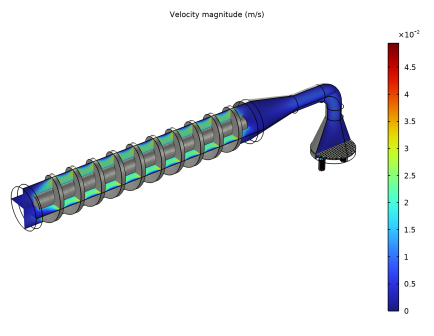
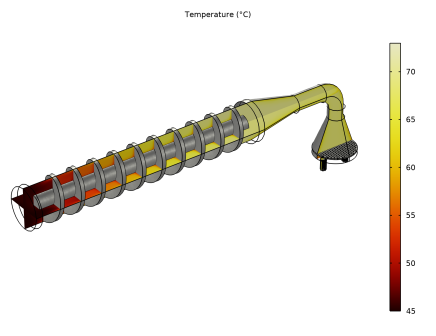
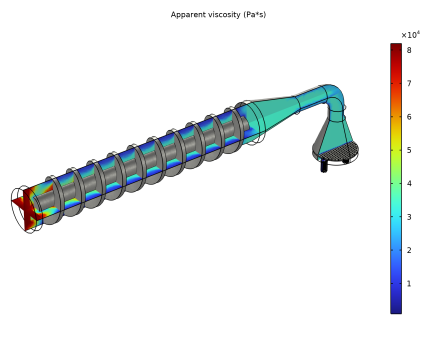
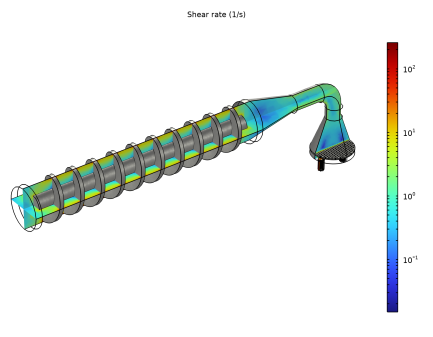
The results of the frozen rotor simulation are shown in Figure 2 through Figure 5.
Figure 4 shows the temperature distribution. The temperature increases due to viscous heat dissipation. The viscous heating is generated in the areas with a high shear rate (Figure 5), near the wall of the barrel and inside the extrusion dies. The heat generated near the barrel wall is convected in the axial direction in a helical path along the screw.
The apparent viscosity decreases with increasing temperature (Figure 4). High values of the viscosity in the low-shear-rate zones near the rotating screw lead to poor mixing of the dough.
The velocity plot (Figure 2) shows an uneven velocity distribution in the extrusion channels. This results in different mass flow rates through the extrusion holes and may lead to varying quality of the final product.
Figure 2: Velocity profile in the screw extruder.
Figure 3: Temperature profile in the screw extruder.
Figure 4: Apparent viscosity.
Figure 5: Shear rate.
Reference
1. F. Sarghini, A. Romano, and P. Masi, “Experimental Analysis and Numerical Simulation of Pasta Dough Extrusion Process,” J. Food Eng., vol. 176, pp. 56–70, 2016.
Application Library path: Polymer_Flow_Module/Tutorials/pasta_extrusion
Modeling Instructions
From the File menu, choose New.
New
In the New window, click  Model Wizard.
Model Wizard
1
In the Model Wizard window, click  3D.
2
In the Select Physics tree, select Fluid Flow > Nonisothermal Flow > Rotating Machinery, Nonisothermal Flow > Laminar Flow.
3
Click Add.
4
Click  Study.
5
In the Select Study tree, select Preset Studies for Selected Physics Interfaces > Frozen Rotor.
6
Geometry 1
Create the geometry. To simplify this step, insert a prepared geometry sequence.
1
In the Geometry toolbar, click Insert Sequence and choose Insert Sequence.
2
3
In the Geometry toolbar, click  Build All.
Disable the analysis of the geometry as the remaining small geometric details are needed.
4
In the Model Builder window, under Component 1 (comp1) click Geometry 1.
5
In the Settings window for Geometry, locate the Cleanup section.
6
Clear the Automatic detection of small details checkbox.
7
In the Geometry toolbar, click  Build All.
Moving Mesh
Rotating Domain 1
1
In the Model Builder window, under Component 1 (comp1) > Moving Mesh click Rotating Domain 1.
2
In the Settings window for Rotating Domain, locate the Domain Selection section.
3
From the Selection list, choose Rotating Domain.
4
Click to expand the Override section. Locate the Rotation section. In the f text field, type 20[RPM].
5
Locate the Axis section. Specify the urot vector as
Next, define the material properties. The physics interface and the chosen fluid model will suggest which material properties are required to solve the model. Therefore, before creating a semolina dough material, choose the Power law model in the Laminar Flow interface.
Laminar Flow (spf)
Fluid Properties 1
1
In the Model Builder window, under Component 1 (comp1) > Laminar Flow (spf) click Fluid Properties 1.
2
In the Settings window for Fluid Properties, locate the Fluid Properties section.
3
Find the Constitutive relation subsection. From the list, choose Inelastic non-Newtonian.
Materials
Material 1 (mat1)
1
In the Model Builder window, under Component 1 (comp1) right-click Materials and choose Blank Material.
2
In the Settings window for Material, locate the Material Contents section.
3
Define interpolation functions for the temperature-dependent power-law coefficients.
Interpolation 1 (int1)
1
In the Model Builder window, expand the Material 1 (mat1) node.
2
Right-click Component 1 (comp1) > Materials > Material 1 (mat1) > Power law (PowerLaw) and choose Functions > Interpolation.
3
In the Settings window for Interpolation, locate the Definition section.
4
In the Function name text field, type m30.
5
6
Locate the Units section. In the Function table, enter the following settings:
7
In the Argument table, enter the following settings:
Interpolation 2 (m2)
1
Right-click Interpolation 1 (m30) and choose Duplicate.
2
In the Settings window for Interpolation, locate the Definition section.
3
In the Function name text field, type n30.
4
5
Locate the Units section. In the Function table, enter the following settings:
Pasta 30% Hydration
1
In the Model Builder window, under Component 1 (comp1) > Materials > Material 1 (mat1) click Power law (PowerLaw).
2
In the Settings window for Power Law, locate the Output Properties section.
3
4
In the Model Builder window, click Material 1 (mat1).
5
In the Settings window for Material, type Pasta 30% Hydration in the Label text field.
6
In the Model Builder window, collapse the Component 1 (comp1) > Materials > Pasta 30% Hydration (mat1) > Power law (PowerLaw) node.
The flow velocity in this model is very slow. Thus, it is safe to neglect the inertial terms of the Navier–Stokes equations and use the Stokes equation for creeping flow.
Laminar Flow (spf)
1
In the Model Builder window, under Component 1 (comp1) click Laminar Flow (spf).
2
In the Settings window for Laminar Flow, locate the Physical Model section.
3
From the Compressibility list, choose Incompressible flow.
4
Select the Neglect inertial term (Stokes flow) checkbox.
To eliminate unphysical behavior of the Power law model at zero shear rate, the COMSOL Multiphysics implementation introduces a cutoff shear rate value. Modify the default minimum shear rate value according to Ref. 1
Fluid Properties 1
1
In the Model Builder window, under Component 1 (comp1) > Creeping Flow (spf) click Fluid Properties 1.
2
In the Lower shear rate limit text field, type 1[1/s].
Open Boundary 1
1
In the Physics toolbar, click  Boundaries and choose Open Boundary.
2
In the Settings window for Open Boundary, locate the Boundary Selection section.
3
From the Selection list, choose Inlet.
4
Locate the Boundary Condition section. In the f0 text field, type 2[MPa].
Outlet 1
1
In the Physics toolbar, click  Boundaries and choose Outlet.
2
In the Settings window for Outlet, locate the Boundary Selection section.
3
From the Selection list, choose Outlet.
Wall 2
1
In the Physics toolbar, click  Boundaries and choose Wall.
2
In the Settings window for Wall, locate the Boundary Selection section.
3
From the Selection list, choose Exterior Walls, Rotating Domain.
4
Click to expand the Wall Movement section. From the Translational velocity list, choose Zero (Fixed wall).
Heat Transfer in Fluids (ht)
In the Model Builder window, under Component 1 (comp1) click Heat Transfer in Fluids (ht).
Outflow 1
1
In the Physics toolbar, click  Boundaries and choose Outflow.
2
In the Settings window for Outflow, locate the Boundary Selection section.
3
From the Selection list, choose Outlet.
Temperature 1
1
In the Physics toolbar, click  Boundaries and choose Temperature.
2
In the Settings window for Temperature, locate the Boundary Selection section.
3
From the Selection list, choose Inlet.
4
Locate the Temperature section. In the T0 text field, type 45[degC].
Heat Flux 1
1
In the Physics toolbar, click  Boundaries and choose Heat Flux.
2
In the Settings window for Heat Flux, locate the Boundary Selection section.
3
From the Selection list, choose External Boundaries.
4
Locate the Heat Flux section. From the Flux type list, choose Convective heat flux.
5
In the h text field, type 50.
6
In the Text text field, type 45[degC].
Mesh 1
1
In the Model Builder window, under Component 1 (comp1) click Mesh 1.
2
In the Settings window for Mesh, locate the Physics-Controlled Mesh section.
3
From the Element size list, choose Coarse.
4
Click  Build All.
Study 1
1
In the Model Builder window, click Study 1.
2
In the Settings window for Study, locate the Study Settings section.
3
Clear the Generate default plots checkbox.
4
In the Study toolbar, click  Compute.
Result Templates
1
In the Home toolbar, click  Result Templates to open the Result Templates window.
2
Go to the Result Templates window.
3
In the tree, select Study 1/Solution 1 (sol1) > Creeping Flow > Velocity (spf).
4
Click the Add Result Template button in the window toolbar.
Results
Multislice 1
1
In the Model Builder window, expand the Velocity (spf) node, then click Multislice 1.
2
In the Settings window for Multislice, locate the Multiplane Data section.
3
Find the x-planes subsection. In the Planes text field, type 0.
4
Find the z-planes subsection. From the Entry method list, choose Coordinates.
5
In the Coordinates text field, type 0.
To improve the visualization, it is possible to include the metal surfaces of the screw and render it as a scratched steel surface. To facilitate this, it is best to define an explicit selection of the desired surfaces.
Surface 1
1
In the Model Builder window, right-click Velocity (spf) and choose Surface.
2
In the Settings window for Surface, locate the Expression section.
3
In the Expression text field, type 1.
4
Click to expand the Title section. From the Title type list, choose None.
Selection 1
1
Right-click Surface 1 and choose Selection.
2
In the Settings window for Selection, locate the Selection section.
3
From the Selection list, choose Metal Surfaces.
Material Appearance 1
1
In the Model Builder window, right-click Surface 1 and choose Material Appearance.
2
In the Settings window for Material Appearance, locate the Appearance section.
3
From the Appearance list, choose Custom.
4
From the Material type list, choose Steel (scratched).
5
Click the  Show Grid button in the Graphics toolbar.
6
Click the  Show Axis Orientation button in the Graphics toolbar.
7
In the Velocity (spf) toolbar, click  Plot.
Temperature
1
In the Model Builder window, right-click Velocity (spf) and choose Duplicate.
Modify the plot so that it looks similar to Figure 3.
2
In the Settings window for 3D Plot Group, type Temperature in the Label text field.
Multislice 1
1
In the Model Builder window, expand the Temperature node, then click Multislice 1.
2
In the Settings window for Multislice, click Replace Expression in the upper-right corner of the Expression section. From the menu, choose Component 1 (comp1) > Heat Transfer in Fluids > Temperature > T - Temperature - K.
3
Locate the Expression section. From the Unit list, choose °C.
4
Locate the Coloring and Style section. From the Color table list, choose ThermalDark.
5
In the Temperature toolbar, click  Plot.
Continue with viscosity (Figure 4) and shear rate plots.
Viscosity
1
In the Model Builder window, right-click Velocity (spf) and choose Duplicate.
2
In the Settings window for 3D Plot Group, type Viscosity in the Label text field.
Multislice 1
1
In the Model Builder window, expand the Viscosity node, then click Multislice 1.
2
In the Settings window for Multislice, click Replace Expression in the upper-right corner of the Expression section. From the menu, choose Component 1 (comp1) > Creeping Flow > Material properties > spf.mu_app - Apparent viscosity - Pa·s.
3
In the Viscosity toolbar, click  Plot.
Shear Rate
1
In the Model Builder window, right-click Viscosity and choose Duplicate.
2
In the Settings window for 3D Plot Group, type Shear Rate in the Label text field.
Multislice 1
1
In the Model Builder window, expand the Viscosity 1 node, then click Results > Shear Rate > Multislice 1.
2
In the Settings window for Multislice, click Replace Expression in the upper-right corner of the Expression section. From the menu, choose Component 1 (comp1) > Creeping Flow > Velocity and pressure > spf.sr - Shear rate - 1/s.
3
Locate the Coloring and Style section. From the Scale list, choose Logarithmic.
4
In the Shear Rate toolbar, click  Plot.