
|
|
|






 |
|||
 |
|||
|
e+Cl2=>e+Cl+Cl
|
|||
|
e+Cl-=>2e+Cl
|
|
Ar+=>Ar
|
||||
|
Cl-=>Cl
|
||||
|
Cl+=>Cl
|
|
•
|
Increase the negative ion diffusion coefficient or decreasing its mobility. When using the option Compute Mobility and Diffusivity the mobility is computed using Einstein relation which by default uses the gas temperature. By specifying a higher ion temperature results in a smaller mobility.
|
|
•
|
Enable Isotropic diffusion for ions in the Inconsistent Stabilization section (the stabilization sections are visible when Stabilization is selected in Show More Options). This option adds artificial diffusion to all ions and helps smoothing the sharp transition of the negative ion density between the electropositive edge and the electronegative core, and also increase the density of the negative ions in the electropositive edge effectively increasing its losses by transport. This option should be used very carefully since completely wrong results can be obtained if too much diffusion is used (the tuning parameter for ions should not be larger than 0.1). A useful strategy is to start with a large Tuning parameter for ions (for example, 0.5) and ramp it down using a Auxiliary sweep.
|
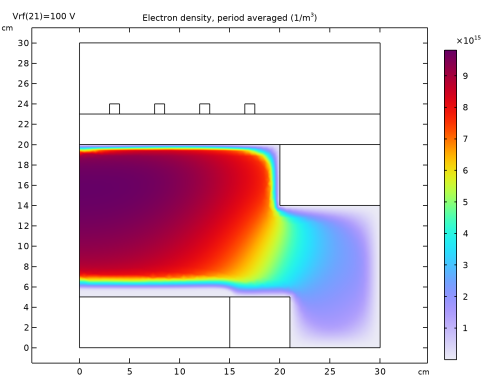


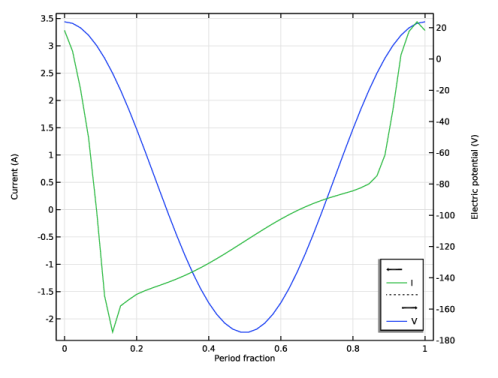
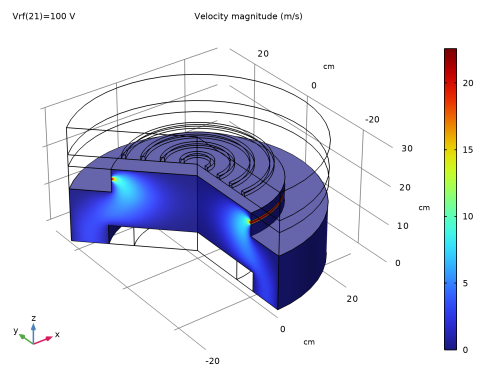
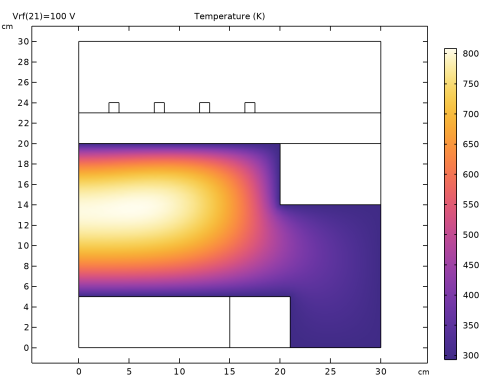
|
1
|
|
2
|
In the Select Physics tree, select Plasma > Nonisothermal Plasma Flow > Inductively Coupled Plasma with RF Bias.
|
|
3
|
Click Add.
|
|
4
|
Click
 Study. Study. |
|
5
|
In the Select Study tree, select Preset Studies for Selected Multiphysics > Frequency–Time Periodic.
|
|
6
|
Click
 Done. Done. |
|
1
|
|
2
|
|
3
|
|
1
|
|
2
|
|
3
|
|
4
|
|
1
|
|
2
|
|
3
|
|
4
|
|
5
|
|
1
|
|
2
|
|
3
|
|
4
|
|
1
|
|
2
|
Select the object r3 only.
|
|
3
|
|
4
|
|
5
|
|
1
|
|
2
|
|
3
|
|
4
|
|
1
|
|
2
|
|
3
|
|
4
|
|
5
|
|
1
|
|
2
|
|
3
|
|
4
|
|
1
|
|
2
|
|
3
|
|
4
|
|
5
|
|
6
|
|
1
|
|
2
|
|
3
|
|
4
|
|
5
|
|
6
|
|
7
|
|
8
|
|
1
|
|
2
|
On the object fin, select Boundaries 6 and 29 only.
|
|
3
|
|
4
|
|
1
|
|
2
|
|
1
|
|
2
|
|
1
|
|
2
|
|
3
|
|
1
|
|
2
|
|
4
|
|
1
|
|
2
|
Go to the Add Material window.
|
|
3
|
|
4
|
Click the Add to Component button in the window toolbar.
|
|
5
|
|
6
|
Click the Add to Component button in the window toolbar.
|
|
7
|
|
8
|
Click the Add to Component button in the window toolbar.
|
|
9
|
|
1
|
|
2
|
Click
 Clear Selection. Clear Selection. |
|
1
|
|
2
|
|
3
|
|
1
|
|
1
|
|
2
|
|
3
|
|
4
|
|
5
|
Click OK.
|
|
1
|
|
2
|
|
3
|
Select the Reaction source stabilization checkbox.
|
|
4
|
Locate the Transport Settings section. Find the Include subsection. Select the Mixture diffusion correction checkbox.
|
|
5
|
Locate the Plasma Properties section. Select the Use reduced electron transport properties checkbox.
|
|
6
|
Locate the Electron Energy Distribution Function Settings section. From the Electron energy distribution function list, choose Maxwellian.
|
|
7
|
|
8
|
|
9
|
Click to expand the Inconsistent Stabilization section. Select the Isotropic diffusion for ions checkbox.
|
|
10
|
|
11
|
|
a
|
Species properties using Preset species data
|
|
1
|
|
2
|
|
3
|
Click
 Browse. Browse. |
|
4
|
Browse to the model’s Application Libraries folder and double-click the file Ar_Cl2_plasma_chemistry.txt.
|
|
5
|
Click
 Import. Import. |
|
1
|
In the Model Builder window, expand the Component 1 (comp1) > Plasma, Time Periodic (ptp) > Group - Species node, then click Species: Cl2.
|
|
2
|
|
3
|
|
1
|
|
2
|
|
3
|
|
1
|
|
2
|
|
3
|
|
1
|
|
2
|
|
3
|
|
1
|
|
2
|
|
3
|
Select the Initial value from electroneutrality constraint checkbox.
|
|
1
|
|
2
|
|
3
|
Select the From mass constraint checkbox.
|
|
1
|
|
2
|
|
3
|
|
4
|
|
1
|
|
2
|
|
3
|
|
1
|
|
2
|
|
3
|
|
1
|
|
2
|
|
3
|
|
1
|
|
1
|
|
1
|
|
2
|
|
3
|
|
4
|
|
1
|
|
2
|
|
3
|
|
4
|
|
1
|
|
2
|
|
3
|
|
1
|
|
1
|
|
2
|
|
3
|
Click
 Add. Add. |
|
5
|
Click
 Add. Add. |
|
7
|
Click
 Add. Add. |
|
1
|
|
1
|
|
1
|
|
3
|
|
4
|
|
5
|
|
6
|
|
1
|
|
1
|
|
2
|
|
3
|
Select the Coil group checkbox.
|
|
4
|
|
5
|
|
6
|
|
1
|
|
2
|
|
3
|
Click
 Clear Selection. Clear Selection. |
|
5
|
|
1
|
|
3
|
|
4
|
From the list, choose Mass flow.
|
|
5
|
|
6
|
|
1
|
|
1
|
|
2
|
|
3
|
Click
 Clear Selection. Clear Selection. |
|
1
|
|
2
|
|
3
|
|
1
|
|
2
|
|
3
|
|
5
|
|
6
|
|
1
|
|
2
|
|
3
|
|
4
|
|
6
|
|
1
|
|
1
|
|
2
|
|
3
|
|
4
|
|
1
|
|
2
|
|
3
|
|
4
|
|
5
|
|
6
|
|
7
|
Select the Symmetric distribution checkbox.
|
|
1
|
|
2
|
|
3
|
|
5
|
Click to expand the Control Entities section. From the Smooth across removed control entities list, choose Off.
|
|
1
|
|
3
|
|
4
|
|
5
|
|
6
|
|
7
|
Select the Reverse direction checkbox.
|
|
1
|
|
3
|
|
4
|
|
5
|
|
6
|
|
1
|
|
2
|
|
3
|
|
5
|
Click to expand the Corner Settings section. From the Handling of sharp corners list, choose No special handling.
|
|
6
|
|
1
|
|
2
|
|
3
|
|
5
|
|
6
|
|
1
|
|
2
|
|
3
|
|
4
|
Click
 Build All. Build All. |
|
1
|
|
2
|
|
1
|
|
2
|
|
3
|
|
4
|
|
1
|
In the Model Builder window, under Results, Ctrl-click to select Electron Density, Period Averaged (ptp), Electron Temperature, Period Averaged (ptp), Electric Potential, Period Averaged (ptp), Capacitive Power Deposition, Period Averaged (ptp), Current and Voltage, Metal Contact 1 (ptp), Velocity (spf), Pressure (spf), Velocity, 3D (spf), Temperature (ht), Magnetic Flux Density (mf), and Magnetic Flux Density, Revolved Geometry (mf).
|
|
2
|
Right-click and choose Group.
|
|
1
|
In the Model Builder window, expand the ICP > Solver Configurations node, then click Results > Group 1.
|
|
2
|
|
1
|
In the Model Builder window, expand the ICP > Solver Configurations > Solution 1 (sol1) > Stationary Solver 1 node, then click Fully Coupled 1.
|
|
2
|
|
3
|
|
4
|
|
5
|
|
6
|
|
7
|
|
8
|
In the Model Builder window, under ICP > Solver Configurations > Solution 1 (sol1) > Stationary Solver 1 click Direct, heat transfer variables (ht) (Merged).
|
|
9
|
|
10
|
|
11
|
|
1
|
|
2
|
|
1
|
|
2
|
In the Settings window for 2D Plot Group, type Inductive Power Absorbed by Electrons in the Label text field.
|
|
1
|
|
2
|
|
3
|
|
4
|
|
1
|
|
3
|
|
1
|
|
2
|
Go to the Add Study window.
|
|
3
|
Find the Studies subsection. In the Select Study tree, select Preset Studies for Selected Multiphysics > Frequency–Time Periodic.
|
|
4
|
Click the Add Study button in the window toolbar.
|
|
5
|
|
1
|
|
2
|
|
3
|
Click to expand the Values of Dependent Variables section. Find the Initial values of variables solved for subsection. From the Settings list, choose User controlled.
|
|
4
|
|
5
|
|
6
|
|
7
|
Click
 Add. Add. |
|
9
|
Click
 Range. Range. |
|
10
|
|
11
|
|
12
|
|
13
|
Click Replace.
|
|
14
|
|
15
|
|
16
|
|
17
|
|
18
|
|
19
|
|
1
|
In the Model Builder window, expand the ICP/CCP > Solver Configurations node, then click Results > Group 2.
|
|
2
|
|
1
|
In the Model Builder window, expand the ICP/CCP > Solver Configurations > Solution 2 (sol2) > Stationary Solver 1 node, then click Fully Coupled 1.
|
|
2
|
|
3
|
Select the Plot checkbox.
|
|
5
|
Click to expand the Method and Termination section. In the Initial damping factor text field, type 1.
|
|
1
|
|
2
|
|
3
|
|
1
|
|
2
|
In the Settings window for 2D Plot Group, type Inductive Power Absorbed by Electrons ICP/CCP in the Label text field.
|
|
1
|
|
2
|
|
3
|
|
4
|
|
1
|
|
3
|
|
1
|
In the Model Builder window, under Results > ICP/CCP click Inductive Power Absorbed by Electrons ICP/CCP.
|
|
2
|
|
3
|
|
1
|
|
2
|
|
3
|
|
4
|
|
5
|


