





PDF

Oxygen Boltzmann Analysis
Introduction
The Boltzmann equation can be solved to validate sets of electron impact collision cross sections. In fact, sets of collision cross sections are traditionally inferred by solving a two-term approximation to the Boltzmann equation and comparing the results to swarm experiments. This model solves the Boltzmann equation in the two-term approximation and compares the computed drift velocity and the characteristic energy to experimental data.
Model Definition
The Boltzmann equation in the two-term approximation can be written as
where f is the electron energy distribution function (EEDF) (eV3/2) and
(1)
and
(2)
For definitions of the quantities in the equations Equation 1 and Equation 2, see the chapter The Boltzmann Equation, Two-Term Approximation Interface in the Plasma Module User’s Guide.
At zero energy, the condition that energy flux is zero must hold:
and as ε → ∞, f → 0.
When the Boltzmann equation has been solved the drift velocity and characteristic energy for a given reduced electric field can be compared to experimental results. The drift velocity is defined as
where E/Nn is the reduced electric field and μN is the reduced electron mobility which for a DC electric field is
.
The characteristic energy is defined as
where D is the electron diffusion coefficient
The experimental data comes from Ref. 2.
The EEDF is defined by how electrons gain energy from the electric field and lose (or gain) their energy in collisions with the background gas. The electron collisions are characterized by cross sections that need to be provided by the user. In this model, the background gas is molecular oxygen and the following electron impact collisions are considered (electron impact cross sections are obtained from Ref. 3):
Δε (eV)
In a superelastic collision, the electrons gain energy from excited species. The mole fraction of each species is given in the table below and is estimated from typical discharge conditions that occur in a drift tube. The degree of ionization is set to 106.
Results and Discussion
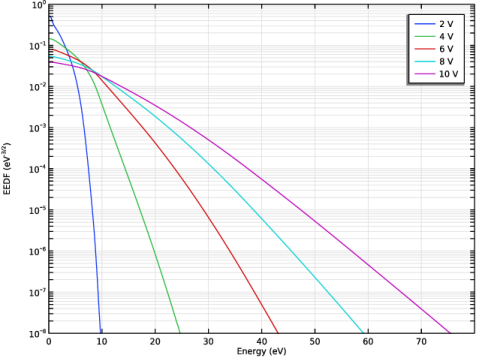
Figure 1 plots EEDFs resulting from the solution of the Boltzmann equation in the two-term approximation for different values of the mean electron energy. The EEDF with lowest mean electron energy (2 eV blue line) has a very low population of electrons with energies above the ionization threshold. As the mean electron energy increases, the population of electrons with higher energy increases. This makes ionization processes more likely. Electron impact ionization is important as it is usually the primary mechanism for sustaining plasmas. Notice also that the EEDF is not linear on the log scale. This indicates that the EEDF is non-Maxwellian under these conditions.
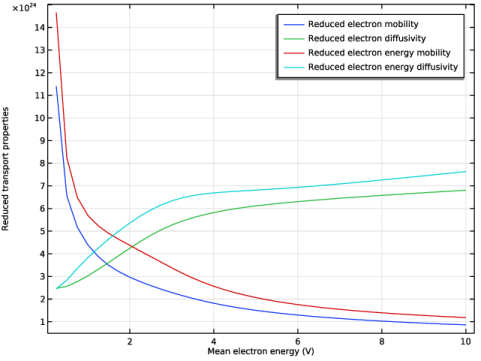
The reduced electron transport properties are plotted in Figure 2. The transport properties have a much weaker dependence on the EEDF compared to rate or Townsend coefficients. The electron mobility and electron energy mobility decrease as the mean electron energy increases. The electron diffusivity and electron energy diffusivity increase as the mean electron energy increases. If the EEDF was Maxwellian the rate of change of the transport parameters would be such that the following relations would hold
In the case that the EEDF is non-Maxwellian, this relation does not necessarily hold true.
The electron drift velocity and the characteristic energy (ratio of the electron diffusivity and mobility) are macroscopic quantities that can be computed by integrating appropriate cross sections over computed EEDFs and compared directly with measurements from swarm experiments. Since the EEDF is very sensitive to the cross sections the comparison between the measured and computed drift velocity and the characteristic energy can be used to find a coherent set of cross sections.
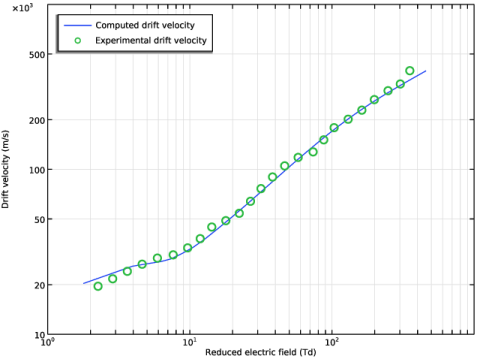
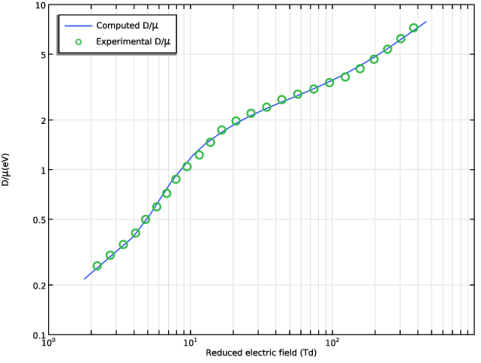
The simulated and experimental drift velocity and characteristic energy are plotted in Figure 3 and Figure 4. The agreement between the two is good over a wide range of reduced electric fields, indicating that the cross section data is consistent with experimental measurements.
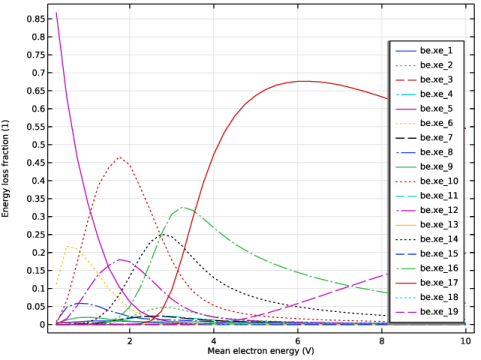
The fraction of power channeled into various reactions is shown in Figure 5. This is important in design of plasma sources because often the desired reactive species is known in advance. The plot gives an indication of what the target mean electron energy should be in order to channel as much of the available power into a specific reaction. Of course, the power channeled into ionization must be high enough to sustain the plasma.
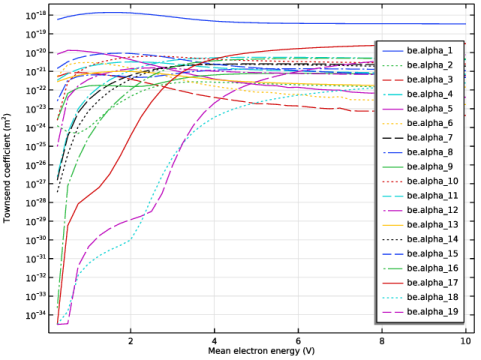
The Townsend coefficients are plotted in Figure 6. The Townsend coefficients offer an alternative way of defining reaction rates. The reaction rate depends on the electron flux rather than the electron density. Townsend coefficients should be used when modeling DC discharges.
Figure 1: Plot of the EEDF for different values of the mean electron energy.
Figure 2: Reduced transport properties versus mean electron energy.
Figure 3: Computed and experimental drift velocity for oxygen.
Figure 4: Computed and experimental D for different reduced electric fields.
Figure 5: Plot of the fraction of the total power channeled into each reaction versus mean electron energy.
Figure 6: Townsend coefficients versus mean electron energy for oxygen.
References
1. G.J.M. Hagelaar and L.C. Pitchford, “Solving the Boltzmann Equation to Obtain Electron Transport Coefficients and Rate Coefficients for Fluid Models,” Plasma Sources Science and Technology, vol. 14, pp. 722–733, 2005.
2. J. Dutton, “A Survey of Electron Swarm Data,” J. Phys. Chem. Ref. Data, vol. 4, pp. 577–866, 1975.
3. Morgan database, www.lxcat.net, retrieved 2017.
Application Library path: Plasma_Module/Two-Term_Boltzmann_Equation/boltzmann_oxygen
Modeling Instructions
From the File menu, choose New.
New
In the New window, click  Model Wizard.
Model Wizard
1
In the Model Wizard window, Select the Boltzmann Equation, Two-Term Approximation (be) interface and the Mean Energies study.
2
3
In the Select Physics tree, select Plasma > Boltzmann Equation, Two-Term Approximation (be).
4
Click Add.
5
Click  Study.
6
In the Select Study tree, select Preset Studies for Selected Physics Interfaces > Mean Energies.
7
Boltzmann Equation, Two-Term Approximation (be)
Select to solve the Boltzmann equation in the two-term approximation, include electron-electron collisions, and change the number of elements and the element ratio in the extra dimension.
Select also to automatically compute the maximum energy that the EEDF is solved for.
1
In the Model Builder window, under Component 1 (comp1) click Boltzmann Equation, Two-Term Approximation (be).
2
In the Settings window for Boltzmann Equation, Two-Term Approximation, locate the Electron Energy Distribution Function Settings section.
3
From the Electron energy distribution function list, choose Boltzmann equation, two-term approximation (quadratic).
4
Select the Electron–electron collisions checkbox.
5
In the N text field, type 500.
6
In the R text field, type 100.
7
Select the Compute maximum energy checkbox.
Import a set of electron impact cross sections for oxygen.
Cross Section Import 1
1
In the Physics toolbar, click  Global and choose Cross Section Import.
2
In the Settings window for Cross Section Import, locate the Cross Section Import section.
3
Click  Browse.
4
5
Click  Import.
Set the mole fraction of the different species, and choose which results are to be plotted.
Boltzmann Model 1
1
In the Model Builder window, click Boltzmann Model 1.
2
In the Settings window for Boltzmann Model, locate the Mole Fraction Settings section.
3
From the Mole constrained species list, choose O2.
4
5
Locate the Results section. Find the Generate the following default plots subsection. Clear the Mean electron energy checkbox.
6
Clear the Rate coefficients checkbox.
7
Select the Townsend coefficients checkbox.
8
Select the Energy loss fraction checkbox.
Set mean electron energy to 0.25 eV since the simulation starts with that value.
Initial Values 1
1
In the Model Builder window, click Initial Values 1.
2
In the Settings window for Initial Values, locate the Initial Values section.
3
In the ε0 text field, type 0.25[V].
Import experimental data for the electron drift velocity and the characteristic energy to later compare with the simulation results.
Definitions (comp1)
Interpolation 1 (int1)
1
In the Home toolbar, click  Functions and choose Global > Interpolation.
2
In the Settings window for Interpolation, locate the Definition section.
3
Click  Load from File.
4
5
Locate the Units section. In the Argument table, enter the following settings:
6
In the Function table, enter the following settings:
Interpolation 2 (int2)
1
In the Home toolbar, click  Functions and choose Global > Interpolation.
2
In the Settings window for Interpolation, locate the Definition section.
3
Click  Load from File.
4
5
Locate the Units section. In the Argument table, enter the following settings:
6
In the Function table, enter the following settings:
7
Locate the Interpolation and Extrapolation section. From the Extrapolation list, choose Linear.
Prepare the study to sweep from 0.25 to 10 eV with steps of 0.25 eV.
Study 1
Step 1: Mean Energies
1
In the Model Builder window, under Study 1 click Step 1: Mean Energies.
2
In the Settings window for Mean Energies, locate the Study Settings section.
3
Click  Range.
4
In the Range dialog, type 0.25 in the Start text field.
5
In the Step text field, type 0.25.
6
In the Stop text field, type 10.
7
Click Replace.
1
In the Model Builder window, click Step 1: Mean Energies.
2
In the Study toolbar, click  Compute.
Look at the EEDFs, transport parameters, Townsend coefficients and energy loss fractions.
Results
EEDF (be)
1
In the Settings window for 1D Plot Group, locate the Data section.
2
From the Parameter selection (freq) list, choose From list.
3
In the Parameter values (freq (V)) list, choose 2, 4, 6, 8, and 10.
4
Locate the Axis section. Select the Manual axis limits checkbox.
5
In the x minimum text field, type 0.
6
In the x maximum text field, type 80.
7
In the y minimum text field, type 1e-8.
8
In the y maximum text field, type 1.
9
In the EEDF (be) toolbar, click  Plot.
Transport Properties (be)
1
In the Model Builder window, click Transport Properties (be).
2
In the Transport Properties (be) toolbar, click  Plot.
Global 1
1
In the Model Builder window, expand the Townsend Coefficients (be) node, then click Global 1.
2
In the Settings window for Global, click to expand the Coloring and Style section.
3
Find the Line style subsection. From the Line list, choose Cycle.
4
Click to expand the Legends section. Find the Include subsection. Clear the Description checkbox.
5
Select the Expression checkbox.
6
In the Townsend Coefficients (be) toolbar, click  Plot.
Global 1
1
Click the  y-Axis Log Scale button in the Graphics toolbar.
2
In the Model Builder window, expand the Energy Loss Fraction (be) node, then click Global 1.
3
In the Settings window for Global, locate the Coloring and Style section.
4
Find the Line style subsection. From the Line list, choose Cycle.
5
Locate the Legends section. Find the Include subsection. Clear the Description checkbox.
6
Select the Expression checkbox.
7
In the Energy Loss Fraction (be) toolbar, click  Plot.
Prepare the plots to compare the computed and measured drift velocity and characteristic energy as a function of the reduced electric field.
Drift velocity
1
In the Results toolbar, click  1D Plot Group.
2
In the Settings window for 1D Plot Group, click to expand the Title section.
3
From the Title type list, choose None.
4
In the Label text field, type Drift velocity.
5
Locate the Plot Settings section.
6
Select the x-axis label checkbox. In the associated text field, type Reduced electric field (Td).
7
Select the y-axis label checkbox. In the associated text field, type Drift velocity (m/s).
8
Locate the Axis section. Select the Manual axis limits checkbox.
9
In the x minimum text field, type 1.
10
In the x maximum text field, type 1e3.
11
In the y minimum text field, type 1e4.
12
In the y maximum text field, type 1e6.
13
Select the x-axis log scale checkbox.
14
Select the y-axis log scale checkbox.
15
Locate the Legend section. From the Position list, choose Upper left.
Global 1
1
Right-click Drift velocity and choose Global.
2
In the Settings window for Global, locate the y-Axis Data section.
3
4
Locate the x-Axis Data section. From the Parameter list, choose Expression.
5
In the Expression text field, type be.EN.
6
From the Unit list, choose Td.
Global 2
1
In the Model Builder window, right-click Drift velocity and choose Global.
2
In the Settings window for Global, locate the y-Axis Data section.
3
4
Locate the x-Axis Data section. From the Parameter list, choose Expression.
5
In the Expression text field, type be.EN.
6
From the Unit list, choose Td.
7
Locate the Coloring and Style section. Find the Line style subsection. From the Line list, choose None.
8
From the Width list, choose 3.
9
Find the Line markers subsection. From the Marker list, choose Circle.
10
From the Positioning list, choose Interpolated.
11
In the Number text field, type 25.
12
In the Drift velocity toolbar, click  Plot.
Characteristic energy
1
In the Results toolbar, click  1D Plot Group.
2
In the Settings window for 1D Plot Group, locate the Title section.
3
From the Title type list, choose None.
4
In the Label text field, type Characteristic energy.
5
Locate the Plot Settings section.
6
Select the x-axis label checkbox. In the associated text field, type Reduced electric field (Td).
7
Select the y-axis label checkbox. In the associated text field, type D/\mu (eV).
8
Locate the Axis section. Select the Manual axis limits checkbox.
9
In the x minimum text field, type 1.
10
In the x maximum text field, type 1e3.
11
In the y minimum text field, type 0.1.
12
In the y maximum text field, type 10.
13
Select the x-axis log scale checkbox.
14
Select the y-axis log scale checkbox.
15
Locate the Legend section. From the Position list, choose Upper left.
Global 1
1
Right-click Characteristic energy and choose Global.
2
In the Settings window for Global, locate the y-Axis Data section.
3
4
Locate the x-Axis Data section. From the Parameter list, choose Expression.
5
In the Expression text field, type be.EN.
6
From the Unit list, choose Td.
Global 2
1
In the Model Builder window, right-click Characteristic energy and choose Global.
2
In the Settings window for Global, locate the y-Axis Data section.
3
4
Locate the x-Axis Data section. From the Parameter list, choose Expression.
5
In the Expression text field, type be.EN.
6
From the Unit list, choose Td.
7
Locate the Coloring and Style section. Find the Line style subsection. From the Line list, choose None.
8
From the Width list, choose 3.
9
Find the Line markers subsection. From the Marker list, choose Circle.
10
From the Positioning list, choose Interpolated.
11
In the Number text field, type 25.
12
In the Characteristic energy toolbar, click  Plot.