






PDF

Dry Air Boltzmann Analysis
Introduction
In this model the Boltzmann equation in the two-term approximation is solved for a mixture of nitrogen/oxygen at 80/20 (to represent dry air) to obtain the electron energy distribution function (EEDF) and the macroscopic transport parameters and sources terms that can be used in a fluid-type model.
In a cold plasma the EEDF is rarely a Maxwellian and its shape is strongly dependent on the background gas composition. It is recommended to use an analytic EEDF (for example, Maxwellian) when preparing a model in the Plasma or Plasma, Time Periodic interfaces to simplify the work flow. However, after the model is solving well it is recommended to investigate the effects of a more realistic EEDF.
This investigation can be done with the Boltzmann Equation, Two-Term Approximation interface. The first part of the study is to solve for the EEDF for the conditions that the reactor is operating and observe how different the transport parameters and source terms are when using an analytic EEDF. The second part is to incorporate the computed data into the fluid model and see if the results of interest change significantly.
The easiest way to incorporate kinetic effects into a fluid model is to directly use the computed EEDFs that were previously computed using the Boltzmann Equation, Two-Term Approximation interface. This way, the rate constants of electron impact reactions (defined with electron impact cross sections) and electron transport properties are computed using the given EEDFs. The second way is to give specific data in the form of reaction rates for some reactions or transport parameters. The first approach is definitely the best since all quantities are dependent of only an imported file and given electron impact cross sections. However, there are cases when using the Local Field Approximation (LFA) or Townsend coefficients are needed that the second approach is the only choice.
The EEDF that can be imported into the fluid model can only be parameterized for the electron mean energy. This means that other parameters (for example, ionization degree, mole fractions of excited states, gas temperature, and gas density) that can influence the EEDF need to be estimated to represent the discharge.
The Plasma interface also offers the possibility to solve for the Boltzmann equation in the two-term approximation fully coupled with the fluid model equations. With this approach the EEDF is computed for every time step and space position, and the local species densities, electron density, gas density are used. Please note that this approach is very computational demanding and obtaining a solution is very difficult if not impossible.
In Ref. 1 (in the section “Coefficient for fluid equations”) it is made a good discussion on how to use the results of a Boltzmann equation solver to obtain transport and rate coefficients for fluid models.
Model Definition
The Boltzmann equation in the two-term approximation can be written as the divergence of the electron flux in the energy space
with a convection part given by
(1)
and a diffusive part with a diffusive coefficient given by
(2)
Above F0 is the electron energy distribution function (EEDF) (eV3/2).
For definitions of the quantities in the equations Equation 1 and Equation 2, see the chapter The Boltzmann Equation, Two-Term Approximation Interface in the Plasma Module User’s Guide.
When the Boltzmann equation has been solved different macroscopic quantities can be computed by suitable integration of electron impact cross sections over the EEDFs as show below. In the DC limit the electron drift velocity, mobility, and diffusivity are defined as
and
,
The rate coefficients are computed from the EEDF by way of the following integral
.
The mean electron energy is defined by the integral
(3).
Townsend coefficients are computed using
where νk is the frequency associated with the reaction rate kk, and the power absorbed by the electrons from the electric field in the DC limit is given by
.
The inputs to the Boltzmann equation are the reduced electric field, the gas temperature, the electron density, the ionization degree, the reduced excitation frequency, the different mole fractions of species with which electrons can collide, and the electron impact cross sections. In this example, data for a discharge operating in the DC limit with negligible ionization degree is computed. It is also assumed that only collisions with ground state of molecular oxygen and nitrogen can influence the EEDF significantly. This means it is assumed that collisions with excited states (direct and superelastic) and with atomic elements coming from dissociative reactions do not affect the EEDF. The gas temperature is used to compute the energy that the electrons receive from a collision with the background gas. This contribution is only of interest if the gas energy is close to the electron energy. With this set of approximations only three input parameters are of interest: the reduced electric field, the mole fraction of oxygen, and the mole fraction of nitrogen. The mole fraction for the mixture nitrogen/oxygen is fixed at 80/20, representing a typical dry air composition at sea level. In order to obtain EEDFs to export the input to the study is the electron mean energy and an ODE is automatically introduced to find the reduced electric field.
The EEDF is defined by how electrons gain energy from the electric field and lose (or gain) their energy in collisions with the background gas. The electron collisions are characterized by cross sections that need to be provided by the user. In this model, the background gas is molecular oxygen and nitrogen. The electron impact collisions considered are obtained from Ref. 2 and Ref. 3 and are listed in Table 1 and Table 2.
Δε (eV)
Δε (eV)
Results and Discussion
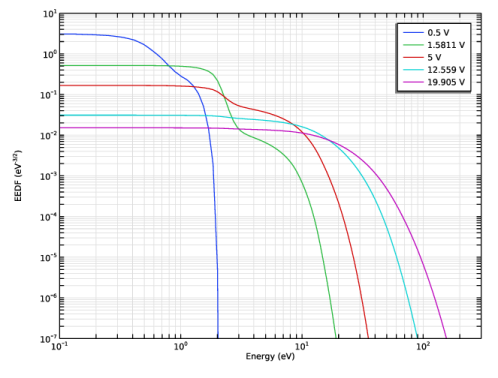
Figure 1 shows EEDFs for several electron mean energies. It is possible to observe that these EEDFs deviate considerable from a Maxwellian distribution function.
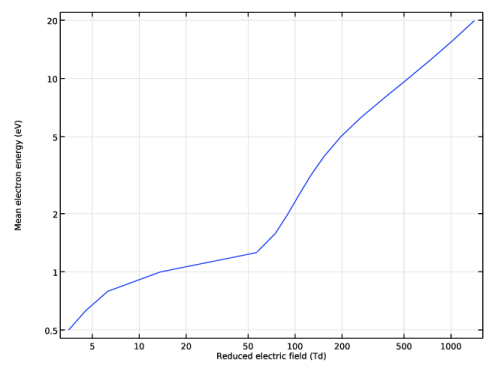
Figure 2 shows the electron mean energy as a function of the reduced electric field. This information (a function that relates the electron mean energy with the reduced electric field) needs to be provided when using the Local Field Approximation (LFA) in the Plasma interface. The LFA assumes that the energy gain by the electrons from the electric field is locally lost in collisions with the background gas. It is a function like the one in Figure 2 that gives the model the information of what energy the electrons have provided an electric field computed by Poisson’s equation.
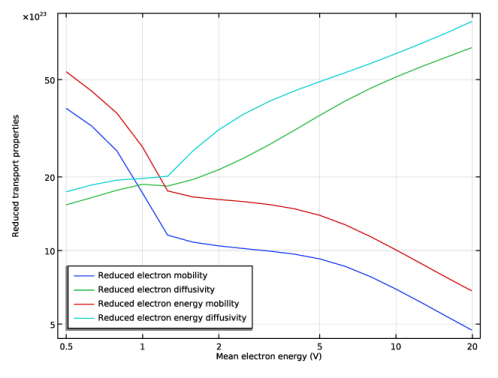
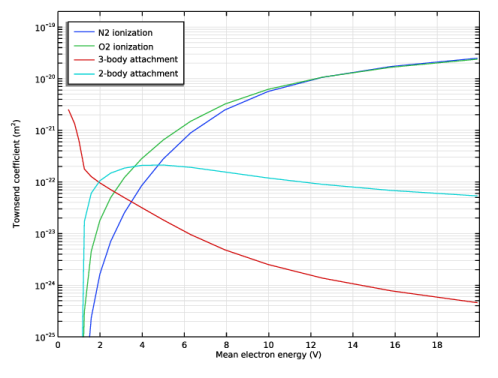
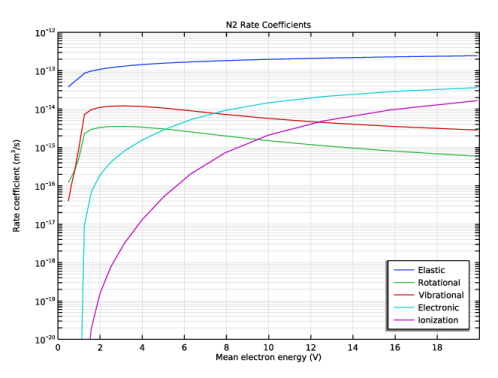
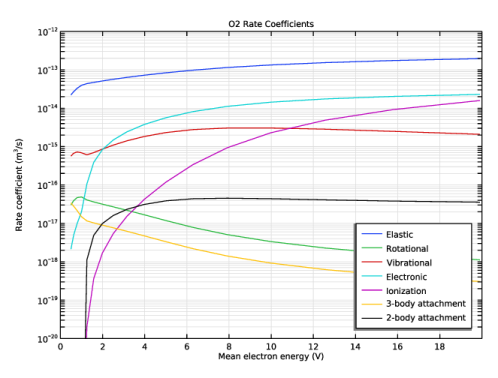
Figure 3, Figure 4, Figure 5, and Figure 6 show different electron transport properties, Townsend coefficients, and rate constants. This information can be used in a plasma fluid model like the one used in the Plasma interface. The information needed for the fluid model depends on the type of reactor and the information that is needed to obtain from the model.
For example, to model a corona discharge in dry air at atmospheric pressure where we only want to know the voltage-current characteristic and to have an idea of the plasma density it is not needed to include explicitly all reactions present in the current example in the fluid model. For the fluid model, a set of 4 electron impact reactions for the ionization and attachment described by Townsend coefficients (data in Figure 4) gives a good estimate of electron creation and destruction in the discharge (reactions between heavy species like ion–ion recombination and photoionization are also needed but they will not be described here). To model a corona discharge the LFA is recommended and in this cases the electron mean energy as a function of the reduced field (data in Figure 3) is also needed. Strictly speaking, the Townsend coefficients can be given to the model directly as a function of the reduced electric field by user define functions. However, in the Plasma interface the predefined tables for Townsend coefficients and rate constants are always a function of the electron mean energy and in this case the electron mean energy as a function of the reduced field is needed.
If the question changes to “How much ozone is produced?” a more complex chemistry that involves excited states, electron impact dissociation, and atomic oxygen is needed. If the dissociation degree is low it might not be necessary to include it in the Boltzmann equation analysis but it should be investigated if the EEDFs are influenced by the presence of atomic oxygen and nitrogen. To find which reactions are important for ozone production a literature research is needed. But in any case the simple model with 4 electron impact reactions mentioned in the previous paragraph should be used as the starting point on top of which more reactions are added.
In Figure 4 and Figure 6 the 3-body attachment reaction rate and Townsend coefficient are multiplied by the gas density in cm-3 because the cross section is normalized to the gas density in units of cm-3 as mention in the data from Ref. 3.
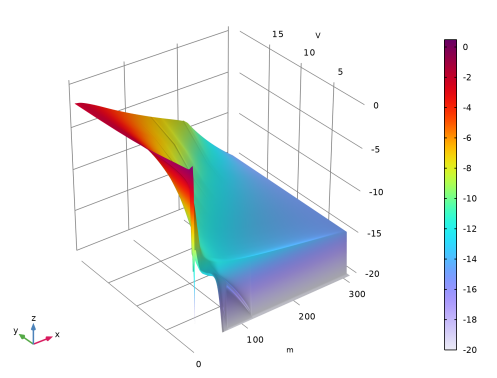
Figure 7 shows EEDFs parameterized for electron mean energy. It is a 2D map like this that needs to be exported to be used in the plasma interface. The last instructions in the Model Instructions section in this document show how to prepare and export the EEDFs.
Note on units: In the Plasma Module, the electron energy and electron mean energy appear with units of V but internally are treated as eV. As such, in this context, V should be read as eV. In the Boltzmann Equation, Two-Term Approximation interface the extra dimension that represents the electron energy and on which the EEDF is solved appears with units of meters but is treated internally as eV.
Figure 1: EEDFs for a mixture of nitrogen/oxygen at 80/20 for several electron mean energies.
Figure 2: Electron mean energy as a function of the reduced electric field.
Figure 3: Electron transport properties as a function of the electron mean energy.
Figure 4: Ionization and attachment Townsend coefficients as a function of the electron mean energy.
Figure 5: Rate coefficients for electron impact reactions with nitrogen.
Figure 6: Rate coefficients for electron impact reactions with oxygen.
Figure 7: EEDFs (logarithm base 10) where the x-axis represents the electron energy and the y-axis represents the electron mean energy.
References
1. G.J.M. Hagelaar and L.C. Pitchford, “Solving the Boltzmann Equation to Obtain Electron Transport Coefficients and Rate Coefficients for Fluid Models,” Plasma Sources Sci. Technol., vol. 14, pp. 722–733, 2005.
2. www.lxcat.net
3. Phelps database, www.lxcat.net, retrieved 2022.
Application Library path: Plasma_Module/Two-Term_Boltzmann_Equation/boltzmann_dry_air
Modeling Instructions
From the File menu, choose New.
New
In the New window, click  Model Wizard.
Model Wizard
1
In the Model Wizard window, click  0D.
2
In the Select Physics tree, select Plasma > Boltzmann Equation, Two-Term Approximation (be).
3
Click Add.
4
Click  Study.
5
In the Select Study tree, select Preset Studies for Selected Physics Interfaces > Mean Energies.
6
Add parameters to represent the model fraction of O2 and N2. A fixed mixture of 80/20 N2/O2 is used in this example but this ratio can be easily parameterized.
Global Definitions
Parameters 1
1
In the Model Builder window, under Global Definitions click Parameters 1.
2
In the Settings window for Parameters, locate the Parameters section.
3
Definitions (comp1)
Variables 1
1
In the Model Builder window, under Component 1 (comp1) right-click Definitions and choose Variables.
Add a variable to compute the gas density at 300 K. This variable is used to compute the Townsend coefficient and rate constants for the 3-body attachment reaction.
Add also a variable to be used for the maximum energy that the electron energy distribution function is solved.
2
In the Settings window for Variables, locate the Variables section.
3
Choose to solve the Boltzmann equation in the two-term approximation, increase the number of mesh elements along the energy axis, refine the mesh in the low energy region, and set the electron maximum energy.
Boltzmann Equation, Two-Term Approximation (be)
1
In the Model Builder window, under Component 1 (comp1) click Boltzmann Equation, Two-Term Approximation (be).
2
In the Settings window for Boltzmann Equation, Two-Term Approximation, locate the Electron Energy Distribution Function Settings section.
3
From the Electron energy distribution function list, choose Boltzmann equation, two-term approximation (linear).
4
In the N text field, type 300.
5
In the R text field, type 50.
6
In the εmax text field, type Emax.
Cross Section Import 1
1
In the Physics toolbar, click  Global and choose Cross Section Import.
Import electron impact cross sections for nitrogen and oxygen. Use a Group node to group all Electron Impact Reaction features to simplify navigation.
2
In the Settings window for Cross Section Import, locate the Cross Section Import section.
3
Click  Browse.
4
5
Click  Import.
Cross Section Import 2
1
In the Physics toolbar, click  Global and choose Cross Section Import.
2
In the Settings window for Cross Section Import, locate the Cross Section Import section.
3
Click  Browse.
4
5
Click  Import.
10: e+N2=>e+N2(v6), 11: e+N2=>e+N2(v8), 12: e+N2=>e+N2(A3), 13: e+N2=>e+N2(A3), 14: e+N2=>e+N2(B3), 15: e+N2=>e+N2(W3), 16: e+N2=>e+N2(A3), 17: e+N2=>e+N2(B3), 18: e+N2=>e+N2(a1), 19: e+N2=>e+N2(a1), 1: e+N2=>e+N2, 20: e+N2=>e+N2(w1), 21: e+N2=>e+N2(c3), 22: e+N2=>e+N2(E3), 23: e+N2=>e+N2(a1), 24: e+N2=>e+N2(Sum), 25: e+N2=>2e+N2+, 26: e+N2=>2e+N2+, 27: e+O2=>O+O-, 28: e+O2=>O+O-, 29: e+O2=>e+O2, 2: e+N2=>e+N2(rot), 30: e+O2=>e+O2(rot), 31: e+O2=>e+O2(v1), 32: e+O2=>e+O2(v1res), 33: e+O2=>e+O2(v2), 34: e+O2=>e+O2(v2res), 35: e+O2=>e+O2(v3), 36: e+O2=>e+O2(v4), 37: e+O2=>e+O2(a1), 38: e+O2=>e+O2(b1), 39: e+O2=>e+O2(e4.5), 3: e+N2=>e+N2(v1), 40: e+O2=>e+O2(e6.0), 41: e+O2=>e+ O2(e8.4), 42: e+O2=>e+O2(e9.97), 43: e+O2=>2e+O2+, 4: e+N2=>e+N2(v1res), 5: e+N2=>e+N2(v2), 6: e+N2=>e+N2(v3), 7: e+N2=>e+N2(v4), 8: e+N2=>e+N2(v5), 9: e+N2=>e+N2(v5), Cross Section Import 1, Cross Section Import 2
1
In the Model Builder window, under Component 1 (comp1) > Boltzmann Equation, Two-Term Approximation (be), Ctrl-click to select Cross Section Import 1, Cross Section Import 2, 1: e+N2=>e+N2, 2: e+N2=>e+N2(rot), 3: e+N2=>e+N2(v1), 4: e+N2=>e+N2(v1res), 5: e+N2=>e+N2(v2), 6: e+N2=>e+N2(v3), 7: e+N2=>e+N2(v4), 8: e+N2=>e+N2(v5), 9: e+N2=>e+N2(v5), 10: e+N2=>e+N2(v6), 11: e+N2=>e+N2(v8), 12: e+N2=>e+N2(A3), 13: e+N2=>e+N2(A3), 14: e+N2=>e+N2(B3), 15: e+N2=>e+N2(W3), 16: e+N2=>e+N2(A3), 17: e+N2=>e+N2(B3), 18: e+N2=>e+N2(a1), 19: e+N2=>e+N2(a1), 20: e+N2=>e+N2(w1), 21: e+N2=>e+N2(c3), 22: e+N2=>e+N2(E3), 23: e+N2=>e+N2(a1), 24: e+N2=>e+N2(Sum), 25: e+N2=>2e+N2+, 26: e+N2=>2e+N2+, 27: e+O2=>O+O-, 28: e+O2=>O+O-, 29: e+O2=>e+O2, 30: e+O2=>e+O2(rot), 31: e+O2=>e+O2(v1), 32: e+O2=>e+O2(v1res), 33: e+O2=>e+O2(v2), 34: e+O2=>e+O2(v2res), 35: e+O2=>e+O2(v3), 36: e+O2=>e+O2(v4), 37: e+O2=>e+O2(a1), 38: e+O2=>e+O2(b1), 39: e+O2=>e+O2(e4.5), 40: e+O2=>e+O2(e6.0), 41: e+O2=>e+ O2(e8.4), 42: e+O2=>e+O2(e9.97), and 43: e+O2=>2e+O2+.
2
Electron impact reactions
1
In the Settings window for Group, type Electron impact reactions in the Label text field.
2
In the Model Builder window, collapse the Electron impact reactions node.
Set the mole fractions for nitrogen and oxygen. Choose to plot the Townsend coefficients and to not plot rate coefficients.
Boltzmann Model 1
1
In the Model Builder window, click Boltzmann Model 1.
2
In the Settings window for Boltzmann Model, locate the Mole Fraction Settings section.
3
4
Locate the Results section. Find the Generate the following default plots subsection. Select the Townsend coefficients checkbox.
5
Clear the Rate coefficients checkbox.
Set the electron mean energies to solve for. Use a logarithmic distribution to have a better sampling at low electron energies where variations are faster.
Study 1
Step 1: Mean Energies
1
In the Model Builder window, under Study 1 click Step 1: Mean Energies.
2
In the Settings window for Mean Energies, locate the Study Settings section.
3
Click  Range.
4
In the Range dialog, choose Logarithmic from the Entry method list.
5
In the Start text field, type 0.5.
6
In the Stop text field, type 20.
7
In the Steps per decade text field, type 10.
8
Click Replace.
9
In the Study toolbar, click  Compute.
Results
EEDF (be)
Prepare plots for the electron energy distribution function, mean electron energy as a function of the reduced electric field, Townsend coefficients, and rate constants.
1
In the Settings window for 1D Plot Group, locate the Axis section.
2
Select the Manual axis limits checkbox.
3
In the x minimum text field, type 0.1.
4
In the x maximum text field, type 300.
5
In the y minimum text field, type 1e-7.
6
In the y maximum text field, type 10.
7
Select the x-axis log scale checkbox.
8
Locate the Data section. From the Parameter selection (freq) list, choose From list.
9
In the Parameter values (freq (V)) list, choose 0.5, 1.5811, 5, 12.559, and 19.905.
10
In the EEDF (be) toolbar, click  Plot.
Mean Electron Energy (be)
1
In the Model Builder window, click Mean Electron Energy (be).
2
In the Settings window for 1D Plot Group, locate the Axis section.
3
Select the x-axis log scale checkbox.
4
Select the y-axis log scale checkbox.
Transport Properties (be)
1
In the Model Builder window, click Transport Properties (be).
2
In the Settings window for 1D Plot Group, locate the Axis section.
3
Select the x-axis log scale checkbox.
4
Select the y-axis log scale checkbox.
5
Locate the Legend section. From the Position list, choose Lower left.
Townsend Coefficients (be)
1
In the Model Builder window, click Townsend Coefficients (be).
2
In the Settings window for 1D Plot Group, locate the Axis section.
3
Select the Manual axis limits checkbox.
4
In the x minimum text field, type 0.
5
In the x maximum text field, type 20.
6
In the y minimum text field, type 1e-25.
7
In the y maximum text field, type 2e-19.
8
Locate the Legend section. From the Position list, choose Upper left.
Global 1
1
In the Model Builder window, expand the Townsend Coefficients (be) node, then click Global 1.
2
In the Settings window for Global, locate the y-Axis Data section.
3
Click  Clear Table.
4
5
In the Townsend Coefficients (be) toolbar, click  Plot.
N2 Rate Coefficients
1
In the Results toolbar, click  1D Plot Group.
2
In the Settings window for 1D Plot Group, type N2 Rate Coefficients in the Label text field.
3
Click to expand the Title section. From the Title type list, choose Manual.
4
In the Title text area, type N2 Rate Coefficients.
5
Locate the Plot Settings section. Select the x-axis label checkbox.
6
Select the y-axis label checkbox.
7
In the x-axis label text field, type Mean electron energy (V).
8
In the y-axis label text field, type Rate coefficient (m<sup>3</sup>/s).
9
Locate the Axis section. Select the y-axis log scale checkbox.
10
Select the Manual axis limits checkbox.
11
In the x minimum text field, type 0.
12
In the x maximum text field, type 20.
13
In the y minimum text field, type 1e-20.
14
In the y maximum text field, type 1e-12.
15
Locate the Legend section. From the Position list, choose Lower right.
Global 1
1
Right-click N2 Rate Coefficients and choose Global.
2
In the Settings window for Global, locate the y-Axis Data section.
3
4
Locate the x-Axis Data section. From the Parameter list, choose Expression.
5
In the Expression text field, type be.ebar.
6
In the N2 Rate Coefficients toolbar, click  Plot.
O2 Rate Coefficients 1
1
In the Model Builder window, right-click N2 Rate Coefficients and choose Duplicate.
2
In the Settings window for 1D Plot Group, type O2 Rate Coefficients 1 in the Label text field.
3
Locate the Title section. In the Title text area, type O2 Rate Coefficients.
Global 1
1
In the Model Builder window, expand the O2 Rate Coefficients  1 node, then click Global 1.
2
In the Settings window for Global, locate the y-Axis Data section.
3
Click  Clear Table.
4
5
In the O2 Rate Coefficients 1 toolbar, click  Plot.
In the following, two datasets are created to prepare the data to plot the EEDFs in a 2D plot and to export the EEDFs to be used in the Plasma interface.
The Boltzmann Equation, Two-Term Approximation interface is a 0D interface and uses an extra dimension to represent the electron energy on a 1D axis. As the extra dimension is normalized to the Maximum energy value, it has to be manually scaled with the Maximum energy value before exporting the data. To do this, we can use a Transformation dataset. With a Transformation dataset, you can scale, rotate, and move datasets.
Parametric Extrusion 1D 1
In the Results toolbar, click  More Datasets and choose Parametric Extrusion 1D.
Transformation 2D 1
1
In the Results toolbar, click  More Datasets and choose Transformation 2D.
2
In the Settings window for Transformation 2D, locate the Transformation section.
3
Select the Scale checkbox.
4
In the x text field, type Emax/1[V].
EEDF 2D
1
In the Results toolbar, click  2D Plot Group.
2
In the Settings window for 2D Plot Group, type EEDF 2D in the Label text field.
3
Locate the Data section. From the Dataset list, choose Transformation 2D 1.
4
Click to expand the Title section. From the Title type list, choose None.
Surface 1
1
Right-click EEDF 2D and choose Surface.
2
In the Settings window for Surface, locate the Expression section.
3
In the Expression text field, type log10(be.f).
4
Locate the Coloring and Style section. From the Color table list, choose Prism.
Height Expression 1
Right-click Surface 1 and choose Height Expression.
Data 1
1
In the Results toolbar, click  Data and choose Data.
2
In the Settings window for Data, locate the Data section.
3
From the Dataset list, choose Transformation 2D 1.
4
Locate the Expressions section. In the table, enter the following settings:
The next steps to export the data are to choose the folder where the file is going to be exported and click the Export button. The exported file is ready to be used in the Plasma interface.