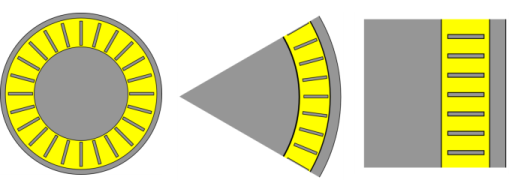
|
|
|
|
•
|
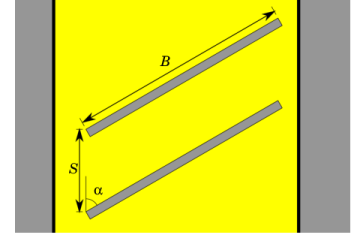
The particles experience diffuse scattering at the blade walls, following the distribution called Lambert’s cosine law or Knudsen’s cosine law
|

|
•
|
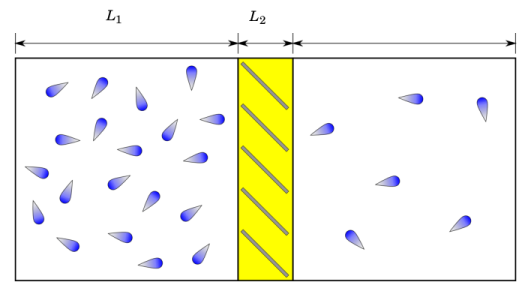
L1 is a characteristic length scale of either domain adjacent to the pump
|
|
•
|
L2 is a characteristic length scale within a stage of the pump
|
|
•
|
λ (SI unit: m) is the molecular mean free path
|



|
•
|
|
1
|
|
2
|
|
3
|
Click Add.
|
|
4
|
Click
 Study. Study. |
|
5
|
|
6
|
Click
 Done. Done. |
|
1
|
|
2
|
|
3
|
Click
 Load from File. Load from File. |
|
4
|
Browse to the model’s Application Libraries folder and double-click the file turbomolecular_pump_quasi_2d_parameters.txt.
|
|
1
|
In the Model Builder window, under Component 1 (comp1) right-click Definitions and choose Variables.
|
|
2
|
|
1
|
|
2
|
|
3
|
|
1
|
|
1
|
|
2
|
|
4
|
|
1
|
In the Model Builder window, under Component 1 (comp1) > Geometry 1 right-click Work Plane 1 (wp1) and choose Extrude.
|
|
2
|
|
1
|
In the Model Builder window, under Component 1 (comp1) > Mathematical Particle Tracing (pt) click Particle Properties 1.
|
|
2
|
|
3
|
|
1
|
|
2
|
In the Settings window for Auxiliary Dependent Variable, locate the Auxiliary Dependent Variable section.
|
|
3
|
|
1
|
|
3
|
|
4
|
|
5
|
|
6
|
|
7
|
|
8
|
Locate the Initial Value of Auxiliary Dependent Variables section. In the noCollision0 text field, type 1.
|
|
9
|
Click to expand the Advanced Settings section. Select the Subtract moving frame velocity from initial particle velocity checkbox.
|
|
10
|
|
11
|
|
1
|
|
2
|
|
3
|
|
1
|
|
3
|
|
4
|
|
5
|
|
6
|
Click to expand the New Value of Auxiliary Dependent Variables section. Select the Assign new value to auxiliary variable noCollision checkbox. Use the default value, 0.
|
|
1
|
In the Physics toolbar, click
 Boundaries and choose Outlet. The Outlet will stop particles when they either cross the pump stage completely or get deflected back to the Inlet boundary. Boundaries and choose Outlet. The Outlet will stop particles when they either cross the pump stage completely or get deflected back to the Inlet boundary. |
|
1
|
|
1
|
|
2
|
|
3
|
|
4
|
Click
 Build All. Build All. |
|
1
|
|
2
|
|
3
|
|
1
|
|
2
|
|
3
|
Click
 Add. Add. |
|
1
|
|
2
|
|
3
|
|
4
|
|
5
|
|
1
|
|
2
|
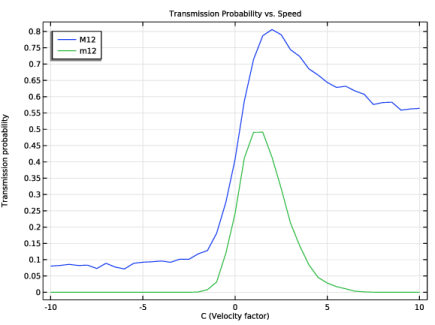
In the Settings window for 1D Plot Group, type Transmission Probability: Sweep Over Speeds in the Label text field.
|
|
3
|
Locate the Data section. From the Dataset list, choose Sweep Over Speeds/Parametric Solutions 1 (sol2).
|
|
4
|
|
5
|
|
6
|
|
7
|
Locate the Plot Settings section.
|
|
8
|
|
9
|
|
1
|
|
2
|
|
4
|
|
5
|
|
7
|
|
1
|
|
2
|
Go to the Add Study window.
|
|
3
|
|
4
|
Click the Add Study button in the window toolbar.
|
|
5
|
|
1
|
|
2
|
|
1
|
|
2
|
|
3
|
Click
 Add. Add. |
|
1
|
|
2
|
|
3
|
|
4
|
|
5
|
|
1
|
In the Model Builder window, right-click Transmission Probability: Sweep Over Speeds and choose Duplicate.
|
|
2
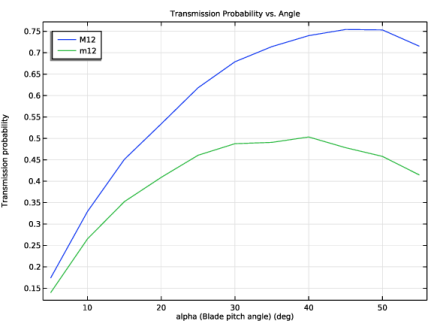
|
In the Settings window for 1D Plot Group, type Transmission Probability: Sweep Over Angles in the Label text field.
|
|
3
|
Locate the Data section. From the Dataset list, choose Sweep Over Angles/Parametric Solutions 2 (sol45).
|
|
4
|
|
5
|
|
1
|
|
2
|
Go to the Add Study window.
|
|
3
|
|
4
|
Click the Add Study button in the window toolbar.
|
|
5
|
|
1
|
|
2
|
|
1
|
|
2
|
|
3
|
Click
 Add. Add. |
|
1
|
|
2
|
|
3
|
|
4
|
|
5
|
|
1
|
In the Model Builder window, right-click Transmission Probability: Sweep Over Speeds and choose Duplicate.
|
|
2
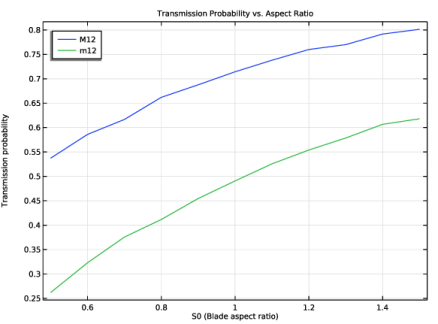
|
In the Settings window for 1D Plot Group, type Transmission Probability: Sweep Over Aspect Ratios in the Label text field.
|
|
3
|
Locate the Data section. From the Dataset list, choose Sweep Over Aspect Ratios/Parametric Solutions 3 (sol58).
|
|
4
|