
|
|
|



|
1
|
|
2
|
In the Select Physics tree, select AC/DC > Particle Tracing > Particle–Field Interaction, Nonrelativistic.
|
|
3
|
Click Add.
|
|
4
|
Click
 Study. Study. |
|
5
|
|
6
|
Click
 Done. Done. |
|
1
|
|
2
|
|
3
|
Click
 Load from File. Load from File. |
|
4
|
Browse to the model’s Application Libraries folder and double-click the file multipactor_saturation_parameters.txt.
|
|
1
|
|
2
|
|
3
|
Click
 Load from File. Load from File. |
|
4
|
Browse to the model’s Application Libraries folder and double-click the file multipactor_saturation_variables_global.txt.
|
|
1
|
|
2
|
|
3
|
Find the Intervals subsection. In the table, enter the following settings:
|
|
4
|
|
5
|
|
6
|
|
1
|
|
2
|
|
3
|
|
1
|
|
2
|
|
3
|
|
4
|
|
5
|
|
6
|
Click
 Build All Objects. Build All Objects. |
|
1
|
|
2
|
|
3
|
Click
 Load from File. Load from File. |
|
4
|
Browse to the model’s Application Libraries folder and double-click the file multipactor_saturation_variables_local.txt.
|
|
1
|
|
1
|
|
3
|
|
4
|
|
1
|
|
2
|
In the Show More Options dialog, in the tree, select the checkbox for the node Physics > Advanced Physics Options.
|
|
3
|
Click OK.
|
|
1
|
|
2
|
In the Settings window for Charged Particle Tracing, locate the Particle Release and Propagation section.
|
|
3
|
|
4
|
|
5
|
Click to expand the Advanced Settings section. From the Reuse particle degrees of freedom list, choose All disappeared particles.
|
|
1
|
In the Model Builder window, under Component 1 (comp1) > Charged Particle Tracing (cpt) click Electric Force 1.
|
|
2
|
|
3
|
|
1
|
|
3
|
|
4
|
Specify the B vector as
|
|
1
|
|
2
|
|
3
|
|
4
|
|
5
|
|
1
|
|
3
|
|
4
|
|
1
|
|
2
|
|
3
|
|
4
|
|
5
|
|
1
|
|
2
|
|
3
|
|
4
|
|
5
|
|
1
|
|
2
|
|
3
|
Click
 Select Quantity. Select Quantity. |
|
4
|
|
5
|
|
6
|
Click OK.
|
|
7
|
|
8
|
|
1
|
|
1
|
|
2
|
|
3
|
|
1
|
|
2
|
|
3
|
|
1
|
|
1
|
|
1
|
In the Model Builder window, under Component 1 (comp1) > Multiphysics click Electric Particle–Field Interaction 1 (epfi1).
|
|
2
|
In the Settings window for Electric Particle–Field Interaction, click to expand the Charge Multiplication Factor section.
|
|
3
|
|
1
|
|
1
|
|
3
|
|
4
|
|
1
|
|
2
|
|
3
|
|
1
|
|
2
|
|
3
|
|
1
|
|
2
|
|
3
|
In the Model Builder window, expand the Study 1 > Solver Configurations > Solution 1 (sol1) > Time-Dependent Solver 1 node.
|
|
4
|
Right-click Study 1 > Solver Configurations > Solution 1 (sol1) > Time-Dependent Solver 1 and choose Fully Coupled.
|
|
5
|
|
6
|
|
7
|
|
1
|
|
2
|
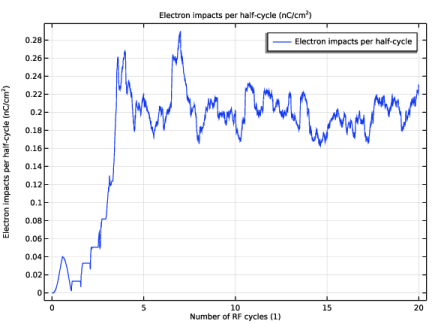
In the Settings window for Global, click Replace Expression in the upper-right corner of the y-Axis Data section. From the menu, choose Component 1 (comp1) > Definitions > Variables > impacts_change - Electron impacts per half-cycle - C/m².
|
|
3
|
Locate the y-Axis Data section. In the table, enter the following settings:
|
|
4
|
|
5
|
Click Replace Expression in the upper-right corner of the x-Axis Data section. From the menu, choose Global definitions > Variables > tau - Number of RF cycles - 1.
|
|
1
|
|
2
|
|
3
|
|
4
|
|
5
|
Click
 Plot, to verify that the cut plane passes through the middle of the domain. Plot, to verify that the cut plane passes through the middle of the domain. |
|
1
|
|
2
|
|
3
|
|
1
|
|
2
|
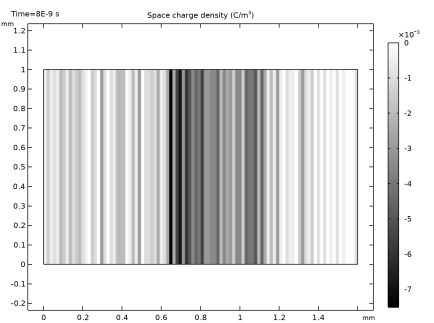
In the Settings window for Surface, click Replace Expression in the upper-right corner of the Expression section. From the menu, choose Component 1 (comp1) > Currents and charge > epfi1.rhos - Space charge density - C/m³.
|
|
3
|
|
1
|
|
2
|
|
3
|
|
4
|


