|
|
|





|
1
|
|
2
|
|
3
|
Click Add.
|
|
4
|
In the Select Physics tree, select Mathematics > ODE and DAE Interfaces > Global ODEs and DAEs (ge).
|
|
5
|
Click Add.
|
|
6
|
Click
 Study. Study. |
|
7
|
|
8
|
Click
 Done. Done. |
|
1
|
|
2
|
|
3
|
Click
 Load from File. Load from File. |
|
4
|
Browse to the model’s Application Libraries folder and double-click the file tesla_microvalve_transient_optimization_parameters.txt.
|
|
1
|
|
2
|
|
3
|
|
4
|
|
5
|
Locate the Selections of Resulting Entities section. Select the Resulting objects selection checkbox.
|
|
1
|
|
2
|
|
3
|
|
4
|
|
5
|
Locate the Selections of Resulting Entities section. Select the Resulting objects selection checkbox.
|
|
1
|
|
2
|
|
3
|
|
4
|
Select the Keep input objects checkbox.
|
|
5
|
|
1
|
|
2
|
|
3
|
|
4
|
|
5
|
|
6
|
|
1
|
|
2
|
|
3
|
|
4
|
|
1
|
|
2
|
|
3
|
|
4
|
|
1
|
|
2
|
|
3
|
|
4
|
|
5
|
|
6
|
Click OK.
|
|
1
|
|
2
|
|
3
|
|
4
|
|
1
|
In the Model Builder window, under Component 1 (comp1) right-click Materials and choose Blank Material.
|
|
2
|
|
3
|
Locate the Material Contents section. In the table, enter the following settings:
|
|
1
|
|
2
|
|
3
|
|
4
|
|
5
|
In the text field, type meshsz.
|
|
6
|
|
7
|
|
8
|
|
9
|
|
10
|
|
11
|
|
1
|
|
2
|
|
3
|
|
1
|
|
2
|
|
3
|
|
4
|
|
5
|
|
6
|
|
1
|
|
2
|
|
3
|
|
1
|
|
2
|
|
3
|
|
4
|
|
1
|
|
2
|
|
3
|
|
1
|
|
2
|
|
3
|
|
4
|
|
1
|
In the Model Builder window, under Component 1 (comp1) > Global ODEs and DAEs (ge) click Global Equations 1 (ODE1).
|
|
2
|
|
1
|
|
2
|
|
3
|
Click the Custom button.
|
|
4
|
|
5
|
Click
 Build All. Build All. |
|
1
|
|
2
|
|
1
|
|
2
|
|
3
|
|
4
|
|
5
|
|
6
|
Click Add Expression in the upper-right corner of the Objective Function section. From the menu, choose Component 1 (comp1) > Global ODEs and DAEs > comp1.obj - State variable obj - 1.
|
|
7
|
|
8
|
|
9
|
|
10
|
|
1
|
|
2
|
|
3
|
In the Output times text field, type range(0,tmax/7,tmax)so that a timestep is saved exactly at t=0.75*Tperiod where the objective evaluation begins.
|
|
4
|
|
1
|
|
2
|
|
3
|
|
1
|
In the Model Builder window, expand the Study 1: Optimization > Solver Configurations > Solution 1 (sol1) > Optimization Solver 1 node, then click Time-Dependent Solver 1.
|
|
2
|
|
3
|
|
4
|
|
5
|
|
6
|
|
7
|
Locate the General section. In the Variables list, choose Pressure (comp1.p), Velocity Field (comp1.u), and Global Equations 1 (comp1.ODE1).
|
|
8
|
|
9
|
In the Model Builder window, under Study 1: Optimization > Solver Configurations > Solution 1 (sol1) > Optimization Solver 1 > Time-Dependent Solver 1 > Segregated 1 click Segregated Step 1.
|
|
10
|
|
11
|
|
12
|
In the Add dialog, in the Variables list, choose Control Material Volume Factor (comp1.dtopo1.theta_c), Pressure (comp1.p), and Velocity Field (comp1.u).
|
|
13
|
Click OK.
|
|
14
|
In the Model Builder window, under Study 1: Optimization > Solver Configurations > Solution 1 (sol1) > Optimization Solver 1 > Time-Dependent Solver 1 > Segregated 1 click Segregated Step 2.
|
|
15
|
|
16
|
|
17
|
In the Add dialog, in the Variables list, choose Control Material Volume Factor (comp1.dtopo1.theta_c) and Global Equations 1 (comp1.ODE1).
|
|
18
|
Click OK.
|
|
19
|
|
20
|
|
21
|
|
1
|
|
2
|
|
3
|
Select the Plot checkbox.
|
|
4
|
|
5
|
|
1
|
|
2
|
|
3
|
|
1
|
In the Model Builder window, under Results > Topology Optimization click Output material volume factor.
|
|
2
|
|
3
|
|
1
|
|
2
|
|
3
|
|
4
|
|
5
|
|
6
|
|
1
|
|
2
|
In the Settings window for Filter, click Replace Expression in the upper-right corner of the Expression section. From the menu, choose Component 1 (comp1) > Definitions > Density Model 1 > Auxiliary variables > dtopo1.theta_f - Filtered material volume factor.
|
|
3
|
|
1
|
|
2
|
|
1
|
|
2
|
|
1
|
In the Model Builder window, under Component 2: Verification (comp2) right-click Definitions and choose Paste Domain Probe.
|
|
2
|
|
3
|
|
1
|
In the Model Builder window, expand the Component 2: Verification (comp2) > Laminar Flow (spf2) node, then click Symmetry 1.
|
|
2
|
|
3
|
|
1
|
|
2
|
|
3
|
|
1
|
|
2
|
|
3
|
|
1
|
In the Model Builder window, expand the Component 2: Verification (comp2) > Global ODEs and DAEs (ge2) node, then click Global Equations 1 (ODE1).
|
|
2
|
|
1
|
|
2
|
|
1
|
|
2
|
|
3
|
Click the Custom button.
|
|
4
|
|
5
|
|
6
|
|
7
|
Click
 Build All. Build All. |
|
8
|
|
1
|
|
2
|
Go to the Add Study window.
|
|
3
|
|
4
|
Click the Add Study button in the window toolbar.
|
|
5
|
|
1
|
|
2
|
In the Solve for column of the table, under Component 1: Optimization (comp1), clear the checkboxes for Laminar Flow (spf), Global ODEs and DAEs (ge), and Topology Optimization.
|
|
3
|
|
1
|
|
2
|
|
3
|
In the Solve for column of the table, under Component 2: Verification (comp2), clear the checkboxes for Laminar Flow (spf2) and Global ODEs and DAEs (ge2).
|
|
1
|
In the Model Builder window, expand the Study 2 > Solver Configurations > Solution 2 (sol2) node, then click Time-Dependent Solver 1.
|
|
2
|
|
3
|
|
4
|
|
5
|
|
6
|
|
7
|
Locate the General section. In the Variables list, choose Filtered Material Volume Factor (comp1.dtopo1.theta_f), Pressure (comp1.p), Velocity Field (comp1.u), Global Equations 1 (comp1.ODE1), and Global Equations 1 (comp2.ODE1).
|
|
8
|
|
9
|
In the Model Builder window, under Study 2 > Solver Configurations > Solution 2 (sol2) > Time-Dependent Solver 1 > Segregated 1 click Segregated Step 1.
|
|
10
|
|
11
|
|
12
|
In the Add dialog, in the Variables list, choose Control Material Volume Factor (comp1.dtopo1.theta_c) and Global Equations 1 (comp2.ODE1).
|
|
13
|
Click OK.
|
|
14
|
|
15
|
|
16
|
|
1
|
|
2
|
|
1
|
In the Model Builder window, under Results, Ctrl-click to select Velocity (spf2), Pressure (spf2), and Objective (Verification).
|
|
2
|
Right-click and choose Group.
|
|
1
|
|
2
|
|
3
|
|
1
|
|
2
|
|
3
|
|
4
|
|
5
|
|
1
|
|
2
|
|
3
|
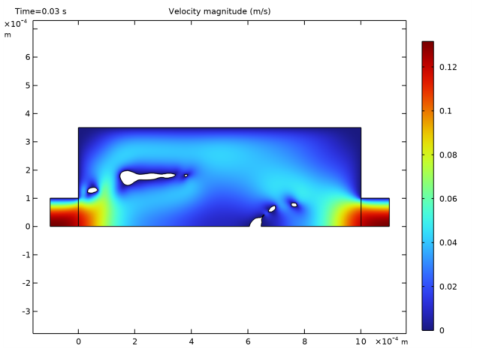
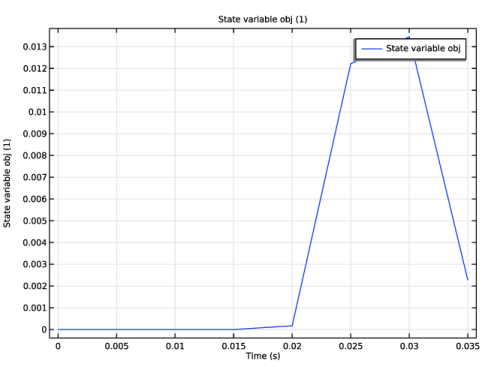
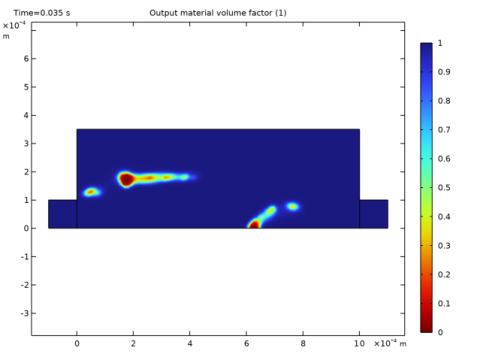
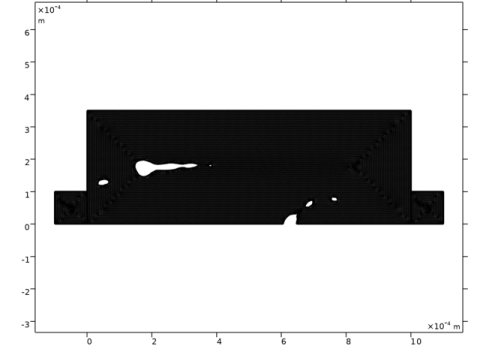
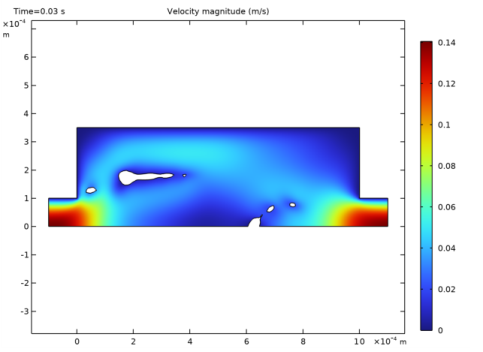 The filtered material volume factor is plotted for the optimized design.