PDF

Maximizing the Eigenfrequency of a Shell
Introduction
Shape optimization can be used to alter the geometry of an existing product to improve its performance. You can do that using the Deformed Geometry interface, but you have to decide which shape deformations to allow. It is important to impose some restriction to preserve the mesh quality during the optimization. One approach is to use a polynomial to introduce some regularization (in combination with a maximum displacement parameter), so that the slope of the shape variation is bounded. This type of regularized shape optimization can be set up using equation based modeling, but it is also built into the Free Shape Shell feature. This feature differs from the Free Shape Boundary feature in that it can be used on boundaries that are not adjacent to meshed domains.
Model Definition
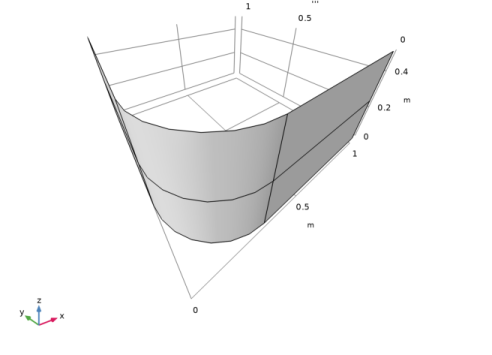
Shape optimization is often subject to constraints on the geometry deformation, and this model shows how the Free Shape Shell feature can be combined with the Symmetry/Roller feature to restrict edges to move along an imaginary boundary defined by a normal vector. The sides as well as the loaded edges are fixed using the Fixed Edge feature. The eigenmodes are not symmetric, so the entire shell has to be modeled in every optimization iteration, but it is possible to enforce a symmetric design using the Mirror Symmetry feature.The initial geometry of the shell is shown in Figure 1.
An Eigenvalue solver is required for computing the eigenfrequency of the shell, while the dependent variables associated with the Free Shape Shell features requires a Stationary solver. Gradient based optimization over multiple study steps is unsupported, but it s possible to combine the two solver types using a single Stationary Then Eigenfrequency study step.
Figure 1: The initial geometry is shown. The displacement and rotation is fixed at the leftmost edge of the shell. The shape deformation of this edge is restricted to the xz-plane.
The shell is made of steel and the objective is to maximize the lowest eigenfrequency by deforming the mesh used for the discretization of the shell.
Results and Discussion
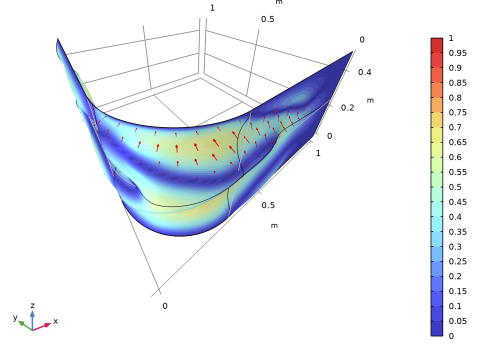
The optimal design is intuitive in the sense that it deforms the shell, so that material is moved away from the midplane, increasing the stiffness of the shell; see Figure 2.
Figure 2: The default shape optimization plot shows the edges of the old geometry in gray together with a surface plot of the relative normal boundary displacement in colors. The actual displacement is shown with red arrows.
By deforming the shell the optimization is able to increase the lowest eigenfrequency by a factor of four. The area (and thus the mass) of the shell is increased by the optimization, but the tip of the shell remains relatively flat to avoid introducing more mass in this area.
Notes About the COMSOL Implementation
This model combines the Shape Optimization and Shell interfaces. The Shell interface computes fold lines automatically, but the details of this computation is affected by the presence of Deformed Geometry and/or Shape Optimization. Therefore it is good practice to perform a verification analysis in a new component, and this model includes such a verification analysis, which results in a somewhat lower eigenfrequency. The eigenmodes can also appear different, but this is primarily due to the fact that the optimization produces degenerate eigenmodes, so one can only expect that the eigenmodes (for the low frequencies) span the same space.
Application Library path: Optimization_Module/Shape_Optimization/shell_eigenfrequency_shape_optimization
Modeling Instructions
From the File menu, choose New.
New
In the New window, click  Model Wizard.
Model Wizard
1
In the Model Wizard window, click  3D.
2
In the Select Physics tree, select Structural Mechanics > Shell (shell).
3
Click Add.
4
Click  Study.
5
In the Select Study tree, select Empty Study.
6
Global Definitions
Parameters 1
1
In the Model Builder window, under Global Definitions click Parameters 1.
2
In the Settings window for Parameters, locate the Parameters section.
3
Component 1: Optimization
1
In the Model Builder window, click Component 1 (comp1).
2
In the Settings window for Component, type Component 1: Optimization in the Label text field.
Geometry 1
Work Plane 1 (wp1)
In the Geometry toolbar, click  Work Plane.
Work Plane 1 (wp1) > Plane Geometry
In the Model Builder window, click Plane Geometry.
Work Plane 1 (wp1) > Square 1 (sq1)
In the Work Plane toolbar, click  Square.
Work Plane 1 (wp1) > Fillet 1 (fil1)
1
In the Work Plane toolbar, click  Fillet.
2
On the object sq1, select Point 1 only.
3
In the Settings window for Fillet, locate the Radius section.
4
In the Radius text field, type 0.3.
Work Plane 1 (wp1) > Convert to Curve 1 (ccur1)
1
In the Work Plane toolbar, click  Conversions and choose Convert to Curve.
2
Edges to Delete
1
In the Work Plane toolbar, click  Selections and choose Box Selection.
2
In the Settings window for Box Selection, type Edges to Delete in the Label text field.
3
Locate the Geometric Entity Level section. From the Level list, choose Boundary.
4
Locate the Box Limits section. In the xw minimum text field, type 0.9.
5
In the yw minimum text field, type 0.9.
Work Plane 1 (wp1) > Delete Entities 1 (del1)
1
Right-click Plane Geometry and choose Delete Entities.
2
In the Settings window for Delete Entities, locate the Entities or Objects to Delete section.
3
From the Selection list, choose Edges to Delete.
Extrude 1 (ext1)
1
In the Model Builder window, right-click Geometry 1 and choose Extrude.
2
In the Settings window for Extrude, locate the Distances section.
3
4
Locate the Selections of Resulting Entities section. Select the Resulting objects selection checkbox.
5
From the Show in physics list, choose Boundary selection.
Work Plane 2 (wp2)
1
In the Geometry toolbar, click  Work Plane.
2
In the Settings window for Work Plane, locate the Plane Definition section.
3
In the z-coordinate text field, type 0.25.
Partition Objects 1 (par1)
1
In the Geometry toolbar, click  Booleans and Partitions and choose Partition Objects.
2
In the Settings window for Partition Objects, locate the Partition Objects section.
3
From the Objects to partition list, choose Extrude 1.
4
From the Partition with list, choose Work plane.
5
In the Geometry toolbar, click  Build All.
Exterior Edges
1
In the Geometry toolbar, click  Selections and choose Adjacent Selection.
2
In the Settings window for Adjacent Selection, type Exterior Edges in the Label text field.
3
Locate the Input Entities section. From the Geometric entity level list, choose Boundary.
4
Locate the Output Entities section. From the Geometric entity level list, choose Adjacent edges.
5
Locate the Input Entities section. Click  Add.
6
In the Add dialog, select Extrude 1 in the Input selections list.
7
Fixed Edge
1
In the Geometry toolbar, click  Selections and choose Box Selection.
2
In the Settings window for Box Selection, locate the Geometric Entity Level section.
3
From the Level list, choose Edge.
4
In the Label text field, type Fixed Edge.
5
Locate the Box Limits section. In the y minimum text field, type 0.99.
6
Locate the Output Entities section. From the Include entity if list, choose Entity inside box.
Internal Symmetry
1
In the Geometry toolbar, click  Selections and choose Box Selection.
2
In the Settings window for Box Selection, type Internal Symmetry in the Label text field.
3
Locate the Geometric Entity Level section. From the Level list, choose Edge.
4
Locate the Box Limits section. In the z minimum text field, type 0.24.
5
In the z maximum text field, type 0.26.
6
Locate the Output Entities section. From the Include entity if list, choose Entity inside box.
7
In the Geometry toolbar, click  Build All.
The model geometry is now complete.
Add Material
1
In the Materials toolbar, click  Add Material to open the Add Material window.
2
Go to the Add Material window.
3
In the tree, select Built-in > Structural steel.
4
Click the Add to Component button in the window toolbar.
5
In the Materials toolbar, click  Add Material to close the Add Material window.
Mesh 1
Mapped 1
1
In the Mesh toolbar, click  More Generators and choose Mapped.
2
In the Settings window for Mapped, locate the Boundary Selection section.
3
From the Selection list, choose All boundaries.
Size
1
In the Model Builder window, click Size.
2
In the Settings window for Size, locate the Element Size section.
3
From the Predefined list, choose Extra fine.
4
Click  Build All.
Shell (shell)
We expect the Free Shape Shell feature to preserve continuity of the normal, so that correct fold line constraints are applied.
1
In the Model Builder window, under Component 1: Optimization (comp1) click Shell (shell).
2
In the Settings window for Shell, click to expand the Fold-Line Settings section.
3
In the α text field, type 0.
Fixed Constraint 1
1
In the Physics toolbar, click  Edges and choose Fixed Constraint.
2
In the Settings window for Fixed Constraint, locate the Edge Selection section.
3
From the Selection list, choose Fixed Edge.
Component 1: Optimization (comp1)
Define the shape optimization problem using the Free Shape Shell, Symmetry/Roller, and Fixed Edge features.
Free Shape Shell 1
1
In the Physics toolbar, click  Optimization and choose Shape Optimization, Shell.
2
In the Settings window for Free Shape Shell, locate the Boundary Selection section.
3
From the Selection list, choose All boundaries.
4
Click to expand the Continuity section. From the Preserve continuity of normals over symmetry boundaries list, choose User defined.
5
Click to expand the Preserve Continuity of Normals over Symmetry Boundaries section. From the Selection list, choose Internal Symmetry.
6
Locate the Control Variable Settings section. In the text field, type Lmax.
7
Locate the Filtering section. From the Rmin list, choose Small.
Fixed Edge 1
1
In the Shape Optimization toolbar, click  Fixed Edge.
2
In the Settings window for Fixed Edge, locate the Edge Selection section.
3
From the Selection list, choose Exterior Edges.
Symmetry/Roller 1
1
In the Shape Optimization toolbar, click  Symmetry/Roller.
2
In the Settings window for Symmetry/Roller, locate the Geometric Entity Selection section.
3
From the Geometric entity level list, choose Edge.
4
From the Selection list, choose Fixed Edge.
5
Locate the Prescribed Normal Vector section. Specify the n vector as
Preserving the symmetry of the design requires the use of the Symmetry/Roller and Mirror Symmetry features, because the eigenmodes are not symmetric, so the entire shell has to be modeled in every optimization iteration.
Symmetry/Roller 2
1
In the Shape Optimization toolbar, click  Symmetry/Roller.
2
In the Settings window for Symmetry/Roller, locate the Geometric Entity Selection section.
3
From the Geometric entity level list, choose Edge.
4
From the Selection list, choose Internal Symmetry.
Mirror Symmetry 1
1
In the Shape Optimization toolbar, click  Mirror Symmetry.
2
In the Settings window for Mirror Symmetry, locate the Geometric Entity Selection section.
3
From the Geometric entity level list, choose Boundary.
4
Study 1
Step 1: Stationary Then Eigenfrequency
In the Study toolbar, click  More Study Steps and choose Eigenfrequency > Stationary Then Eigenfrequency.
Shape Optimization
1
In the Study toolbar, click  Optimization and choose Shape Optimization.
It is often difficult to converge shape- and topology optimization problems on the tolerance, so limit the number of GCMMA iterations to reduce the computational time.
2
In the Settings window for Shape Optimization, locate the Optimization Solver section.
3
In the Maximum number of iterations text field, type 20.
4
In the Move limits text field, type 0.2.
5
Locate the Objective Function section. In the table, enter the following settings:
6
From the Type list, choose Maximization.
7
From the Solution list, choose Minimum of objectives.
8
Find the Objective settings subsection. From the Objective scaling list, choose Initial solution based.
9
In the Model Builder window, click Study 1.
10
In the Settings window for Study, type Study 1: Maximize Lowest Eigenfrequency in the Label text field.
11
In the Study toolbar, click  Show Default Plots.
Results
Mirror 3D 1
1
In the Model Builder window, expand the Results > Datasets node.
2
Right-click Results > Datasets and choose More 3D Datasets > Mirror 3D.
3
In the Settings window for Mirror 3D, locate the Plane Data section.
4
From the Plane list, choose XY-planes.
5
In the Z-coordinate text field, type 0.25.
Shape Optimization
1
In the Model Builder window, click Shape Optimization.
2
In the Settings window for 3D Plot Group, locate the Data section.
3
From the Dataset list, choose Mirror 3D 1.
Study 1: Maximize Lowest Eigenfrequency
1
In the Model Builder window, under Study 1: Maximize Lowest Eigenfrequency click Shape Optimization.
2
In the Settings window for Shape Optimization, click to expand the Output section.
3
Select the Plot checkbox.
4
5
In the Study toolbar, click  Compute.
Results
1
In the Model Builder window, under Results click Shape Optimization.
2
In the Shape Optimization toolbar, click  Plot.
The Shell interface treats fold lines differently with shape optimization, so it is good practice to perform a verification in a new component.
Filter 1
1
In the Model Builder window, expand the Results > Datasets node.
2
Right-click Results > Datasets and choose Filter.
3
In the Settings window for Filter, locate the Expression section.
4
In the Expression text field, type 1.
5
6
Right-click Filter 1 and choose Create Mesh-Based Geometry.
Component 2: Verification
In the Settings window for Component, type Component 2: Verification in the Label text field.
Mesh 2
Free Triangular 1
1
In the Mesh toolbar, click  More Generators and choose Free Triangular.
2
In the Settings window for Free Triangular, locate the Boundary Selection section.
3
From the Selection list, choose All boundaries.
Size
1
In the Model Builder window, click Size.
2
In the Settings window for Size, locate the Element Size section.
3
From the Predefined list, choose Extra fine.
4
Click  Build All.
Paste the Shell interface and material from the first component.
Shell (shell)
In the Model Builder window, under Component 1: Optimization (comp1) right-click Shell (shell) and choose Copy.
Shell (shell2)
1
In the Model Builder window, right-click Component 2: Verification (comp2) and choose Paste Shell.
2
In the Messages from Paste dialog, click OK.
Fixed Constraint 1
1
In the Model Builder window, expand the Shell (shell2) node, then click Fixed Constraint 1.
2
In the Settings window for Fixed Constraint, locate the Edge Selection section.
3
From the Selection list, choose Fixed Edge.
Materials
Structural steel (mat1)
In the Model Builder window, under Component 1: Optimization (comp1) > Materials right-click Structural steel (mat1) and choose Copy.
Structural steel (mat2)
In the Model Builder window, under Component 2: Verification (comp2) right-click Materials and choose Paste Material.
Add Study
1
In the Home toolbar, click  Add Study to open the Add Study window.
2
Go to the Add Study window.
3
Find the Studies subsection. In the Select Study tree, select General Studies > Eigenfrequency.
4
Find the Physics interfaces in study subsection. In the table, clear the Solve checkbox for Shell (shell).
5
Click the Add Study button in the window toolbar.
6
In the Home toolbar, click  Add Study to close the Add Study window.
Disable the irrelevant physics interfaces in the study steps.
Study 1: Maximize Lowest Eigenfrequency
Step 1: Stationary Then Eigenfrequency
1
In the Settings window for Stationary Then Eigenfrequency, locate the Physics and Variables Selection section.
2
In the Solve for column of the table, under Component 2: Verification (comp2), clear the checkbox for Shell (shell2).
Study 2
Step 1: Eigenfrequency
1
In the Model Builder window, under Study 2 click Step 1: Eigenfrequency.
2
In the Settings window for Eigenfrequency, locate the Physics and Variables Selection section.
3
In the Solve for column of the table, under Component 1: Optimization (comp1), clear the checkboxes for Shell (shell) and Shape Optimization.
4
In the Model Builder window, click Study 2.
5
In the Settings window for Study, type Study 2: Verification in the Label text field.
6
In the Study toolbar, click  Compute.
Delete irrelevant result features.
Results
Eigenfrequencies (Study 2: Verification), Participation Factors (Study 2: Verification), Shape Optimization 1
1
Note that the optimization causes the first two eigenfrequencies to become degenerate, so the first two eigenmodes in the verification should span the same space as in the optimization, but the eigenmodes themselves can be different.