|
|
|

|
1
|
|
2
|
|
3
|
Click Add.
|
|
4
|
Click
 Study. Study. |
|
5
|
|
6
|
Click
 Done. Done. |
|
1
|
|
2
|
|
1
|
|
2
|
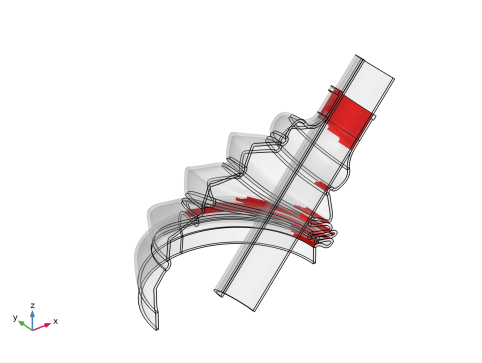
Browse to the model’s Application Libraries folder and double-click the file rubber_boot_seal_geom_sequence.mph.
|
|
1
|
|
2
|
|
3
|
|
4
|
|
1
|
|
2
|
|
3
|
|
1
|
|
2
|
|
3
|
|
1
|
|
3
|
|
4
|
Click to select the
 Activate Selection toggle button. Activate Selection toggle button. |
|
1
|
|
2
|
|
3
|
|
4
|
Locate the Destination Boundaries section. From the Selection list, choose Contact Surface, Outside.
|
|
5
|
|
6
|
|
1
|
|
2
|
|
3
|
|
4
|
|
5
|
|
6
|
|
1
|
|
2
|
|
3
|
|
4
|
|
5
|
|
1
|
|
1
|
|
2
|
|
3
|
From the list, choose Centroid of selected entities.
|
|
4
|
Locate the Prescribed Displacement at Center of Rotation section. Select the Prescribed in x direction checkbox.
|
|
5
|
Select the Prescribed in y direction checkbox.
|
|
6
|
Select the Prescribed in z direction checkbox.
|
|
7
|
|
8
|
Specify the Ω vector as
|
|
9
|
|
1
|
|
1
|
|
2
|
|
3
|
From the list, choose Nitsche.
|
|
4
|
Click to expand the Contact Surface Offset and Adjustment section. In the doffset,s text field, type -overlap*(1-min(para1,1)).
|
|
5
|
|
1
|
|
2
|
|
3
|
|
1
|
|
2
|
|
3
|
Click
 Add. Add. |
|
4
|
|
5
|
Click OK.
|
|
6
|
|
7
|
From the list, choose Nitsche.
|
|
8
|
|
1
|
|
2
|
|
3
|
|
1
|
|
1
|
|
1
|
|
1
|
|
2
|
Go to the Add Material window.
|
|
3
|
|
4
|
Click the Add to Component button in the window toolbar.
|
|
5
|
|
1
|
|
1
|
|
2
|
|
3
|
Click the Custom button.
|
|
4
|
Locate the Element Size Parameters section.
|
|
5
|
|
1
|
|
2
|
|
3
|
|
1
|
|
2
|
|
3
|
|
1
|
|
1
|
|
2
|
|
3
|
|
4
|
|
1
|
|
2
|
|
3
|
|
1
|
|
2
|
|
3
|
|
4
|
|
5
|
|
1
|
|
3
|
|
4
|
Select the Reverse direction checkbox.
|
|
1
|
|
2
|
|
3
|
Click
 Clear Selection. Clear Selection. |
|
5
|
|
6
|
Click
 Build All. Build All. |
|
1
|
|
2
|
|
3
|
Select the Plot checkbox.
|
|
4
|
|
5
|
|
6
|
Click
 Add. Add. |
|
1
|
|
2
|
|
3
|
Select the Plot checkbox.
|
|
4
|
|
5
|
|
6
|
Click
 Add. Add. |
|
8
|
Click
 Add. Add. |
|
10
|
|
1
|
|
2
|
|
3
|
In the Model Builder window, expand the Study 1 > Solver Configurations > Solution 1 (sol1) > Dependent Variables 1 node, then click Auxiliary Pressure (comp1.solid.hmm1.pw).
|
|
4
|
|
5
|
|
6
|
In the Model Builder window, expand the Study 1 > Solver Configurations > Solution 1 (sol1) > Stationary Solver 1 node, then click Parametric 1.
|
|
7
|
|
8
|
Select the Tuning of step size checkbox.
|
|
9
|
|
10
|
In the Model Builder window, under Study 1 > Solver Configurations > Solution 1 (sol1) > Stationary Solver 1 click Fully Coupled 1.
|
|
11
|
|
12
|
|
13
|
|
14
|
In the Model Builder window, expand the Study 1 > Solver Configurations > Solution 1 (sol1) > Stationary Solver 2 node.
|
|
15
|
In the Model Builder window, expand the Study 1 > Solver Configurations > Solution 1 (sol1) > Dependent Variables 2 node, then click Auxiliary Pressure (comp1.solid.hmm1.pw).
|
|
16
|
|
17
|
|
18
|
In the Model Builder window, under Study 1 > Solver Configurations > Solution 1 (sol1) > Stationary Solver 2 click Parametric 1.
|
|
19
|
|
20
|
Select the Tuning of step size checkbox.
|
|
21
|
|
22
|
|
23
|
In the Model Builder window, under Study 1 > Solver Configurations > Solution 1 (sol1) > Stationary Solver 2 click Fully Coupled 1.
|
|
24
|
|
25
|
|
26
|
|
27
|
|
1
|
|
2
|
|
3
|
|
4
|
|
1
|
|
2
|
|
3
|
|
1
|
|
2
|
|
3
|
|
4
|
|
5
|
|
6
|
|
1
|
|
2
|
|
3
|
|
4
|
|
1
|
|
2
|
|
3
|
|
1
|
|
2
|
|
3
|
|
4
|
|
5
|
|
6
|
|
1
|
|
2
|
|
3
|
|
4
|
|
1
|
|
2
|
|
3
|
|
4
|
|
1
|
|
2
|
|
3
|
|
1
|
|
2
|
|
3
|
|
1
|
|
2
|
|
3
|
|
4
|
|
5
|
|
1
|
|
2
|
|
3
|
|
1
|
|
2
|
|
3
|
|
4
|
|
5
|
|
1
|
|
2
|
Click
 Done. Done. |
|
1
|
|
2
|
|
3
|
|
1
|
|
2
|
|
3
|
|
1
|
|
2
|
|
3
|
|
4
|
Locate the Coordinates section. In the table, enter the following settings:
|
|
1
|
|
2
|
|
3
|
|
4
|
|
5
|
|
6
|
|
7
|
|
8
|
|
1
|
|
2
|
|
3
|
|
4
|
|
5
|
|
6
|
|
7
|
|
8
|
|
1
|
|
2
|
|
3
|
|
4
|
|
5
|
|
6
|
|
7
|
|
8
|
|
9
|
Select the Clockwise checkbox.
|
|
1
|
|
2
|
|
3
|
|
4
|
|
5
|
|
6
|
|
7
|
|
8
|
|
1
|
|
2
|
|
3
|
|
4
|
|
5
|
|
6
|
|
7
|
|
8
|
|
1
|
|
2
|
|
3
|
|
4
|
|
5
|
|
6
|
|
7
|
|
8
|
|
9
|
Select the Clockwise checkbox.
|
|
1
|
|
2
|
|
3
|
|
4
|
|
5
|
|
1
|
|
2
|
|
3
|
|
4
|
|
5
|
|
6
|
|
7
|
|
8
|
|
1
|
|
2
|
|
3
|
|
4
|
|
5
|
|
6
|
|
7
|
|
8
|
|
1
|
|
2
|
|
3
|
|
4
|
|
5
|
|
6
|
|
7
|
|
8
|
|
1
|
|
2
|
|
3
|
|
4
|
Locate the Coordinates section. In the table, enter the following settings:
|
|
1
|
|
2
|
Click in the Graphics window and then press Ctrl+A to select all objects.
|
|
1
|
|
2
|
Select the object uni1 only.
|
|
3
|
|
4
|
|
5
|
|
1
|
|
2
|
On the object thi1, select Points 21, 28, 36, and 37 only.
|
|
3
|
|
4
|
|
1
|
|
2
|
On the object fil1, select Points 5, 6, 9, 10, 13–20, 25–28, and 37 only.
|
|
3
|
|
4
|
|
1
|
|
2
|
|
3
|
|
4
|
|
5
|
|
6
|
|
1
|
|
2
|
On the object fil2, select Point 50 only.
|
|
3
|
|
4
|
|
5
|
On the object fil2, select Point 53 only.
|
|
6
|
Click
 Build Selected. Build Selected. |
|
1
|
Right-click Component 1 (comp1) > Geometry 1 > Work Plane 1 (wp1) > Plane Geometry > Line Segment 1 (ls1) and choose Duplicate.
|
|
2
|
|
3
|
|
4
|
On the object fil2, select Point 51 only.
|
|
5
|
|
6
|
On the object fil2, select Point 54 only.
|
|
7
|
Click
 Build Selected. Build Selected. |
|
1
|
Right-click Component 1 (comp1) > Geometry 1 > Work Plane 1 (wp1) > Plane Geometry > Line Segment 2 (ls2) and choose Duplicate.
|
|
2
|
|
3
|
|
4
|
On the object fil2, select Point 58 only.
|
|
5
|
|
6
|
On the object fil2, select Point 61 only.
|
|
7
|
Click
 Build Selected. Build Selected. |
|
1
|
Right-click Component 1 (comp1) > Geometry 1 > Work Plane 1 (wp1) > Plane Geometry > Line Segment 3 (ls3) and choose Duplicate.
|
|
2
|
|
3
|
|
4
|
On the object fil2, select Point 57 only.
|
|
5
|
|
6
|
On the object fil2, select Point 60 only.
|
|
7
|
Click
 Build Selected. Build Selected. |
|
1
|
Right-click Component 1 (comp1) > Geometry 1 > Work Plane 1 (wp1) > Plane Geometry > Line Segment 4 (ls4) and choose Duplicate.
|
|
2
|
|
3
|
|
4
|
On the object fil2, select Point 44 only.
|
|
5
|
|
6
|
On the object fil2, select Point 42 only.
|
|
7
|
Click
 Build Selected. Build Selected. |
|
1
|
Right-click Component 1 (comp1) > Geometry 1 > Work Plane 1 (wp1) > Plane Geometry > Line Segment 5 (ls5) and choose Duplicate.
|
|
2
|
|
3
|
|
4
|
On the object fil2, select Point 40 only.
|
|
5
|
|
6
|
On the object fil2, select Point 38 only.
|
|
7
|
Click
 Build Selected. Build Selected. |
|
1
|
Right-click Component 1 (comp1) > Geometry 1 > Work Plane 1 (wp1) > Plane Geometry > Line Segment 6 (ls6) and choose Duplicate.
|
|
2
|
|
3
|
|
4
|
On the object fil2, select Point 39 only.
|
|
5
|
|
6
|
On the object fil2, select Point 37 only.
|
|
7
|
Click
 Build Selected. Build Selected. |
|
1
|
Right-click Component 1 (comp1) > Geometry 1 > Work Plane 1 (wp1) > Plane Geometry > Line Segment 7 (ls7) and choose Duplicate.
|
|
2
|
|
3
|
|
4
|
On the object fil2, select Point 41 only.
|
|
5
|
|
6
|
On the object fil2, select Point 43 only.
|
|
7
|
Click
 Build Selected. Build Selected. |
|
1
|
Right-click Component 1 (comp1) > Geometry 1 > Work Plane 1 (wp1) > Plane Geometry > Line Segment 8 (ls8) and choose Duplicate.
|
|
2
|
|
3
|
|
4
|
On the object fil2, select Point 56 only.
|
|
5
|
|
6
|
On the object fil2, select Point 62 only.
|
|
7
|
Click
 Build Selected. Build Selected. |
|
1
|
Right-click Component 1 (comp1) > Geometry 1 > Work Plane 1 (wp1) > Plane Geometry > Line Segment 9 (ls9) and choose Duplicate.
|
|
2
|
|
3
|
|
4
|
On the object fil2, select Point 55 only.
|
|
5
|
|
6
|
On the object fil2, select Point 59 only.
|
|
7
|
Click
 Build Selected. Build Selected. |
|
1
|
Right-click Component 1 (comp1) > Geometry 1 > Work Plane 1 (wp1) > Plane Geometry > Line Segment 10 (ls10) and choose Duplicate.
|
|
2
|
|
3
|
|
4
|
On the object fil2, select Point 32 only.
|
|
5
|
|
6
|
On the object fil2, select Point 30 only.
|
|
7
|
Click
 Build Selected. Build Selected. |
|
1
|
Right-click Component 1 (comp1) > Geometry 1 > Work Plane 1 (wp1) > Plane Geometry > Line Segment 11 (ls11) and choose Duplicate.
|
|
2
|
|
3
|
|
4
|
On the object fil2, select Point 28 only.
|
|
5
|
|
6
|
On the object fil2, select Point 26 only.
|
|
7
|
Click
 Build Selected. Build Selected. |
|
1
|
Right-click Component 1 (comp1) > Geometry 1 > Work Plane 1 (wp1) > Plane Geometry > Line Segment 12 (ls12) and choose Duplicate.
|
|
2
|
|
3
|
|
4
|
On the object fil2, select Point 27 only.
|
|
5
|
|
6
|
On the object fil2, select Point 25 only.
|
|
7
|
Click
 Build Selected. Build Selected. |
|
1
|
Right-click Component 1 (comp1) > Geometry 1 > Work Plane 1 (wp1) > Plane Geometry > Line Segment 13 (ls13) and choose Duplicate.
|
|
2
|
|
3
|
|
4
|
On the object fil2, select Point 29 only.
|
|
5
|
|
6
|
On the object fil2, select Point 31 only.
|
|
7
|
Click
 Build Selected. Build Selected. |
|
1
|
Right-click Component 1 (comp1) > Geometry 1 > Work Plane 1 (wp1) > Plane Geometry > Line Segment 14 (ls14) and choose Duplicate.
|
|
2
|
|
3
|
|
4
|
On the object fil2, select Point 46 only.
|
|
5
|
|
6
|
On the object fil2, select Point 48 only.
|
|
7
|
Click
 Build Selected. Build Selected. |
|
1
|
Right-click Component 1 (comp1) > Geometry 1 > Work Plane 1 (wp1) > Plane Geometry > Line Segment 15 (ls15) and choose Duplicate.
|
|
2
|
|
3
|
|
4
|
On the object fil2, select Point 45 only.
|
|
5
|
|
6
|
On the object fil2, select Point 47 only.
|
|
7
|
Click
 Build Selected. Build Selected. |
|
1
|
Right-click Component 1 (comp1) > Geometry 1 > Work Plane 1 (wp1) > Plane Geometry > Line Segment 16 (ls16) and choose Duplicate.
|
|
2
|
|
3
|
|
4
|
On the object fil2, select Point 24 only.
|
|
5
|
|
6
|
On the object fil2, select Point 22 only.
|
|
7
|
Click
 Build Selected. Build Selected. |
|
1
|
Right-click Component 1 (comp1) > Geometry 1 > Work Plane 1 (wp1) > Plane Geometry > Line Segment 17 (ls17) and choose Duplicate.
|
|
2
|
|
3
|
|
4
|
On the object fil2, select Point 20 only.
|
|
5
|
|
6
|
On the object fil2, select Point 18 only.
|
|
7
|
Click
 Build Selected. Build Selected. |
|
1
|
Right-click Component 1 (comp1) > Geometry 1 > Work Plane 1 (wp1) > Plane Geometry > Line Segment 18 (ls18) and choose Duplicate.
|
|
2
|
|
3
|
|
4
|
On the object fil2, select Point 19 only.
|
|
5
|
|
6
|
On the object fil2, select Point 17 only.
|
|
7
|
Click
 Build Selected. Build Selected. |
|
1
|
Right-click Component 1 (comp1) > Geometry 1 > Work Plane 1 (wp1) > Plane Geometry > Line Segment 19 (ls19) and choose Duplicate.
|
|
2
|
|
3
|
|
4
|
On the object fil2, select Point 21 only.
|
|
5
|
|
6
|
On the object fil2, select Point 23 only.
|
|
7
|
Click
 Build Selected. Build Selected. |
|
1
|
Right-click Component 1 (comp1) > Geometry 1 > Work Plane 1 (wp1) > Plane Geometry > Line Segment 20 (ls20) and choose Duplicate.
|
|
2
|
|
3
|
|
4
|
On the object fil2, select Point 34 only.
|
|
5
|
|
6
|
On the object fil2, select Point 36 only.
|
|
7
|
Click
 Build Selected. Build Selected. |
|
1
|
Right-click Component 1 (comp1) > Geometry 1 > Work Plane 1 (wp1) > Plane Geometry > Line Segment 21 (ls21) and choose Duplicate.
|
|
2
|
|
3
|
|
4
|
On the object fil2, select Point 33 only.
|
|
5
|
|
6
|
On the object fil2, select Point 35 only.
|
|
7
|
Click
 Build Selected. Build Selected. |
|
1
|
Right-click Component 1 (comp1) > Geometry 1 > Work Plane 1 (wp1) > Plane Geometry > Line Segment 22 (ls22) and choose Duplicate.
|
|
2
|
|
3
|
|
4
|
On the object fil2, select Point 14 only.
|
|
5
|
|
6
|
On the object fil2, select Point 11 only.
|
|
7
|
Click
 Build Selected. Build Selected. |
|
1
|
Right-click Component 1 (comp1) > Geometry 1 > Work Plane 1 (wp1) > Plane Geometry > Line Segment 23 (ls23) and choose Duplicate.
|
|
2
|
|
3
|
|
4
|
On the object fil2, select Point 10 only.
|
|
5
|
|
6
|
On the object fil2, select Point 6 only.
|
|
7
|
Click
 Build Selected. Build Selected. |
|
1
|
Right-click Component 1 (comp1) > Geometry 1 > Work Plane 1 (wp1) > Plane Geometry > Line Segment 24 (ls24) and choose Duplicate.
|
|
2
|
|
3
|
|
4
|
On the object fil2, select Point 7 only.
|
|
5
|
|
6
|
On the object fil2, select Point 5 only.
|
|
7
|
Click
 Build Selected. Build Selected. |
|
1
|
Right-click Component 1 (comp1) > Geometry 1 > Work Plane 1 (wp1) > Plane Geometry > Line Segment 25 (ls25) and choose Duplicate.
|
|
2
|
|
3
|
|
4
|
On the object fil2, select Point 13 only.
|
|
5
|
|
6
|
On the object fil2, select Point 12 only.
|
|
7
|
Click
 Build Selected. Build Selected. |
|
1
|
Right-click Component 1 (comp1) > Geometry 1 > Work Plane 1 (wp1) > Plane Geometry > Line Segment 26 (ls26) and choose Duplicate.
|
|
2
|
|
3
|
|
4
|
On the object fil2, select Point 15 only.
|
|
5
|
|
6
|
On the object fil2, select Point 16 only.
|
|
7
|
Click
 Build Selected. Build Selected. |
|
1
|
Right-click Component 1 (comp1) > Geometry 1 > Work Plane 1 (wp1) > Plane Geometry > Line Segment 27 (ls27) and choose Duplicate.
|
|
2
|
|
3
|
|
4
|
On the object fil2, select Point 8 only.
|
|
5
|
|
6
|
On the object fil2, select Point 9 only.
|
|
7
|
Click
 Build Selected. Build Selected. |
|
1
|
Right-click Component 1 (comp1) > Geometry 1 > Work Plane 1 (wp1) > Plane Geometry > Line Segment 28 (ls28) and choose Duplicate.
|
|
2
|
|
3
|
|
4
|
On the object fil2, select Point 1 only.
|
|
5
|
|
6
|
On the object fil2, select Point 3 only.
|
|
7
|
Click
 Build Selected. Build Selected. |
|
1
|
In the Model Builder window, under Component 1 (comp1) > Geometry 1 > Work Plane 1 (wp1) > Plane Geometry, Ctrl-click to select Line Segment 1 (ls1), Line Segment 2 (ls2), Line Segment 3 (ls3), Line Segment 4 (ls4), Line Segment 5 (ls5), Line Segment 6 (ls6), Line Segment 7 (ls7), Line Segment 8 (ls8), Line Segment 9 (ls9), Line Segment 10 (ls10), Line Segment 11 (ls11), Line Segment 12 (ls12), Line Segment 13 (ls13), Line Segment 14 (ls14), Line Segment 15 (ls15), Line Segment 16 (ls16), Line Segment 17 (ls17), Line Segment 18 (ls18), Line Segment 19 (ls19), Line Segment 20 (ls20), Line Segment 21 (ls21), Line Segment 22 (ls22), Line Segment 23 (ls23), Line Segment 24 (ls24), Line Segment 25 (ls25), Line Segment 26 (ls26), Line Segment 27 (ls27), Line Segment 28 (ls28), and Line Segment 29 (ls29).
|
|
2
|
Right-click and choose Group.
|
|
1
|
In the Model Builder window, under Component 1 (comp1) > Geometry 1 right-click Work Plane 1 (wp1) and choose Revolve.
|
|
2
|
|
3
|
Click the Angles button.
|
|
4
|
|
5
|
|
1
|
|
2
|
Select the object rev1 only.
|
|
3
|
|
4
|
|
1
|
|
2
|
|
3
|
|
4
|
|
5
|
|
6
|
Click to expand the Layers section. In the table, enter the following settings:
|
|
1
|
|
2
|
|
3
|
|
4
|
On the object cyl1, select Domains 1, 3, and 4 only.
|
|
1
|
|
2
|
|
3
|
|
4
|
Clear the Create pairs checkbox.
|
|
1
|
|
2
|
On the object fin, select Boundaries 12, 15, 25, 38, 44, 47, 62, 68, 71, 81, 84, 101, 104, 162, 165, 182, 185, 201, 204, 210, 225, 228, 234, 244, 251, and 255 only.
|
|
1
|
|
2
|
On the object igf1, select Boundaries 4, 9, 23, 35, 51, 73, 74, 85, 90, 109, 132, 144, 153, and 154 only.
|
|
3
|