|
|
|
 , with
  ,
,  , and
, and  denoting the elastic deformation gradient in the equilibrium network, the elastic deformation gradient in the nonequilibrium network, and the viscoplastic deformation gradient, respectively.
 ); cp are known constants derived from a five-term approximation of the inverse Langevin function; and Cel,
  , and Jel denote the right elastic Cauchy–Green deformation tensor of the network, its first isochoric invariant, and the elastic volume ratio, respectively. The shear moduli of the two networks are related by the energy factor βv, such that
  . In the nearly incompressible formulation, the volumetric strain energy density Wvol acts as a penalty term on the volume ratio Jel given a large bulk modulus K with respect to the shear modulus of the network.
 is the effective chain stretch in the viscoplastic element, ε = 0.001 is a numerical correction factor to avoid division by zero (Ref. 2),
  is a material parameter controlling the strain hardening, the flow resistance σres is a parameter introduced for dimensional consistency, and n is the stress hardening exponent. In summary, the six unknown material parameters that need to be estimated from experimental data are
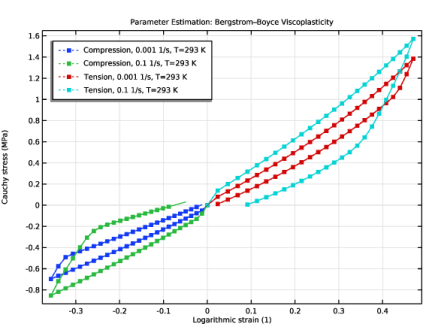
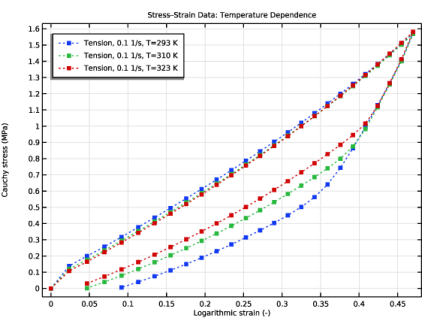
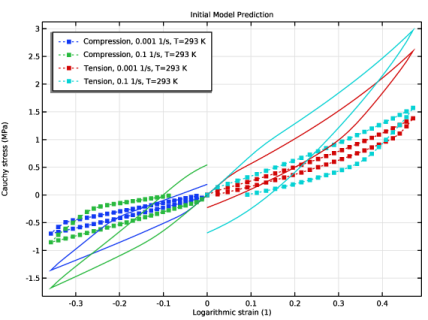
  , N, βv, A, c, and n, see Table 1. It is worth noting that A and σres are dependent parameters; here, we choose to fix σres and only include A in the parameter estimation.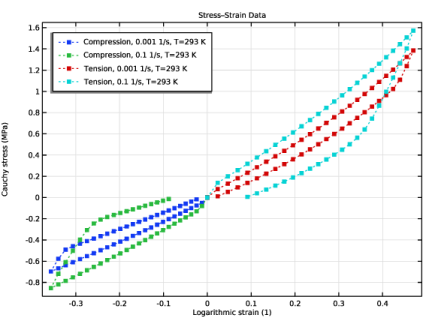



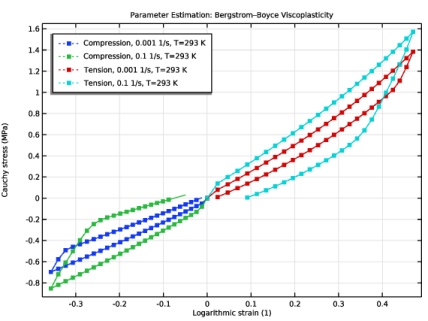
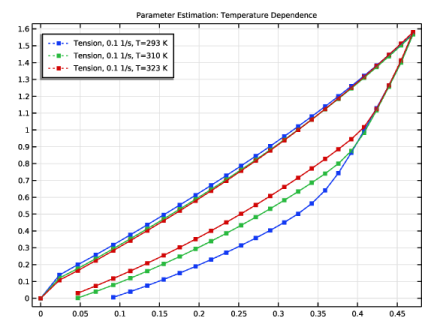
|
1
|
|
2
|
|
3
|
Click Add.
|
|
4
|
Click
 Study. Study. |
|
5
|
|
6
|
Click
 Done. Done. |
|
1
|
In the Model Builder window, click the root node.
|
|
2
|
|
3
|
From the Unit system list, choose MPa. The MPa base unit system is often convenient to use when working with structural mechanics problems.
|
|
1
|
|
2
|
|
3
|
|
4
|
|
5
|
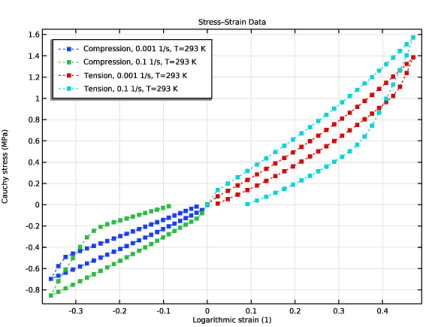
Browse to the model’s Application Libraries folder and double-click the file parameter_estimation_polymer_viscoplasticity_compression_1e-3_T293K.txt.
|
|
1
|
|
2
|
|
3
|
|
4
|
Browse to the model’s Application Libraries folder and double-click the file parameter_estimation_polymer_viscoplasticity_compression_1e-1_T293K.txt.
|
|
1
|
|
2
|
|
3
|
|
4
|
Browse to the model’s Application Libraries folder and double-click the file parameter_estimation_polymer_viscoplasticity_tension_1e-3_T293K.txt.
|
|
1
|
|
2
|
|
3
|
|
4
|
Browse to the model’s Application Libraries folder and double-click the file parameter_estimation_polymer_viscoplasticity_tension_1e-1_T293K.txt.
|
|
1
|
|
2
|
|
3
|
|
4
|
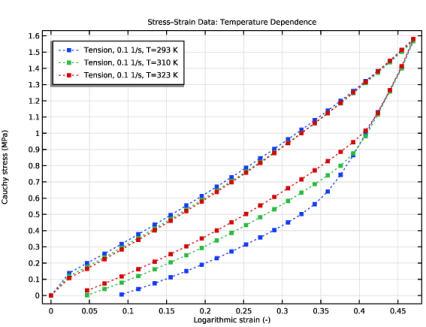
Browse to the model’s Application Libraries folder and double-click the file parameter_estimation_polymer_viscoplasticity_tension_1e-1_T310K.txt.
|
|
1
|
|
2
|
|
3
|
|
4
|
Browse to the model’s Application Libraries folder and double-click the file parameter_estimation_polymer_viscoplasticity_tension_1e-1_T323K.txt.
|
|
1
|
|
2
|
|
3
|
|
4
|
Locate the Plot Settings section.
|
|
5
|
|
6
|
|
7
|
|
1
|
|
2
|
In the Settings window for Table Graph, type Compression, 0.001 1/s, T=293 K in the Label text field.
|
|
3
|
|
4
|
|
5
|
|
6
|
Locate the Coloring and Style section. Find the Line style subsection. From the Line list, choose Dotted.
|
|
7
|
|
8
|
|
9
|
|
10
|
Select the Label checkbox.
|
|
1
|
|
2
|
|
3
|
|
1
|
|
2
|
|
3
|
|
1
|
|
2
|
|
3
|
|
4
|
|
1
|
|
2
|
|
3
|
Locate the Parameters section. In the table, enter the following settings:
|
|
1
|
|
2
|
|
3
|
Locate the Parameters section. In the table, enter the following settings:
|
|
1
|
|
2
|
|
3
|
|
4
|
|
5
|
|
1
|
|
2
|
|
3
|
|
1
|
|
2
|
Select the object blk1 only.
|
|
3
|
|
4
|
|
5
|
|
6
|
|
7
|
|
1
|
In the Model Builder window, under Component 1 (comp1) right-click Materials and choose Blank Material.
|
|
2
|
|
3
|
Click to expand the Material Properties section. In the Material properties tree, select Solid Mechanics > Hyperelastic Material > Arruda–Boyce.
|
|
4
|
Click
 Add to Material. Add to Material. |
|
5
|
In the Material properties tree, select Solid Mechanics > Viscoplastic Material > Bergstrom–Boyce Viscoplasticity.
|
|
6
|
Click
 Add to Material. Add to Material. |
|
7
|
In the Model Builder window, expand the Component 1 (comp1) > Materials > Bergstrom–Boyce Material (mat1) node, then click Arruda–Boyce (ArrudaBoyce).
|
|
8
|
|
10
|
In the Model Builder window, under Component 1 (comp1) > Materials > Bergstrom–Boyce Material (mat1) click Bergstrom–Boyce viscoplasticity (BergstromBoyce).
|
|
11
|
|
1
|
|
2
|
|
3
|
From the list, choose Quasistatic.
|
|
4
|
|
1
|
|
2
|
Click in the Graphics window and then press Ctrl+A to select both domains.
|
|
3
|
|
4
|
|
5
|
|
6
|
|
7
|
|
1
|
|
2
|
|
3
|
|
4
|
|
5
|
|
6
|
|
7
|
|
8
|
Locate the Model Input section. From the T list, choose User defined. In the associated text field, type T.
|
|
1
|
|
1
|
|
2
|
In the Settings window for Prescribed Displacement, type Uniaxial Compression in the Label text field.
|
|
4
|
Locate the Prescribed Displacement section. From the Displacement in x direction list, choose Prescribed.
|
|
5
|
|
1
|
|
2
|
|
4
|
Locate the Prescribed Displacement section. In the u 0 x text field, type emax_ten*tri1(t/t_end)*1[mm].
|
|
1
|
|
1
|
|
2
|
|
3
|
|
4
|
|
1
|
|
2
|
|
3
|
|
4
|
|
1
|
|
1
|
|
1
|
|
2
|
In the Settings window for Variables, type Global Stress and Strain Variables in the Label text field.
|
|
3
|
Locate the Variables section. In the table, enter the following settings:
|
|
1
|
|
2
|
|
3
|
|
1
|
|
2
|
|
3
|
Click
 Add. Add. |
|
1
|
|
2
|
|
3
|
|
1
|
|
2
|
|
3
|
In the Model Builder window, expand the Forward Problem > Solver Configurations > Solution 1 (sol1) > Dependent Variables 1 node, then click Viscoplastic Strain Tensor, Local Coordinate System (comp1.solid.hmm1.pvp1.evp).
|
|
4
|
|
5
|
|
6
|
In the Model Builder window, under Forward Problem > Solver Configurations > Solution 1 (sol1) > Dependent Variables 1 click Equivalent Viscoplastic Strain (comp1.solid.hmm1.pvp1.evpe).
|
|
7
|
|
8
|
|
9
|
In the Model Builder window, under Forward Problem > Solver Configurations > Solution 1 (sol1) > Dependent Variables 1 click Auxiliary Pressure (comp1.solid.hmm1.pw).
|
|
10
|
|
11
|
|
12
|
In the Model Builder window, under Forward Problem > Solver Configurations > Solution 1 (sol1) > Dependent Variables 1 click Displacement Field (comp1.u).
|
|
13
|
|
14
|
|
15
|
In the Model Builder window, under Forward Problem > Solver Configurations > Solution 1 (sol1) click Time-Dependent Solver 1.
|
|
16
|
|
17
|
|
18
|
Find the Algebraic variable settings subsection. From the Consistent initialization list, choose Off.
|
|
19
|
In the Model Builder window, under Forward Problem > Solver Configurations > Solution 1 (sol1) > Time-Dependent Solver 1 click Fully Coupled 1.
|
|
20
|
|
21
|
|
22
|
|
23
|
|
24
|
|
1
|
|
2
|
|
3
|
Locate the Data section. From the Dataset list, choose Forward Problem/Parametric Solutions 1 (sol2).
|
|
1
|
|
2
|
|
3
|
Locate the y-Axis Data section. In the table, enter the following settings:
|
|
4
|
|
5
|
|
6
|
|
7
|
|
1
|
|
2
|
|
3
|
Locate the y-Axis Data section. In the table, enter the following settings:
|
|
4
|
|
5
|
|
6
|
|
1
|
|
2
|
In the Settings window for Least-Squares Objective, type Compression, 0.001 1/s, T=293 K in the Label text field.
|
|
3
|
|
4
|
Locate the Data Column Settings section. In the table, enter the following settings:
|
|
6
|
|
7
|
|
8
|
|
9
|
|
1
|
|
2
|
In the Settings window for Least-Squares Objective, type Compression, 0.1 1/s, T=293 K in the Label text field.
|
|
3
|
Locate the Experimental Data section. From the Result table list, choose Compression, 0.1 1/s, T=293 K.
|
|
4
|
Locate the Data Column Settings section. In the table, click to select the cell at row number 3 and column number 1.
|
|
5
|
|
6
|
Locate the Experimental Conditions section. In the table, enter the following settings:
|
|
1
|
|
2
|
In the Settings window for Least-Squares Objective, type Tension, 0.001 1/s, T=293 K in the Label text field.
|
|
3
|
Locate the Experimental Data section. From the Result table list, choose Tension, 0.001 1/s, T=293 K.
|
|
4
|
Locate the Data Column Settings section. In the table, click to select the cell at row number 3 and column number 1.
|
|
5
|
|
6
|
|
7
|
Locate the Experimental Conditions section. In the table, enter the following settings:
|
|
1
|
|
2
|
In the Settings window for Least-Squares Objective, type Tension, 0.1 1/s, T=293 K in the Label text field.
|
|
3
|
|
4
|
Locate the Data Column Settings section. In the table, click to select the cell at row number 3 and column number 1.
|
|
5
|
|
6
|
Locate the Experimental Conditions section. In the table, enter the following settings:
|
|
1
|
|
2
|
Go to the Add Study window.
|
|
3
|
|
4
|
Click the Add Study button in the window toolbar.
|
|
5
|
|
1
|
|
2
|
|
1
|
|
2
|
|
3
|
|
4
|
Locate the Objective Function section. In the table, select the Active checkboxes for Compression, 0.001 1/s, T=293 K, Compression, 0.1 1/s, T=293 K, Tension, 0.001 1/s, T=293 K, and Tension, 0.1 1/s, T=293 K.
|
|
5
|
|
7
|
|
8
|
|
1
|
|
2
|
|
3
|
In the Model Builder window, expand the Parameter Estimation > Solver Configurations > Solution 5 (sol5) > Dependent Variables 1 node, then click Viscoplastic Strain Tensor, Local Coordinate System (comp1.solid.hmm1.pvp1.evp).
|
|
4
|
|
5
|
|
6
|
In the Model Builder window, under Parameter Estimation > Solver Configurations > Solution 5 (sol5) > Dependent Variables 1 click Equivalent Viscoplastic Strain (comp1.solid.hmm1.pvp1.evpe).
|
|
7
|
|
8
|
|
9
|
In the Model Builder window, under Parameter Estimation > Solver Configurations > Solution 5 (sol5) > Dependent Variables 1 click Auxiliary Pressure (comp1.solid.hmm1.pw).
|
|
10
|
|
11
|
|
12
|
In the Model Builder window, under Parameter Estimation > Solver Configurations > Solution 5 (sol5) > Dependent Variables 1 click Displacement Field (comp1.u).
|
|
13
|
|
14
|
|
15
|
In the Model Builder window, expand the Parameter Estimation > Solver Configurations > Solution 5 (sol5) > Optimization Solver 1 node, then click Time-Dependent Solver 1.
|
|
16
|
|
17
|
|
18
|
Find the Algebraic variable settings subsection. From the Consistent initialization list, choose Off.
|
|
19
|
In the Model Builder window, expand the Parameter Estimation > Solver Configurations > Solution 5 (sol5) > Optimization Solver 1 > Time-Dependent Solver 1 node, then click Fully Coupled 1.
|
|
20
|
|
21
|
|
22
|
|
23
|
|
1
|
|
2
|
In the Settings window for 1D Plot Group, type Parameter Estimation: Bergstrom-Boyce Viscoplasticity in the Label text field.
|
|
3
|
|
1
|
|
2
|
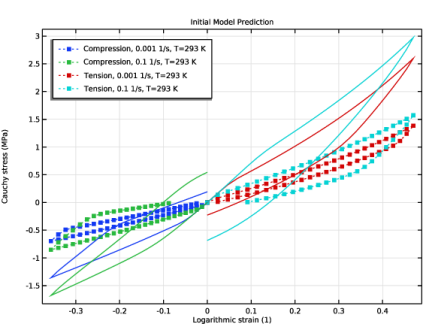
In the Settings window for Global, type Model Prediction, Compression 0.001 1/s in the Label text field.
|
|
3
|
Locate the y-Axis Data section. In the table, enter the following settings:
|
|
4
|
|
5
|
|
6
|
|
7
|
|
1
|
|
2
|
In the Settings window for Global, type Model Prediction, Compression 0.1 1/s in the Label text field.
|
|
3
|
Locate the y-Axis Data section. In the table, enter the following settings:
|
|
4
|
|
1
|
|
2
|
In the Settings window for Global, type Model Prediction, Tension 0.001 1/s in the Label text field.
|
|
3
|
Locate the y-Axis Data section. In the table, enter the following settings:
|
|
4
|
|
1
|
|
2
|
|
3
|
Locate the y-Axis Data section. In the table, enter the following settings:
|
|
1
|
|
2
|
|
3
|
Select the Plot checkbox.
|
|
5
|
Select the Show individual objective values checkbox.
|
|
6
|
Select the Table graph checkbox.
|
|
7
|
|
1
|
In the Model Builder window, under Component 1 (comp1) > Solid Mechanics (solid) right-click Hyperelastic Material 1 and choose Duplicate.
|
|
2
|
|
3
|
From the μ0 list, choose User defined. In the associated text field, type withsol('sol5', mu0_eq)*(1+(T-Tref)/Tref).
|
|
4
|
|
1
|
In the Model Builder window, expand the Hyperelastic Material 2 node, then click Polymer Viscoplasticity 1.
|
|
2
|
|
3
|
|
4
|
Find the Inelastic element subsection. From the A list, choose User defined. In the associated text field, type withsol('sol5', A).
|
|
5
|
|
6
|
|
7
|
From the σco list, choose User defined. Find the Isotropic hardening model subsection. From the c list, choose User defined. In the associated text field, type withsol('sol5', c).
|
|
1
|
|
2
|
In the Settings window for 1D Plot Group, type Stress-Strain Data: Temperature Dependence in the Label text field.
|
|
3
|
|
4
|
|
5
|
|
1
|
|
2
|
|
3
|
|
4
|
|
5
|
|
6
|
|
7
|
Locate the Coloring and Style section. Find the Line style subsection. From the Line list, choose Dotted.
|
|
8
|
|
9
|
|
10
|
|
11
|
Clear the Headers checkbox.
|
|
12
|
|
1
|
|
2
|
|
3
|
|
1
|
|
2
|
|
3
|
|
4
|
|
1
|
|
2
|
In the Settings window for Least-Squares Objective, type Tension, 0.1 1/s, T=310 K in the Label text field.
|
|
3
|
|
4
|
Locate the Data Column Settings section. In the table, click to select the cell at row number 3 and column number 1.
|
|
5
|
|
6
|
|
1
|
|
2
|
In the Settings window for Least-Squares Objective, type Tension, 0.1 1/s, T=323 K in the Label text field.
|
|
3
|
|
4
|
Locate the Data Column Settings section. In the table, click to select the cell at row number 3 and column number 1.
|
|
5
|
|
6
|
Locate the Experimental Conditions section. In the table, enter the following settings:
|
|
1
|
|
2
|
Go to the Add Study window.
|
|
3
|
|
4
|
Click the Add Study button in the window toolbar.
|
|
5
|
|
1
|
In the Settings window for Study, type Parameter Estimation: Temperature Dependence in the Label text field.
|
|
2
|
|
1
|
|
2
|
|
3
|
|
4
|
Locate the Objective Function section. In the table, enter the following settings:
|
|
5
|
|
7
|
|
8
|
|
1
|
|
2
|
|
3
|
Select the Modify model configuration for study step checkbox.
|
|
4
|
In the tree, select Component 1 (comp1) > Solid Mechanics (solid), Controls spatial frame > Hyperelastic Material 1.
|
|
5
|
Click
 Disable. Disable. |
|
1
|
|
2
|
Click
 Compute. Compute. |
|
1
|
In the Model Builder window, right-click Stress–Strain Data: Temperature Dependence and choose Duplicate.
|
|
2
|
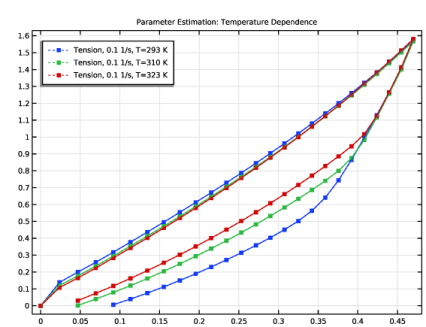
In the Settings window for 1D Plot Group, type Parameter Estimation: Temperature Dependence in the Label text field.
|
|
3
|
Locate the Data section. From the Dataset list, choose Parameter Estimation: Temperature Dependence/Solution 6 (sol6).
|
|
1
|
|
2
|
In the Settings window for Global, type Model Prediction, Tension 0.1 1/s, T=293 K in the Label text field.
|
|
3
|
Locate the Data section. From the Dataset list, choose Parameter Estimation: Temperature Dependence/Solution 6 (sol6).
|
|
4
|
|
5
|
|
6
|
Locate the y-Axis Data section. In the table, enter the following settings:
|
|
7
|
|
8
|
|
9
|
|
10
|
|
1
|
|
2
|
In the Settings window for Global, type Model Prediction, Tension 0.1 1/s, T=310 K in the Label text field.
|
|
3
|
|
4
|
Locate the y-Axis Data section. In the table, enter the following settings:
|
|
5
|
|
1
|
|
2
|
In the Settings window for Global, type Model Prediction, Tension 0.1 1/s, T=323 K in the Label text field.
|
|
3
|
|
4
|
Locate the y-Axis Data section. In the table, enter the following settings:
|
|
5
|
|
1
|
|
2
|
Go to the Result Templates window.
|
|
3
|
In the tree, select Parameter Estimation/Solution 5 (sol5) > Solid Mechanics > Estimated Parameters (std2).
|
|
4
|
Click the Add Result Template button in the window toolbar.
|
|
5
|
|
1
|
|
2
|
|
3
|
|
4
|
|
5
|
|
6
|
|
7
|
Locate the Expressions section. In the table, enter the following settings:
|
|
8
|