PDF

Eigenvalue Analysis of a Turbocharger Rotor
Introduction
In this tutorial model, an eigenvalue analysis of a turbocharger rotor is performed. The rotor is analyzed in an unconstrained configuration, also commonly known as free–free conditions. A rotor like this is usually intended for high-speed applications, but here the analysis is performed at standstill.
This example also illustrates how a mesh on NASTRAN format can be imported in COMSOL Multiphysics.
Model Definition
Roughly speaking, the turbocharger rotor consists of three main components: a shaft, a turbine wheel, and a compressor wheel. These components are usually manufactured in metal alloys tailored for high-temperature applications. However, for simplicity, we here assume that the assembly is made of a standard structural steel. For an eigenfrequency analysis, the only important parameter is the ratio between Young’s modules and mass density.
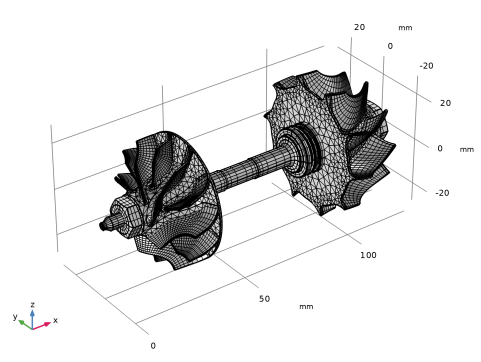
The geometry is created from a mesh NASTRAN on format, which you can import into the COMSOL Desktop. The imported mesh is visualized in Figure 1. Note that the geometry unit is millimeters.
Figure 1: The mesh of the turbocharger rotor.
Results and Discussion
The eigenfrequency analysis conducted in the model yields the twelve lowest eigenfrequencies, and their associated mode shapes. Given that the turbocharger rotor is analyzed in an unconstrained configuration, six of these eigenmodes have zero-valued eigenfrequencies. In a structural mechanics context, these are often referred to as rigid body modes.
In addition, six nonrigid modes are obtained from the analysis. Since these are usually of greater interest, we will here focus on those.
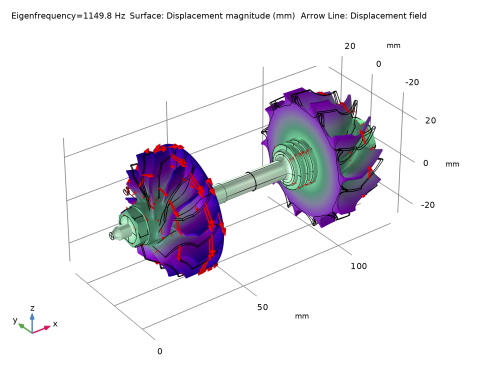
Figure 2 shows the mode shape related to the first nonrigid eigenmode. The associated eigenfrequency is approximately 1150 Hz. This is found to be the first torsional mode.
Figure 2: The mode shape associated with the first nonrigid eigenmode.
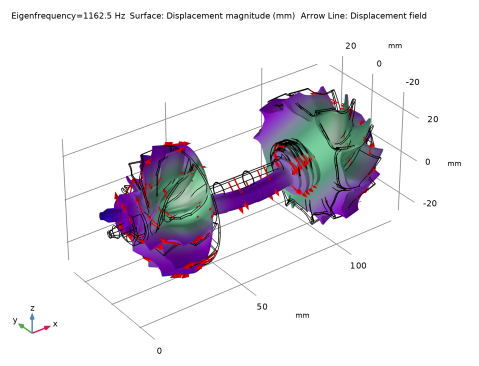
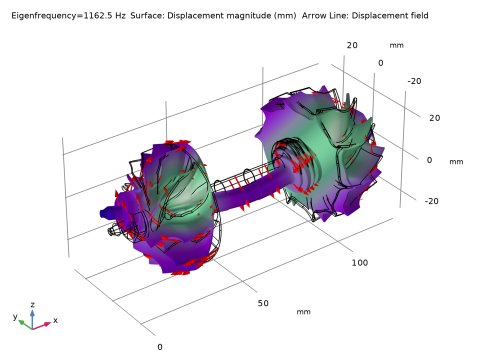
Figure 3 shows the mode shape of the second nonrigid eigenmode. This is the first bending mode. This mode has eigenfrequency of approximately 1163 Hz.
Figure 3: The mode shape associated with the second nonrigid eigenmode.
All eigenfrequencies associated with the nonrigid eigenmodes are summarized in Table 1.
Application Library path: COMSOL_Multiphysics/Structural_Mechanics/turbocharger_rotor
Modeling Instructions
From the File menu, choose New.
New
In the New window, click  Model Wizard.
Model Wizard
1
In the Model Wizard window, click  3D.
2
In the Select Physics tree, select Structural Mechanics > Solid Mechanics (solid).
3
Click Add.
4
Click  Study.
5
In the Select Study tree, select General Studies > Eigenfrequency.
6
Geometry 1
Import a NASTRAN mesh file under the Mesh node. In addition to the mesh, this will create geometrical objects like domains and boundaries. Before importing the file, select millimeters as the length unit to get the correct size for the geometry.
1
In the Model Builder window, under Component 1 (comp1) click Geometry 1.
2
In the Settings window for Geometry, locate the Units section.
3
From the Length unit list, choose mm.
Mesh 1
Import 1
1
In the Mesh toolbar, click  Import.
2
In the Settings window for Import, locate the Import section.
3
From the Source list, choose NASTRAN file.
4
From the Data to import list, choose Only mesh.
5
Click  Browse.
6
7
Click  Import.
Add Material
1
In the Materials toolbar, click  Add Material to open the Add Material window.
2
Go to the Add Material window.
3
In the tree, select Built-in > Structural steel.
4
Click the Add to Component button in the window toolbar.
5
In the Materials toolbar, click  Add Material to close the Add Material window.
To perform the eigenfrequency analysis under unconstrained conditions, no changes are required in the physics interface. You are thus ready to conduct the eigenfrequency analysis.
Study 1
Increase the desired number of eigenfrequencies to 12. This will give you six rigid-body modes along with six nonrigid modes.
Step 1: Eigenfrequency
1
In the Model Builder window, under Study 1 click Step 1: Eigenfrequency.
2
In the Settings window for Eigenfrequency, locate the Study Settings section.
3
Select the Desired number of eigenfrequencies checkbox. In the associated text field, type 12.
4
In the Study toolbar, click  Compute.
Results
Mode Shape (solid)
The default plot shows the displacement magnitude on top of the deformed shape of the first mode, which in this case is a rigid-body mode. To get a plot showing another eigenmode, you can follow the instructions below. These will give you a plot of the first nonrigid mode.
1
In the Settings window for 3D Plot Group, locate the Data section.
2
From the Eigenfrequency (Hz) list, choose 1149.8.
Add a displacement arrow plot for better visualization of the mode type.
Arrow Line 1
1
Right-click Mode Shape (solid) and choose Arrow Line.
2
In the Settings window for Arrow Line, locate the Arrow Positioning section.
3
In the Number of arrows text field, type 400.
4
Locate the Coloring and Style section.
5
Select the Scale factor checkbox. In the associated text field, type 7e4.
6
In the Mode Shape (solid) toolbar, click  Plot.
7
Click the  Go to Default View button in the Graphics toolbar.
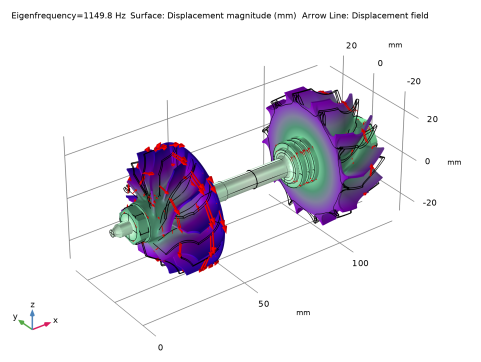
The resulting plot should be similar to the one shown below. The mode is a torsional mode.
Now, select the second nonrigid mode. This corresponds to the eighth eigenfrequency in the list.
Mode Shape (solid)
1
In the Model Builder window, click Mode Shape (solid).
2
In the Settings window for 3D Plot Group, locate the Data section.
3
From the Eigenfrequency (Hz) list, choose 1162.5.
4
In the Mode Shape (solid) toolbar, click  Plot.
The resulting plot should be similar to the one shown below. The second nonrigid mode is the first bending mode.