
|
|
|

|
10-15
|
||||
|
10-15
|
||||
|
10-15
|
||||
|
10-15
|
||||
|
10-16
|
||||
|
10-16
|
||||
|
10-16
|
||||
|
10-16
|
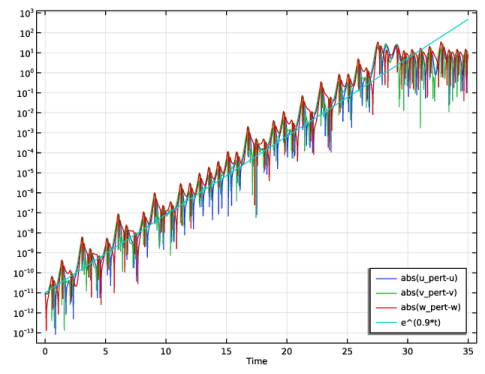
|
•
|
|
•
|
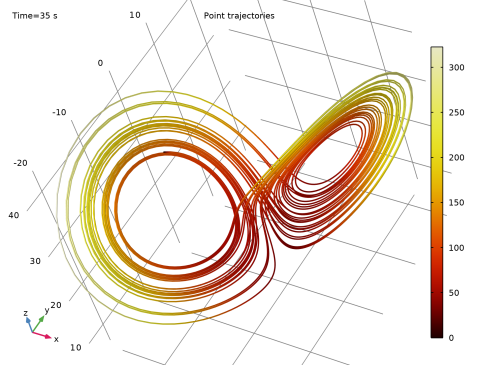
A Point Trajectories plot in the phase space for the states show the typical “butterfly” or “figure eight” pattern shown in Figure 2. To be able to generate this plot, the model uses a 3D geometry even though it only involves ODEs.
|
|
1
|
|
2
|
In the Select Physics tree, select Mathematics > ODE and DAE Interfaces > Global ODEs and DAEs (ge).
|
|
3
|
Click Add.
|
|
4
|
Click
 Study. Study. |
|
5
|
|
6
|
Click
 Done. Done. |
|
1
|
In the Model Builder window, click the root node.
|
|
2
|
|
3
|
|
1
|
|
2
|
|
1
|
In the Model Builder window, under Component 1 (comp1) > Global ODEs and DAEs (ge) click Global Equations 1 (ODE1).
|
|
2
|
|
1
|
|
2
|
|
3
|
Click
 Range. Range. |
|
4
|
|
5
|
|
6
|
Click Replace.
|
|
7
|
|
8
|
|
9
|
|
1
|
In the Model Builder window, expand the Study 1 > Solver Configurations > Solution 1 (sol1) node, then click Time-Dependent Solver 1.
|
|
2
|
|
3
|
|
4
|
|
1
|
|
2
|
|
3
|
Click
 Add twice. Add twice. |
|
5
|
|
6
|
|
1
|
|
2
|
|
3
|
|
4
|
|
5
|
|
1
|
|
2
|
|
4
|
|
1
|
|
2
|
|
3
|
|
4
|
|
5
|
|
1
|
|
2
|
|
3
|
|
4
|
|
5
|
|
6
|
Locate the Coloring and Style section. Find the Line style subsection. From the Type list, choose Tube.
|
|
7
|
|
1
|
|
2
|
|
3
|
|
4
|
|
5
|
|
1
|
|
2
|
|
3
|
|
4
|
|
5
|
|
1
|
In the Model Builder window, expand the Results > Derived Values node, then click Global Evaluation 1.
|
|
2
|
|
3
|
|
4
|
|
5
|
|
6
|
|
7
|
Click
 Evaluate. Evaluate. |
|
8
|


