



PDF

An Integro-Partial Differential Equation1
Introduction
This example contains an analysis of conductive and radiative heat transfer in a hollow pipe, where the ends are held at two different temperatures. To solve this integro-partial differential equation, the model makes use of the destination operator and a nonlocal integration coupling.
Model Definition
This example investigates how to solve the integro-partial differential equation
(1)
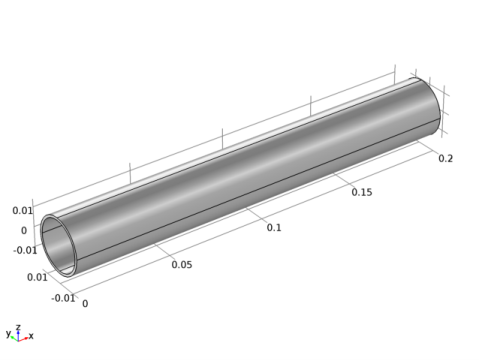
where L is the pipe length, Di and Do are respectively the inner and outer diameters of the pipe, ρ is the density, Cp is the heat capacity, κ is the thermal conductivity, σ is Stefan’s constant (the Stefan-Boltzmann constant), ε is the emissivity, and k(x,  x') is the kernel corresponding to the radiation view factor. This equation arises in the physical description of 1D heat conduction and radiation along a pipe. Figure 1 shows the model geometry.
Before setting up the model, make the following assumptions:
Model heat transfer only in the x direction (assume θ symmetry).
The definition of the kernel k(x, x') is
where ξ = |x − x'|/Di as explained in Ref. 1.
Also consider the following boundary conditions and initial condition:
Figure 1: Model geometry.
Results and Discussion
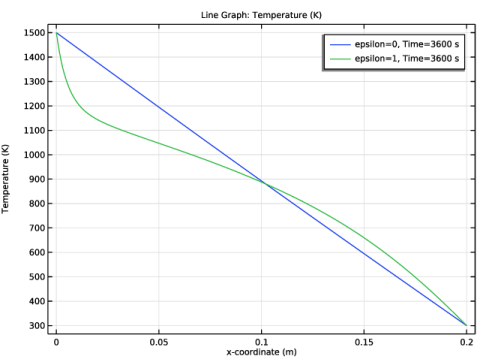
The temperature distribution along the length of the pipe at t = 3600 s appears in Figure 2. The straight line is the solution for the radiation-free model obtained by setting the emissivity to zero:
Figure 2: Temperature distribution along the pipe at t = 3600 s with radiation (ε = 1) and without radiation (ε = 0).
Comparison with the Full 3D Radiation Model
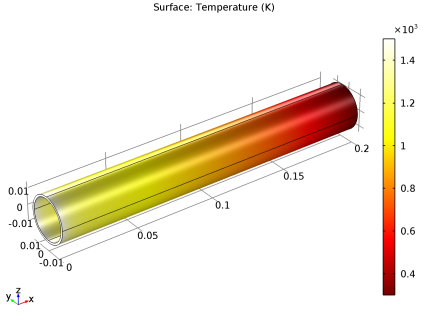
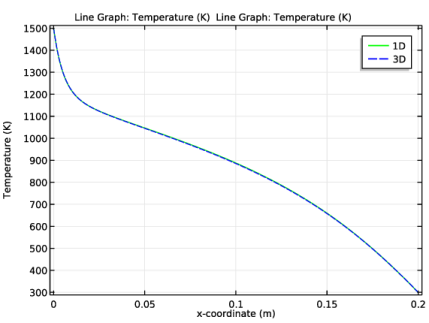
To illustrate the validity of the 1D model, you can set up the entire stationary 3D model using the Heat Transfer Module. Its Heat Transfer interface handles surface-to-surface radiation boundary conditions, making it easy to verify the results. Figure 3 shows the temperature on the 3D cylinder’s surface, while Figure 4 compares the temperature distributions along the axial direction for the 1D and 3D models. Clearly the results are in excellent agreement.
Figure 3: 3D temperature distribution in the pipe.
Figure 4: The temperature distributions for the 1D model and the 3D model.
Notes About the COMSOL Implementation
To model the equation, use the Heat Transfer interface and include the radiation effects in the source term, Q, using a nonlocal integration coupling.
To enter convolution integrals of the type needed here, use the dest operator, which instructs COMSOL Multiphysics to evaluate the expression on which it operates on the destination points instead of the source points. In the expression k(x, x'), x' is the variable to integrate over, whereas the model does not integrate over x. To specify that x should remain a coordinate variable that can take on values from the entire domain, write it as dest(x) inside the nonlocal integration coupling.
Reference
1. R. Siegel and J. Howell, Thermal Radiation Heat Transfer, 4th ed., Taylor & Francis Group, New York, 2001.
Application Library path: COMSOL_Multiphysics/Equation_Based/integro_partial
Modeling Instructions
From the File menu, choose New.
New
In the New window, click  Model Wizard.
Model Wizard
1
In the Model Wizard window, click  1D.
2
In the Select Physics tree, select Heat Transfer > Heat Transfer in Solids (ht).
3
Click Add.
4
Click  Study.
5
In the Select Study tree, select General Studies > Time Dependent.
6
Global Definitions
Parameters 1
1
In the Model Builder window, under Global Definitions click Parameters 1.
2
In the Settings window for Parameters, locate the Parameters section.
3
Geometry 1
Interval 1 (i1)
1
In the Model Builder window, under Component 1 (comp1) right-click Geometry 1 and choose Interval.
2
In the Settings window for Interval, locate the Interval section.
3
4
Click  Build All Objects.
Definitions
Define variables for the radiation terms on the left-hand side of Equation 1. For this purpose, you need a nonlocal integration coupling.
Integration 1 (intop1)
1
In the Definitions toolbar, click  Nonlocal Couplings and choose Integration.
2
In the Settings window for Integration, locate the Source Selection section.
3
From the Selection list, choose All domains.
Variables 1
1
In the Definitions toolbar, click  Local Variables.
2
In the Settings window for Variables, locate the Geometric Entity Selection section.
3
From the Geometric entity level list, choose Domain.
4
From the Selection list, choose All domains.
5
Locate the Variables section. In the table, enter the following settings:
Materials
Material 1 (mat1)
1
In the Model Builder window, under Component 1 (comp1) right-click Materials and choose Blank Material.
By default, the first material applies for all domains. COMSOL Multiphysics indicates any undefined material parameters required by the physics interfaces defined on those domains.
2
In the Settings window for Material, locate the Material Contents section.
3
Heat Transfer in Solids (ht)
Solid 1
The material parameters you just defined suffice to fully determine the Solid node. Add a separate Heat Source node for the radiation terms in Equation 1.
Heat Source 1
1
In the Physics toolbar, click  Domains and choose Heat Source.
2
In the Settings window for Heat Source, locate the Domain Selection section.
3
From the Selection list, choose All domains.
4
Locate the Heat Source section. In the Q0 text field, type Q_source+Q_loss.
Initial Values 1
1
In the Model Builder window, click Initial Values 1.
2
In the Settings window for Initial Values, locate the Initial Values section.
3
In the T text field, type T_init.
Temperature 1
1
In the Physics toolbar, click  Boundaries and choose Temperature.
2
3
In the Settings window for Temperature, locate the Temperature section.
4
In the T0 text field, type T_cold+DT_max*tanh(t/1[min]).
Temperature 2
1
In the Physics toolbar, click  Boundaries and choose Temperature.
2
3
In the Settings window for Temperature, locate the Temperature section.
4
In the T0 text field, type T_cold.
Mesh 1
1
In the Model Builder window, under Component 1 (comp1) click Mesh 1.
2
In the Settings window for Mesh, locate the Physics-Controlled Mesh section.
3
From the Element size list, choose Extra fine.
4
Click  Build All.
Study 1
Step 1: Time Dependent
1
In the Model Builder window, under Study 1 click Step 1: Time Dependent.
2
In the Settings window for Time Dependent, locate the Study Settings section.
3
In the Output times text field, type range(0,1[min],1[h]).
To compare the temperature distribution in the radiation model with that of a model without radiation, add a parametric sweep with the emissivity as the parameter taking the values 0 and 1.
Parametric Sweep
1
In the Study toolbar, click  Parametric Sweep.
2
In the Settings window for Parametric Sweep, locate the Study Settings section.
3
4
5
In the Study toolbar, click  Compute.
Results
The default plot shows the solution for all time steps. Reproduce the plot in Figure 2 comparing the solutions at the last time step as follows.
Temperature (ht)
1
In the Model Builder window, under Results click Temperature (ht).
2
In the Settings window for 1D Plot Group, locate the Data section.
3
From the Time selection list, choose Last.
Line Graph 1
1
In the Model Builder window, expand the Temperature (ht) node, then click Line Graph 1.
2
In the Settings window for Line Graph, click to expand the Legends section.
3
Select the Show legends checkbox.
4
In the Temperature (ht) toolbar, click  Plot.

1
This application is courtesy of Daniel Smith and Ali Shajii of MKS Instruments, Wilmington, Mass., USA.