|
|
|


|
1
|
|
2
|
|
3
|
Click Add.
|
|
4
|
Click
 Study. Study. |
|
5
|
|
6
|
Click
 Done. Done. |
|
1
|
|
2
|
|
1
|
|
2
|
|
3
|
|
1
|
|
2
|
|
3
|
|
4
|
|
5
|
|
6
|
Click
 Build Selected. Build Selected. |
|
1
|
|
2
|
|
3
|
|
4
|
|
1
|
|
2
|
|
3
|
|
4
|
|
5
|
Select the object c1 only.
|
|
6
|
Click
 Build Selected. Build Selected. |
|
7
|
|
1
|
|
2
|
|
1
|
|
2
|
|
3
|
|
1
|
In the Model Builder window, under Component 1 (comp1) > Electric Currents (ec) click Current Conservation in Solids 1.
|
|
2
|
In the Settings window for Current Conservation in Solids, locate the Constitutive Relation Jc-E section.
|
|
3
|
|
4
|
Locate the Constitutive Relation D-E section. From the εr list, choose User defined. In the associated text field, type 80.
|
|
1
|
|
3
|
|
4
|
|
1
|
|
1
|
|
3
|
|
4
|
|
1
|
|
3
|
In the Settings window for Prescribed Normal Mesh Velocity, locate the Prescribed Normal Mesh Velocity section.
|
|
4
|
|
1
|
|
1
|
|
2
|
|
3
|
|
4
|
Click
 Build All. Build All. |
|
5
|
|
1
|
|
2
|
|
3
|
|
4
|
|
1
|
|
1
|
|
1
|
|
2
|
|
1
|
|
2
|
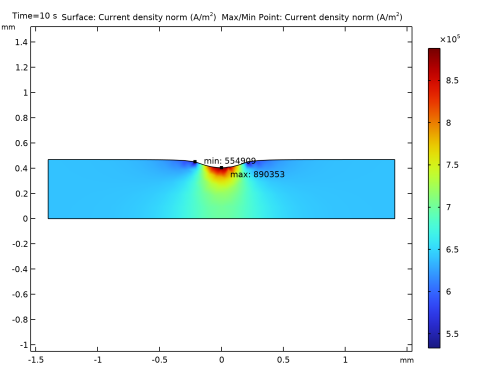
In the Settings window for Surface, click Replace Expression in the upper-right corner of the Expression section. From the menu, choose Component 1 (comp1) > Electric Currents > Currents and charge > ec.normJ - Current density norm - A/m².
|
|
3
|
|
4
|
|
1
|
|
2
|
|
3
|
|
1
|
|
2
|
|
1
|
|
2
|
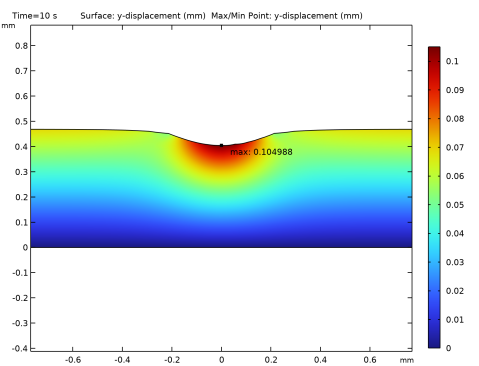
In the Settings window for Surface, click Replace Expression in the upper-right corner of the Expression section. From the menu, choose Component 1 (comp1) > Definitions > Variables > dy - y-displacement - m.
|
|
3
|
|
4
|
|
1
|
|
2
|
|
3
|
|
4
|