PDF

The Black–Scholes Equation
Introduction
There are different types of stock options:
A call option is the right to buy a security at a specified price (called the exercise or strike price) during a specified period of time.
A put option is the right to sell a security at a specified price during a specified period of time.
American options can be exercised at any time up to and including the day the option expires. European options can be exercised only on the day the option expires.
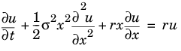
The famous Black–Scholes equation computes the cost u of a European stock option
with the following parameters:
x, the underlying asset price
r, the continuous compounding rate of interest
σ, the standard deviation of the asset’s rate of return (also known as volatility)
A put option’s value on the exercise day is
where K is the strike price. The problem domain is infinite and consists of the entire real axis across the time domain 0 ≤ t ≤ T. 
The assumptions made in deriving the Black-Scholes equation are:
Black and Scholes derived an analytical expression for the solution to the above problem. However, the formula works only for certain cases. For instance, you cannot use it when σ and r are functions of x and t. Using the PDE formulation, you can determine the price for such cases.
Model Definition
Because you work within a finite domain 0 ≤ x ≤ X, it is necessary to specify not only the boundary conditions for t = T but also for x = 0 and x = X. It is therefore necessary to analyze the problem’s characteristics to determine the location of the input and output boundaries.
Equation Definition
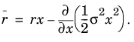
To put the equation in coefficient form, rewrite the equation as
In the following, denote
To reduce the problems with inflow boundaries, start by considering a put option: Study the value of a put option at a strike price K = 40 with σ = 0.3 and r = 0.12.
Boundary Conditions and Initial Conditions
Make the domain be 0 ≤ x ≤ 80 with time running from 12 to 0. Then the initial condition at t = 12 and x = 80 is 0 based on the put option’s value. The initial condition in the region 0 ≤ x ≤ 40 varies linearly from 0 to 40. At the end of the simulation domain, the boundary is free (use a homogeneous boundary condition).
Notes About the COMSOL Implementation
Model the Black-Scholes equation using the following approach:
Create a 1D time-dependent model, using the time-stepping algorithm to solve for c as a function of x and t, the time. The time steps go backward in time. Using a variable substitution to reverse the sign of the time, the da coefficient becomes 1.
To model the initial condition, use the logical expression (x<40)*(40-x). This means that in the areas where > 40, the initial value is zero.
Application Library path: COMSOL_Multiphysics/Equation_Based/black_scholes_put
Modeling Instructions
From the File menu, choose New.
New
In the New window, click  Model Wizard.
Model Wizard
1
In the Model Wizard window, click  1D.
2
In the Select Physics tree, select Mathematics > PDE Interfaces > Coefficient Form PDE (c).
3
Click Add.
4
Click  Study.
5
In the Select Study tree, select General Studies > Time Dependent.
6
Root
1
In the Model Builder window, click the root node.
2
In the root node’s Settings window, locate the Unit System section.
3
From the Unit system list, choose None.
Keeping track of units is not important in this model; by turning off unit support, you avoid the need to specify dimensions for equation coefficients and coordinates to get rid of unit warnings.
Geometry 1
Interval 1 (i1)
1
In the Model Builder window, under Component 1 (comp1) right-click Geometry 1 and choose Interval.
2
In the Settings window for Interval, locate the Interval section.
3
4
Click  Build Selected.
Global Definitions
Parameters 1
1
In the Model Builder window, under Global Definitions click Parameters 1.
2
In the Settings window for Parameters, locate the Parameters section.
3
Coefficient Form PDE (c)
Coefficient Form PDE 1
1
In the Model Builder window, under Component 1 (comp1) > Coefficient Form PDE (c) click Coefficient Form PDE 1.
2
In the Settings window for Coefficient Form PDE, locate the Diffusion Coefficient section.
3
In the c text field, type 1/2*sigma^2*x^2.
4
Locate the Absorption Coefficient section. In the a text field, type r.
5
Locate the Source Term section. In the f text field, type 0.
6
Locate the Damping or Mass Coefficient section. In the da text field, type -1.
7
Click to expand the Convection Coefficient section. In the β text field, type (-r+sigma^2)*x.
Initial Values 1
1
In the Model Builder window, click Initial Values 1.
2
In the Settings window for Initial Values, locate the Initial Values section.
3
In the u text field, type (x<40)*(40-x).
Flux/Source 1
1
In the Physics toolbar, click  Boundaries and choose Flux/Source.
2
Dirichlet Boundary Condition 1
1
In the Physics toolbar, click  Boundaries and choose Dirichlet Boundary Condition.
2
Mesh 1
Edge 1
In the Mesh toolbar, click  Edge.
Size
1
In the Model Builder window, click Size.
2
In the Settings window for Size, locate the Element Size section.
3
Click the Custom button.
4
Locate the Element Size Parameters section. In the Maximum element size text field, type 2.
5
Click  Build All.
The mesh consists of 40 elements.
Study 1
Step 1: Time Dependent
1
In the Model Builder window, under Study 1 click Step 1: Time Dependent.
2
In the Settings window for Time Dependent, locate the Study Settings section.
3
In the Output times text field, type range(12,-0.5,0).
4
In the Study toolbar, click  Compute.
Results
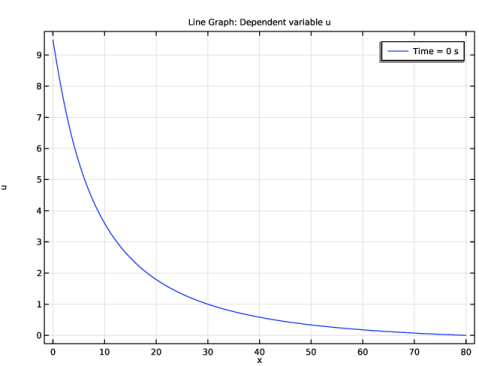
To see the plot of u as a Line Graph at time = 0, follow the steps given below.
Coefficient Form PDE
1
In the Model Builder window, under Results click Coefficient Form PDE.
2
In the Settings window for 1D Plot Group, locate the Data section.
3
From the Time selection list, choose From list.
4
In the Times (s) list box, select 0.
5
Click to expand the Title section. Locate the Plot Settings section.
6
Select the x-axis label checkbox. In the associated text field, type x.
7
Select the y-axis label checkbox. In the associated text field, type u.
Line Graph 1
1
In the Model Builder window, expand the Coefficient Form PDE node, then click Line Graph 1.
2
In the Settings window for Line Graph, click Replace Expression in the upper-right corner of the x-Axis Data section. From the menu, choose Component 1 (comp1) > Geometry > Coordinate > x - x-coordinate.
3
Click to expand the Legends section. Select the Show legends checkbox.
4
Find the Prefix and suffix subsection. In the Prefix text field, type Time = .
5
In the Coefficient Form PDE toolbar, click  Plot.