PDF

Outgassing Pipes
Introduction
This benchmark model computes the pressure in a system of outgassing pipes with a high aspect ratio. The results are compared with a 1D simulation and a Monte-Carlo simulation of the same system from the literature.
Model Definition
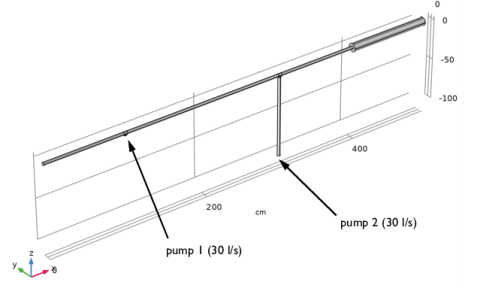
The system consists of a long circular tube with a single change in cross section. A constant outgassing flux of 3×10-12 Torr-l/cm2 is emitted from the walls of the pipes. Two pumps are attached to the system, one directly on the pipe and the other via an additional length of pipe. Both pumps operate at a pump speed of 30 l/s. The model geometry, along with the location of the two pumps, is shown in Figure 1.
Figure 1: Model geometry. The location of the two pumps is indicated. All other surfaces outgas at a constant rate of 3×10-12 Torr-l/cm2.
Results and Discussion
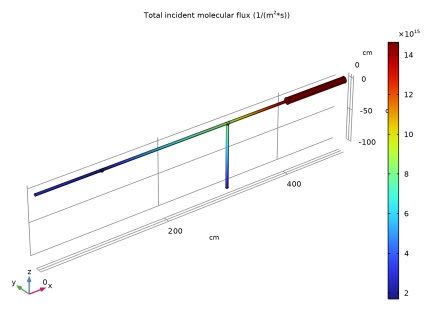
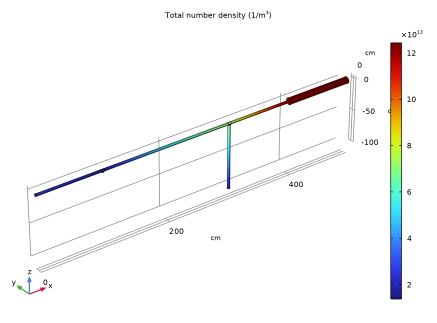
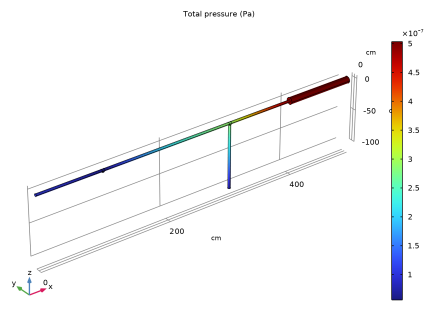
Figures 2, 3 and 4 show the molecular flux, number density and pressure respectively on the surfaces of the pipes.
Figure 2: Molecular flux on the surface of the pipes.
Figure 3: Number density on the pipe surfaces.
Figure 4: Pressure in the pipes.
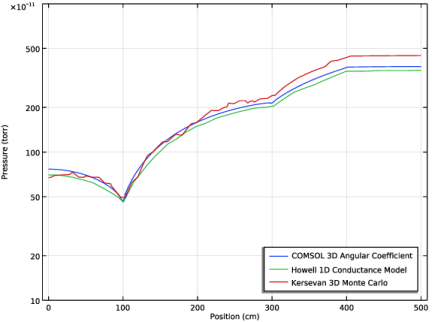
Figure 5: Pressure distribution along the top surface of the pipes. The results are compared with those from Ref. 1 and Ref. 2.
The pressure distribution in the pipes is in good agreement with the distributions given in Ref. 1 and Ref. 2.
Application Library path: Molecular_Flow_Module/Benchmarks/outgassing_pipes
References
1. J. Howell, B. Wherle, and H. Jostlein, “Calculation of pressure distribution in vacuum systems using a commercial finite element program,” Proc. 991 IEEE Particle Accelerator Conference (APS Beam Physics), vol. 4, pp.2295–2297, 1991.
2. R. Kersevan, “Analytical and numerical tools for vacuum systems,” CERN Accelerator School, Silken Park Hotel San Jorge, Platija d’Aro, Spain, 16-24 May 2006.
Modeling Instructions
From the File menu, choose New.
New
In the New window, click  Model Wizard.
Model Wizard
1
In the Model Wizard window, click  3D.
2
In the Select Physics tree, select Fluid Flow > Rarefied Flow > Free Molecular Flow (fmf).
3
Click Add.
4
Click  Study.
5
In the Select Study tree, select General Studies > Stationary.
6
Define model parameters.
Global Definitions
Parameters 1
1
In the Model Builder window, under Global Definitions click Parameters 1.
2
In the Settings window for Parameters, locate the Parameters section.
3
Define the geometry.
Geometry 1
1
In the Model Builder window, under Component 1 (comp1) click Geometry 1.
2
In the Settings window for Geometry, locate the Units section.
3
From the Length unit list, choose cm.
Cylinder 1 (cyl1)
1
In the Geometry toolbar, click  Cylinder.
2
In the Settings window for Cylinder, locate the Size and Shape section.
3
In the Radius text field, type 2.
4
In the Height text field, type 400.
5
Locate the Axis section. From the Axis type list, choose x-axis.
Cylinder 2 (cyl2)
1
In the Geometry toolbar, click  Cylinder.
2
In the Settings window for Cylinder, locate the Size and Shape section.
3
In the Radius text field, type 5.
4
In the Height text field, type 100.
5
Locate the Position section. In the x text field, type 400.
6
Locate the Axis section. From the Axis type list, choose x-axis.
Cylinder 3 (cyl3)
1
In the Geometry toolbar, click  Cylinder.
2
In the Settings window for Cylinder, locate the Size and Shape section.
3
In the Radius text field, type 2.
4
In the Height text field, type 2.
5
Locate the Position section. In the x text field, type 100.
6
In the z text field, type -2.
Cylinder 4 (cyl4)
1
In the Geometry toolbar, click  Cylinder.
2
In the Settings window for Cylinder, locate the Size and Shape section.
3
In the Radius text field, type 2.
4
In the Height text field, type 100.
5
Locate the Position section. In the x text field, type 300.
6
In the z text field, type -100.
Cylinder 5 (cyl5)
1
In the Geometry toolbar, click  Cylinder.
2
In the Settings window for Cylinder, locate the Size and Shape section.
3
In the Radius text field, type 2.
4
In the Height text field, type 4.
5
Locate the Position section. In the x text field, type 98.
6
Locate the Axis section. From the Axis type list, choose x-axis.
7
Click  Build Selected.
Cylinder 6 (cyl6)
1
Right-click Cylinder 5 (cyl5) and choose Duplicate.
2
In the Settings window for Cylinder, locate the Position section.
3
In the x text field, type 298.
4
Click  Build Selected.
Cylinder 7 (cyl7)
1
In the Geometry toolbar, click  Cylinder.
2
In the Settings window for Cylinder, locate the Size and Shape section.
3
In the Radius text field, type 2.
4
In the Height text field, type 2.
5
Locate the Position section. In the x text field, type 300.
6
In the z text field, type -2.
7
Click  Build Selected.
Union 1 (uni1)
1
In the Geometry toolbar, click  Booleans and Partitions and choose Union.
2
In the Settings window for Union, locate the Union section.
3
Clear the Keep interior boundaries checkbox.
4
Click in the Graphics window and then press Ctrl+A to select all objects.
5
Click  Build Selected.
6
Click the  Zoom Extents button in the Graphics toolbar.
Disable the analysis of the geometry as the remaining small geometric details can be kept.
7
In the Model Builder window, click Geometry 1.
8
In the Settings window for Geometry, locate the Cleanup section.
9
Clear the Automatic detection of small details checkbox.
Add interpolation functions for benchmark comparisons.
Definitions
Interpolation 1 (int1)
1
In the Definitions toolbar, click  Interpolation.
2
In the Settings window for Interpolation, locate the Definition section.
3
Click  Load from File.
4
Interpolation 2 (int2)
1
In the Definitions toolbar, click  Interpolation.
2
In the Settings window for Interpolation, locate the Definition section.
3
Click  Load from File.
4
Set up the physics and boundary conditions.
Free Molecular Flow (fmf)
Molecular Flow 1
1
In the Model Builder window, under Component 1 (comp1) > Free Molecular Flow (fmf) click Molecular Flow 1.
2
In the Settings window for Molecular Flow, locate the Molecular Weight of Species section.
3
In the Mn,G text field, type Mn0.
Surface Temperature 1
1
In the Model Builder window, click Surface Temperature 1.
2
In the Settings window for Surface Temperature, locate the Surface Temperature section.
3
In the T text field, type T0.
Wall 1
1
In the Model Builder window, click Wall 1.
2
In the Settings window for Wall, locate the Wall Type section.
3
From the Wall type list, choose Outgassing wall.
4
Locate the Flux section. From the Outgoing flux list, choose Thermal desorption rate.
Vacuum Pump 1
1
In the Physics toolbar, click  Boundaries and choose Vacuum Pump.
2
3
In the Settings window for Vacuum Pump, locate the Vacuum Pump section.
4
From the Specify pump flux list, choose Pump speed.
5
In the SG text field, type ps.
Vacuum Pump 2
1
Right-click Vacuum Pump 1 and choose Duplicate.
2
In the Settings window for Vacuum Pump, locate the Boundary Selection section.
3
Click  Clear Selection.
4
Mesh the geometry.
Mesh 1
Edge 1
1
In the Mesh toolbar, click  More Generators and choose Edge.
2
This rather long list includes all of the circular edges where different cylinders are connected in the geometry. A shortcut is to copy the selection list from these instructions and then click the Paste selection button. An alternative is to create an Explicit selection, where you can select the Group by continuous tangent checkbox to reduce the number of clicks required.
Size
1
In the Model Builder window, click Size.
2
In the Settings window for Size, locate the Element Size section.
3
From the Predefined list, choose Extra fine.
Mapped 1
1
In the Mesh toolbar, click  More Generators and choose Mapped.
2
This boundary selection comprises the sides of all of the long cylinders in the geometry. As for the edge selection above, an Explicit selection with the Group by continuous tangent checkbox can reduce the number of clicks required.
Distribution 1
1
Right-click Mapped 1 and choose Distribution.
2
3
In the Settings window for Distribution, locate the Distribution section.
4
In the Number of elements text field, type 80.
Distribution 2
1
In the Model Builder window, right-click Mapped 1 and choose Distribution.
2
3
In the Settings window for Distribution, locate the Distribution section.
4
In the Number of elements text field, type 160.
5
Click  Build Selected.
Free Triangular 1
1
In the Mesh toolbar, click  More Generators and choose Free Triangular.
2
In the Settings window for Free Triangular, locate the Boundary Selection section.
3
From the Geometric entity level list, choose Remaining.
4
Click  Build All.
Study 1
In the Study toolbar, click  Compute.
Results
Total Pressure (fmf)
Plot the pressure profile.
1D Plot Group 4
1
In the Results toolbar, click  1D Plot Group.
2
In the Settings window for 1D Plot Group, click to expand the Title section.
3
From the Title type list, choose None.
4
Locate the Plot Settings section.
5
Select the x-axis label checkbox. In the associated text field, type Position (cm).
6
Select the y-axis label checkbox. In the associated text field, type Pressure (torr).
Line Graph 1
1
Right-click 1D Plot Group 4 and choose Line Graph.
2
In the Settings window for Line Graph, locate the y-Axis Data section.
3
In the Expression text field, type fmf.ptot.
4
Locate the x-Axis Data section. From the Parameter list, choose Expression.
5
In the Expression text field, type x.
6
Locate the y-Axis Data section. From the Unit list, choose Torr.
7
8
Click to expand the Legends section. Select the Show legends checkbox.
9
From the Legends list, choose Manual.
10
Line Graph 2
1
Right-click Line Graph 1 and choose Duplicate.
2
In the Settings window for Line Graph, locate the y-Axis Data section.
3
In the Expression text field, type int1(x/1[cm]).
4
Locate the Legends section. In the table, enter the following settings:
Line Graph 3
1
Right-click Line Graph 2 and choose Duplicate.
2
In the Settings window for Line Graph, locate the y-Axis Data section.
3
In the Expression text field, type int2(x/1[cm]).
4
Locate the Legends section. In the table, enter the following settings:
Pressure Profile
1
In the Model Builder window, under Results click 1D Plot Group 4.
2
In the Settings window for 1D Plot Group, type Pressure Profile in the Label text field.
3
Locate the Legend section. From the Position list, choose Lower right.
4
Locate the Axis section. Select the Manual axis limits checkbox.
5
In the y minimum text field, type 1e-10.
6
In the y maximum text field, type 1e-8.
7
Select the y-axis log scale checkbox.
8
In the Pressure Profile toolbar, click  Plot.
Compare the resulting plot with that in Figure 5.