PDF

Nonisothermal Flow in a 2D Mixer
Introduction
This model demonstrates how to obtain the temperature distribution in a simplified tabletop lab mixer using the Rotating Machinery, Nonisothermal Flow interface in the Mixer Module. The key instructive element is to demonstrate the Frozen Rotor method, which substantially speeds up the computation time for a mixing study.
General Description
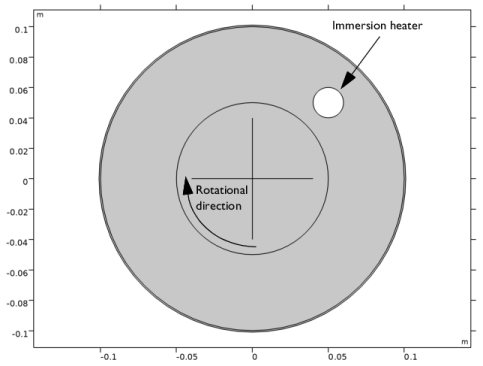
The model geometry is shown in Figure 1. It represents a cross-section view of a table-top lab mixer. Small mixers are not always baffled. Instead, one or several rods are inserted through the mixer lid and function as baffles. The rods typically contain equipment to measure, for example, temperature or pH level. In this model, the mixer is baffled by a simplified immersion heater, which has a constant surface temperature of 60°C.
Figure 1: Model geometry.
The mixer tank is filled with water which is agitated by the impeller rotating clockwise (as indicated in Figure 1) with 20 rotations per minute (rpm). The thickness of the impeller blades is significantly smaller than the diameter of the tank, and the impeller blades are therefore modeled as infinitely thin.
The tank is made of steel and is subjected to cooling by natural convection that takes place on the outside of the mixer. The surrounding conditions are standard conditions (temperature equal to 20°C and pressure equal to 1 atmosphere) and the reactor is 0.2 m high. These conditions are needed as input for the natural convection correlations used to calculate the heat transfer coefficient from the tank wall to the surrounding.
Model Setup
The Reynolds number for a mixer is commonly calculated as
(1)
where N is the number of rotations per second, Da the impeller diameter and ν the kinematic viscosity. A high Reynolds number means that the flow has a tendency to become turbulent. Evaluating Equation 1 using ν at 60°C gives Re = 6944.This Reynolds number would warrant the use of a turbulence model, if the model was three-dimensional. But the restriction to two dimensions means that a laminar flow model works at higher Reynolds number, and this model does not employ any turbulence model. A possible extension of the model is to apply a turbulence model and recalculate the result to investigate the effect of possible turbulent structures in the flow.
The objective of this model is to obtain the temperature distribution at operating conditions. One way to get there would be to start from zero velocity and a homogeneous temperature distribution and simulate the startup of the mixer. This approach is simple, but requires a relatively long computation time.
A computationally more efficient method is to first simulate the flow using the frozen rotor approach. The Frozen rotor approach is a modeling concept that treats the rotor as fixed, or frozen in space. The flow in the rotating domain is assumed to be stationary in terms of a rotating coordinate system. The effect of the rotation is then accounted for by Coriolis and centrifugal forces. The flow in the nonrotating parts is also assumed to be stationary, but in a nonrotating coordinate system. See the section Frozen Rotor in the CFD Module User’s Guide for more information. The result of a frozen rotor simulation is an approximation to the flow at operating conditions. The result depends on the angular position of the impeller and cannot represent transient effects. However, it is still a very good starting condition to reach operating conditions.
The frozen rotor result is used as input in a time-dependent simulation and the progress toward the operating conditions is monitored using probe plots.
Results and Discussion
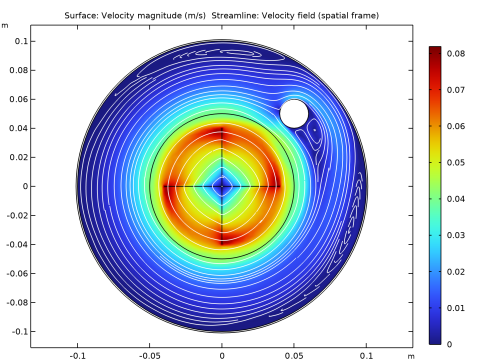
Figure 2 shows the velocity distribution obtained from the frozen-rotor simulation. As expected, the highest velocity magnitude is found at the tip of the mixer blades. There are three recirculation zones: One downstream of the immersion heater, one along the top wall and one along the bottom wall.
Figure 2: Velocity field obtained from the frozen rotor simulation.
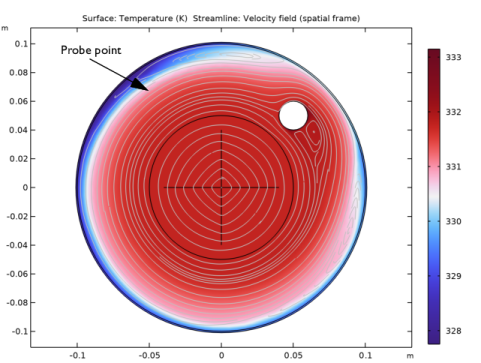
Figure 3 shows the temperature distribution obtained from the frozen-rotor simulation. Streamlines are also included to visualize the flow field. The temperature is relatively homogeneous throughout the mixer. There are some cold spots in connection to the recirculation zones. This is expected since the fluid there has a longer residence time close to the solid wall, and therefore has less contact with the heated fluid closer to the center of the mixer.
Figure 3: Temperature distribution obtained from the frozen rotor simulation.
To monitor the progress toward steady state, the velocity magnitude and temperature are probed at (x,y) = (−0.05,0.065). The location is indicated in Figure 3. As can be seen, it is located just outside the recirculation zone along the top wall.
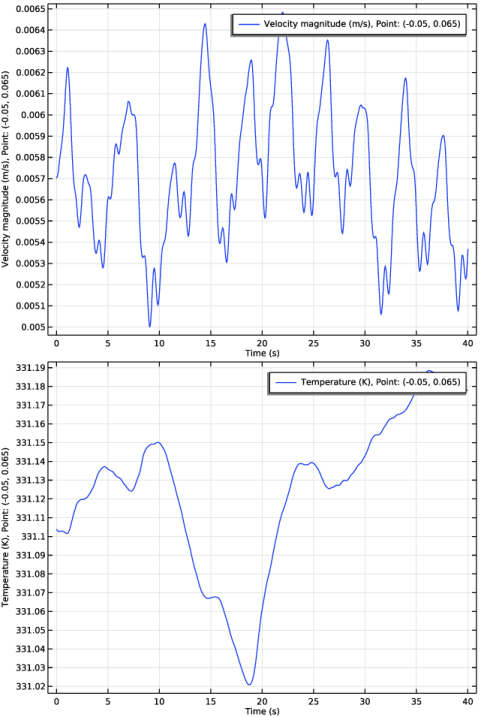
The probe plots produced during the time dependent simulation are shown in Figure 4. The velocity probe plot shows that the flow pattern, after an initial transient, oscillates around the frozen-rotor result with an amplitude of about 10%. The deviations in temperature are much smaller.
The velocity probe plot exhibits quasiperiodic structure. Discrete Fourier analysis reproduces a peak at a frequency 1.33 Hz which corresponds to the passing of the blades. Several other frequencies can be identified, the most pronounced peaks are at 0.125 Hz, 0.25 Hz, 0.42 Hz and 1.07 Hz. Evaluating the Strouhal frequency for the immersion heater (for typical value of the Strouhal number St = 0.2) gives a value of about 1.48 Hz. Hence, oscillations in the mixer, which include the intermittent boundary-layer separation, can not be completely explained as being driven by the frequency of the rotating blades and the main frequency of the Kármán vortex street behind the heater. Probably, some more intricate mechanisms are involved. The temperature variations are within the tolerance set in the default solver sequence.
Figure 4: Probe plots of velocity and temperature.
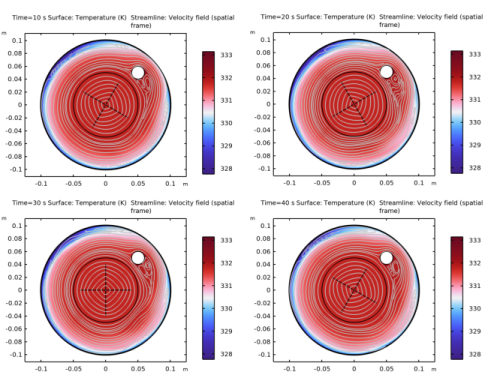
A more complete picture of the progress from the frozen rotor solution toward operating conditions can be obtained through an animation. Figure 5 shows four snapshots from such an animation. The time runs from upper left to lower right. The most notable changes occur in the recirculation zones. The recirculation zone behind the immersion heater shows a periodic shedding pattern typical for flow around a cylinder at moderate Reynolds numbers.
Looking at Figure 3, it can be seen that the recirculation zone along the top wall contains a single, large vortex. As the simulation progresses (from t = 20 s to t = 40 s), the size and strength of the vortices varies as a result of the interaction between the disturbance, produced by the immersion heater, and the outer wall.
Figure 5: Evolution of the temperature field from frozen rotor solution toward operating conditions.
The results obtained in this model are typical for rotating machinery models: The frozen rotor approach can at a minimal computation effort deliver a decent approximation of the flow and temperature fields. But transient effects can only be captured by a time dependent simulation and these effects can change local temperature and velocity values significantly.
Application Library path: Mixer_Module/Tutorials/nonisothermal_mixer
Modeling Instructions
From the File menu, choose New.
New
In the New window, click  Model Wizard.
Model Wizard
1
In the Model Wizard window, click  2D.
2
In the Select Physics tree, select Fluid Flow > Nonisothermal Flow > Rotating Machinery, Nonisothermal Flow > Laminar Flow.
3
Click Add.
4
Click  Study.
5
In the Select Study tree, select Preset Studies for Selected Physics Interfaces > Frozen Rotor.
6
Geometry 1
Circle 1 (c1)
1
In the Geometry toolbar, click  Circle.
2
In the Settings window for Circle, locate the Size and Shape section.
3
In the Radius text field, type 0.1.
Circle 2 (c2)
1
In the Geometry toolbar, click  Circle.
2
In the Settings window for Circle, locate the Size and Shape section.
3
In the Radius text field, type 0.101.
Union 1 (uni1)
1
In the Geometry toolbar, click  Booleans and Partitions and choose Union.
2
Click in the Graphics window and then press Ctrl+A to select both objects.
Circle 3 (c3)
1
In the Geometry toolbar, click  Circle.
2
In the Settings window for Circle, locate the Size and Shape section.
3
In the Radius text field, type 0.01.
4
Locate the Position section. In the x text field, type 0.05.
5
In the y text field, type 0.05.
Difference 1 (dif1)
1
In the Geometry toolbar, click  Booleans and Partitions and choose Difference.
2
3
In the Settings window for Difference, locate the Difference section.
4
Click to select the  Activate Selection toggle button for Objects to subtract.
5
Circle 4 (c4)
1
In the Geometry toolbar, click  Circle.
2
In the Settings window for Circle, locate the Size and Shape section.
3
In the Radius text field, type 0.05.
Difference 2 (dif2)
1
In the Geometry toolbar, click  Booleans and Partitions and choose Difference.
2
3
In the Settings window for Difference, locate the Difference section.
4
Click to select the  Activate Selection toggle button for Objects to subtract.
5
6
Select the Keep objects to subtract checkbox.
Line Segment 1 (ls1)
1
In the Geometry toolbar, click  More Primitives and choose Line Segment.
2
In the Settings window for Line Segment, locate the Starting Point section.
3
From the Specify list, choose Coordinates.
4
Locate the Endpoint section. From the Specify list, choose Coordinates.
5
Locate the Starting Point section. In the y text field, type -0.04.
6
Locate the Endpoint section. In the y text field, type 0.04.
Line Segment 2 (ls2)
1
In the Geometry toolbar, click  More Primitives and choose Line Segment.
2
In the Settings window for Line Segment, locate the Starting Point section.
3
From the Specify list, choose Coordinates.
4
Locate the Endpoint section. From the Specify list, choose Coordinates.
5
Locate the Starting Point section. In the x text field, type -0.04.
6
Locate the Endpoint section. In the x text field, type 0.04.
Union 2 (uni2)
1
In the Geometry toolbar, click  Booleans and Partitions and choose Union.
2
Select the objects c4, ls1, and ls2 only.
Form Union (fin)
The boundary between the rotating and nonrotating domain must be an assembly boundary so that the parts can move relative to each other.
1
In the Model Builder window, under Component 1 (comp1) > Geometry 1 click Form Union (fin).
2
In the Settings window for Form Union/Assembly, locate the Form Union/Assembly section.
3
From the Action list, choose Form an assembly.
4
In the Geometry toolbar, click  Build All.
5
Click the  Zoom Extents button in the Graphics toolbar.
Add Material
1
In the Materials toolbar, click  Add Material to open the Add Material window.
2
Go to the Add Material window.
3
In the tree, select Built-in > Water, liquid.
4
Click the Add to Component button in the window toolbar.
5
In the tree, select Built-in > Steel AISI 4340.
6
Click the Add to Component button in the window toolbar.
7
In the Materials toolbar, click  Add Material to close the Add Material window.
Materials
Steel AISI 4340 (mat2)
Select Domain 1 only.
Moving Mesh
Rotating Domain 1
1
In the Model Builder window, under Component 1 (comp1) > Moving Mesh click Rotating Domain 1.
2
In the Settings window for Rotating Domain, locate the Domain Selection section.
3
4
Click  Remove from Selection.
5
6
Locate the Rotation section. In the f text field, type -20[rpm].
Laminar Flow (spf)
1
In the Model Builder window, under Component 1 (comp1) click Laminar Flow (spf).
2
In the Settings window for Laminar Flow, locate the Domain Selection section.
3
4
Click  Remove from Selection.
5
Interior Wall 1
1
In the Physics toolbar, click  Boundaries and choose Interior Wall.
2
Pressure Point Constraint 1
1
In the Physics toolbar, click  Points and choose Pressure Point Constraint.
2
Heat Transfer in Fluids (ht)
In the Model Builder window, under Component 1 (comp1) click Heat Transfer in Fluids (ht).
Solid 1
1
In the Physics toolbar, click  Domains and choose Solid.
2
Temperature 1
1
In the Physics toolbar, click  Boundaries and choose Temperature.
2
3
In the Settings window for Temperature, locate the Temperature section.
4
In the T0 text field, type 60[degC].
Heat Flux 1
1
In the Physics toolbar, click  Boundaries and choose Heat Flux.
2
3
In the Settings window for Heat Flux, locate the Heat Flux section.
4
From the Flux type list, choose Convective heat flux.
5
From the Heat transfer coefficient list, choose External natural convection.
6
In the L text field, type 0.2.
Mesh 1
1
In the Model Builder window, under Component 1 (comp1) click Mesh 1.
2
In the Settings window for Mesh, locate the Physics-Controlled Mesh section.
3
From the Element size list, choose Fine.
4
Right-click Component 1 (comp1) > Mesh 1 and choose Edit Physics-Induced Sequence.
Size
1
In the Model Builder window, under Component 1 (comp1) > Mesh 1 click Size.
2
In the Settings window for Size, locate the Element Size section.
3
From the Predefined list, choose Coarse.
Free Triangular 1
To avoid unnecessarily small elements in the mixer vessel wall, add a separate size node with reduced resolution in narrow regions.
Size 1
1
In the Model Builder window, right-click Free Triangular 1 and choose Size.
2
In the Settings window for Size, locate the Geometric Entity Selection section.
3
From the Geometric entity level list, choose Domain.
4
5
Locate the Element Size section. Click the Custom button.
6
Locate the Element Size Parameters section.
7
Select the Resolution of narrow regions checkbox. In the associated text field, type 0.1.
Free Triangular 1
Right-click Free Triangular 1 and choose Build Selected.
Boundary Layers 1
Use a boundary layer mesh also in the solid domain to increase the resolution there.
1
In the Model Builder window, click Boundary Layers 1.
2
Click in the Graphics window and then press Ctrl+A to select all domains.
3
In the Settings window for Boundary Layers, click  Build Selected.
Study 1
In the Study toolbar, click  Compute.
Results
Velocity (spf)
Recreate Figure 2 using the following steps.
Streamline 1
1
Right-click Velocity (spf) and choose Streamline.
2
In the Settings window for Streamline, locate the Streamline Positioning section.
3
From the Positioning list, choose Uniform density.
4
In the Density level text field, type 8.5.
5
Locate the Coloring and Style section. Find the Point style subsection. From the Color list, choose White.
6
In the Velocity (spf) toolbar, click  Plot.
7
Click the  Zoom Extents button in the Graphics toolbar.
Surface 1
Recreate Figure 3 using the following steps.
1
In the Model Builder window, expand the Results > Temperature (ht) node, then click Surface 1.
2
In the Settings window for Surface, locate the Coloring and Style section.
3
From the Color table list, choose Wave.
Streamline 1
1
In the Model Builder window, right-click Temperature (ht) and choose Streamline.
2
In the Settings window for Streamline, locate the Streamline Positioning section.
3
From the Positioning list, choose Uniform density.
4
In the Density level text field, type 8.5.
5
Locate the Coloring and Style section. Find the Point style subsection. From the Color list, choose Gray.
6
In the Temperature (ht) toolbar, click  Plot.
Definitions
Add a probe to follow the development of the flow during the time-dependent simulation.
Domain Point Probe 1
1
In the Definitions toolbar, click  Probes and choose Domain Point Probe.
2
In the Settings window for Domain Point Probe, locate the Point Selection section.
3
In row Coordinates, set x to -0.05[m].
4
In row Coordinates, set y to 0.065[m].
The probe is located at the outer edge of recirculation zone that is positioned along the upper wall.
Point Probe Expression 2 (ppb2)
1
In the Model Builder window, expand the Domain Point Probe 1 node.
2
Right-click Component 1 (comp1) > Definitions > Domain Point Probe 1 > Point Probe Expression 1 (ppb1) and choose Duplicate.
3
In the Settings window for Point Probe Expression, locate the Expression section.
4
In the Expression text field, type T.
5
Click to expand the Table and Window Settings section. From the Plot window list, choose New window.
Add Study
Add a time-dependent study.
1
In the Home toolbar, click  Add Study to open the Add Study window.
2
Go to the Add Study window.
3
Find the Studies subsection. In the Select Study tree, select General Studies > Time Dependent.
4
Click the Add Study button in the window toolbar.
5
In the Home toolbar, click  Add Study to close the Add Study window.
Study 2
Step 1: Time Dependent
1
In the Settings window for Time Dependent, locate the Study Settings section.
2
In the Output times text field, type range(0,0.5,40).
3
Click to expand the Values of Dependent Variables section. Find the Initial values of variables solved for subsection. From the Settings list, choose User controlled.
4
From the Method list, choose Solution.
5
From the Study list, choose Study 1, Frozen Rotor.
For the transient simulation, add a restriction on the time step. This will make sure that the impeller rotation at each time step is bounded, and that a high accuracy is maintained throughout the simulation. First generate the solver sequence.
Solution 2 (sol2)
1
In the Study toolbar, click  Show Default Solver.
Apply a maximum time step of 0.05 s. This is equivalent to an impeller rotation of 6 degrees.
2
In the Model Builder window, expand the Solution 2 (sol2) node, then click Time-Dependent Solver 1.
3
In the Settings window for Time-Dependent Solver, click to expand the Time Stepping section.
4
From the Maximum step constraint list, choose Constant.
5
In the Maximum step text field, type 0.05.
6
In the Study toolbar, click  Compute.
Results
Two probe plots will automatically appear when you start the calculation.
The following steps create an animation that contains the plots in Figure 5.
Temperature (ht) 1
Plot the dataset edges on the spatial frame to make them follow the rotation.
1
In the Model Builder window, under Results click Temperature (ht) 1.
2
In the Settings window for 2D Plot Group, locate the Plot Settings section.
3
From the Frame list, choose Spatial  (x, y, z).
Surface 1
1
In the Model Builder window, expand the Temperature (ht) 1 node, then click Surface 1.
2
In the Settings window for Surface, locate the Coloring and Style section.
3
From the Color table list, choose Wave.
Streamline 1
1
In the Model Builder window, right-click Temperature (ht) 1 and choose Streamline.
2
In the Settings window for Streamline, locate the Streamline Positioning section.
3
From the Positioning list, choose Uniform density.
4
In the Density level text field, type 8.5.
5
Locate the Coloring and Style section. Find the Point style subsection. From the Color list, choose Gray.
Animation 1
1
In the Results toolbar, click  Animation and choose File.
2
In the Settings window for Animation, locate the Target section.
3
From the Target list, choose Player.
4
Locate the Scene section. From the Subject list, choose Temperature (ht) 1.
5
Locate the Frames section. From the Frame selection list, choose All.
6
Locate the Playing section. In the Display each frame for text field, type 0.25.
7
Click the  Play button in the Graphics toolbar.