PDF

Centrifugal Pump
Introduction
Centrifugal pumps are widely used in the industry and can be found in various applications. These pumps belong to the axisymmetric work-absorbing turbomachinery category for which fluid is transported through the conversion of rotational kinetic energy into hydrodynamic energy. In most applications, fluid enters the pump along the rotating axis and is accelerated by the impeller. The flow is expelled radially outward into a diffuser, or volute chamber, from where it exits. The rotational kinetic energy of the pump is typically supplied by an engine or a motor.
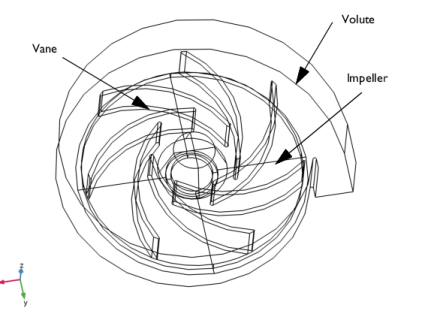
Figure 1: Geometry of the semiopen centrifugal pump.
The current model represents a semiopen centrifugal pump with seven vanes. For the semiopen impeller, the vanes are attached to the hub with a shroud on one side of the impeller. The volute has a spiral shape and the outer radius of the impeller is 10 cm. The size of the modeled pump is typical for automotive applications. The geometry in this work is highly parameterized, allowing straightforward modifications of the geometry to study different configurations of the centrifugal pump if needed.
Model Definition
This model shows how to set up rotating machinery simulations with the frozen rotor approach for centrifugal pumps. The equations that govern the physics are the Navier-Stokes equations and the continuity equation.
A frozen rotor is a cost and time efficient steady-state approximation where individual zones are assigned rotational different speeds. The flow in each of these zones is solved using the moving reference frame equations. In a sense, this approach can be described as freezing the motion of the moving part in a given position and then observing the resulting flow field with the rotor in that fixed position.
Turbulence is modeled with the k-ω model. This is a widely used model for turbomachinery simulations, with good performance for swirling flows and in the near-wall region.
The pressure condition at the inlet and outlet is set up using the aveop operator:
and
The problem is solved for different total pressure values, ptot, at the inlet in order to obtain a pump curve for the specific geometry considered here.
Results and Discussion
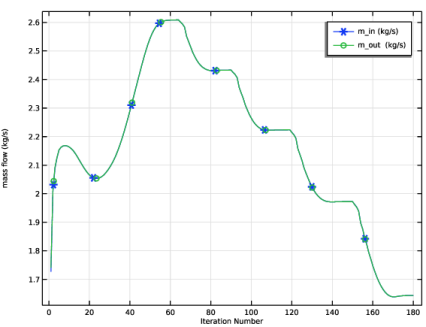
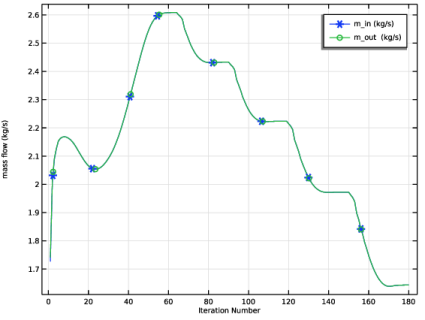
The mass flow is monitored by two probe plots, one at the inlet and one at the outlet. Figure 2 shows that the mass flow at the inlet and the outlet are the equal, which means that mass conservation is achieved.
Figure 2: Mass flow probes at the inlet and the outlet.
Note that the five jumps in the curve represent a change in the given total pressure value at the inlet.
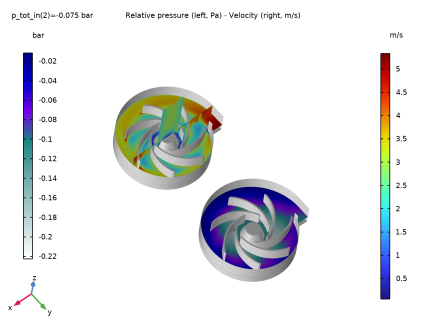
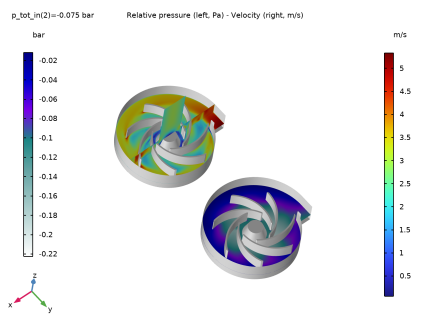
Figure 3: Distribution of the pressure and the velocity magnitude.
Examples of the pressure and velocity magnitude distributions are given in Figure 3. The solution clearly shows a rise in pressure and the corresponding change in velocity from the incoming (inlet) flow, radially toward the volute.
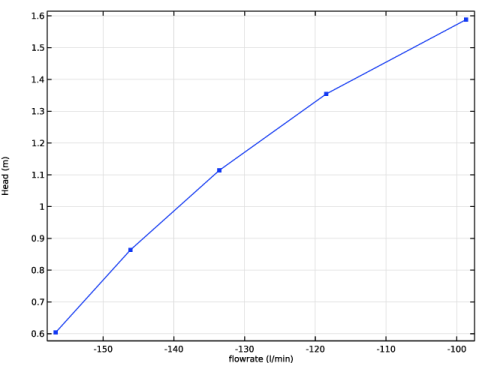
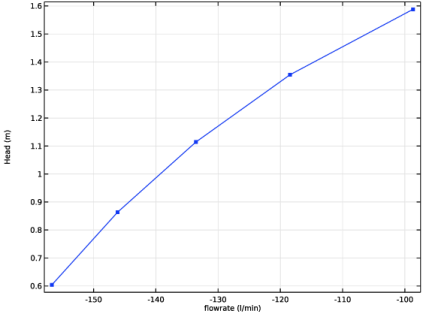
Finally, Figure 4 shows the pump performance curve. The total pressure at the inlet is expressed in terms of the pressure head, H, which is equal to
This curve is central when designing a pump for a given application. Choosing the right pump configuration maximizes the pump and system efficiency, prolongs the life of the system and reduces operational costs.
Table 1 shows the relation between shaft power consumption and pump efficiency.
Figure 4: Pump curve.
Application Library path: Mixer_Module/Tutorials/centrifugal_pump
Modeling Instructions
From the File menu, choose New.
New
In the New window, click  Model Wizard.
Model Wizard
1
In the Model Wizard window, click  3D.
2
In the Select Physics tree, select Fluid Flow > Single-Phase Flow > Rotating Machinery, Fluid Flow > Turbulent Flow > Turbulent Flow, k-ω.
3
Click Add.
4
Click  Study.
5
In the Select Study tree, select Preset Studies for Selected Physics Interfaces > Frozen Rotor with Initialization.
6
Load the parameterized geometry sequence from file. Note that parameters used in the geometry are included with the sequence.
Geometry 1
1
In the Geometry toolbar, click Insert Sequence and choose Insert Sequence.
2
3
In the Geometry toolbar, click  Build All.
Partition Domains 1 (pard1)
1
In the Geometry toolbar, click  Booleans and Partitions and choose Partition Domains.
2
In the Settings window for Partition Domains, locate the Partition Domains section.
3
From the Partition with list, choose Extended faces.
4
On the object cmf2, select Boundaries 13, 14, 73, and 94 only.
5
Click to select the  Activate Selection toggle button for Domains to partition.
6
On the object cmf2, select Domain 1 only.
7
Click  Build Selected.
Disable the analysis of the geometry as the remaining small geometric details are needed.
8
In the Model Builder window, click Geometry 1.
9
In the Settings window for Geometry, locate the Cleanup section.
10
Clear the Automatic detection of small details checkbox.
11
In the Geometry toolbar, click  Build All.
Global Definitions
Parameters 1
1
In the Model Builder window, under Global Definitions click Parameters 1.
2
In the Settings window for Parameters, locate the Parameters section.
3
Add Material
1
In the Materials toolbar, click  Add Material to open the Add Material window.
2
Go to the Add Material window.
3
In the tree, select Built-in > Water, liquid.
4
Click the Add to Component button in the window toolbar.
5
In the Materials toolbar, click  Add Material to close the Add Material window.
Definitions
Boundary Probe 1 (bnd1)
1
In the Definitions toolbar, click  Probes and choose Boundary Probe.
2
In the Settings window for Boundary Probe, type m_in in the Variable name text field.
3
Locate the Probe Type section. From the Type list, choose Integral.
4
Locate the Source Selection section. From the Selection list, choose Manual.
5
Click  Clear Selection.
6
7
Locate the Expression section. In the Expression text field, type -rhoRef*(u*nx+v*ny+w*nz).
8
Click to expand the Table and Window Settings section. Click  Add Plot Window.
Boundary Probe 2 (bnd2)
1
In the Definitions toolbar, click  Probes and choose Boundary Probe.
2
In the Settings window for Boundary Probe, type m_out in the Variable name text field.
3
Locate the Probe Type section. From the Type list, choose Integral.
4
Locate the Source Selection section. From the Selection list, choose Manual.
5
Click  Clear Selection.
6
7
Locate the Expression section. In the Expression text field, type rhoRef*(u*nx+v*ny+w*nz).
8
Locate the Table and Window Settings section. From the Plot window list, choose Probe Plot 1.
Integration 1 (intop1)
1
In the Definitions toolbar, click  Nonlocal Couplings and choose Integration.
2
In the Settings window for Integration, type int_rot in the Operator name text field.
3
Locate the Source Selection section. From the Geometric entity level list, choose Boundary.
4
From the Selection list, choose Walls 2.
Integration 2 (intop2)
1
In the Definitions toolbar, click  Nonlocal Couplings and choose Integration.
2
In the Settings window for Integration, type int_in in the Operator name text field.
3
Locate the Source Selection section. From the Geometric entity level list, choose Boundary.
4
Click  Paste Selection.
5
In the Paste Selection dialog, type 57 in the Selection text field.
6
Integration 3 (intop3)
1
In the Definitions toolbar, click  Nonlocal Couplings and choose Integration.
2
In the Settings window for Integration, type int_out in the Operator name text field.
3
Locate the Source Selection section. From the Geometric entity level list, choose Boundary.
4
Click  Paste Selection.
5
In the Paste Selection dialog, type 6 in the Selection text field.
6
Variables 1
1
In the Model Builder window, right-click Definitions and choose Variables.
2
In the Settings window for Variables, locate the Variables section.
3
Moving Mesh
Rotating Domain 1
1
In the Model Builder window, under Component 1 (comp1) > Moving Mesh click Rotating Domain 1.
2
In the Settings window for Rotating Domain, locate the Domain Selection section.
3
From the Selection list, choose Rotating Domain 1.
4
Locate the Rotation section. In the f text field, type rot_rpm.
5
Locate the Axis section. Specify the urot vector as
Turbulent Flow, k-ω (spf)
Inlet 1
1
In the Physics toolbar, click  Boundaries and choose Inlet.
2
3
In the Settings window for Inlet, locate the Boundary Condition section.
4
5
Locate the Pressure Conditions section. From the Pressure list, choose Total.
6
Select the Average checkbox.
7
In the p0 text field, type p_tot_in.
8
Locate the Turbulence Conditions section. In the Uref text field, type 3[m/s].
Outlet 1
1
In the Physics toolbar, click  Boundaries and choose Outlet.
2
In the Settings window for Outlet, locate the Pressure Conditions section.
3
From the Pressure list, choose Total.
4
Wall 2
1
In the Physics toolbar, click  Boundaries and choose Wall.
2
In the Settings window for Wall, locate the Boundary Selection section.
3
Click  Paste Selection.
4
In the Paste Selection dialog, type 64, 65, 87, 93 in the Selection text field.
5
6
In the Settings window for Wall, click to expand the Wall Movement section.
7
From the Translational velocity list, choose Zero (Fixed wall).
The Translational velocity is set to Zero (Fixed Wall) to ensure zero velocity at the lower wall. If set to Automatic from frame, it will rotate since it is adjacent to the Rotating Domain.
Mesh 1
1
In the Model Builder window, under Component 1 (comp1) click Mesh 1.
2
In the Settings window for Mesh, locate the Physics-Controlled Mesh section.
3
In the table, clear the Use checkbox for Geometric Analysis, Detail Size.
4
Right-click Component 1 (comp1) > Mesh 1 and choose Edit Physics-Induced Sequence.
Size 1
1
In the Model Builder window, under Component 1 (comp1) > Mesh 1 click Size 1.
2
In the Settings window for Size, locate the Element Size section.
3
From the Predefined list, choose Normal.
Free Tetrahedral 1
1
In the Model Builder window, click Free Tetrahedral 1.
2
In the Settings window for Free Tetrahedral, locate the Domain Selection section.
3
From the Geometric entity level list, choose Domain.
4
Click  Paste Selection.
5
In the Paste Selection dialog, type 1, 3, 4, 5 in the Selection text field.
6
Boundary Layers 1
1
In the Model Builder window, click Boundary Layers 1.
2
In the Settings window for Boundary Layers, locate the Geometric Entity Selection section.
3
Click  Clear Selection.
4
Click  Paste Selection.
5
In the Paste Selection dialog, type 1, 3, 4, 5 in the Selection text field.
6
7
In the Settings window for Boundary Layers, click to expand the Corner Settings section.
8
In the Trim for angles greater than text field, type 280.
Boundary Layer Properties 1
1
In the Model Builder window, expand the Boundary Layers 1 node, then click Boundary Layer Properties 1.
2
In the Settings window for Boundary Layer Properties, locate the Layers section.
3
In the Number of layers text field, type 5.
4
From the Thickness specification list, choose First layer.
5
In the Thickness text field, type 2.5e-4.
Boundary Layer Properties 2
1
Right-click Component 1 (comp1) > Mesh 1 > Boundary Layers 1 > Boundary Layer Properties 1 and choose Duplicate.
2
In the Settings window for Boundary Layer Properties, locate the Layers section.
3
In the Thickness text field, type 6e-5.
4
Boundary Layer Properties 3
1
Right-click Boundary Layer Properties 2 and choose Duplicate.
2
3
In the Settings window for Boundary Layer Properties, locate the Layers section.
4
In the Thickness text field, type 1.2e-4.
Boundary Layer Properties 4
1
Right-click Boundary Layer Properties 3 and choose Duplicate.
2
3
In the Settings window for Boundary Layer Properties, locate the Layers section.
4
In the Thickness text field, type 2e-4.
Swept 1
In the Mesh toolbar, click  Swept.
Distribution 1
1
Right-click Swept 1 and choose Distribution.
2
In the Settings window for Distribution, locate the Domain Selection section.
3
From the Selection list, choose Manual.
4
Click  Clear Selection.
5
Click  Paste Selection.
6
In the Paste Selection dialog, type 6 in the Selection text field.
7
8
In the Settings window for Distribution, locate the Distribution section.
9
From the Distribution type list, choose Predefined.
10
In the Number of elements text field, type 10.
11
In the Element ratio text field, type 4.
Distribution 2
1
In the Model Builder window, right-click Swept 1 and choose Distribution.
2
In the Settings window for Distribution, locate the Domain Selection section.
3
Click  Clear Selection.
4
Click  Paste Selection.
5
In the Paste Selection dialog, type 2 in the Selection text field.
6
7
In the Settings window for Distribution, locate the Distribution section.
8
From the Distribution type list, choose Predefined.
9
In the Number of elements text field, type 20.
10
In the Element ratio text field, type 4.
Use mapped mesh to improve the mesh quality.
Mapped 1
1
In the Mesh toolbar, click  More Generators and choose Mapped.
2
3
Distribution 1
1
In the Model Builder window, right-click Mapped 1 and choose Distribution.
2
3
In the Settings window for Distribution, locate the Distribution section.
4
In the Number of elements text field, type 20.
Distribution 2
1
In the Model Builder window, right-click Mapped 1 and choose Distribution.
2
3
In the Settings window for Distribution, locate the Distribution section.
4
In the Number of elements text field, type 3.
Use mapped mesh to improve the mesh quality.
Mapped 2
1
In the Mesh toolbar, click  More Generators and choose Mapped.
2
3
Distribution 1
1
In the Model Builder window, right-click Mapped 2 and choose Distribution.
2
3
In the Settings window for Distribution, locate the Distribution section.
4
In the Number of elements text field, type 20.
Distribution 2
1
In the Model Builder window, right-click Mapped 2 and choose Distribution.
2
3
In the Settings window for Distribution, locate the Distribution section.
4
In the Number of elements text field, type 3.
Convert the mapped mesh to a triangular mesh.
Convert 1
1
In the Mesh toolbar, click  Modify and choose Convert.
2
In the Model Builder window, right-click Mesh 1 and choose Build All.
Study 1
Step 2: Frozen Rotor
1
In the Model Builder window, under Study 1 click Step 2: Frozen Rotor.
2
In the Settings window for Frozen Rotor, click to expand the Results While Solving section.
3
From the Probes list, choose None.
4
Click to expand the Study Extensions section. Select the Auxiliary sweep checkbox.
5
6
The continuation solver works best for models with linear dependence on the parameter. A more robust alternative for nonlinear applications is to start from the solution for the previous parameter value.
7
From the Run continuation for list, choose No parameter.
8
From the Reuse solution from previous step list, choose Yes.
Solution 1 (sol1)
1
In the Study toolbar, click  Show Default Solver.
2
In the Model Builder window, expand the Solution 1 (sol1) node.
3
In the Model Builder window, expand the Study 1 > Solver Configurations > Solution 1 (sol1) > Stationary Solver 2 node, then click Segregated 1.
4
In the Settings window for Segregated, click to expand the Results While Solving section.
5
From the Probes list, choose All.
6
In the Study toolbar, click  Compute.
Results
Study 1/Solution 1 (sol1)
In the Model Builder window, expand the Results > Datasets node, then click Study 1/Solution 1 (sol1).
Selection
1
In the Results toolbar, click  Attributes and choose Selection.
2
In the Settings window for Selection, locate the Geometric Entity Selection section.
3
From the Geometric entity level list, choose Domain.
4
Click  Paste Selection.
5
In the Paste Selection dialog, type 1 3 4 5 6 in the Selection text field.
6
Walls
1
In the Results toolbar, click  More Datasets and choose Surface.
2
In the Settings window for Surface, locate the Selection section.
3
From the Selection list, choose Walls.
4
In the Label text field, type Walls.
Performance data
1
In the Results toolbar, click  More Derived Values and choose Average > Volume Average.
2
In the Settings window for Volume Average, locate the Selection section.
3
From the Selection list, choose All domains.
4
In the Label text field, type Performance data.
5
Locate the Expressions section. In the table, enter the following settings:
6
Clicknext to  Evaluate, then choose New Table.
Performance data
1
In the Model Builder window, expand the Results > Tables node, then click Table 2.
2
In the Settings window for Table, type Performance data in the Label text field.
Pump Curve
1
In the Results toolbar, click  1D Plot Group.
2
In the Settings window for 1D Plot Group, type Pump Curve in the Label text field.
3
Locate the Data section. From the Dataset list, choose None.
Table Graph 1
1
Right-click Pump Curve and choose Table Graph.
2
In the Settings window for Table Graph, locate the Data section.
3
From the Table list, choose Performance data.
4
From the Plot columns list, choose Manual.
5
In the Columns list box, select Head (m).
6
From the x-axis data list, choose flowrate (l/min).
7
Locate the Coloring and Style section. Find the Line markers subsection. From the Marker list, choose Point.
8
In the Pump Curve toolbar, click  Plot.
Velocity (spf)
1
In the Model Builder window, expand the Results > Velocity (spf) node, then click Velocity (spf).
2
In the Settings window for 3D Plot Group, locate the Plot Settings section.
3
Clear the Plot dataset edges checkbox.
4
Locate the Data section. From the Parameter value (p_tot_in (bar)) list, choose -0.075.
5
Click to expand the Plot Array section. From the Array type list, choose Linear.
6
From the Array axis list, choose y.
Multislice 1
1
In the Model Builder window, click Multislice 1.
2
In the Settings window for Multislice, click to expand the Title section.
3
From the Title type list, choose None.
4
Locate the Multiplane Data section. Find the x-planes subsection. In the Planes text field, type 0.
5
Find the y-planes subsection. From the Entry method list, choose Coordinates.
6
In the Coordinates text field, type 0.
7
Find the z-planes subsection. From the Entry method list, choose Coordinates.
8
In the Coordinates text field, type 0.01.
9
Locate the Coloring and Style section. Select the Color legend checkbox.
Surface 1
1
In the Model Builder window, right-click Velocity (spf) and choose Surface.
2
In the Settings window for Surface, locate the Data section.
3
From the Dataset list, choose Walls.
4
Locate the Expression section. In the Expression text field, type 1.
5
Click to expand the Title section. From the Title type list, choose None.
6
Locate the Coloring and Style section. From the Coloring list, choose Uniform.
7
From the Color list, choose Gray.
8
Click to expand the Plot Array section. Select the Manual indexing checkbox.
Multislice 1, Surface 1
1
In the Model Builder window, under Results > Velocity (spf), Ctrl-click to select Multislice 1 and Surface 1.
2
Multislice 2
1
In the Settings window for Multislice, locate the Expression section.
2
In the Expression text field, type p.
3
From the Unit list, choose bar.
4
Locate the Multiplane Data section. Find the y-planes subsection. From the Entry method list, choose Number of planes.
5
In the Planes text field, type 0.
6
Locate the Coloring and Style section. From the Color table list, choose AuroraAustralis.
7
Select the Color legend checkbox.
8
Click to expand the Plot Array section. Select the Manual indexing checkbox.
9
In the Index text field, type 1.
Surface 2
1
In the Model Builder window, click Surface 2.
2
In the Settings window for Surface, locate the Plot Array section.
3
In the Index text field, type 1.
Velocity (spf)
1
In the Model Builder window, click Velocity (spf).
2
In the Settings window for 3D Plot Group, click to expand the Title section.
3
From the Title type list, choose Manual.
4
In the Title text area, type Relative pressure (left, Pa) - Velocity (right, m/s).
5
Locate the Color Legend section. From the Position list, choose Alternating.
6
Select the Show units checkbox.
7
In the Velocity (spf) toolbar, click  Plot.
8
Click the  Zoom Extents button in the Graphics toolbar.
Pressure (spf)
1
In the Model Builder window, click Pressure (spf).
2
In the Settings window for 3D Plot Group, locate the Data section.
3
From the Parameter value (p_tot_in (bar)) list, choose -0.15.
Surface
1
In the Model Builder window, expand the Pressure (spf) node, then click Surface.
2
In the Settings window for Surface, locate the Expression section.
3
From the Unit list, choose bar.
4
In the Pressure (spf) toolbar, click  Plot.
5
Click the  Zoom Extents button in the Graphics toolbar.
Surface 1
1
In the Model Builder window, expand the Wall Resolution (spf) node, then click Surface 1.
2
In the Settings window for Surface, locate the Data section.
3
From the Dataset list, choose Walls.
4
Locate the Expression section. In the Expression text field, type spf.d_w_plus.
5
In the Wall Resolution (spf) toolbar, click  Plot.
Probe Plot Group 1
1
In the Model Builder window, under Results click Probe Plot Group 1.
2
In the Settings window for 1D Plot Group, locate the Plot Settings section.
3
Select the y-axis label checkbox. In the associated text field, type mass flow (kg/s).
Probe Table Graph 1
1
In the Model Builder window, expand the Probe Plot Group 1 node, then click Probe Table Graph 1.
2
In the Settings window for Table Graph, locate the Coloring and Style section.
3
Find the Line markers subsection. From the Marker list, choose Cycle.
4
Click to expand the Legends section. From the Legends list, choose Manual.
5
6
In the Probe Plot Group 1 toolbar, click  Plot.
Exterior Walls 2
1
In the Results toolbar, click  More Datasets and choose Surface.
2
In the Settings window for Surface, type Exterior Walls 2 in the Label text field.
3
Study 1/Solution 1 (4) (sol1)
In the Results toolbar, click  More Datasets and choose Solution.
Cut Plane 1
1
In the Results toolbar, click  Cut Plane.
2
In the Settings window for Cut Plane, locate the Data section.
3
From the Dataset list, choose Study 1/Solution 1 (4) (sol1).
4
Locate the Plane Data section. From the Plane list, choose xy-planes.
5
In the z-coordinate text field, type 0.0125.
Velocity Streamlines
1
In the Results toolbar, click  3D Plot Group.
2
In the Settings window for 3D Plot Group, type Velocity Streamlines in the Label text field.
3
Locate the Data section. From the Dataset list, choose Study 1/Solution 1 (4) (sol1).
4
From the Parameter value (p_tot_in (bar)) list, choose -0.075.
5
Locate the Plot Settings section. Clear the Plot dataset edges checkbox.
Surface 1
1
Right-click Velocity Streamlines and choose Surface.
2
In the Settings window for Surface, locate the Data section.
3
From the Dataset list, choose Exterior Walls  2.
4
Locate the Coloring and Style section. From the Coloring list, choose Uniform.
5
From the Color list, choose Gray.
Surface 2
1
In the Model Builder window, right-click Velocity Streamlines and choose Surface.
2
In the Settings window for Surface, locate the Data section.
3
From the Dataset list, choose Cut Plane 1.
4
From the Parameter value (p_tot_in (bar)) list, choose -0.075.
5
Locate the Coloring and Style section. From the Color table list, choose JupiterAuroraBorealis.
Velocity Streamlines
In the Model Builder window, click Velocity Streamlines.
Streamline Surface 1
1
In the Velocity Streamlines toolbar, click  More Plots and choose Streamline Surface.
2
In the Settings window for Streamline Surface, locate the Data section.
3
From the Dataset list, choose Cut Plane 1.
4
From the Parameter value (p_tot_in (bar)) list, choose -0.075.
5
Locate the Streamline Positioning section. From the Positioning list, choose Uniform density.
6
In the Density level text field, type 9.4.
7
Locate the Coloring and Style section. Find the Line style subsection. From the Type list, choose Tube.
8
In the Tube radius expression text field, type 0.05.
9
Select the Radius scale factor checkbox. In the associated text field, type 0.005.
10
Find the Point style subsection. From the Color list, choose Custom.
11
12
Click Define custom colors.
13
14
Click Add to custom colors.
15
Click Show color palette only or OK on the cross-platform desktop.
Streamline 2
1
Right-click Velocity Streamlines and choose Streamline.
2
In the Settings window for Streamline, locate the Streamline Positioning section.
3
In the Number text field, type 14.
4
5
Locate the Coloring and Style section. Find the Line style subsection. From the Type list, choose Tube.
6
In the Tube radius expression text field, type 0.05.
7
Select the Radius scale factor checkbox. In the associated text field, type 0.005.
8
Find the Point style subsection. From the Color list, choose Custom.
9
10
Click Define custom colors.
11
12
Click Add to custom colors.
13
Click Show color palette only or OK on the cross-platform desktop.
14
In the Velocity Streamlines toolbar, click  Plot.
15
Click the  Zoom Extents button in the Graphics toolbar.