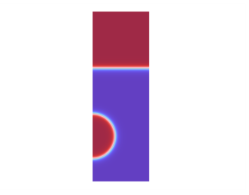
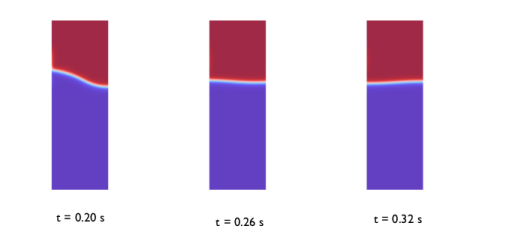
|
|
|
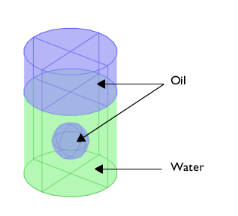








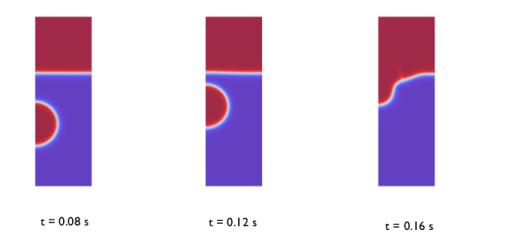
|
1
|
|
2
|
In the Select Physics tree, select Fluid Flow > Multiphase Flow > Two-Phase Flow, Level Set > Laminar Flow.
|
|
3
|
Click Add.
|
|
4
|
Click
 Study. Study. |
|
5
|
In the Select Study tree, select Preset Studies for Selected Multiphysics > Time Dependent with Phase Initialization.
|
|
6
|
Click
 Done. Done. |
|
1
|
|
2
|
|
3
|
|
1
|
|
2
|
|
3
|
|
4
|
|
5
|
Click
 Build Selected. Build Selected. |
|
1
|
|
2
|
|
3
|
|
4
|
|
5
|
|
6
|
Click
 Build Selected. Build Selected. |
|
1
|
|
2
|
|
3
|
|
4
|
|
5
|
|
6
|
|
7
|
Click
 Build Selected. Build Selected. |
|
1
|
|
2
|
|
1
|
In the Model Builder window, under Component 1 (comp1) > Multiphysics click Two-Phase Flow, Level Set 1 (tpf1).
|
|
2
|
|
3
|
Click
 Add Multiphase Material. Add Multiphase Material. |
|
4
|
|
5
|
Locate the Surface Tension section. Select the Include surface tension force in momentum equation checkbox.
|
|
6
|
|
7
|
|
1
|
In the Model Builder window, under Component 1 (comp1) > Materials > Multiphase Material 1 (mpmat1) click Phase 1 (mpmat1.phase1).
|
|
2
|
|
3
|
Click
 Add Material from Library . This button is found when expanding the options next to the Material list. Add Material from Library . This button is found when expanding the options next to the Material list. |
|
1
|
Go to the Add Material to Phase 1 (mpmat1.phase1) window.
|
|
2
|
|
3
|
Click Add Material.
|
|
1
|
In the Model Builder window, under Component 1 (comp1) > Materials > Multiphase Material 1 (mpmat1) click Phase 2 (mpmat1.phase2).
|
|
2
|
|
3
|
Click
 Add Material from Library . This button is found when expanding the options next to the Material list. Add Material from Library . This button is found when expanding the options next to the Material list. |
|
1
|
Go to the Add Material to Phase 2 (mpmat1.phase2) window.
|
|
2
|
|
3
|
Click Add Material.
|
|
1
|
|
2
|
|
3
|
|
1
|
|
1
|
|
2
|
|
3
|
Select the Include gravity checkbox.
|
|
1
|
|
3
|
|
4
|
Clear the Compensate for hydrostatic pressure checkbox.
|
|
1
|
|
2
|
|
3
|
Clear the Compensate for hydrostatic pressure checkbox.
|
|
1
|
|
1
|
|
2
|
|
1
|
|
2
|
|
3
|
|
4
|
|
5
|
Click
 Build All. Build All. |
|
1
|
|
2
|
|
3
|
|
1
|
|
2
|
|
1
|
|
2
|
|
3
|
|
4
|
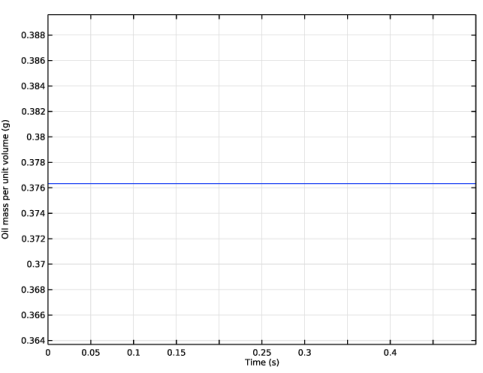
Click Replace Expression in the upper-right corner of the Expressions section. From the menu, choose Component 1 (comp1) > Definitions > Variables > rho_oil - Oil mass per unit volume - kg/m³.
|
|
5
|
Locate the Expressions section. In the table, enter the following settings:
|
|
6
|
Click
 Evaluate. Evaluate. |
|
1
|
Go to the Table 1 window.
|
|
2
|
Click the Table Graph button in the window toolbar.
|
|
1
|
|
2
|
|
3
|
Select the Manual axis limits checkbox.
|
|
4
|
|
5
|
|
6
|
|
7
|
|
1
|
|
2
|
|
3
|
Clear the Plot dataset edges checkbox.
|
|
1
|
|
2
|
|
3
|
|
1
|
|
2
|
|
3
|
|
4
|
|
1
|
|
2
|
|
3
|
|
4
|
|
5
|
|
6
|
|
1
|
|
2
|
|
3
|
|
1
|
|
2
|
|
3
|
|
4
|
|
1
|
|
1
|
|
2
|
|
3
|
|
4
|
|
1
|
|
2
|
|
3
|
|
4
|
|
5
|
|
1
|
|
2
|
|
3
|
Clear the Plot dataset edges checkbox.
|
|
4
|
|
5
|
|
1
|
|
2
|