







PDF

Separation Through Electrocoalescence
Introduction
A mixture of immiscible liquids is known as an emulsion. Many chemical processes result in emulsions consisting of the desired product and a solvent. Droplets of most emulsions will coalesce given enough time, but it is often desirable to speed up the separation process.
If the liquids have different electric permittivities, an electric field can be applied across the emulsion to stimulate coalescence. This method, known as electrocoalescence, has important applications, for instance, in the separation of oil from water.
To model electrocoalescence, you need to solve the Navier–Stokes equations, describing the fluid motion, and track the interfaces between the immiscible fluids. In order to include the electric forces acting on the fluids, you also have to solve for the local electric field. This complex multiphysics process can readily be set up and solved with COMSOL Multiphysics.
Model Definition
Geometry
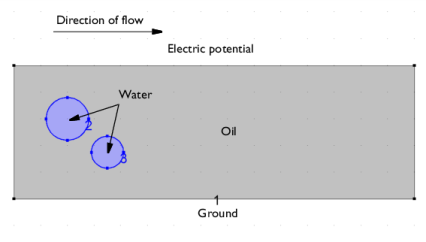
Two droplets of water with radii of 1.6 and 1.2 mm, respectively, are transported in an oil phase flowing between two parallel plates. The average velocity of the multiphase flow is 5 cm/s. An electric potential of 5 kV is applied over the plates.
Figure 1: Two water droplets are transported in an oil phase flowing between two plates.
The Two-Phase Flow, Phase Field Interface
The Laminar Two-Phase Flow, Phase Field interface sets up the equations for the fluid motion according to the Navier–Stokes equations:
where u denotes velocity (SI unit: m/s), ρ the density (SI unit: kg/m3), μ dynamic viscosity (SI unit: Pas), p pressure (SI unit: Pa), g gravity (SI unit: m/s2). Fst is the surface tension force (SI unit: N/m3), and F is any additional volume force (SI unit: N/m3).
To track the fluid interface, the Laminar Two-Phase Flow, Phase Field interface uses a phase-field method:
The phase-field variable ϕ is 1 in water and 1 in oil. The density and viscosity, which is different for oil and water, is automatically calculated from the phase-field variable ϕ, as well as the surface tension force. σ is the surface tension coefficient (SI unit: N/m), ε is a numerical parameter (m) that determines the thickness of the fluid interface, that is, the region where the phase-field variable varies smoothly from 1 to 1. χ controls the mobility of the interface.
The Electrostatics interface
The Electrostatics interface sets up the following equations for the electric potential V:
Here, ε0 is the permittivity of vacuum, and εr is the relative permittivity.
The Coupling of the Two Physics
The software automatically sets up the equations described in the two previous sections. You only have to specify how they are coupled. For the Two Phase Flow interface, you need to specify the electric force. The electric force is given by the divergence of the Maxwell stress tensor:
(1)
The Maxwell stress tensor is given by
where E is the electric field and D is the electric displacement field:
The present example is in 2D, so the stress tensor is
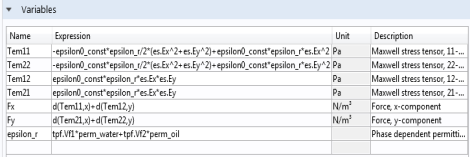
The components of the electric field are calculated by the Electrostatics interface. Their predefined variable names, along with the variable names of the permeabilities can be used directly to set up expressions calculating the component of the stress tensor.
Figure 2: Use the Variables feature to define expressions. Predefined variables and operators can be typed in directly.
The components of the volume force are given by Equation 1. Once again, these can also be entered directly as expressions in the graphical user interface. Table 1 shows the syntax for the partial derivatives of the stress tensor that express the volume force in the x and y directions.
Finally, you also need to specify the relative permittivity, which is constant, but different, for each fluid. Define it from the internally defined volume fractions of each fluid, Vf1 and Vf2:
Here, εr1 and εr2 denote the relative permittivity of oil and water, respectively. Instead of using a user-defined variable, this model uses the Multiphase Material to define the effective material properties. This way, the variable es.epsilonr_iso in the electrostatics interface is already the correct averaged material property.
Results and Discussion
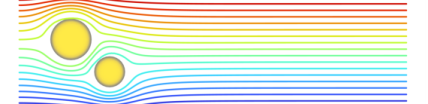
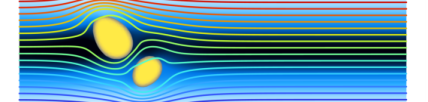
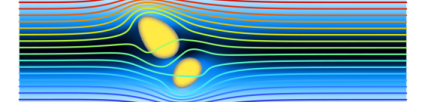
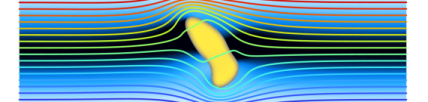
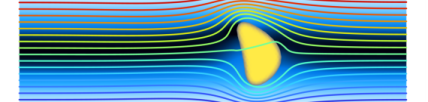
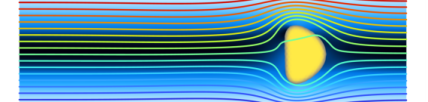
Figure 3 shows snapshots of the velocity and water droplets at 0.05 s intervals. Contour lines of the electric potential show a dynamic behavior, clearly illustrating the bidirectional coupling in this multiphysics problem. The influence of the electric field causes the water droplets to stretch to the point where they come into contact. At this point, surface tension causes the droplets to coalesce. The surface tension forces counteract the electric forces stretching the newly formed droplet.
Figure 3: Water droplets, velocity, and the contour lines of the electric potential at 0, 0.05, 0.1, 0.015, 0.2, 0.25, 0.3 seconds.
Application Library path: Microfluidics_Module/Two-Phase_Flow/electrocoalescence
Modeling Instructions
From the File menu, choose New.
New
In the New window, click  Model Wizard.
Model Wizard
1
In the Model Wizard window, click  2D.
2
In the Select Physics tree, select AC/DC > Electric Fields and Currents > Electrostatics (es).
3
Click Add.
4
In the Select Physics tree, select Fluid Flow > Multiphase Flow > Two-Phase Flow, Phase Field > Laminar Flow.
5
Click Add.
6
Click  Study.
7
In the Select Study tree, select Preset Studies for Selected Multiphysics > Time Dependent with Phase Initialization.
8
Geometry 1
1
In the Model Builder window, under Component 1 (comp1) click Geometry 1.
2
In the Settings window for Geometry, locate the Units section.
3
From the Length unit list, choose mm.
Rectangle 1 (r1)
1
In the Geometry toolbar, click  Rectangle.
2
In the Settings window for Rectangle, locate the Size and Shape section.
3
In the Width text field, type 30.
4
In the Height text field, type 10.
Circle 1 (c1)
1
In the Geometry toolbar, click  Circle.
2
In the Settings window for Circle, locate the Size and Shape section.
3
In the Radius text field, type 1.6.
4
Locate the Position section. In the x text field, type 4.
5
In the y text field, type 6.
Circle 2 (c2)
1
In the Geometry toolbar, click  Circle.
2
In the Settings window for Circle, locate the Size and Shape section.
3
In the Radius text field, type 1.2.
4
Locate the Position section. In the x text field, type 7.
5
In the y text field, type 3.5.
Global Definitions
Parameters 1
1
In the Model Builder window, under Global Definitions click Parameters 1.
2
In the Settings window for Parameters, locate the Parameters section.
3
Definitions
Variables 1
1
In the Definitions toolbar, click  Local Variables.
2
In the Settings window for Variables, locate the Variables section.
3
Create a step function which will be used to ramp up the inlet velocity from zero to its full value over the initial 0.01 s.
Step 1 (step1)
1
In the Definitions toolbar, click  More Functions and choose Step.
2
In the Settings window for Step, locate the Parameters section.
3
In the Location text field, type 0.005.
4
Click to expand the Smoothing section. In the Size of transition zone text field, type 0.01.
5
Now, create selections to be used when setting up the boundary conditions.
Outlet
1
In the Definitions toolbar, click  Explicit.
2
In the Settings window for Explicit, type Outlet in the Label text field.
3
Locate the Input Entities section. From the Geometric entity level list, choose Boundary.
4
Inlet
1
In the Definitions toolbar, click  Explicit.
2
In the Settings window for Explicit, type Inlet in the Label text field.
3
Locate the Input Entities section. From the Geometric entity level list, choose Boundary.
4
Oil/Water Interface
1
In the Definitions toolbar, click  Explicit.
2
In the Settings window for Explicit, type Oil/Water Interface in the Label text field.
3
Locate the Input Entities section. From the Geometric entity level list, choose Boundary.
4
Electrostatics (es)
Initial Values 1
1
In the Model Builder window, under Component 1 (comp1) > Electrostatics (es) click Initial Values 1.
2
In the Settings window for Initial Values, locate the Initial Values section.
3
In the V text field, type y*V0/10[mm].
Charge Conservation in Fluids 1
1
In the Physics toolbar, click  Domains and choose Charge Conservation in Fluids.
2
In the Settings window for Charge Conservation in Fluids, locate the Domain Selection section.
3
From the Selection list, choose All domains.
Electric Potential 1
1
In the Physics toolbar, click  Boundaries and choose Electric Potential.
2
3
In the Settings window for Electric Potential, locate the Electric Potential section.
4
In the V0 text field, type V0.
Ground 1
1
In the Physics toolbar, click  Boundaries and choose Ground.
2
Multiphysics
Two-Phase Flow, Phase Field 1 (tpf1)
1
In the Model Builder window, under Component 1 (comp1) > Multiphysics click Two-Phase Flow, Phase Field 1 (tpf1).
2
In the Settings window for Two-Phase Flow, Phase Field, locate the Surface Tension section.
3
From the Surface tension coefficient list, choose User defined. In the σ text field, type sigma.
4
Locate the Material Properties section. Click  Add Multiphase Material.
Materials
Phase 1 (mpmat1.phase1)
1
In the Model Builder window, under Component 1 (comp1) > Materials > Multiphase Material 1 (mpmat1) click Phase 1 (mpmat1.phase1).
2
In the Settings window for Phase, locate the Link Settings section.
3
Click  Add Material from Library . This button is found when expanding the options next to the Material list.
Add Material to Phase 1 (mpmat1.phase1)
1
Go to the Add Material to Phase 1 (mpmat1.phase1) window.
2
In the tree, select Liquids and Gases > Liquids > Water.
3
Click Add Material.
Global Definitions
Water (mat1)
1
In the Model Builder window, under Global Definitions > Materials click Water (mat1).
2
In the Settings window for Material, locate the Material Contents section.
3
Materials
Phase 2 (mpmat1.phase2)
1
In the Model Builder window, under Component 1 (comp1) > Materials > Multiphase Material 1 (mpmat1) click Phase 2 (mpmat1.phase2).
2
In the Settings window for Phase, locate the Link Settings section.
3
Click  Blank Material . This button is found when expanding the options next to the Material list.
Global Definitions
Oil
1
In the Model Builder window, under Global Definitions > Materials click Material 2 (mat2).
2
In the Settings window for Material, type Oil in the Label text field.
3
Locate the Material Contents section. In the table, enter the following settings:
Phase Field in Fluids (pf)
Phase Field Model 1
1
In the Model Builder window, under Component 1 (comp1) > Phase Field in Fluids (pf) click Phase Field Model 1.
2
In the Settings window for Phase Field Model, locate the Phase Field Parameters section.
3
In the εpf text field, type 0.15[mm].
4
From the Mobility tuning parameter list, choose Calculate from velocity.
5
In the U text field, type u_max.
Initial Values, Fluid 2
1
In the Model Builder window, click Initial Values, Fluid 2.
2
Laminar Flow (spf)
In the Model Builder window, under Component 1 (comp1) click Laminar Flow (spf).
Volume Force 1
1
In the Physics toolbar, click  Domains and choose Volume Force.
2
In the Settings window for Volume Force, locate the Domain Selection section.
3
From the Selection list, choose All domains.
4
Locate the Volume Force section. Specify the F vector as
Inlet 1
1
In the Physics toolbar, click  Boundaries and choose Inlet.
2
In the Settings window for Inlet, locate the Boundary Selection section.
3
From the Selection list, choose Inlet.
4
Locate the Boundary Condition section. From the list, choose Fully developed flow.
5
Locate the Fully Developed Flow section. In the Uav text field, type u_in*step1(t*1[1/s]).
Phase Field in Fluids (pf)
1
In the Model Builder window, under Component 1 (comp1) click Phase Field in Fluids (pf).
2
In the Physics toolbar, click  Boundaries and choose Inlet.
1
In the Settings window for Inlet, locate the Boundary Selection section.
2
From the Selection list, choose Inlet.
3
Locate the Phase Field Condition section. From the list, choose Fluid 2 (φ = 1).
Laminar Flow (spf)
In the Model Builder window, under Component 1 (comp1) click Laminar Flow (spf).
Outlet 1
1
In the Physics toolbar, click  Boundaries and choose Outlet.
2
In the Settings window for Outlet, locate the Boundary Selection section.
3
From the Selection list, choose Outlet.
4
Locate the Boundary Condition section. From the list, choose Fully developed flow.
Phase Field in Fluids (pf)
1
In the Model Builder window, under Component 1 (comp1) click Phase Field in Fluids (pf).
2
In the Physics toolbar, click  Boundaries and choose Outlet.
1
In the Settings window for Outlet, locate the Boundary Selection section.
2
From the Selection list, choose Outlet.
Mesh 1
1
In the Model Builder window, under Component 1 (comp1) click Mesh 1.
2
In the Settings window for Mesh, locate the Physics-Controlled Mesh section.
3
From the Element size list, choose Fine.
4
Click  Build All.
Study 1
Step 2: Time Dependent
1
In the Model Builder window, under Study 1 click Step 2: Time Dependent.
2
In the Settings window for Time Dependent, locate the Study Settings section.
3
In the Output times text field, type range(0,0.05,0.3).
In time-dependent simulations, you should, if possible, scale your variables manually. Do this as follows:
Solution 1 (sol1)
1
In the Study toolbar, click  Show Default Solver.
2
In the Model Builder window, expand the Solution 1 (sol1) node, then click Dependent Variables 2.
3
In the Settings window for Dependent Variables, locate the Scaling section.
4
From the Method list, choose Manual.
5
In the Model Builder window, expand the Study 1 > Solver Configurations > Solution 1 (sol1) > Dependent Variables 2 node, then click Electric Potential (comp1.V).
6
In the Settings window for Field, locate the Scaling section.
7
From the Method list, choose Manual.
8
In the Scale text field, type 1e3.
9
In the Model Builder window, under Study 1 > Solver Configurations > Solution 1 (sol1) > Dependent Variables 2 click Velocity Field (comp1.u).
10
In the Settings window for Field, locate the Scaling section.
11
From the Method list, choose Manual.
12
In the Scale text field, type u_max.
Next, couple the Electrostatics and Velocity u, Pressure p segregated groups.
13
In the Model Builder window, expand the Study 1 > Solver Configurations > Solution 1 (sol1) > Time-Dependent Solver 1 > Segregated 1 node, then click Velocity u, Pressure p.
14
In the Settings window for Segregated Step, locate the General section.
15
Under Variables, click  Add.
16
In the Add dialog, select Electric Potential (comp1.V) in the Variables list.
17
18
In the Model Builder window, under Study 1 > Solver Configurations > Solution 1 (sol1) > Time-Dependent Solver 1 > Segregated 1 right-click Electrostatics and choose Disable.
You are now ready to compute the solution:
19
In the Study toolbar, click  Compute.
Results
Velocity (spf)
1
In the Model Builder window, under Results click Velocity (spf).
2
In the Settings window for 2D Plot Group, locate the Plot Settings section.
3
Clear the Plot dataset edges checkbox.
Velocity
1
In the Model Builder window, expand the Velocity (spf) node, then click Surface.
2
In the Settings window for Surface, type Velocity in the Label text field.
3
Click to expand the Range section. Select the Manual color range checkbox.
4
In the Maximum text field, type u_max.
5
Locate the Coloring and Style section. From the Color table list, choose JupiterAuroraBorealis.
6
From the Color table transformation list, choose Reverse.
Volume Fraction of Fluid
1
In the Model Builder window, right-click Velocity (spf) and choose Surface.
2
In the Settings window for Surface, type Volume Fraction of Fluid in the Label text field.
3
Locate the Expression section. In the Expression text field, type tpf1.Vf1.
4
Locate the Range section. Select the Manual data range checkbox.
5
In the Minimum text field, type 0.5.
6
In the Maximum text field, type 1.
7
Locate the Coloring and Style section. From the Color table list, choose Cividis.
8
Clear the Color legend checkbox.
Electric potential
1
Right-click Velocity (spf) and choose Contour.
2
In the Settings window for Contour, type Electric potential in the Label text field.
3
Locate the Coloring and Style section. From the Contour type list, choose Tube.
4
In the Tube radius expression text field, type 0.06.
5
Select the Radius scale factor checkbox.
6
Clear the Color legend checkbox.
7
In the Velocity (spf) toolbar, click  Plot.
Velocity (spf)
1
In the Model Builder window, click Velocity (spf).
2
In the Settings window for 2D Plot Group, locate the Data section.
3
From the Time (s) list, choose 0.
4
In the Velocity (spf) toolbar, click  Plot.
5
Click the  Zoom Extents button in the Graphics toolbar.
Similarly, plot the solution for the times 0.05, 0.1, 0.15, 0.2, 0.25, and 0.3 s to reproduce the remaining plots in Figure 3.