
|
|
|





|
1
|
|
2
|
In the Select Physics tree, select Heat Transfer > Heat Transfer in Solids (ht) and Heat Transfer > Metal Processing > Alpha–Beta Phase Transformation (abp).
|
|
3
|
Click Add.
|
|
4
|
Click
 Study. Study. |
|
5
|
|
6
|
Click
 Done. Done. |
|
1
|
|
2
|
|
1
|
|
2
|
|
3
|
|
1
|
|
2
|
|
3
|
|
4
|
|
5
|
|
1
|
|
2
|
|
3
|
|
4
|
Click
 Load from File. Load from File. |
|
5
|
Browse to the model’s Application Libraries folder and double-click the file welding_of_a_titanium_plate_xieqalpha.txt.
|
|
6
|
|
7
|
In the Argument table, enter the following settings:
|
|
1
|
|
2
|
|
3
|
|
4
|
Click
 Load from File. Load from File. |
|
5
|
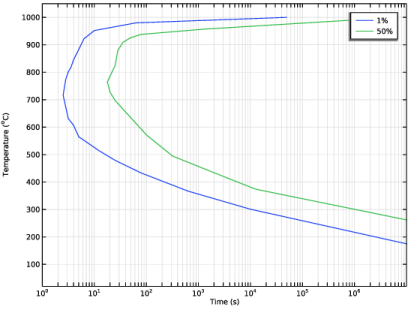
Browse to the model’s Application Libraries folder and double-click the file welding_of_a_titanium_plate_ttt1.txt.
|
|
6
|
|
7
|
|
8
|
In the Argument table, enter the following settings:
|
|
1
|
|
2
|
|
3
|
|
4
|
Click
 Load from File. Load from File. |
|
5
|
Browse to the model’s Application Libraries folder and double-click the file welding_of_a_titanium_plate_ttt50.txt.
|
|
6
|
|
7
|
|
8
|
In the Argument table, enter the following settings:
|
|
1
|
|
2
|
|
3
|
|
4
|
Click
 Load from File. Load from File. |
|
5
|
Browse to the model’s Application Libraries folder and double-click the file welding_of_a_titanium_plate_fdiss.txt.
|
|
6
|
|
7
|
In the Argument table, enter the following settings:
|
|
1
|
|
2
|
|
3
|
|
4
|
Click
 Load from File. Load from File. |
|
5
|
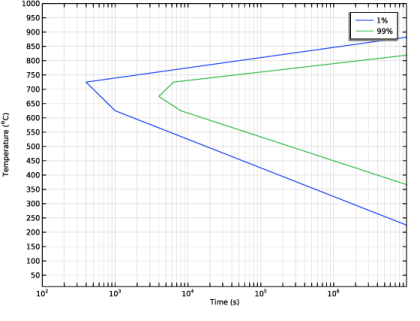
Browse to the model’s Application Libraries folder and double-click the file welding_of_a_titanium_plate_ttt1m.txt.
|
|
6
|
|
7
|
|
8
|
In the Argument table, enter the following settings:
|
|
1
|
|
2
|
|
3
|
|
4
|
Click
 Load from File. Load from File. |
|
5
|
Browse to the model’s Application Libraries folder and double-click the file welding_of_a_titanium_plate_ttt99m.txt.
|
|
6
|
|
7
|
|
8
|
In the Argument table, enter the following settings:
|
|
1
|
|
2
|
|
3
|
|
4
|
|
1
|
|
2
|
|
3
|
|
4
|
|
1
|
|
2
|
|
3
|
|
4
|
|
1
|
|
2
|
|
3
|
|
4
|
|
1
|
|
2
|
|
3
|
|
4
|
|
5
|
|
6
|
|
7
|
|
8
|
|
9
|
Clear the Bottom checkbox.
|
|
11
|
Click
 Build Selected. Build Selected. |
|
1
|
|
2
|
|
3
|
|
4
|
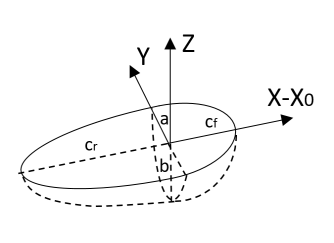
Locate the Heat Source section. In the Q0 text field, type (X>=X0)*an1(X-X0,Y,Z,q0,a,b,cf) + (X<X0)*an1(X-X0,Y,Z,q0,a,b,cr).
|
|
1
|
|
3
|
|
4
|
|
5
|
|
6
|
|
1
|
|
3
|
In the Settings window for Surface-to-Ambient Radiation, locate the Surface-to-Ambient Radiation section.
|
|
4
|
|
1
|
|
2
|
|
3
|
Click Create Compound Material in the upper-right corner of the section.
|
|
1
|
In the Model Builder window, under Component 1 (comp1) > Alpha–Beta Phase Transformation (abp) click Beta.
|
|
2
|
|
3
|
Click Create Phase Material in the upper-right corner of the section.
|
|
1
|
|
2
|
|
3
|
Click Create Phase Material in the upper-right corner of the section.
|
|
1
|
|
2
|
|
3
|
Click Create Phase Material in the upper-right corner of the section.
|
|
1
|
|
2
|
|
3
|
|
4
|
|
5
|
|
6
|
|
7
|
|
8
|
|
1
|
|
2
|
|
3
|
|
1
|
|
2
|
|
3
|
|
4
|
|
5
|
|
6
|
|
7
|
|
1
|
|
2
|
|
3
|
|
4
|
|
5
|
|
6
|
|
7
|
|
1
|
|
2
|
|
3
|
|
4
|
|
5
|
|
1
|
|
2
|
Right-click Global Definitions > Materials > Beta (mat2) > Basic (def) and choose Functions > Analytic.
|
|
3
|
|
4
|
|
5
|
|
6
|
|
8
|
|
1
|
|
2
|
|
4
|
|
5
|
|
6
|
Click OK.
|
|
7
|
|
1
|
|
2
|
|
3
|
|
4
|
|
5
|
Locate the Units section. In the table, enter the following settings:
|
|
6
|
|
1
|
|
2
|
|
1
|
|
2
|
Right-click Global Definitions > Materials > Widmanstätten Alpha (mat3) > Basic (def) and choose Functions > Analytic.
|
|
3
|
|
4
|
|
5
|
|
6
|
|
8
|
|
1
|
In the Model Builder window, under Global Definitions > Materials > Widmanstätten Alpha (mat3) click Basic (def).
|
|
2
|
|
4
|
|
5
|
|
6
|
Click OK.
|
|
7
|
|
1
|
|
2
|
|
3
|
|
4
|
|
5
|
Locate the Units section. In the table, enter the following settings:
|
|
6
|
|
1
|
In the Model Builder window, under Global Definitions > Materials > Widmanstätten Alpha (mat3) click Basic (def).
|
|
2
|
|
1
|
|
2
|
Right-click Global Definitions > Materials > Martensitic Alpha (mat4) > Basic (def) and choose Functions > Analytic.
|
|
3
|
|
4
|
|
5
|
|
6
|
|
8
|
|
1
|
In the Model Builder window, under Global Definitions > Materials > Martensitic Alpha (mat4) click Basic (def).
|
|
2
|
|
4
|
|
5
|
|
6
|
Click OK.
|
|
7
|
|
1
|
|
2
|
|
3
|
|
4
|
|
5
|
Locate the Units section. In the table, enter the following settings:
|
|
6
|
|
1
|
In the Model Builder window, under Global Definitions > Materials > Martensitic Alpha (mat4) click Basic (def).
|
|
2
|
|
1
|
|
1
|
|
2
|
|
3
|
|
1
|
|
1
|
|
2
|
|
3
|
|
1
|
|
2
|
|
3
|
|
4
|
Click
 Build All. Build All. |
|
1
|
|
2
|
|
3
|
|
4
|
|
1
|
|
2
|
Go to the Result Templates window.
|
|
3
|
|
4
|
Click the Add Result Template button in the window toolbar.
|
|
5
|
|
1
|
|
2
|
|
3
|
|
4
|
|
5
|
|
6
|
|
7
|
Click
 Plot. Plot. |
|
1
|
|
2
|
|
3
|
|
4
|
|
5
|
|
6
|
|
1
|
|
2
|
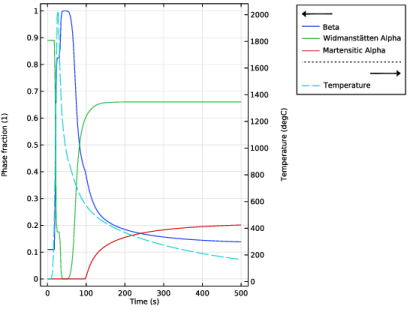
In the Settings window for Point Graph, click Replace Expression in the upper-right corner of the y-Axis Data section. From the menu, choose Component 1 (comp1) > Alpha–Beta Phase Transformation > Phase composition > abp.phase1.xiGp - Phase fraction - 1.
|
|
3
|
|
4
|
|
1
|
|
2
|
In the Settings window for Point Graph, click Replace Expression in the upper-right corner of the y-Axis Data section. From the menu, choose Component 1 (comp1) > Alpha–Beta Phase Transformation > Phase composition > abp.phase2.xiGp - Phase fraction - 1.
|
|
3
|
|
4
|
|
1
|
|
2
|
In the Settings window for Point Graph, click Replace Expression in the upper-right corner of the y-Axis Data section. From the menu, choose Component 1 (comp1) > Alpha–Beta Phase Transformation > Phase composition > abp.phase3.xiGp - Phase fraction - 1.
|
|
3
|
|
4
|
|
1
|
|
2
|
|
3
|
Select the Plot on secondary y-axis checkbox.
|
|
4
|
|
5
|
|
6
|
|
8
|
Click to expand the Coloring and Style section. Find the Line style subsection. From the Line list, choose Dashed.
|
|
9
|


