


PDF

Dilatometry Curves from CCT
Introduction
Simulation of quenching of a steel component requires phase transformation data that describes how the austenite decomposes into a combination of ferrite, pearlite, bainite, and martensite. This data is generally temperature-dependent, and must be obtained from literature resources, from performing experiments, or using computational methods. Similarly, material properties are also temperature-dependent, vary between metallurgical phases, and must be obtained in some manner. This example imports computed phase transformation data and phase material properties for a general steel to compute a CCT diagram and dilatometry curves across a range of cooling rates.
Model Definition
In order to simulate phase transformations during cooling from an austenitic state, various aspects of the problem have to be accounted for. The most important aspects are discussed below.
Continuous Cooling Transformation
In this example, a fully austenitic base structure is cooled from 900°C to room temperature, across a range of constant cooling rates. Rates from 0.001 K/s to 1000 K/s are used, in ten increments per decade.
Phase Transformations
Phase transformation data and metallurgical phase material properties for general steels can be exported from JMatPro® (Ref. 1), and imported into COMSOL Multiphysics. Every phase transformation model in the Metal Processing Module is of the general form:
where the rate term As → d describes the rate at which a destination phase forms at the expense of a source phase. Each built-in phase transformation model in the Metal Processing Module is of this form, and the difference between models lies in the functional form for the rate term. When phase transformations are imported, applicable phase transformation models in the Metal Processing Module are automatically configured, that is, their respective rate terms are configured using the imported data. For diffusive phase transformations, this means that the Lebond–Devaux, the Johnson–Mehl–Avrami–Kolmogorov, and the Kirkaldy–Venugopalan, simplified phase transformation models are configured (using TTT data), and for the displacive martensitic phase transformation, the Koistinen–Marburger phase transformation model is configured. For the diffusive phase transformations, the imported data is additionally processed into a temperature-dependent interpolation function (rate term) A that makes no a-priori assumption as to an underlying phase transformation model structure. It has the form
where is the temperature-dependent equilibrium phase fraction of the destination phase. This “phase transformation model free” formulation is selected by default for diffusive phase transformations imported from JMatPro®, as it generally provides the best fit.
In this example, we use an example file from JMatPro® containing phase transformation data for a hypoeutectoid steel. Austenite decomposition into ferrite, pearlite, bainite, and martensite is included in the file that is imported.
Thermal Strains
In the phase transformation physics interfaces of the Metal Processing Module, thermal strains can be computed either using thermal expansion coefficients and volume reference temperatures of the different metallurgical phases, or using temperature-dependent densities of the different metallurgical phases. In this example, we use the density-based approach. The axial thermal strain measure is defined as
where ρ is the phase fraction averaged density of the steel, evaluated at the initial phase composition and the volume reference temperature, and ρth is the phase fraction averaged density of the steel, evaluated at the current phase composition and the current temperature.
This model uses an example file from JMatPro® containing phase material property data for a hypoeutectoid steel, including temperature-dependent density functions for austenite, ferrite, pearlite, bainite, and martensite.
Results and Discussion
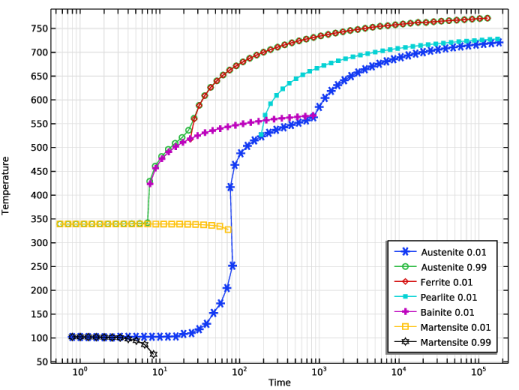
A common way to characterize, or illustrate, the phase transformation behavior of steels is through a CCT diagram, in which each curve corresponds to the time required to reach a certain phase fraction of a certain phase, at different cooling rates. Figure 1 shows the CCT diagram resulting from the imported phase transformation data. The red curve corresponds to 1% of ferrite having formed, and so on. The blue curve corresponds in this case effectively to the cessation of all phase transformations, as it represents the 1% line of (available) austenite.
Figure 1: Computed CCT diagram based on the imported phase transformation data.
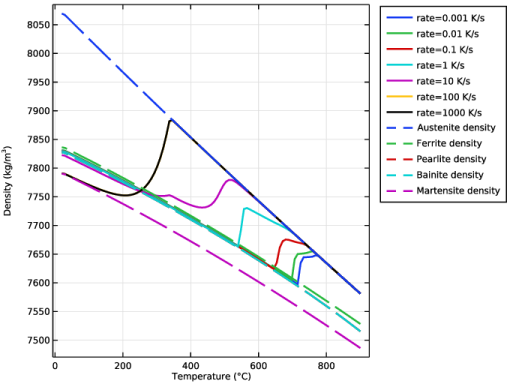
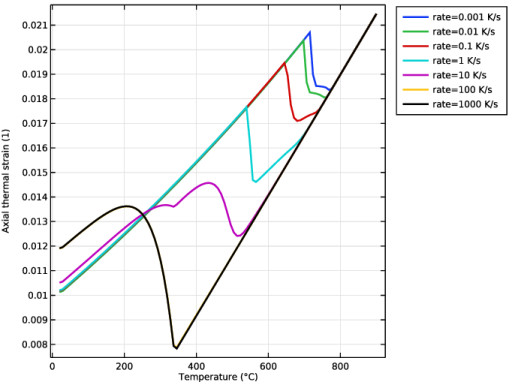
The different metallurgical phases are of different, and temperature-dependent, densities. This is shown in Figure 2. Notably, the density curve for austenite is higher than other phases, suggesting that as the steel phase transforms during cooling, there is should be a density decrease, which should manifest itself as a thermal expansion. In the figure, the evolving effective density of the steel is shown. At the highest cooling rate (1000 K/s), the austenite decomposes fully into martensite, and the figure shows how the effective density transitions from the density of pure austenite, to that of pure martensite (the black curve). The effective density curves corresponding to lower cooling rates, where the resulting phase composition is a mixture of destination phases, all originate as pure austenite, but subsequently display various kinks corresponding to different phase transformations taking place. From the effective density, a thermal strain measure can be defined. Figure 3 shows, for a selection of cooling rates, the resulting (axial) thermal strain based on the evolving effective density of the steel. Note here, that since the computation started at an elevated temperature of 900°C, while the volume reference temperature of the phases was set to room temperature, this will appear as an initial strain (an offset).
Figure 2: Temperature-dependent phase densities and the evolving effective density resulting from phase transformations, at different cooling rates.
Figure 3: Axial thermal strain computed based on the evolving effective density, at different cooling rates.
Notes About the COMSOL Implementation
The Austenite Decomposition is used in 0D, since we are prescribing cooling rates directly and do not model the heat transfer in a solid body.
Phase transformation data is imported by selecting Import Phase Transformations in the physics interface context menu.
Phase material properties are imported by selecting Import Materials from the Materials context menu under Global Definitions or under Materials at the component level (not available in 0D).
Reference
1. Sente Software, Ltd., United Kingdom.
Application Library path: Metal_Processing_Module/Transformation_Diagrams/dilatometry_curves_from_cct
Modeling Instructions
From the File menu, choose New.
New
In the New window, click  Model Wizard.
Model Wizard
1
In the Model Wizard window, click  0D.
2
In the Select Physics tree, select Heat Transfer > Metal Processing > Austenite Decomposition (audc).
3
Click Add.
4
Click  Study.
5
In the Select Study tree, select General Studies > Time Dependent.
6
Global Definitions
Parameters 1
1
In the Model Builder window, under Global Definitions click Parameters 1.
2
In the Settings window for Parameters, locate the Parameters section.
3
4
In the Materials toolbar, click Import Materials and choose Import Materials.
5
In the Import Materials dialog, click  Browse.
6
Browse to the model’s Application Libraries folder and double-click the file dilatometry_curves_from_cct_JMatPro_general_steel.xml.
7
Austenite Decomposition (audc)
General Steel, Austenite to Ferrite
1
In the Model Builder window, under Component 1 (comp1) right-click Austenite Decomposition (audc) and choose Import Phase Transformations.
2
Browse to the model’s Application Libraries folder and double-click the file dilatometry_curves_from_cct_JMatPro_general_steel.xml.
3
In the Settings window for Austenite Decomposition, locate the Temperature section.
4
In the T text field, type Ts-rate*t.
5
Select the Enable thermal strains checkbox.
6
From the Thermal strain formulation list, choose Density based.
Austenite
1
In the Model Builder window, click Austenite.
2
In the Settings window for Metallurgical Phase, locate the Phase Material section.
3
From the Phase material list, choose General Steel, Austenite (mat1).
4
Locate the Transformation Times section. Select the Compute transformation times checkbox.
5
Select the Decreasing phase fraction checkbox.
Ferrite
1
In the Model Builder window, click Ferrite.
2
In the Settings window for Metallurgical Phase, locate the Phase Material section.
3
From the Phase material list, choose General Steel, Ferrite (mat2).
4
Locate the Transformation Times section. Select the Compute transformation times checkbox.
Pearlite
1
In the Model Builder window, click Pearlite.
2
In the Settings window for Metallurgical Phase, locate the Phase Material section.
3
From the Phase material list, choose General Steel, Pearlite (mat3).
4
Locate the Transformation Times section. Select the Compute transformation times checkbox.
Bainite
1
In the Model Builder window, click Bainite.
2
In the Settings window for Metallurgical Phase, locate the Phase Material section.
3
From the Phase material list, choose General Steel, Bainite (mat4).
4
Locate the Transformation Times section. Select the Compute transformation times checkbox.
Martensite
1
In the Model Builder window, click Martensite.
2
In the Settings window for Metallurgical Phase, locate the Phase Material section.
3
From the Phase material list, choose General Steel, Martensite (mat5).
4
Locate the Transformation Times section. Select the Compute transformation times checkbox.
General Steel, Austenite to Ferrite
1
In the Model Builder window, click General Steel, Austenite to Ferrite.
2
In the Settings window for Phase Transformation, locate the Phase Transformation section.
3
From the ξs list, choose Austenite.
4
From the ξd list, choose Ferrite.
General Steel, Austenite to Pearlite
1
In the Model Builder window, click General Steel, Austenite to Pearlite.
2
In the Settings window for Phase Transformation, locate the Phase Transformation section.
3
From the ξs list, choose Austenite.
4
From the ξd list, choose Pearlite.
General Steel, Austenite to Bainite
1
In the Model Builder window, click General Steel, Austenite to Bainite.
2
In the Settings window for Phase Transformation, locate the Phase Transformation section.
3
From the ξs list, choose Austenite.
4
From the ξd list, choose Bainite.
General Steel, Austenite to Martensite
1
In the Model Builder window, click General Steel, Austenite to Martensite.
2
In the Settings window for Phase Transformation, locate the Phase Transformation section.
3
From the ξs list, choose Austenite.
4
From the ξd list, choose Martensite.
Study 1
Parametric Sweep
1
In the Study toolbar, click  Parametric Sweep.
2
In the Settings window for Parametric Sweep, locate the Study Settings section.
3
4
5
6
Click  Range.
7
In the Range dialog, choose Logarithmic from the Entry method list.
8
In the Start text field, type 1e-3.
9
In the Stop text field, type 1e3.
10
In the Steps per decade text field, type 10.
11
Click Add.
Step 1: Time Dependent
1
In the Model Builder window, click Step 1: Time Dependent.
2
In the Settings window for Time Dependent, locate the Study Settings section.
3
In the Output times text field, type range(0,0.01,1)*(Ts-Tf)/rate.
4
In the Study toolbar, click  Get Initial Value.
Solution 1 (sol1)
1
In the Model Builder window, expand the Solver Configurations node.
2
In the Model Builder window, expand the Solution 1 (sol1) node.
3
In the Model Builder window, click Time-Dependent Solver 1.
4
In the Settings window for Time-Dependent Solver, click to expand the Time Stepping section.
5
From the Steps taken by solver list, choose Strict.
6
In the Study toolbar, click  Compute.
Set preferred units for result presentation.
Results
Preferred Units 1
1
In the Results toolbar, click  Configurations and choose Preferred Units.
2
In the Settings window for Preferred Units, locate the Units section.
3
Click  Add Physical Quantity.
4
In the Physical Quantity dialog, select General > Temperature (K) in the tree.
5
6
In the Settings window for Preferred Units, locate the Units section.
7
8
Click  Apply.
Axial Thermal Strain (audc)
1
In the Model Builder window, under Results click Axial Thermal Strain (audc).
2
In the Settings window for 1D Plot Group, locate the Data section.
3
From the Parameter selection (rate) list, choose From list.
4
In the Parameter values (rate (K/s)) list, choose 0.001, 0.01, 0.1, 1, 10, 100, and 1000.
5
Click to expand the Title section. From the Title type list, choose None.
Global 1
1
In the Model Builder window, expand the Axial Thermal Strain (audc) node, then click Global 1.
2
In the Settings window for Global, click to expand the Coloring and Style section.
3
From the Width list, choose 2.
4
Click to expand the Legends section. Find the Include subsection. Clear the Description checkbox.
5
In the Axial Thermal Strain (audc) toolbar, click  Plot.