|
|
|
|
•
|
Self-weight in the negative Z direction
|
|
•
|
A payload of 1000 kg at the tip of the crane
|
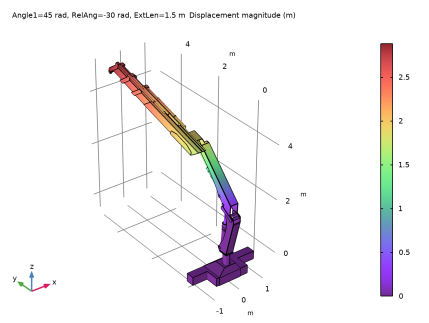
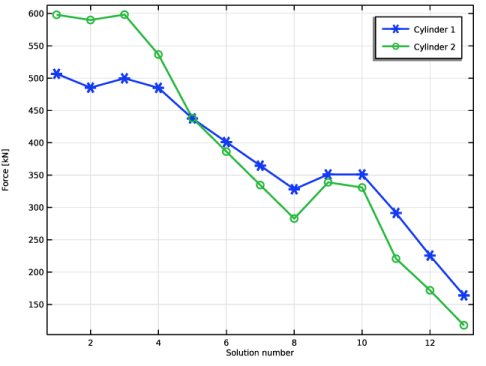
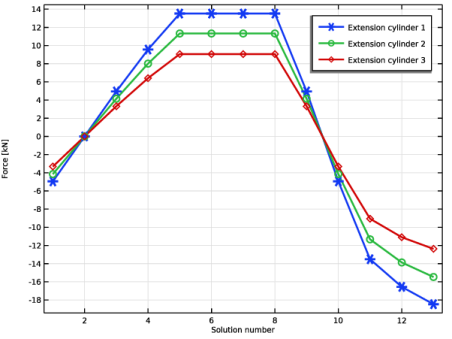
|
1
|
|
2
|
|
3
|
Click Add.
|
|
4
|
Click
 Study. Study. |
|
5
|
|
6
|
Click
 Done. Done. |
|
1
|
|
2
|
|
3
|
Click
 Browse. Browse. |
|
4
|
Browse to the model’s Application Libraries folder and double-click the file truck_mounted_crane.mphbin.
|
|
5
|
Click
 Import. Import. |
|
1
|
|
2
|
|
3
|
|
4
|
Clear the Create pairs checkbox.
|
|
5
|
|
6
|
|
7
|
|
8
|
Clear the Automatic detection of small details checkbox.
|
|
1
|
|
2
|
Go to the Add Material window.
|
|
3
|
|
4
|
Click the Add to Component button in the window toolbar.
|
|
5
|
|
1
|
|
2
|
|
2
|
|
1
|
|
2
|
|
3
|
|
4
|
|
5
|
|
1
|
|
1
|
|
2
|
|
3
|
|
4
|
|
5
|
|
1
|
|
1
|
|
2
|
|
3
|
|
4
|
|
5
|
|
1
|
|
1
|
|
2
|
|
3
|
|
4
|
|
5
|
|
1
|
|
1
|
|
2
|
|
3
|
|
4
|
|
5
|
|
1
|
|
1
|
|
2
|
|
3
|
|
1
|
|
2
|
In the Settings window for Prismatic Joint, type Prismatic Cylinder1-Piston1 in the Label text field.
|
|
3
|
|
4
|
|
5
|
|
6
|
Select the Reverse direction checkbox.
|
|
7
|
|
1
|
|
1
|
|
1
|
In the Model Builder window, under Component 1 (comp1) > Multibody Dynamics (mbd), Ctrl-click to select Hinge Base-Boom1, Hinge Base-Cylinder1, Hinge Base-Link1, Hinge Boom1-Link2, Slot Link1-Link2, Slot Link1-Piston1, and Prismatic Cylinder1-Piston1.
|
|
2
|
Right-click and choose Duplicate.
|
|
1
|
|
2
|
|
3
|
|
1
|
In the Model Builder window, expand the Hinge Boom1-Boom2 node, then click Center of Joint: Boundary 1.
|
|
2
|
|
3
|
Click
 Clear Selection. Clear Selection. |
|
1
|
In the Model Builder window, under Component 1 (comp1) > Multibody Dynamics (mbd) click Hinge Base-Cylinder1.1.
|
|
2
|
|
3
|
|
4
|
|
1
|
In the Model Builder window, expand the Hinge Boom1-Cylinder2 node, then click Center of Joint: Boundary 1.
|
|
2
|
|
3
|
Click
 Clear Selection. Clear Selection. |
|
1
|
In the Model Builder window, under Component 1 (comp1) > Multibody Dynamics (mbd) click Hinge Base-Link1.1.
|
|
2
|
|
3
|
|
4
|
|
1
|
In the Model Builder window, expand the Hinge Boom1-Link3 node, then click Center of Joint: Boundary 1.
|
|
2
|
|
3
|
Click
 Clear Selection. Clear Selection. |
|
1
|
In the Model Builder window, under Component 1 (comp1) > Multibody Dynamics (mbd) click Hinge Boom1-Link2.1.
|
|
2
|
|
3
|
|
4
|
|
1
|
In the Model Builder window, expand the Hinge Boom2-Link4 node, then click Center of Joint: Boundary 1.
|
|
2
|
|
3
|
Click
 Clear Selection. Clear Selection. |
|
1
|
In the Model Builder window, under Component 1 (comp1) > Multibody Dynamics (mbd) click Slot Link1-Link2.1.
|
|
2
|
|
3
|
|
4
|
|
1
|
In the Model Builder window, expand the Slot Link3-Link4 node, then click Center of Joint: Boundary 1.
|
|
2
|
|
3
|
Click
 Clear Selection. Clear Selection. |
|
1
|
In the Model Builder window, under Component 1 (comp1) > Multibody Dynamics (mbd) click Slot Link1-Piston1.1.
|
|
2
|
|
3
|
|
4
|
|
1
|
In the Model Builder window, expand the Slot Link3-Piston2 node, then click Center of Joint: Boundary 1.
|
|
2
|
|
3
|
Click
 Clear Selection. Clear Selection. |
|
1
|
In the Model Builder window, under Component 1 (comp1) > Multibody Dynamics (mbd) click Prismatic Cylinder1-Piston1.1.
|
|
2
|
In the Settings window for Prismatic Joint, type Prismatic Cylinder2-Piston2 in the Label text field.
|
|
3
|
|
4
|
|
5
|
|
1
|
In the Model Builder window, expand the Prismatic Cylinder2-Piston2 node, then click Center of Joint: Boundary 1.
|
|
2
|
|
3
|
Click
 Clear Selection. Clear Selection. |
|
1
|
|
2
|
|
3
|
Click
 Clear Selection. Clear Selection. |
|
1
|
|
2
|
In the Settings window for Prismatic Joint, type Prismatic Boom2-Extension1 in the Label text field.
|
|
3
|
|
4
|
|
5
|
|
6
|
|
1
|
|
1
|
|
2
|
In the Settings window for Prismatic Joint, type Prismatic Extension1-Extension2 in the Label text field.
|
|
3
|
|
4
|
|
5
|
|
6
|
|
1
|
|
1
|
|
2
|
In the Settings window for Prismatic Joint, type Prismatic Extension2-Extension3 in the Label text field.
|
|
3
|
|
4
|
|
5
|
|
6
|
|
1
|
|
3
|
|
4
|
|
1
|
|
3
|
|
4
|
|
5
|
|
1
|
|
2
|
|
1
|
|
2
|
In the Show More Options dialog, in the tree, select the checkbox for the node Physics > Equation Contributions.
|
|
3
|
Click OK.
|
|
1
|
|
2
|
|
4
|
|
5
|
|
6
|
|
7
|
Click OK.
|
|
8
|
|
1
|
|
2
|
|
3
|
|
4
|
Click to expand the Reaction Force Settings section. Select the Apply reaction only on joint variables checkbox.
|
|
1
|
|
2
|
|
3
|
|
4
|
Locate the Reaction Force Settings section. Select the Apply reaction only on joint variables checkbox.
|
|
1
|
|
2
|
|
3
|
|
1
|
|
2
|
|
3
|
|
1
|
|
2
|
|
3
|
|
1
|
In the Model Builder window, under Component 1 (comp1) > Multibody Dynamics (mbd), Ctrl-click to select Base, Boom1, Boom2, Extension1, Extension2, Extension3, Cylinder1, Piston1, Cylinder2, Piston2, Link1, Link2, Link3, and Link4.
|
|
2
|
Right-click and choose Group.
|
|
1
|
In the Model Builder window, under Component 1 (comp1) > Multibody Dynamics (mbd), Ctrl-click to select Hinge Base-Boom1, Hinge Base-Cylinder1, Hinge Base-Link1, Hinge Boom1-Link2, Hinge Boom1-Boom2, Hinge Boom1-Cylinder2, Hinge Boom1-Link3, and Hinge Boom2-Link4.
|
|
2
|
Right-click and choose Group.
|
|
1
|
In the Model Builder window, under Component 1 (comp1) > Multibody Dynamics (mbd), Ctrl-click to select Slot Link1-Link2, Slot Link1-Piston1, Slot Link3-Link4, and Slot Link3-Piston2.
|
|
2
|
Right-click and choose Group.
|
|
1
|
In the Model Builder window, under Component 1 (comp1) > Multibody Dynamics (mbd), Ctrl-click to select Prismatic Cylinder1-Piston1, Prismatic Cylinder2-Piston2, Prismatic Boom2-Extension1, Prismatic Extension1-Extension2, and Prismatic Extension2-Extension3.
|
|
2
|
Right-click and choose Group.
|
|
1
|
|
2
|
|
1
|
|
2
|
|
1
|
|
2
|
|
3
|
|
4
|
|
1
|
|
2
|
|
3
|
|
4
|
|
6
|
|
1
|
|
2
|
|
3
|
Select the Auxiliary sweep checkbox.
|
|
4
|
Click
 Load from File. Load from File. |
|
5
|
Browse to the model’s Application Libraries folder and double-click the file truck_mounted_crane_solparam.txt.
|
|
6
|
|
1
|
|
2
|
|
3
|
In the Model Builder window, expand the Study 1 > Solver Configurations > Solution 1 (sol1) > Dependent Variables 1 node, then click Global Equations 1 (comp1.ODE1).
|
|
4
|
|
5
|
|
6
|
|
1
|
|
2
|
|
3
|
|
4
|
|
5
|
|
6
|
|
1
|
|
2
|
From the Parameter value (Angle1 (rad),RelAng (rad),ExtLen (m)) list, choose 9: Angle1=45 rad, RelAng=-30 rad, ExtLen=1.5 m.
|
|
3
|
|
4
|
|
1
|
|
2
|
|
1
|
|
2
|
|
4
|
|
5
|
|
1
|
|
2
|
|
3
|
|
4
|
|
5
|
|
1
|
|
2
|
|
3
|
|
1
|
|
2
|
|
4
|
|
1
|
|
2
|
|
1
|
|
2
|
|
4
|
|
5
|
|
1
|
|
2
|
|
3
|
|
4
|
Locate the Plot Settings section.
|
|
5
|
|
6
|
|
7
|
|
1
|
|
2
|
|
1
|
|
3
|
|
4
|
|
5
|
|
6
|
|
7
|
|
8
|
|
1
|
|
2
|
|
3
|
|
4
|
|
5
|