
|
|
|

|
1
|
|
2
|
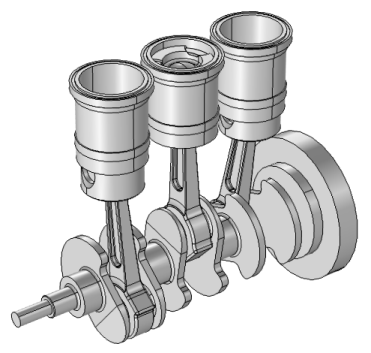
In the Application Libraries window, select Multibody Dynamics Module > Automotive and Aerospace > reciprocating_engine in the tree.
|
|
3
|
Click
 Open. Open. |
|
1
|
|
2
|
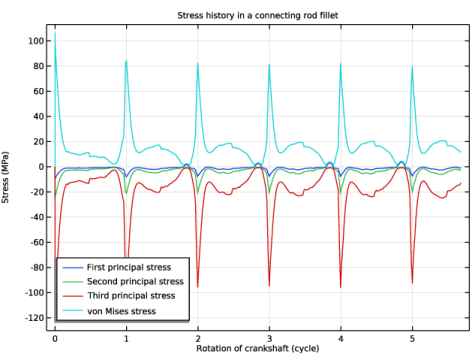
In the Settings window for 1D Plot Group, type Stress history: Connecting rod in the Label text field.
|
|
3
|
Locate the Data section. From the Dataset list, choose Study: Multibody Analysis/Solution 2 (3) (sol2).
|
|
1
|
|
2
|
|
3
|
Click
 Paste Selection. Paste Selection. |
|
4
|
|
5
|
Click OK.
|
|
6
|
|
7
|
|
8
|
|
9
|
|
10
|
|
11
|
|
12
|
|
14
|
|
1
|
|
2
|
|
3
|
|
4
|
Locate the Legends section. In the table, enter the following settings:
|
|
5
|
|
1
|
|
2
|
|
3
|
|
4
|
Locate the Legends section. In the table, enter the following settings:
|
|
5
|
|
1
|
|
2
|
|
3
|
|
4
|
Locate the Legends section. In the table, enter the following settings:
|
|
5
|
|
1
|
|
2
|
|
3
|
Select the x-axis label checkbox. In the associated text field, type Rotation of crankshaft (cycle).
|
|
4
|
|
5
|
|
6
|
|
7
|
|
8
|
|
1
|
|
2
|
Go to the Add Physics window.
|
|
3
|
|
4
|
Find the Physics interfaces in study subsection. In the table, clear the Solve checkboxes for Study: Thermodynamic Analysis and Study: Multibody Analysis.
|
|
5
|
Click the Add to Multibody Analysis button in the window toolbar.
|
|
6
|
|
1
|
|
1
|
|
2
|
|
3
|
|
5
|
|
1
|
|
2
|
|
3
|
|
4
|
|
5
|
Locate the Solution Field section. From the Physics interface list, choose Multibody Dynamics (mbd).
|
|
6
|
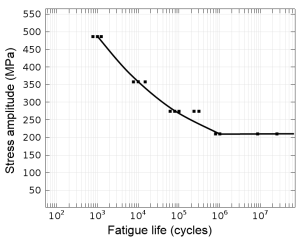
Locate the Fatigue Model Parameters section. From the σf′ list, choose User defined. In the associated text field, type 1.043e9.
|
|
7
|
|
8
|
|
1
|
|
2
|
Go to the Add Study window.
|
|
3
|
Find the Studies subsection. In the Select Study tree, select Preset Studies for Selected Physics Interfaces > Fatigue > Fatigue.
|
|
4
|
Click the Add Study button in the window toolbar.
|
|
5
|
|
1
|
|
2
|
Select the Include geometric nonlinearity checkbox.
|
|
3
|
Locate the Values of Dependent Variables section. Find the Values of variables not solved for subsection. From the Settings list, choose User controlled.
|
|
4
|
|
5
|
|
6
|
|
7
|
In the Time (s) list, choose 0.1368 s, 0.1372 s, 0.1376 s, 0.138 s, 0.1384 s, 0.1388 s, 0.1392 s, 0.1396 s, 0.14 s, 0.1404 s, 0.1408 s, 0.1412 s, 0.1416 s, 0.142 s, 0.1424 s, 0.1428 s, 0.1432 s, 0.1436 s, 0.144 s, 0.1444 s, 0.1448 s, 0.1452 s, 0.1456 s, 0.146 s, 0.1464 s, 0.1468 s, 0.1472 s, 0.1476 s, 0.148 s, 0.1484 s, 0.1488 s, 0.1492 s, 0.1496 s, 0.15 s, 0.1504 s, 0.1508 s, 0.1512 s, 0.1516 s, 0.152 s, 0.1524 s, 0.1528 s, 0.1532 s, 0.1536 s, 0.154 s, 0.1544 s, 0.1548 s, 0.1552 s, 0.1556 s, 0.156 s, 0.1564 s, 0.1568 s, 0.1572 s, 0.1576 s, 0.158 s, 0.1584 s, 0.1588 s, 0.1592 s, 0.1596 s, and 0.16 s.
|
|
8
|
|
9
|
|
10
|


