|
|
|


|
1
|
In SOLIDWORKS open the file tuning_fork.SLDPRT located in the model’s Application Library folder.
|
|
1
|
|
2
|
|
3
|
Click Add.
|
|
4
|
Click
 Study. Study. |
|
5
|
|
6
|
Click
 Done. Done. |
|
1
|
|
2
|
|
3
|
|
1
|
|
2
|
|
3
|
Click Synchronize.
|
|
4
|
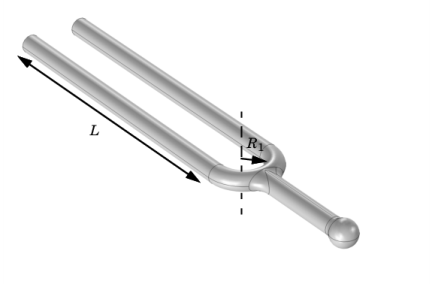
Click to expand the Parameters in CAD Package section. The dimensional parameter for the prong length, D2@Sketch2 in the SOLIDWORKS file, has been linked to COMSOL Multiphysics and is therefore synchronized with the geometry. To manage linked parameters, you can click Parameter Selection on the COMSOL Multiphysics tab in SOLIDWORKS. The global parameter, LL_D2_Sketch2, is automatically generated in the COMSOL Multiphysics model during synchronization to enable parametric sweeps and optimization of the geometry.
|
|
1
|
|
2
|
|
1
|
In the Model Builder window, under Component 1 (comp1) > Geometry 1 click LiveLink for SOLIDWORKS 1 (cad1).
|
|
2
|
|
3
|
Click Synchronize.
|
|
1
|
|
2
|
Go to the Add Material window.
|
|
3
|
|
4
|
Click the right end of the Add to Component split button in the window toolbar.
|
|
5
|
From the menu, choose Add to Component.
|
|
6
|
|
1
|
|
2
|
|
3
|
|
4
|
|
1
|
|
2
|
|
3
|
|
4
|
Locate the Objective Function section. In the table, enter the following settings:
|
|
5
|
|
7
|
|
1
|
|
2
|
In the Settings window for Global Evaluation, click Replace Expression in the upper-right corner of the Expressions section. From the menu, choose Solver > Control parameters > LL_D2_Sketch2 - Control parameter LL_D2_Sketch2 - m.
|
|
3
|
Click
 Evaluate. Evaluate. |
|
1
|
In the Model Builder window, under Component 1 (comp1) > Geometry 1 click LiveLink for SOLIDWORKS 1 (cad1).
|
|
2
|
|
3
|
Click Update Parameters from CAD in the upper-right corner of the section.
|