


PDF

Temperature Distribution in a Vacuum Flask
Introduction
The following example solves for the temperature distribution within a vacuum flask holding hot coffee. The main interest here is to illustrate how to use MATLAB® functions to define material properties and boundary condition directly within the COMSOL model.
Two MATLAB functions are used to define the temperature dependent thermal conductivity of the vacuum flask shell and the insulation foam, while a third function defines the heat transfer coefficient that corresponds to a natural convective cooling for a vertical plate and surrounding air.
Model Definition
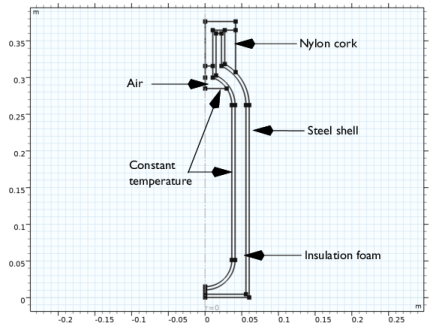
Assume axial symmetry for this simulation to reduce the model geometry to the 2D cross section of the vacuum flask geometry shown in Figure 1.
The vacuum flask consists of a steel shell isolated with a foam material, and a cork made of nylon. On the inside wall apply a constant temperature, assuming that the vacuum flask is filled with coffee of constant temperature.
Figure 1: Cross section of the vacuum flask geometry.
Define the temperature dependent thermal conductivity of the insulating foam according to the following polynomial expression:
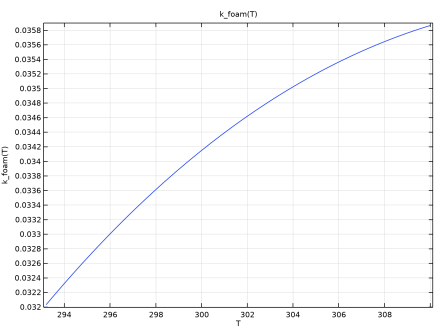
The above expression is plotted in Figure 2 for the temperature interval 293 K − 400 K.
Figure 2: Thermal conductivity of the insulating foam versus temperature.
Use a different polynomial expression for the thermal conductivity of steel according to
The outer surface dissipates heat via natural convection. This loss is characterized by the convective heat transfer coefficient, h, which in practice you often determine with empirical handbook correlations. Because these correlations depend on the surface temperature, Tsurface, engineers must estimate Tsurface and then iterate between h and Tsurface to obtain a converged value for h. The following expression for h is a typical handbook correlation for the case of natural convection in air on a vertical heated wall:
In the above equations, Tambient is the temperature of the air surrounding the vacuum flask, and all other variables are defined in the function script, under step 6 in the section Modeling Instructions — MATLAB®.
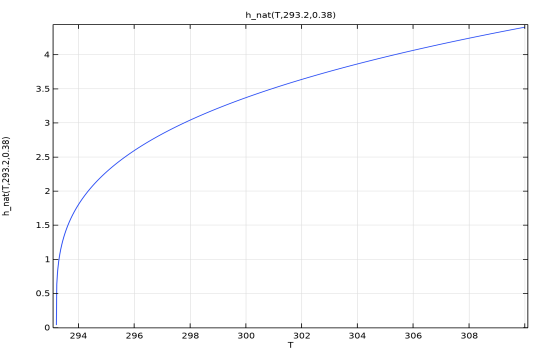
Figure 3 illustrates the expression of heat transfer coefficient as function of the wall temperature, the ambient temperature and the wall length.
Figure 3: Heat transfer coefficient for natural convection cooling of a vertical wall versus the surface temperature. The ambient temperature and the wall length are given constant, Tambient = 293.2 K and L = 38 cm, respectively.
Results and Discussion
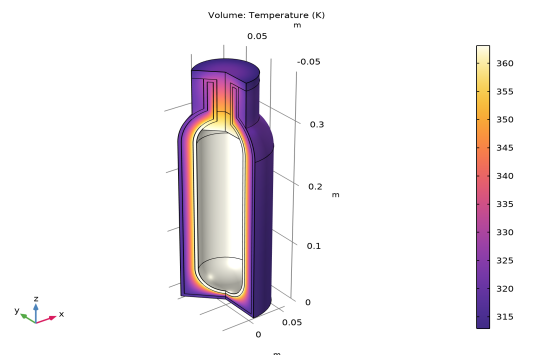
From the temperature distribution in the vacuum flask wall shown in Figure 4 you can see that most of the temperature gradients are in the foam, which shows that the material works well for insulating the vacuum flask.
Figure 4: Temperature distribution in the vacuum flask.
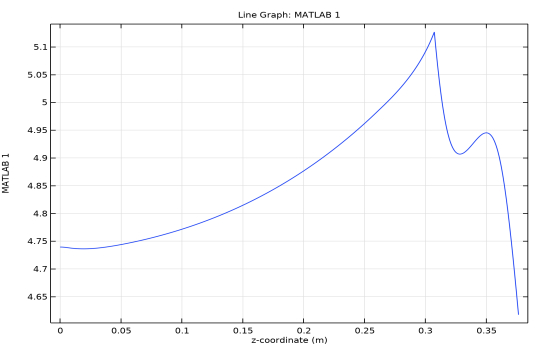
Figure 5 shows the heat transfer coefficient along the vacuum flask surface. Its value depends on the temperature surface, and the discontinuity in the curve is at the boundary between the cap and the steel wall.
Figure 5: Heat transfer coefficient along the surface of the vacuum flask.
Notes About the COMSOL Implementation
To use an external MATLAB function in a COMSOL model add a MATLAB feature node to the tree in the model builder, and specify the functions there. Once you solve the model, COMSOL automatically starts a MATLAB process that evaluates the functions and returns the value to the COMSOL model.
Application Library path: COMSOL_Multiphysics/LiveLink_for_MATLAB/Tutorials/vacuum_flask_llmatlab
Modeling Instructions — MATLAB®
Before the implementation of the model in the COMSOL Desktop®, define the MATLAB functions for the thermal conductivity of the insulating foam, and the convective heat transfer coefficient.
1
2
function out = k_foam(T)
% k_foam returns a value for the insulation foam thermal
% conductivity that vary with the local temperature
out = -2.141+1.87e-2*T-5.3e-5*T.^2+4.945e-8*T.^3;
3
4
function out = k_foam_dT(T)
% Derivative with respect of T of the function k_foam
out = 1.87e-2-10.6e-5*T+14.835e-8*T.^2;
5
Save the file as k_foam_dT.m.
6
function out = h_nat(T, Tamb, L)
% h_nat returns the value of the heat transfer coefficient
% corresponding to the cooling of a vertical plate by air in
% natural convection. The heat transfer coefficient depends
% on the surface temperature T, the temperature of the
% surrounding air Tamb and the length of the wall
 
% Air properties
k = 2e-2; % Thermal conductivity [W/(m*K)]
rho = 1; % Density [kg/m^3]
cp = 1e3; % Heat capacity [J/(kg*K)]
mu = 1e-6; % Dynamic viscosity [Pa*s]
g = 9.81; % Gravity [m/s^2]
 
% Definition of Prandt number
Pr = cp*mu/k;
% Definition of Rayleigh number
Ra = 2*g*rho^2*cp/(mu*k).*abs((T-Tamb)./(T+Tamb)).*L.^3;
% Definition of Nusselt number
num = 387e-3*Ra.^(1/6);
denom = (1+(492e-3/Pr)^(9/16))^(8/27);
Nu = (825e-3+num/denom).^2;
% Return the heat transfer coefficient value
out = k.*Nu./L;
7
8
function out = h_nat_dT(T, Tamb, L)
 
% Air properties
k = 2e-2; % Thermal conductivity [W/(m*K)]
rho = 1; % Density [kg/m^3]
cp = 1e3; % Heat capacity [J/(kg*K)]
mu = 1e-6; % Dynamic viscosity [Pa*s]
g = 9.81; % Gravity [m/s^2]
 
Pr = cp*mu/k;
Ra = 2*g*rho^2*cp/(mu*k).*abs((T-Tamb)./(T+Tamb)+eps).*L.^3;
Ra_dT = 2*g*rho^2*cp/(mu*k)*2.*Tamb./(T+Tamb).^2.*L.^3;
num = 387e-3*Ra.^(1/6);
num_dT = 387e-3/6*Ra.^(-5/6).*Ra_dT;
denom = (1+(492e-3/Pr)^(9/16))^(8/27);
Nu_dT = num_dT.*(2*825e-3+2*num/denom)/denom;
out = k.*Nu_dT./L;
9
Note: It is important to have the same size for the function output as for the input argument. As COMSOL Multiphysics assembles the problem in blocks, the variables have the size of an array. To prevent possible size related issues, use pointwise operators (.*, ./, .^) with the input arguments.
Setting the Directory Path in MATLAB
To be able to solve the model in the COMSOL Desktop, you need to make sure that the path to the MATLAB functions that are used in the model is set in MATLAB. Refer to the section Setting the Function Directory Path in MATLAB® in the LiveLink™ for MATLAB® User’s Guide for details on how do to this.
Modeling Instructions — COMSOL Desktop
From the File menu, choose New.
New
In the New window, click  Model Wizard.
Model Wizard
1
In the Model Wizard window, click  2D Axisymmetric.
2
In the Select Physics tree, select Heat Transfer > Heat Transfer in Solids (ht).
3
Click Add.
4
Click  Study.
5
In the Select Study tree, select General Studies > Stationary.
6
Global Definitions
Parameters 1
1
In the Model Builder window, under Global Definitions click Parameters 1.
2
In the Settings window for Parameters, locate the Parameters section.
3
MATLAB 1
1
In the Home toolbar, click  Functions and choose Global > MATLAB.
2
In the Settings window for MATLAB, locate the Functions section.
3
4
Click to expand the Plot Parameters section. In the table, enter the following settings:
5
6
Locate the Functions section. In the table, enter the following settings:
7
Click  Move Up.
8
Locate the Plot Parameters section. In the table, enter the following settings:
9
10
Click to expand the Derivatives section. In the table, enter the following settings:
11
Locate the Functions section. In the table, enter the following settings:
Geometry 1
Import 1 (imp1)
1
In the Home toolbar, click  Import.
2
In the Settings window for Import, locate the Source section.
3
Click  Browse.
4
5
Click  Import.
Form Union (fin)
1
In the Model Builder window, right-click Form Union (fin) and choose Build Selected.
2
Click the  Zoom Extents button in the Graphics toolbar.
3
In the Settings window for Form Union/Assembly, click  Build Selected.
Definitions
Variables 1
1
In the Definitions toolbar, click  Local Variables.
2
In the Settings window for Variables, locate the Variables section.
3
Materials
In the Model Builder window, under Component 1 (comp1) right-click Materials and choose Browse Materials.
Material Browser
1
In the Material Browser window, select Built-in > Nylon in the tree.
2
Click  Add to Component.
3
In the tree, select Built-in > Air.
4
Click  Add to Component.
5
6
Materials
Steel
1
In the Materials toolbar, click  Blank Material.
2
3
In the Settings window for Material, locate the Material Contents section.
4
5
Right-click Material 3 (mat3) and choose Rename.
6
In the Rename Material dialog, type Steel in the New label text field.
7
Foam
1
In the Materials toolbar, click  Blank Material.
2
3
In the Settings window for Material, locate the Material Contents section.
4
5
Right-click Material 4 (mat4) and choose Rename.
6
In the Rename Material dialog, type Foam in the New label text field.
7
Heat Transfer in Solids (ht)
Temperature 1
1
In the Physics toolbar, click  Boundaries and choose Temperature.
2
3
In the Settings window for Temperature, locate the Temperature section.
4
In the T0 text field, type 90[degC].
Heat Flux 1
1
In the Physics toolbar, click  Boundaries and choose Heat Flux.
2
3
In the Settings window for Heat Flux, locate the Heat Flux section.
4
From the Flux type list, choose Convective heat flux.
5
In the h text field, type h_nat(T,T_amb,Length).
6
In the Text text field, type T_amb.
Mesh 1
1
In the Model Builder window, under Component 1 (comp1) click Mesh 1.
2
In the Settings window for Mesh, locate the Physics-Controlled Mesh section.
3
From the Element size list, choose Extremely fine.
4
Click  Build All.
Study 1
In the Study toolbar, click  Compute.
Result Templates
1
In the Results toolbar, click  Result Templates to open the Result Templates window.
2
Go to the Result Templates window.
3
In the tree, select Study 1/Solution 1 (sol1) > Heat Transfer in Solids > Temperature (ht).
4
Click the Add Result Template button in the window toolbar.
5
In the Results toolbar, click  Result Templates to close the Result Templates window.
Results
1D Plot Group 3
In the Results toolbar, click  1D Plot Group.
Line Graph 1
1
In the Model Builder window, right-click 1D Plot Group 3 and choose Line Graph.
2
3
In the Settings window for Line Graph, locate the y-Axis Data section.
4
In the Expression text field, type h_nat(T,T_amb,Length).
5
Locate the x-Axis Data section. From the Parameter list, choose Expression.
6
In the Expression text field, type z.
7
In the 1D Plot Group 3 toolbar, click  Plot.