|
|
|



|
1
|
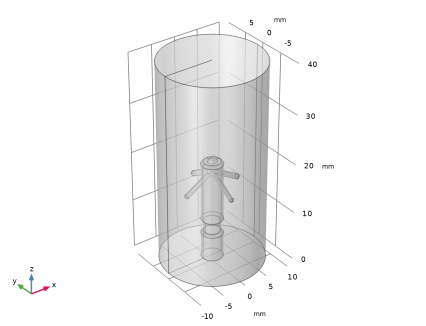
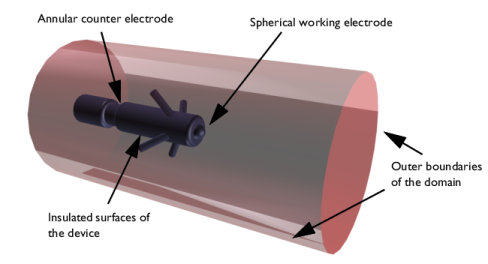
In AutoCAD open the file pacemaker_electrode.dwg located in the model’s Application Library folder.
|
|
1
|
|
2
|
|
3
|
Click Add.
|
|
4
|
Click
 Study. Study. |
|
5
|
|
6
|
Click
 Done. Done. |
|
1
|
|
2
|
|
3
|
|
1
|
|
2
|
|
3
|
Click Synchronize.
|
|
4
|
|
5
|
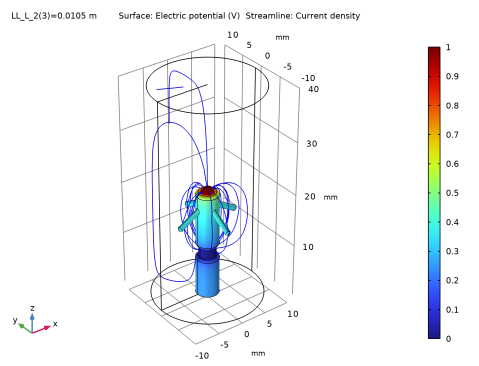
Click to expand the Parameters in CAD Package section. The dimensional parameter for the position of the counter electrode, L_2 in the AutoCAD file, has been linked to COMSOL Multiphysics and is therefore synchronized with the geometry. To manage linked parameters, you can click Parameter Selection on the COMSOL Multiphysics tab in AutoCAD. The global parameter, LL_L_2, is automatically generated in the COMSOL Multiphysics model during synchronization to enable parametric sweeps and optimization of the geometry.
|
|
1
|
|
2
|
Click in the Graphics window and then press Ctrl+A to select all objects.
|
|
3
|
|
1
|
|
2
|
|
3
|
|
4
|
On the object csol1, select Domains 2–8 only.
|
|
5
|
|
6
|
|
1
|
|
2
|
|
3
|
|
4
|
On the object fin, select Boundaries 5–39 only.
|
|
5
|
|
1
|
|
2
|
|
3
|
|
4
|
On the object fin, select Boundaries 20 and 21 only.
|
|
5
|
|
1
|
|
2
|
|
3
|
|
4
|
On the object fin, select Boundaries 23 and 24 only.
|
|
5
|
|
1
|
|
2
|
|
3
|
Click
 Load from File. Load from File. |
|
4
|
Browse to the model’s Application Libraries folder and double-click the file pacemaker_electrode_parameters.txt.
|
|
1
|
|
2
|
|
3
|
|
4
|
|
5
|
|
1
|
In the Model Builder window, under Component 1 (comp1) right-click Materials and choose Blank Material.
|
|
2
|
|
4
|
|
5
|
|
6
|
Click OK.
|
|
1
|
|
2
|
|
3
|
|
1
|
|
2
|
|
3
|
|
4
|
|
1
|
|
2
|
|
3
|
|
4
|
|
1
|
|
2
|
|
4
|
|
1
|
|
2
|
|
3
|
|
1
|
|
2
|
|
3
|
|
4
|
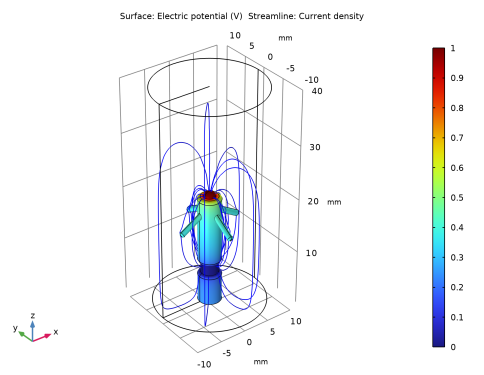
Locate the Coloring and Style section. Find the Point style subsection. From the Color list, choose Blue.
|
|
5
|
|
6
|
|
1
|
|
2
|
|
3
|
Click
 Add. Add. |
|
4
|
Click
 Range. Range. |
|
5
|
|
6
|
|
7
|
|
8
|
Click Add.
|
|
9
|
|
1
|
|
2
|
|
3
|
|
4
|
|
1
|
Go to the Evaluation Group 1 window.
|
|
2
|
Click the Table Graph button in the window toolbar.
|
|
1
|
|
2
|
|
3
|
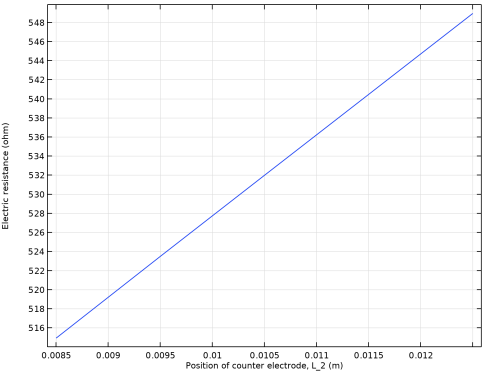
Select the x-axis label checkbox. In the associated text field, type Position of counter electrode, L_2 (m).
|
|
4
|
|
5
|
|
1
|
|
2
|
|
3
|
|
4
|
|
1
|
|
2
|
|
3
|
|
1
|
|
2
|
|
3
|
|
4
|
Locate the Coloring and Style section. Find the Point style subsection. From the Color list, choose Blue.
|
|
5
|