PDF

Heat and Moisture Transport in a Semi-Infinite Wall
Introduction
This tutorial shows how to simulate coupled heat and moisture transport in a building component. The 1D model is a benchmark test defined in Norm EN 15026 for the validation of a software computing moisture transfer by numerical simulation. You can verify that the numerical results obtained with COMSOL Multiphysics are within the validity ranges specified in the norm. See Ref. 1 for details about the norm.
Model Definition
The model geometry consists of a single segment for the building component. Its size is taken large enough to represent it as a semi-infinite region for the simulation time-scale. A relative humidity of 50% and a temperature of 20°C are set as initial conditions, while on the left boundary the relative humidity is set to 95% and the temperature is 30°C.
The time-dependent study is run over one year, with a control of the temperature and relative humidity distributions at 7, 30, and 365 days.
Moisture Transport
The Moisture Transport in Building Materials interface is used to model the moisture storage and the moisture transport by vapor diffusion and capillary flow.
Heat Transfer
The Heat Transfer in Building Materials interface computes the latent heat transfer due to vapor diffusion. In addition, moisture-dependent material properties are used to account for the effects of moisture content on thermal conduction and heat storage.
Material Data
The hygroscopic and thermal material data needed in the equations solved by the Moisture Transport and Heat Transfer interfaces are defined in Norm EN 15026.
Hygroscopic Properties
The moisture storage function w (SI unit: kg/m3) is given by the following sorption isotherm:
where (dimensionless) is the relative humidity, RH2O = 462 J/(kg·K), Tref = 293.15 K, and ρw = 1000 kg/m3.

The moisture diffusivity Dw (SI unit: m2/s), used for the expression of the liquid water flux, is defined as:
where the suction stress s (SI unit: Pa) is defined as:
and the liquid water permeability K (SI unit: kg/(m·s·Pa)) is defined as:
The vapor permeability δp (SI unit: s) used for the expression of the vapor flux, is defined as:
Thermal Properties
The equivalent thermal conductivity keff (SI unit: W/(m·K)) is defined as moisture-dependent, with the following expression:
Finally, from the following data given by the norm for dry material:
the density ρs of dry material is set to 2145.88 kg/m3, which corresponds to a value of Cp,s = 850 J/(kg·K), which is a typical value for concrete. Then the moisture-dependent equivalent heat capacity is defined as:
where Cp,w is the (temperature dependent) water heat capacity at constant pressure.
Results and Discussion
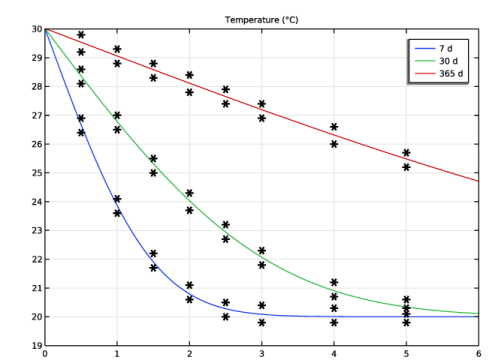
The image below shows the temperature distribution at 7, 30, and 365 days, close to the left boundary of the domain. The norm data are represented by asterisks. You can verify that the numerical results are within the validity ranges for all control times.
Figure 1: Temperature distribution at 7, 30, and 365 days with Norm 15026 validity ranges.
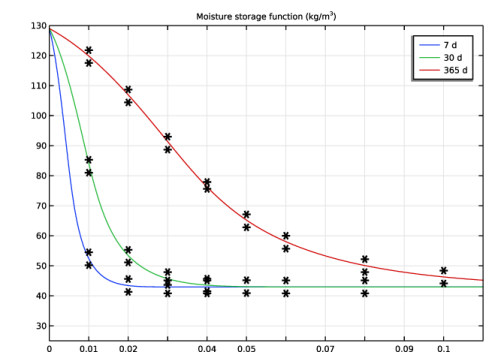
The image below shows the moisture storage function distribution at 7, 30, and 365 days, close to the left boundary of the domain. The norm data are represented by asterisks. You can verify that the numerical results are within the validity ranges for all control times.
Figure 2: Moisture storage function distribution at 7, 30, and 365 days with Norm 15026 validity ranges.
Reference
1. EN 15026, Hygrothermal performance of building components and building elements - Assessment of moisture transfer by numerical simulation, CEN, 2007.
Application Library path: Heat_Transfer_Module/Verification_Examples/semi_infinite_wall
Modeling Instructions
From the File menu, choose New.
New
In the New window, click  Model Wizard.
Model Wizard
1
In the Model Wizard window, click  1D.
2
In the Select Physics tree, select Heat Transfer > Heat and Moisture Transport > Building Materials.
3
Click Add.
4
Click  Study.
5
In the Select Study tree, select General Studies > Time Dependent.
6
Global Definitions
Parameters 1
Define parameters for the temperature and relative humidity conditions on boundaries.
1
In the Model Builder window, under Global Definitions click Parameters 1.
2
In the Settings window for Parameters, locate the Parameters section.
3
Next, set the geometry.
Geometry 1
Interval 1 (i1)
1
In the Model Builder window, under Component 1 (comp1) right-click Geometry 1 and choose Interval.
2
In the Settings window for Interval, locate the Interval section.
3
Next, set the hygroscopic and thermal properties for the material specified in Norm 15026.
Materials
Material - Norm 15026
1
In the Model Builder window, under Component 1 (comp1) right-click Materials and choose Blank Material.
2
In the Settings window for Material, type Material - Norm 15026 in the Label text field.
3
In the Model Builder window, expand the Component 1 (comp1) > Materials > Material - Norm 15026 (mat1) node.
Set the relative humidity as a physical quantity to be used in the material properties.
4
In the Model Builder window, under Component 1 (comp1) > Materials > Material - Norm 15026 (mat1) click Basic (def).
5
In the Settings window for Basic, locate the Model Inputs section.
6
Click  Select Quantity.
7
In the Physical Quantity dialog, type relative humidity in the text field.
8
In the tree, select General > Relative humidity (1).
9
Set the moisture content as a function of relative humidity.
Analytic: wc
1
In the Home toolbar, click  Functions and choose Global > Analytic.
2
In the Settings window for Analytic, type Analytic: wc in the Label text field.
3
In the Function name text field, type wc.
4
Locate the Definition section. In the Expression text field, type 146/(1+(-8e-8*462*293.15*1000*log(phi))^1.6)^0.375.
5
In the Arguments text field, type phi.
6
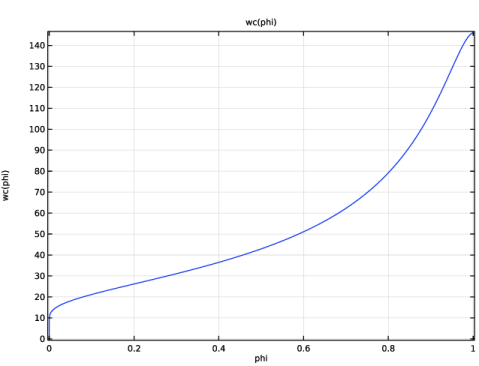
You obtain the graph below.
Material - Norm 15026 (mat1)
Set the thermal conductivity as a function of the moisture content.
Analytic: k
1
In the Home toolbar, click  Functions and choose Global > Analytic.
2
In the Settings window for Analytic, type Analytic: k in the Label text field.
3
In the Function name text field, type k.
4
Locate the Definition section. In the Expression text field, type 1.5+15.8e-3*w.
5
In the Arguments text field, type w.
6
Locate the Plot Parameters section. In the table, enter the following settings:
7
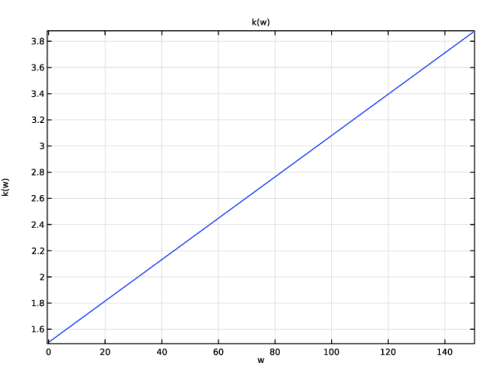
You obtain the graph below.
Material - Norm 15026 (mat1)
Set the suction stress as a function of the moisture content.
Analytic: s
1
In the Home toolbar, click  Functions and choose Global > Analytic.
2
In the Settings window for Analytic, type Analytic: s in the Label text field.
3
In the Function name text field, type s.
4
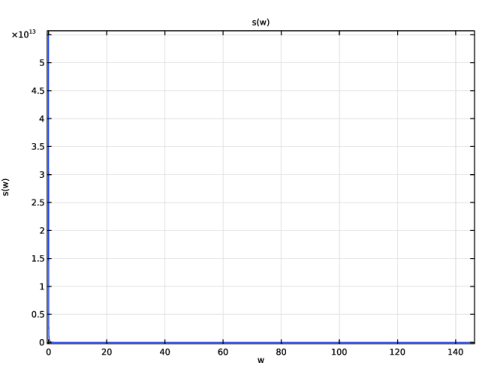
Locate the Definition section. In the Expression text field, type 0.125e8*((146/w)^(1/0.375)-1)^0.625.
5
In the Arguments text field, type w.
6
Locate the Plot Parameters section. In the table, enter the following settings:
7
You obtain the graph below.
Material - Norm 15026 (mat1)
Set the liquid water permeability as a function of the moisture content.
Analytic: K
1
In the Home toolbar, click  Functions and choose Global > Analytic.
2
In the Settings window for Analytic, type Analytic: K in the Label text field.
3
In the Function name text field, type K.
4
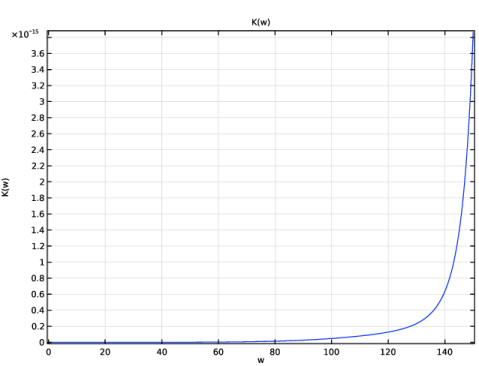
Locate the Definition section. In the Expression text field, type exp(-39.2619+0.0704*(w-146/2)-1.7420e-4*(w-146/2)^2-2.7953e-6*(w-146/2)^3-1.1566e-7*(w-146/2)^4+2.5969e-9*(w-146/2)^5).
5
In the Arguments text field, type w.
6
Locate the Plot Parameters section. In the table, enter the following settings:
7
You obtain the graph below.
Material - Norm 15026 (mat1)
Set the moisture diffusivity as a function of the suction stress and the liquid water permeability.
Analytic: Dw
1
In the Home toolbar, click  Functions and choose Global > Analytic.
2
In the Settings window for Analytic, type Analytic: Dw in the Label text field.
3
In the Function name text field, type Dw.
4
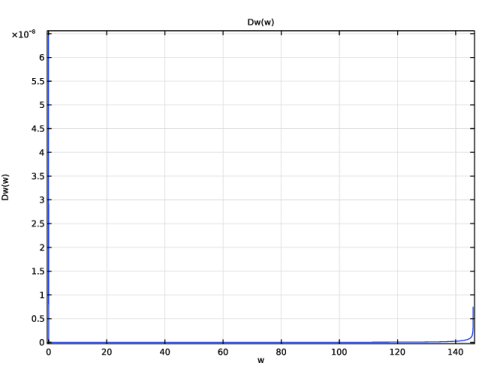
Locate the Definition section. In the Expression text field, type -d(s(w),w)*K(w).
5
In the Arguments text field, type w.
6
Locate the Plot Parameters section. In the table, enter the following settings:
7
You obtain the graph below.
Material - Norm 15026 (mat1)
Finally, set the vapor permeability as a function of the moisture content.
Analytic: delta_p
1
In the Home toolbar, click  Functions and choose Global > Analytic.
2
In the Settings window for Analytic, type Analytic: delta_p in the Label text field.
3
In the Function name text field, type delta_p.
4
Locate the Definition section. In the Expression text field, type (0.01801528/R_const/293.15*26.1e-6/200*(1-w/146)/((1-0.497)*(1-w/146)^2+0.497)).
5
In the Arguments text field, type w.
6
Locate the Plot Parameters section. In the table, enter the following settings:
Analytic: Dw (Dw)
1
In the Model Builder window, click Analytic: Dw (Dw).
2
In the Settings window for Analytic, click  Plot.
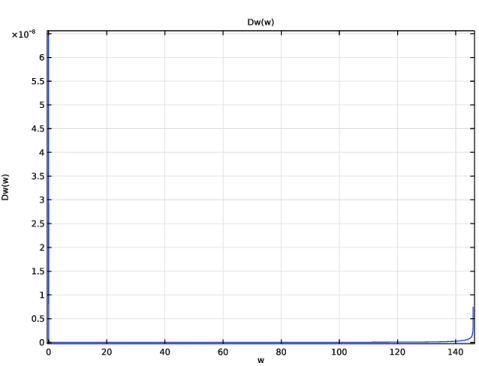
You obtain the graph below.
Material - Norm 15026 (mat1)
1
In the Model Builder window, under Component 1 (comp1) > Materials click Material - Norm 15026 (mat1).
2
In the Settings window for Material, locate the Material Contents section.
3
Define a ramp function used to set a temperature and a relative humidity boundary condition consistent with the initial condition on the left boundary of the domain.
Definitions
Ramp 1 (rm1)
1
In the Definitions toolbar, click  More Functions and choose Ramp.
2
In the Settings window for Ramp, locate the Parameters section.
3
In the Location text field, type 100.
4
In the Slope text field, type 1e-3.
5
Select the Cutoff checkbox.
6
Click to expand the Smoothing section. Select the Size of transition zone at start checkbox.
7
Select the Size of transition zone at cutoff checkbox.
8
In the Size of transition zone at start text field, type 100.
9
In the Size of transition zone at cutoff text field, type 100.
Now, set up the physics interfaces.
Heat Transfer in Building Materials (ht)
Initial Values 1
1
In the Model Builder window, under Component 1 (comp1) > Heat Transfer in Building Materials (ht) click Initial Values 1.
2
In the Settings window for Initial Values, locate the Initial Values section.
3
In the T text field, type T_i.
Temperature 1
1
In the Physics toolbar, click  Boundaries and choose Temperature.
2
3
In the Settings window for Temperature, locate the Temperature section.
4
In the T0 text field, type T_i+(T_e-T_i)*rm1(t[1/s]).
Temperature 2
1
In the Physics toolbar, click  Boundaries and choose Temperature.
2
3
In the Settings window for Temperature, locate the Temperature section.
4
In the T0 text field, type T_i.
Moisture Transport in Building Materials (mt)
Initial Values 1
1
In the Model Builder window, under Component 1 (comp1) > Moisture Transport in Building Materials (mt) click Initial Values 1.
2
In the Settings window for Initial Values, locate the Initial Values section.
3
In the ϕw,0 text field, type phi_i.
Moisture Content 1
1
In the Physics toolbar, click  Boundaries and choose Moisture Content.
2
3
In the Settings window for Moisture Content, locate the Moisture Content section.
4
In the T0 text field, type T_i+(T_e-T_i)*rm1(t[1/s]).
5
In the ϕw,0 text field, type phi_i+(phi_e-phi_i)*rm1(t[1/s]).
Moisture Content 2
1
In the Physics toolbar, click  Boundaries and choose Moisture Content.
2
3
In the Settings window for Moisture Content, locate the Moisture Content section.
4
In the T0 text field, type T_i.
5
In the ϕw,0 text field, type phi_i.
Refine the mesh close to the boundary where exterior conditions are imposed.
Mesh 1
Edge 1
In the Mesh toolbar, click  Edge.
Distribution 1
1
Right-click Edge 1 and choose Distribution.
2
In the Settings window for Distribution, locate the Distribution section.
3
From the Distribution type list, choose Predefined.
4
In the Number of elements text field, type 1000.
5
In the Element ratio text field, type 25.
6
Click  Build All.
Set the time-dependent study and compute.
Study 1
Step 1: Time Dependent
1
In the Model Builder window, under Study 1 click Step 1: Time Dependent.
2
In the Settings window for Time Dependent, locate the Study Settings section.
3
From the Time unit list, choose d.
4
In the Output times text field, type range(0,1,365).
5
From the Tolerance list, choose User controlled.
6
In the Relative tolerance text field, type 1e-3.
7
In the Study toolbar, click  Compute.
You can compare the results for the temperature and moisture storage function with the data of Norm EN 15026. First, import the validity ranges from the norm in tables.
Results
Table 1
1
In the Results toolbar, click  Table.
2
In the Settings window for Table, locate the Data section.
3
Click  Import.
4
Table 2
1
In the Results toolbar, click  Table.
2
In the Settings window for Table, locate the Data section.
3
Click  Import.
4
To visualize the temperature distribution as in Figure 1, follow the next steps.
Temperature (ht)
1
In the Model Builder window, under Results click Temperature (ht).
2
In the Settings window for 1D Plot Group, locate the Axis section.
3
Select the Manual axis limits checkbox.
4
In the x minimum text field, type 0.
5
In the x maximum text field, type 6.
6
In the y minimum text field, type 19.
7
In the y maximum text field, type 30.
8
Locate the Data section. From the Time selection list, choose From list.
9
In the Times (d) list, choose 7, 30, and 365.
Line Graph 1
1
In the Model Builder window, expand the Temperature (ht) node, then click Line Graph 1.
2
In the Settings window for Line Graph, locate the y-Axis Data section.
3
From the Unit list, choose °C.
4
Click to expand the Legends section. Select the Show legends checkbox.
5
In the Temperature (ht) toolbar, click  Plot.
Table Graph 1
1
In the Model Builder window, right-click Temperature (ht) and choose Table Graph.
2
In the Settings window for Table Graph, locate the Coloring and Style section.
3
Find the Line style subsection. From the Line list, choose None.
4
From the Color list, choose From theme.
5
Find the Line markers subsection. From the Marker list, choose Asterisk.
6
In the Temperature (ht) toolbar, click  Plot.
To visualize the moisture storage function distribution as in Figure 2, follow the next steps.
Moisture storage function
1
In the Model Builder window, under Results click Relative Humidity (mt).
2
In the Settings window for 1D Plot Group, type Moisture storage function in the Label text field.
3
Locate the Axis section. Select the Manual axis limits checkbox.
4
In the x minimum text field, type 0.
5
In the x maximum text field, type 0.11.
6
In the y minimum text field, type 25.
7
In the y maximum text field, type 130.
8
Locate the Data section. From the Time selection list, choose From list.
9
In the Times (d) list, choose 7, 30, and 365.
Line Graph 1
1
In the Model Builder window, expand the Moisture storage function node, then click Line Graph 1.
2
In the Settings window for Line Graph, locate the Selection section.
3
From the Selection list, choose All domains.
4
Locate the y-Axis Data section. In the Expression text field, type mt.wc.
5
Locate the Legends section. Select the Show legends checkbox.
6
In the Moisture storage function toolbar, click  Plot.
Table Graph 1
1
In the Model Builder window, right-click Moisture storage function and choose Table Graph.
2
In the Settings window for Table Graph, locate the Data section.
3
From the Table list, choose Table 2.
4
Locate the Coloring and Style section. Find the Line style subsection. From the Line list, choose None.
5
From the Color list, choose From theme.
6
Find the Line markers subsection. From the Marker list, choose Asterisk.
7
In the Moisture storage function toolbar, click  Plot.
You can check that the results fit in the validity ranges given by the norm.