|
|
|
 from the moisture transport equation is used in the Heat Transfer and Fluid Flow interfaces.




|
•
|
Convection of vapor due to total pressure gradient, with the flow field ug computed by the Brinkman equation.
|


|
•
|
Convection of liquid water due to total pressure gradient, with the flow field ul computed by the Darcy’s Law in Equation 2. The permeability for the liquid phase κl depends on the overall permeability of the porous matrix κ and a relative permeability (see Permeability) κrl.
|
|
•
|











|
1
|
|
2
|
In the Select Physics tree, select Heat Transfer > Heat and Moisture Transport > Heat and Moisture Flow > Laminar Flow.
|
|
3
|
Click Add.
|
|
4
|
Click
 Study. Study. |
|
5
|
|
6
|
Click
 Done. Done. |
|
1
|
|
2
|
|
3
|
Click
 Load from File. Load from File. |
|
4
|
Browse to the model’s Application Libraries folder and double-click the file potato_drying_parameters.txt.
|
|
1
|
|
2
|
|
3
|
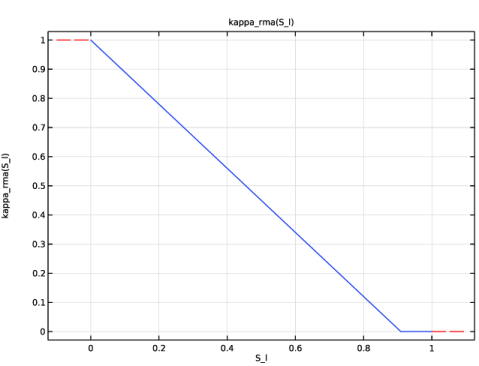
In the Settings window for Piecewise, type Relative Permeability, Moist Air in the Label text field.
|
|
4
|
|
5
|
|
6
|
Find the Intervals subsection. In the table, enter the following settings:
|
|
7
|
|
1
|
|
2
|
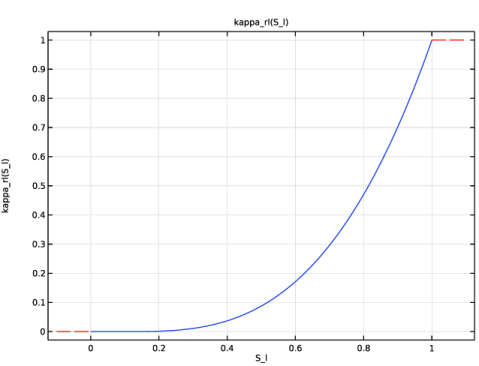
In the Settings window for Piecewise, type Relative Permeability, Liquid Phase in the Label text field.
|
|
3
|
|
4
|
|
5
|
Find the Intervals subsection. In the table, enter the following settings:
|
|
6
|
|
1
|
|
2
|
|
3
|
|
4
|
Click
 Load from File. Load from File. |
|
5
|
Browse to the model’s Application Libraries folder and double-click the file potato_drying_wc.txt.
|
|
6
|
|
7
|
In the Function table, enter the following settings:
|
|
8
|
|
1
|
|
2
|
|
3
|
|
4
|
|
1
|
|
2
|
|
3
|
|
4
|
|
5
|
|
1
|
|
2
|
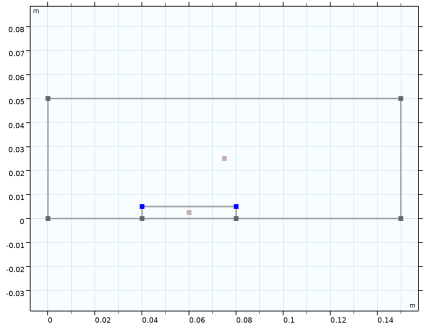
On the object r2, select Points 3 and 4 only.
|
|
3
|
|
4
|
|
5
|
|
6
|
|
1
|
|
2
|
|
3
|
|
4
|
|
1
|
In the Model Builder window, under Component 1 (comp1) > Heat Transfer in Moist Air (ht) click Initial Values 1.
|
|
2
|
|
3
|
|
1
|
|
1
|
|
2
|
|
3
|
|
1
|
|
3
|
|
4
|
|
1
|
|
1
|
|
2
|
|
3
|
|
4
|
Select the Enable porous media domains checkbox.
|
|
1
|
|
1
|
|
3
|
|
4
|
From the list, choose Fully developed flow.
|
|
5
|
|
1
|
|
1
|
In the Model Builder window, under Component 1 (comp1) > Moisture Transport in Air (mt) click Initial Values 1.
|
|
2
|
|
3
|
|
1
|
|
1
|
|
2
|
|
3
|
|
4
|
|
1
|
|
2
|
|
3
|
|
1
|
|
3
|
|
4
|
|
1
|
|
3
|
|
4
|
|
5
|
|
1
|
|
1
|
|
1
|
|
2
|
|
3
|
|
1
|
In the Model Builder window, under Component 1 (comp1) right-click Materials and choose More Materials > Porous Material.
|
|
2
|
|
4
|
|
1
|
|
2
|
|
3
|
|
4
|
Locate the Material Contents section. In the table, enter the following settings:
|
|
1
|
|
2
|
|
4
|
|
5
|
|
6
|
Click
 Select Quantity. Select Quantity. |
|
7
|
|
8
|
|
9
|
Click OK.
|
|
1
|
|
3
|
|
4
|
|
1
|
|
2
|
|
3
|
|
4
|
Click
 Build All. Build All. |
|
1
|
|
2
|
Drag and drop above Step 2: Time Dependent.
|
|
3
|
|
4
|
In the Solve for column of the table, under Component 1 (comp1), clear the checkboxes for Moisture Transport in Air (mt) and Heat Transfer in Moist Air (ht).
|
|
1
|
|
2
|
|
3
|
|
4
|
|
5
|
|
6
|
|
1
|
|
2
|
|
3
|
|
4
|
|
1
|
|
2
|
|
3
|
|
4
|
|
1
|
|
2
|
Go to the Result Templates window.
|
|
3
|
|
4
|
Click the Add Result Template button in the window toolbar.
|
|
5
|
|
1
|
|
2
|
|
3
|
|
1
|
|
2
|
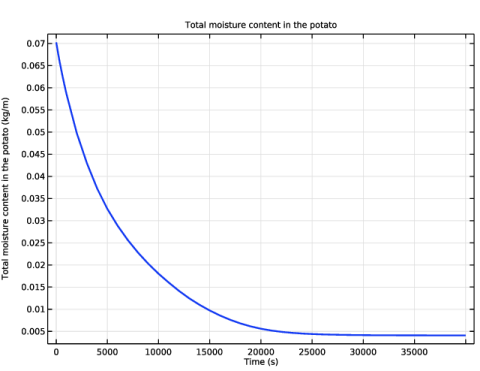
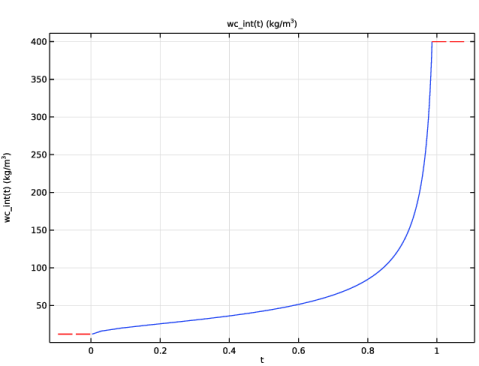
In the Settings window for 1D Plot Group, type Moisture Content in Porous Medium over Time in the Label text field.
|
|
3
|
|
4
|
|
5
|
Locate the Plot Settings section.
|
|
6
|
Select the y-axis label checkbox. In the associated text field, type Total moisture content in the potato (kg/m).
|
|
1
|
|
2
|
|
4
|
|
5
|
|
6
|
|
1
|
|
2
|
|
3
|
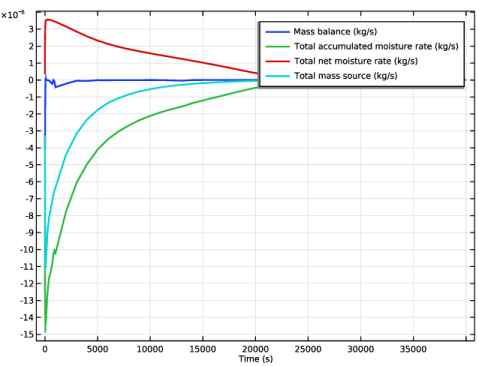
Click Replace Expression in the upper-right corner of the Expressions section. From the menu, choose Component 1 (comp1) > Moisture Transport in Air > Mass balance > mt.massBalance - Mass balance - kg/s.
|
|
4
|
Click Add Expression in the upper-right corner of the Expressions section. From the menu, choose Component 1 (comp1) > Moisture Transport in Air > Mass balance > mt.dwcInt - Total accumulated moisture rate - kg/s.
|
|
5
|
Click Add Expression in the upper-right corner of the Expressions section. From the menu, choose Component 1 (comp1) > Moisture Transport in Air > Mass balance > mt.ntfluxInt - Total net moisture rate - kg/s.
|
|
6
|
Click Add Expression in the upper-right corner of the Expressions section. From the menu, choose Component 1 (comp1) > Moisture Transport in Air > Mass balance > mt.GInt - Total mass source - kg/s.
|
|
7
|
Click
 Evaluate. Evaluate. |
|
1
|
Go to the Table 1 window.
|
|
2
|
Click the Table Graph button in the window toolbar.
|
|
1
|
|
2
|
|
1
|
|
2
|
|
3
|
Select the Show legends checkbox.
|
|
4
|