|
|
|
|
1
|
|
2
|
In the Application Libraries window, select Heat Transfer Module > Tutorials, Forced and Natural Convection > heat_sink in the tree.
|
|
3
|
Click
 Open. Open. |
|
1
|
|
2
|
Go to the Add Physics window.
|
|
3
|
|
4
|
Click the Add to Component 1 button in the window toolbar.
|
|
5
|
|
1
|
|
2
|
|
1
|
In the Model Builder window, under Component 1 (comp1) > Surface-to-Surface Radiation (rad) click Diffuse Surface 1.
|
|
2
|
|
3
|
|
4
|
Locate the Surface Emissivity section. From the ε list, choose User defined. In the associated text field, type 0.85.
|
|
1
|
|
2
|
|
3
|
|
1
|
|
2
|
Go to the Add Multiphysics window.
|
|
3
|
In the tree, select No Predefined Multiphysics Available for the Selected Physics Interfaces.
|
|
4
|
Find the Select the physics interfaces you want to couple subsection. In the table, clear the Couple checkbox for Laminar Flow (spf).
|
|
5
|
|
6
|
Click the Add to Component button in the window toolbar.
|
|
7
|
|
1
|
|
1
|
|
2
|
Go to the Add Study window.
|
|
3
|
|
4
|
Click the Add Study button in the window toolbar.
|
|
5
|
|
1
|
|
2
|
|
3
|
Click OK.
|
|
1
|
In the Model Builder window, expand the Study 1 - without radiation node, then click Step 1: Stationary.
|
|
2
|
|
3
|
In the Solve for column of the table, under Component 1 (comp1), clear the checkbox for Surface-to-Surface Radiation (rad).
|
|
4
|
In the Solve for column of the table, under Component 1 (comp1) > Multiphysics, clear the checkbox for Heat Transfer with Surface-to-Surface Radiation 1 (htrad1).
|
|
1
|
|
2
|
|
3
|
|
1
|
In the Model Builder window, under Results, Ctrl-click to select Temperature (ht), Velocity (spf), Pressure (spf), Temperature and Fluid Flow (nitf1), and Energy Balance (ht).
|
|
2
|
Right-click and choose Group.
|
|
1
|
In the Model Builder window, under Results, Ctrl-click to select Temperature (ht) 1, Velocity (spf) 1, Pressure (spf) 1, Surface Radiosity (rad), and Temperature and Fluid Flow (nitf1) 1.
|
|
2
|
Right-click and choose Group.
|
|
1
|
|
2
|
|
1
|
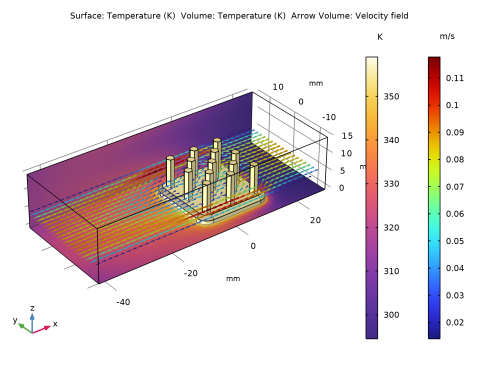
In the Settings window for 3D Plot Group, type Temperature and Fluid Flow, with Radiation in the Label text field.
|
|
2
|
|
1
|
In the Model Builder window, expand the Results > With radiation > Temperature and Fluid Flow, with Radiation > Fluid Flow node, then click Fluid Flow.
|
|
2
|
|
3
|
|
4
|
|
5
|
|
6
|
|
1
|
|
2
|
|
3
|
|
4
|