|
|
|



|
1
|
|
2
|
In the Select Physics tree, select Heat Transfer > Radiation > Heat Transfer with Radiation in Participating Media.
|
|
3
|
Click Add.
|
|
4
|
Click
 Study. Study. |
|
5
|
|
6
|
Click
 Done. Done. |
|
1
|
|
2
|
|
1
|
|
2
|
|
3
|
|
1
|
|
2
|
|
3
|
|
4
|
|
5
|
|
1
|
In the Model Builder window, under Global Definitions right-click Materials and choose Blank Material.
|
|
2
|
|
1
|
|
2
|
|
3
|
|
4
|
|
1
|
|
2
|
|
1
|
In the Model Builder window, under Component 1 (comp1) click Radiation in Participating Media (rpm).
|
|
2
|
In the Settings window for Radiation in Participating Media, locate the Participating Media Settings section.
|
|
3
|
|
1
|
In the Model Builder window, under Component 1 (comp1) > Heat Transfer in Solids (ht) click Initial Values 1.
|
|
2
|
|
3
|
|
1
|
|
2
|
|
3
|
|
4
|
|
1
|
|
1
|
|
2
|
|
3
|
|
1
|
|
2
|
|
1
|
|
2
|
|
3
|
|
4
|
Click
 Build Selected. Build Selected. |
|
1
|
|
2
|
|
1
|
|
2
|
|
3
|
|
1
|
|
2
|
|
3
|
Click
 Add. Add. |
|
1
|
|
2
|
|
3
|
|
4
|
In the Model Builder window, expand the Solution 1 (sol1) > Time-Dependent Solver 1 > Segregated 1 node, then click Radiative Intensities 1.
|
|
5
|
|
6
|
|
7
|
|
1
|
|
2
|
|
1
|
|
2
|
|
3
|
|
4
|
Click Import.
|
|
1
|
|
2
|
|
3
|
|
4
|
|
1
|
In the Model Builder window, under Component 1 (comp1), Ctrl-click to select Heat Transfer in Solids (ht) and Radiation in Participating Media (rpm).
|
|
2
|
Right-click and choose Copy.
|
 Multiphysics Couplings and choose Domain > Heat Transfer with Radiation in Participating Media.
|
1
|
In the Model Builder window, under Component 2 (comp2) click Radiation in Participating Media (rpm2).
|
|
2
|
In the Settings window for Radiation in Participating Media, locate the Participating Media Settings section.
|
|
3
|
Find the Radiation settings subsection. From the Radiation discretization method list, choose P1 approximation.
|
|
1
|
|
2
|
Go to the Add Study window.
|
|
3
|
|
4
|
Click the Add Study button in the window toolbar.
|
|
1
|
In the Model Builder window, under Study 1: DOM, Ctrl-click to select Parametric Sweep and Step 1: Time Dependent.
|
|
2
|
Right-click and choose Copy.
|
|
1
|
|
2
|
In the Solve for column of the table, under Component 1 (comp1), clear the checkboxes for Heat Transfer in Solids (ht) and Radiation in Participating Media (rpm).
|
|
3
|
In the Solve for column of the table, under Component 1 (comp1) > Multiphysics, clear the checkbox for Heat Transfer with Radiation in Participating Media 1 (htrpm1).
|
|
1
|
|
2
|
|
3
|
In the Solve for column of the table, under Component 2 (comp2), clear the checkboxes for Heat Transfer in Solids (ht2) and Radiation in Participating Media (rpm2).
|
|
4
|
In the Solve for column of the table, under Component 2 (comp2) > Multiphysics, clear the checkbox for Heat Transfer with Radiation in Participating Media 2 (htrpm2).
|
|
1
|
|
1
|
|
2
|
|
1
|
|
2
|
|
3
|
|
4
|
Click Import.
|
|
1
|
|
2
|
|
3
|
|
4
|
|
1
|
|
2
|
In the Settings window for Optically Thick Participating Medium, locate the Optically Thick Participating Medium section.
|
|
3
|
|
1
|
Go to the Add Study window.
|
|
2
|
|
3
|
Click the Add Study button in the window toolbar.
|
|
4
|
|
5
|
|
1
|
In the Model Builder window, under Study 2: P1, Ctrl-click to select Parametric Sweep and Step 1: Time Dependent.
|
|
2
|
Right-click and choose Copy.
|
|
1
|
|
2
|
In the Solve for column of the table, under Component 2 (comp2), clear the checkboxes for Heat Transfer in Solids (ht2) and Radiation in Participating Media (rpm2).
|
|
3
|
In the Solve for column of the table, under Component 2 (comp2) > Multiphysics, clear the checkbox for Heat Transfer with Radiation in Participating Media 2 (htrpm2).
|
|
1
|
|
2
|
|
3
|
In the Solve for column of the table, under Component 3 (comp3), clear the checkbox for Heat Transfer in Solids (ht3).
|
|
1
|
|
2
|
|
3
|
In the Solve for column of the table, under Component 3 (comp3), clear the checkbox for Heat Transfer in Solids (ht3).
|
|
1
|
|
2
|
|
3
|
|
4
|
|
5
|
|
6
|
|
1
|
|
2
|
|
3
|
|
1
|
|
2
|
|
3
|
|
1
|
|
2
|
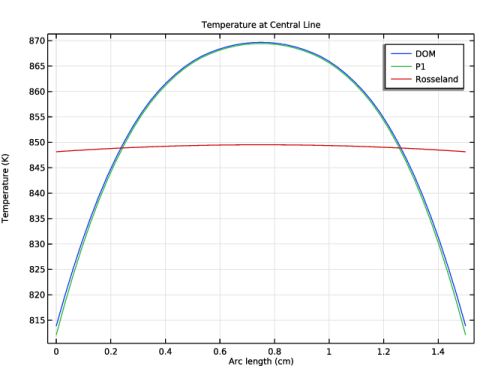
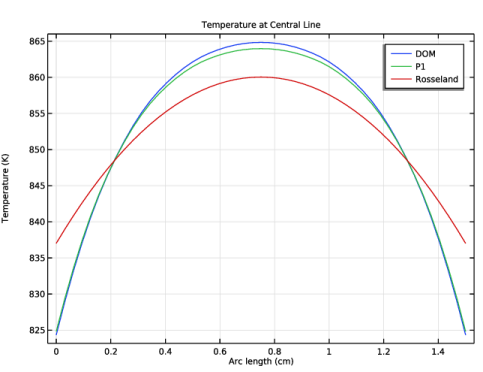
In the Settings window for 1D Plot Group, type Temperature at Central Line for k = 5 in the Label text field.
|
|
3
|
|
4
|
|
1
|
|
2
|
|
3
|
|
4
|
|
5
|
|
6
|
|
7
|
Select the Show legends checkbox.
|
|
9
|
|
1
|
|
2
|
|
3
|
|
4
|
Locate the Legends section. In the table, enter the following settings:
|
|
1
|
|
2
|
|
3
|
|
4
|
Locate the Legends section. In the table, enter the following settings:
|
|
5
|
|
1
|
In the Model Builder window, right-click Temperature at Central Line for k = 5 and choose Duplicate.
|
|
2
|
In the Settings window for 1D Plot Group, type Temperature at Central Line for k = 120 in the Label text field.
|
|
1
|
In the Model Builder window, expand the Temperature at Central Line for k = 120 node, then click Line Graph 1.
|
|
2
|
|
3
|
|
1
|
|
2
|
|
3
|
|
1
|
|
2
|
|
3
|
|
4
|