PDF

Nonisothermal Turbulent Flow over a Flat Plate
Introduction
This model of turbulent airflow over a flat plate validates the skin friction coefficient against the White’s correlation and compares the simulated heat transfer coefficient with Nusselt number based correlations. The simulation results are in good agreement with empirical correlations.
Model Definition
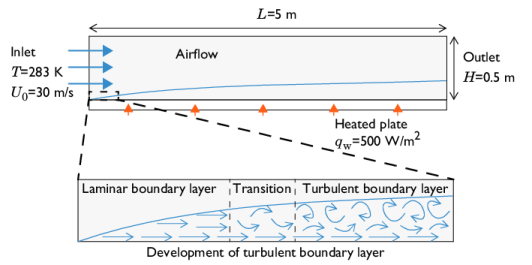
A coupled heat transfer and airflow problem is solved using the Nonisothermal Flow multiphysics interface in a 2D geometry:
Figure 1: Schematic view of the model definition. Note that the boundary layer thickness is exaggerated for clarity.
A laminar airflow with uniform velocity profile U0 = 30 m/s and uniform temperature profile T0 = 283 K enters the domain through the left boundary. It flows above a plate of length L heated with a constant heat flux qw of 500 W/m2. Turbulence quickly develops in the boundary layer due to the high velocity of the air.
Turbulence Modeling and Wall Treatment
The turbulent airflow is modeled by the Reynolds-averaged Navier–Stokes (RANS) equations, by using the Turbulent Flow, SST version of the Nonisothermal Flow multiphysics interface. The Automatic option for Wall treatment provided by this interface allows using wall functions when the boundary layer mesh is coarse, and to switch to a low Reynolds number formulation when the mesh is fine enough in the boundary layer.
Because of the high velocity of the airflow, the laminar and transition boundary layers can be neglected. In a setup where the laminar boundary layer is of importance and later switches to a turbulent boundary layer, the SST turbulence model proposes an option to model transition. The Include transition modeling option is available in the Turbulent Flow, SST physics node.
The Inlet boundary condition is used to set the laminar inlet at the left boundary of the computational domain by imposing both a uniform velocity profile and no turbulent intensity.
Nusselt Number and skin friction Correlations
In Ref. 1 (Eq. 6), the Nusselt number correlation is given for a turbulent flow over a plate either at uniform temperature, or heated with a uniform heat flux. At the position x along the heated plate, the Nusselt number Nux is given by the following formula:
,
where Rex is the Reynolds number at the position x along the heated plate and at film temperature Tf,x, defined by
.
Pr is the Prandtl number at film temperature Tfx, defined by
.
Cf is the skin friction coefficient, defined for example by White’s correlation:
,
where ρ(Τfx) (SI unit: kg/m3) denotes the density, μ(Τf,x) (SI unit: Pa·s) the dynamic viscosity, Cp(Τfx) (SI unit: J/(kg·K)) the heat capacity at constant pressure, and kf(Τfx) (SI unit: W/(m·K)) the thermal conductivity, and Tfx = (T0 + Twx) ⁄ 2, with Twx the plate surface temperature.
The heat transfer coefficient, h (SI unit: W/(m2·K)), at the surface of the heated plate is then expressed as
.
To validate the results of the numerical simulation, the skin friction coefficient and the heat transfer coefficient obtained from the above correlations are compared with the values calculated from the computed velocity and temperature fields, as follows
,
,
where τw is a shear wall stress
,
and Tbx is the bulk temperature at the position x along the heated plate
.
Results and Discussion
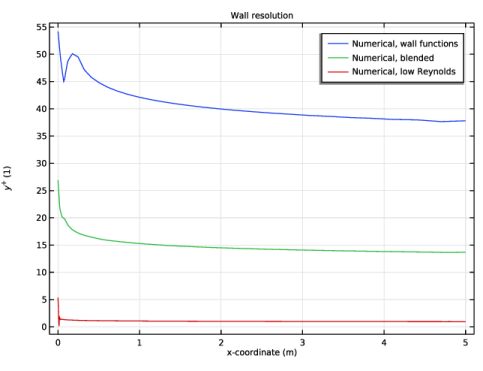
A numerical convergence study based on the mesh refinement is run using the mesh_coeff parameter. The parameter is chosen so that the first fluid cell falls in the turbulent sublayer (y+ > 30), in the buffer layer (1 < y+ < 30), and in the laminar sublayer (y+ < 1) as shown in Figure 2. This way, results are compared when the Automatic wall treatment operates in wall function mode, low Reynolds mode, and the blending of the two.
Figure 2: Wall resolution in viscous units (y+).
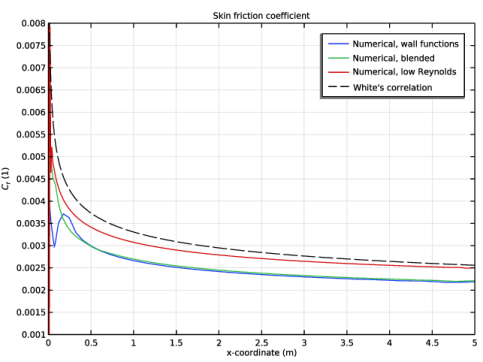
The comparison of the computed skin friction coefficient with that estimated using White’s correlation (Figure 3) shows good agreement across the plate for all three approaches (wall functions, low Reynolds, and blended).
Figure 3: Comparison of the computed skin friction coefficient with values estimated using White’s correlation.
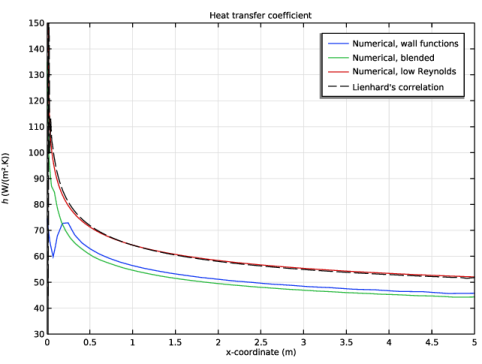
A similar level of agreement is observed in the comparison of the heat transfer coefficient with values obtained from the Nusselt number correlations (Figure 4).
Figure 4: Comparison of the computed heat transfer coefficient with the heat transfer coefficient estimations based on Nusselt number correlations.
References
1. J.H. Lienhard V, Heat transfer in flat-plate boundary layers: a correlation for laminar, transitional, and turbulent flow, Journal of Heat Transfer, 2020.
Application Library path: Heat_Transfer_Module/Verification_Examples/flat_plate_nitf_turbulent
Modeling Instructions
From the File menu, choose New.
New
In the New window, click  Model Wizard.
Model Wizard
1
In the Model Wizard window, click  2D.
2
In the Select Physics tree, select Fluid Flow > Nonisothermal Flow > Turbulent Flow > Turbulent Flow, SST.
3
Click Add.
4
Click  Study.
5
In the Select Study tree, select Preset Studies for Selected Multiphysics > Stationary with Initialization.
6
Global Definitions
Parameters 1
First, define parameters for the geometry, the inlet conditions, and the heat flux applied on the plate.
1
In the Model Builder window, under Global Definitions click Parameters 1.
2
In the Settings window for Parameters, locate the Parameters section.
3
Geometry 1
Rectangle 1 (r1)
1
In the Geometry toolbar, click  Rectangle.
2
In the Settings window for Rectangle, locate the Size and Shape section.
3
In the Width text field, type L.
4
In the Height text field, type b.
5
Click  Build All Objects.
Add Material
1
In the Materials toolbar, click  Add Material to open the Add Material window.
2
Go to the Add Material window.
3
In the tree, select Built-in > Air.
4
Click the Add to Component button in the window toolbar.
5
In the Materials toolbar, click  Add Material to close the Add Material window.
Materials
Air (mat1)
Click the  Zoom Extents button in the Graphics toolbar.
Definitions
Variables 1
1
In the Model Builder window, expand the Component 1 (comp1) > Definitions node.
2
Right-click Definitions and choose Variables.
Define the material properties of the airflow at film conditions for the computation of the Nusselt correlation.
3
In the Settings window for Variables, locate the Variables section.
4
Turbulent Flow, SST (spf)
Set the domain and boundary conditions for the definition of the compressible airflow. An Automatic wall treatment is set by default in the turbulence model.
1
In the Model Builder window, under Component 1 (comp1) click Turbulent Flow, SST (spf).
2
In the Settings window for Turbulent Flow, SST, locate the Physical Model section.
3
From the Compressibility list, choose Compressible flow (Ma<0.3).
Initial Values 1
1
In the Model Builder window, under Component 1 (comp1) > Turbulent Flow, SST (spf) click Initial Values 1.
2
In the Settings window for Initial Values, locate the Initial Values section.
3
Specify the u vector as
Inlet 1
1
In the Physics toolbar, click  Boundaries and choose Inlet.
2
3
In the Settings window for Inlet, locate the Velocity section.
4
In the U0 text field, type U0.
5
Locate the Turbulence Conditions section. From the IT list, choose User defined.
6
Outlet 1
1
In the Physics toolbar, click  Boundaries and choose Outlet.
2
A symmetry boundary condition is applied at the top of the domain to improve numerical convergence.
Symmetry 1
1
In the Physics toolbar, click  Boundaries and choose Symmetry.
2
Heat Transfer in Fluids (ht)
Set the domain and boundary conditions for the definition of heat transfer in air over the heated plate.
1
In the Model Builder window, under Component 1 (comp1) click Heat Transfer in Fluids (ht).
Inflow 1
1
In the Physics toolbar, click  Boundaries and choose Inflow.
2
3
In the Settings window for Inflow, locate the Upstream Properties section.
4
In the Tustr text field, type T0.
Outflow 1
1
In the Physics toolbar, click  Boundaries and choose Outflow.
2
Symmetry 1
1
In the Physics toolbar, click  Boundaries and choose Symmetry.
2
Heat Flux 1
1
In the Physics toolbar, click  Boundaries and choose Heat Flux.
2
In the Settings window for Heat Flux, locate the Heat Flux section.
3
In the q0 text field, type qw.
4
Mesh 1
Set manually a mapped mesh for the numerical convergence study, with refinement in the boundary layer over the plate.
1
In the Model Builder window, under Component 1 (comp1) click Mesh 1.
2
In the Settings window for Mesh, locate the Sequence Type section.
3
From the list, choose User-controlled mesh.
Size 1
1
In the Model Builder window, under Component 1 (comp1) > Mesh 1 right-click Size 1 and choose Delete.
2
Click Yes to confirm.
Corner Refinement 1
1
In the Model Builder window, right-click Corner Refinement 1 and choose Delete.
2
Click Yes to confirm.
Free Triangular 1
1
In the Model Builder window, right-click Free Triangular 1 and choose Delete.
2
Click Yes to confirm.
Boundary Layers 1
1
In the Model Builder window, right-click Boundary Layers 1 and choose Delete.
2
Click Yes to confirm.
Mapped 1
In the Mesh toolbar, click  Mapped.
Distribution (horizontal)
1
Right-click Mapped 1 and choose Distribution.
2
In the Settings window for Distribution, type Distribution (horizontal) in the Label text field.
3
4
Locate the Distribution section. From the Distribution type list, choose Predefined.
5
In the Number of elements text field, type L*2*mesh_coeff.
6
In the Element ratio text field, type 10.
7
Select the Reverse direction checkbox.
Distribution (vertical)
1
Right-click Distribution (horizontal) and choose Duplicate.
2
In the Settings window for Distribution, type Distribution (vertical) in the Label text field.
3
Locate the Boundary Selection section. Click  Clear Selection.
4
5
Locate the Distribution section. In the Number of elements text field, type 10*mesh_coeff.
6
From the Growth rate list, choose Exponential.
7
In the Element ratio text field, type 15*mesh_coeff*(mesh_coeff-1)-30.
8
Clear the Reverse direction checkbox.
9
Click  Build All.
Mesh 1
In the Model Builder window, collapse the Component 1 (comp1) > Mesh 1 node.
Study 1
Add a parametric sweep for the numerical convergence study.
Parametric Sweep
1
In the Study toolbar, click  Parametric Sweep.
2
In the Settings window for Parametric Sweep, locate the Study Settings section.
3
4
5
In the Study toolbar, click  Compute.
Results
The default plot groups show the distributions of velocity, pressure, temperature, and the wall resolution. Follow the instructions below to reproduce the plots shown in Figure 2.
Wall y+
1
In the Results toolbar, click  1D Plot Group.
2
In the Settings window for 1D Plot Group, type Wall y+ in the Label text field.
3
Locate the Data section. From the Dataset list, choose Study 1/Parametric Solutions 1 (sol3).
4
Click to expand the Title section. From the Title type list, choose Manual.
5
In the Title text area, type Wall resolution.
6
Locate the Plot Settings section.
7
Select the y-axis label checkbox. In the associated text field, type \$y^+\$ (1).
8
Click the  Zoom Extents button in the Graphics toolbar.
Numerical
1
Right-click Wall y+ and choose Line Graph.
2
In the Settings window for Line Graph, type Numerical in the Label text field.
3
4
Locate the y-Axis Data section. In the Expression text field, type spf.Delta_wPlus.
5
Locate the x-Axis Data section. From the Parameter list, choose Expression.
6
In the Expression text field, type x.
7
Click to expand the Legends section. Select the Show legends checkbox.
8
From the Legends list, choose Manual.
9
10
In the Wall y+ toolbar, click  Plot.
Finally, follow the instructions below to compare the skin friction and heat transfer coefficients obtained from numerical results with the ones computed from correlations, and reproduce the plot of Figure 3 and Figure 4.
Skin Friction Coefficient
1
In the Results toolbar, click  1D Plot Group.
2
In the Settings window for 1D Plot Group, type Skin Friction Coefficient in the Label text field.
3
Locate the Data section. From the Dataset list, choose Study 1/Parametric Solutions 1 (sol3).
4
Locate the Title section. From the Title type list, choose Manual.
5
In the Title text area, type Skin friction coefficient.
6
Locate the Plot Settings section.
7
Select the y-axis label checkbox. In the associated text field, type \$C_f\$ (1).
8
Locate the Axis section. Select the Manual axis limits checkbox.
9
In the x minimum text field, type 0.
10
In the x maximum text field, type 5.
11
In the y minimum text field, type 1e-3.
12
In the y maximum text field, type 8e-3.
Numerical
1
Right-click Skin Friction Coefficient and choose Line Graph.
2
In the Settings window for Line Graph, type Numerical in the Label text field.
3
4
Locate the y-Axis Data section. In the Expression text field, type Cf_film.
5
Locate the x-Axis Data section. From the Parameter list, choose Expression.
6
In the Expression text field, type x.
7
Locate the Legends section. Select the Show legends checkbox.
8
From the Legends list, choose Manual.
9
White’s correlation
1
In the Model Builder window, right-click Skin Friction Coefficient and choose Line Graph.
2
In the Settings window for Line Graph, locate the Data section.
3
From the Dataset list, choose Study 1/Parametric Solutions 1 (sol3).
4
From the Parameter selection (mesh_coeff) list, choose Last.
5
6
In the Label text field, type White's correlation.
7
Locate the y-Axis Data section. In the Expression text field, type Cf_White.
8
Locate the x-Axis Data section. From the Parameter list, choose Expression.
9
In the Expression text field, type x.
10
Click to expand the Coloring and Style section. Find the Line style subsection. From the Line list, choose Dashed.
11
From the Color list, choose From theme.
12
Locate the Legends section. Select the Show legends checkbox.
13
Find the Include subsection. Clear the Solution checkbox.
14
Select the Label checkbox.
15
In the Skin Friction Coefficient toolbar, click  Plot.
Heat Transfer Coefficient
1
In the Results toolbar, click  1D Plot Group.
2
In the Settings window for 1D Plot Group, type Heat Transfer Coefficient in the Label text field.
3
Locate the Data section. From the Dataset list, choose Study 1/Parametric Solutions 1 (sol3).
4
Locate the Title section. From the Title type list, choose Manual.
5
In the Title text area, type Heat transfer coefficient.
6
Locate the Plot Settings section.
7
Select the y-axis label checkbox. In the associated text field, type \$h\$ (W/(m².K)).
8
Locate the Axis section. Select the Manual axis limits checkbox.
9
In the x minimum text field, type 0.
10
In the x maximum text field, type 5.
11
In the y minimum text field, type 30.
12
In the y maximum text field, type 150.
Numerical
1
Right-click Heat Transfer Coefficient and choose Line Graph.
2
In the Settings window for Line Graph, type Numerical in the Label text field.
3
4
Locate the y-Axis Data section. In the Expression text field, type qw/(ht.Tu-Tb).
5
Locate the x-Axis Data section. From the Parameter list, choose Expression.
6
In the Expression text field, type x.
7
Locate the Legends section. Select the Show legends checkbox.
8
From the Legends list, choose Manual.
9
Lienhard’s correlation
1
In the Model Builder window, right-click Heat Transfer Coefficient and choose Line Graph.
2
In the Settings window for Line Graph, locate the Data section.
3
From the Dataset list, choose Study 1/Parametric Solutions 1 (sol3).
4
From the Parameter selection (mesh_coeff) list, choose Last.
5
6
In the Label text field, type Lienhard's correlation.
7
Locate the y-Axis Data section. In the Expression text field, type ht.kxx*Nu_x_turb_Lienhard/x.
8
Locate the x-Axis Data section. From the Parameter list, choose Expression.
9
In the Expression text field, type x.
10
Locate the Coloring and Style section. Find the Line style subsection. From the Line list, choose Dashed.
11
From the Color list, choose From theme.
12
Locate the Legends section. Select the Show legends checkbox.
13
Find the Include subsection. Clear the Solution checkbox.
14
Select the Label checkbox.
15
In the Heat Transfer Coefficient toolbar, click  Plot.