
PDF

Action on Structures Exposed to Fire
— Heating Process
Introduction
This is the second verification example from Ref. 1 which is part of the European Standard EN-1991-1-2:2010-12, Eurocode 1: Actions on structures - Part 1-2: General actions - Actions on structures exposed to fire. It describes a heating process using a temperature dependent thermal conductivity. Verify that the numerical results obtained with COMSOL Multiphysics are within the validity ranges specified in the norm.
Model Definition
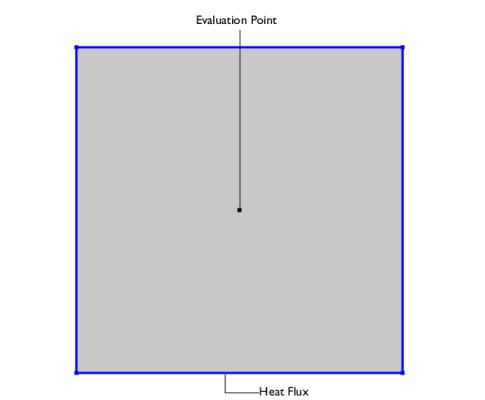
The modeled geometry is a square with a side length of 0.2 m (Figure 1).
Figure 1: Model geometry and setup.
The initial temperature is 0°C. A heat flux condition is applied to all boundaries according to
with the heat transfer coefficient h = 10 W/(m2·K) and Text = 1000°C. In addition, flux due to radiation is considered:
The surface emissivity ε is 0.8 and σ is the Stefan–Boltzmann constant.
The material properties are listed below (Table 1).
ρ
Cp
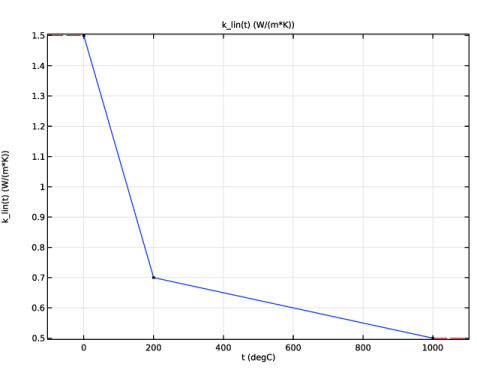
The thermal conductivity is a piecewise linear function of the temperature (Figure 2).
Figure 2: Thermal conductivity function.
Results and Discussion
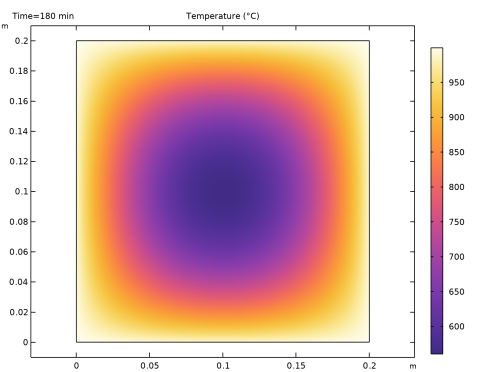
The temperature distribution after 180 min is shown in Figure 3.
Figure 3: Temperature distribution after 180 min.
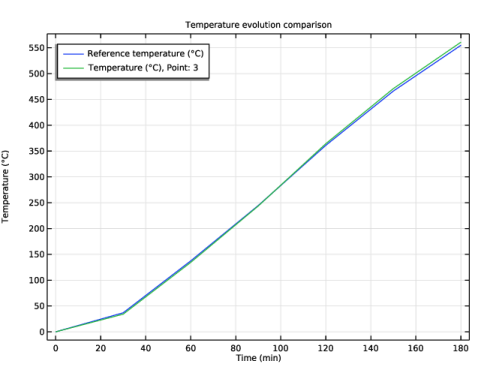
The reference and computed temperatures are compared in Figure 4. The numerical values match the norm values very well.
Figure 4: Reference (blue) and calculated temperature (green).
The exact values, and the absolute and relative errors for each time are listed in Table 2.
Table 2: Results.
To fulfill the norm, the maximum deviation from the reference values must not exceed 5 K for ≤ 60 min and 3% for > 60 min.
Reference
1. DIN EN 1991-1-2/NA, National Annex - Nationally determined parameters - Eurocode 1: Actions on structures - Part 1-2: General actions - Actions on structures exposed to fire
Application Library path: Heat_Transfer_Module/Verification_Examples/fire_effects_heating
Modeling Instructions
From the File menu, choose New.
New
In the New window, click  Model Wizard.
Model Wizard
1
In the Model Wizard window, click  2D.
2
In the Select Physics tree, select Heat Transfer > Heat Transfer in Solids (ht).
3
Click Add.
4
Click  Study.
5
In the Select Study tree, select General Studies > Time Dependent.
6
Geometry 1
Start with creating an interpolation function for the norm values. It will be used later for comparison with the numerical results.
Global Definitions
Reference temperature
1
In the Home toolbar, click  Functions and choose Global > Interpolation.
2
In the Settings window for Interpolation, locate the Definition section.
3
From the Data source list, choose File.
4
Click  Browse.
5
6
Click  Import.
7
In the Label text field, type Reference temperature.
8
Locate the Definition section. In the Function name text field, type Tref.
9
Locate the Units section. In the Argument table, enter the following settings:
10
In the Function table, enter the following settings:
Create another interpolation function for the thermal conductivity.
Thermal conductivity
1
In the Home toolbar, click  Functions and choose Global > Interpolation.
2
In the Settings window for Interpolation, type Thermal conductivity in the Label text field.
3
Locate the Definition section. In the Function name text field, type k_lin.
4
5
Locate the Units section. In the Argument table, enter the following settings:
6
In the Function table, enter the following settings:
7
Geometry 1
Square 1 (sq1)
1
In the Geometry toolbar, click  Square.
2
In the Settings window for Square, locate the Size section.
3
In the Side length text field, type 0.2.
Point 1 (pt1)
1
In the Geometry toolbar, click  Point.
2
In the Settings window for Point, locate the Point section.
3
In the x text field, type 0.1.
4
In the y text field, type .1.
Materials
Material 1 (mat1)
1
In the Model Builder window, under Component 1 (comp1) right-click Materials and choose Blank Material.
2
In the Settings window for Material, locate the Material Contents section.
3
Note, that for the thermal conductivity, you use the interpolation function defined before with the expression k_lin(T).
Definitions
Ambient Properties 1 (ampr1)
1
In the Physics toolbar, click  Shared Properties and choose Ambient Properties.
2
In the Settings window for Ambient Properties, locate the Ambient Conditions section.
3
In the Tamb text field, type 1000[degC].
Heat Transfer in Solids (ht)
Initial Values 1
1
In the Model Builder window, under Component 1 (comp1) > Heat Transfer in Solids (ht) click Initial Values 1.
2
In the Settings window for Initial Values, locate the Initial Values section.
3
In the T text field, type Tref(0).
Heat Flux 1
1
In the Physics toolbar, click  Boundaries and choose Heat Flux.
2
In the Settings window for Heat Flux, locate the Boundary Selection section.
3
From the Selection list, choose All boundaries.
4
Locate the Heat Flux section. From the Flux type list, choose Convective heat flux.
5
In the h text field, type 10.
6
From the Text list, choose Ambient temperature (ampr1).
Surface-to-Ambient Radiation 1
1
In the Physics toolbar, click  Boundaries and choose Surface-to-Ambient Radiation.
2
In the Settings window for Surface-to-Ambient Radiation, locate the Boundary Selection section.
3
From the Selection list, choose All boundaries.
4
Locate the Surface-to-Ambient Radiation section. From the Tamb list, choose Ambient temperature (ampr1).
5
From the ε list, choose User defined. In the associated text field, type 0.8.
Study 1
Step 1: Time Dependent
1
In the Model Builder window, under Study 1 click Step 1: Time Dependent.
2
In the Settings window for Time Dependent, locate the Study Settings section.
3
From the Time unit list, choose min.
4
In the Output times text field, type 0 30 60 90 120 150 180.
The default solver is accurate enough to validate the benchmark. Tightening the tolerance improves the results, especially in terms of energy balance which you can check with the quantity ht.energyBalance.
5
From the Tolerance list, choose User controlled.
6
In the Relative tolerance text field, type 1e-5.
7
In the Study toolbar, click  Compute.
Results
Change the unit of the temperature results to degrees Celsius.
Preferred Units 1
1
In the Results toolbar, click  Configurations and choose Preferred Units.
2
In the Settings window for Preferred Units, locate the Units section.
3
Click  Add Physical Quantity.
4
In the Physical Quantity dialog, select General > Temperature (K) in the tree.
5
6
In the Settings window for Preferred Units, locate the Units section.
7
8
Click  Apply.
Reference temperature
1
In the Results toolbar, click  Global Evaluation.
2
In the Settings window for Global Evaluation, locate the Expressions section.
3
4
In the Label text field, type Reference temperature.
5
Click  Evaluate.
Temperature
1
In the Results toolbar, click  Point Evaluation.
2
3
In the Settings window for Point Evaluation, locate the Expressions section.
4
5
In the Label text field, type Temperature.
Instead of creating a new table, evaluate the results in the same table as before.
6
Right-click on the Point Evaluation: Temperature node.
7
Go to Evaluate and click Table 1 - Global Evaluation: Reference temperature (Tref(t)).
Table 1
1
Go to the Table 1 window.
2
Click the Table Graph button in the window toolbar.
Results
Temperature
1
In the Model Builder window, under Results click 1D Plot Group 2.
2
In the Settings window for 1D Plot Group, type Temperature in the Label text field.
3
Click to expand the Title section. From the Title type list, choose Manual.
4
In the Title text area, type Temperature evolution comparison.
5
Locate the Plot Settings section.
6
Select the y-axis label checkbox. In the associated text field, type Temperature (°C).
7
Locate the Legend section. From the Position list, choose Upper left.
Table Graph 1
1
In the Model Builder window, click Table Graph 1.
2
In the Settings window for Table Graph, click to expand the Legends section.
3
Select the Show legends checkbox.
4
In the Temperature toolbar, click  Plot.
Compare with Figure 4.
Finally, evaluate the absolute and relative errors.
Absolute and relative error
1
In the Results toolbar, click  Point Evaluation.
2
In the Settings window for Point Evaluation, locate the Data section.
3
From the Time selection list, choose Manual.
4
In the Time indices (1-7) text field, type 2 3 4 5 6 7.
5
6
In the Label text field, type Absolute and relative error.
7
Locate the Expressions section. In the table, enter the following settings:
8
Click  Evaluate.
Table 2
1
Go to the Table 2 window.
The absolute and relative errors are within the allowed range. Compare with Table 2.