|
|
|





|
1
|
|
2
|
In the Select Physics tree, select Heat Transfer > Radiation > Heat Transfer with Surface-to-Surface Radiation.
|
|
3
|
Click Add.
|
|
4
|
Click
 Study. Study. |
|
5
|
|
6
|
Click
 Done. Done. |
|
1
|
|
2
|
|
3
|
|
4
|
|
1
|
|
2
|
|
3
|
|
4
|
|
1
|
|
2
|
|
3
|
|
4
|
|
1
|
|
2
|
|
1
|
|
2
|
|
3
|
Locate the Material Contents section. In the table, enter the following settings:
|
|
1
|
In the Model Builder window, under Component 1 (comp1) > Heat Transfer in Solids (ht) click Initial Values 1.
|
|
2
|
|
3
|
|
1
|
|
3
|
|
4
|
|
1
|
|
3
|
|
4
|
|
1
|
|
3
|
|
4
|
|
1
|
|
1
|
|
1
|
In the Model Builder window, under Component 1 (comp1) > Surface-to-Surface Radiation (rad) click Diffuse Surface 1.
|
|
2
|
|
3
|
|
4
|
Locate the Surface Emissivity section. From the ε list, choose User defined. In the associated text field, type 0.8.
|
|
1
|
|
3
|
|
4
|
|
5
|
Locate the Surface Emissivity section. From the ε list, choose User defined. In the associated text field, type 0.4.
|
|
1
|
|
3
|
|
4
|
|
5
|
Locate the Surface Emissivity section. From the ε list, choose User defined. In the associated text field, type 0.6.
|
|
1
|
|
2
|
|
3
|
|
1
|
|
2
|
|
3
|
|
5
|
|
6
|
Locate the Element Size Parameters section.
|
|
7
|
|
1
|
|
2
|
|
3
|
|
5
|
|
6
|
Locate the Element Size Parameters section.
|
|
7
|
|
8
|
Click
 Build Selected. Build Selected. |
|
1
|
|
2
|
|
3
|
|
4
|
|
1
|
|
1
|
|
2
|
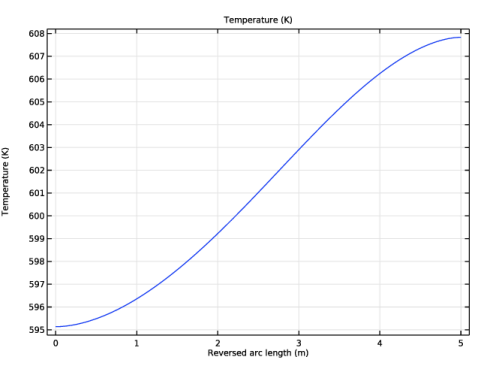
In the Settings window for 1D Plot Group, type Temperature Profile vs. Arc Length in the Label text field.
|
|
1
|
|
3
|
|
4
|
|
5
|
|
1
|
|
2
|
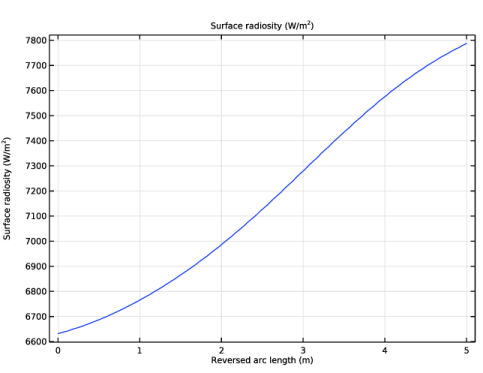
In the Settings window for 1D Plot Group, type Surface Radiosity Profile vs. Arc Length in the Label text field.
|
|
1
|
In the Model Builder window, expand the Surface Radiosity Profile vs. Arc Length node, then click Line Graph 1.
|
|
2
|
In the Settings window for Line Graph, click Replace Expression in the upper-right corner of the y-Axis Data section. From the menu, choose Component 1 (comp1) > Surface-to-Surface Radiation > Surface radiosity > rad.J - Surface radiosity - W/m².
|
|
3
|
|
1
|
|
3
|
In the Settings window for Line Integration, click Replace Expression in the upper-right corner of the Expressions section. From the menu, choose Component 1 (comp1) > Heat Transfer in Solids > Boundary fluxes > ht.ndflux - Normal conductive heat flux - W/m².
|
|
4
|
Click
 Evaluate. Evaluate. |
|
1
|
Go to the Table 1 window.
|
|
1
|
|
3
|
|
5
|
Click
 Evaluate. Evaluate. |
|
1
|
Go to the Table 2 window.
|
|
1
|
|
3
|
|
5
|
Click
 Evaluate. Evaluate. |
|
1
|
Go to the Table 3 window.
|