
PDF

Two-Phase Nonisothermal Zero-Gap Alkaline Water Electrolyzer
Introduction
This model defines a zero-gap alkaline water electrolyzer, where oxygen and hydrogen gas are evolved in porous gas diffusion nickel felt electrodes, placed adjacent to a porous separator (diaphragm).
The geometry defines a unit cell of an electrolyzer stack, in turn comprising two full electrolyzer cells, extending 10 cm along the channel direction. The two electrolyzer cells are separated by a corrugated bipolar steel plate.
The model solves for the fully intercoupled current distribution of the electrolyzer cells, two-phase flow of evolved gases and electrolyte, and heat transfer.
The model is advanced and uses several coupled physics interfaces. For new users, it is recommended to first study the Mass Transport and Electrochemical Reaction in a Fuel Cell Cathode and Fuel Cell Cathode with Liquid Water tutorial examples.
Model Definition
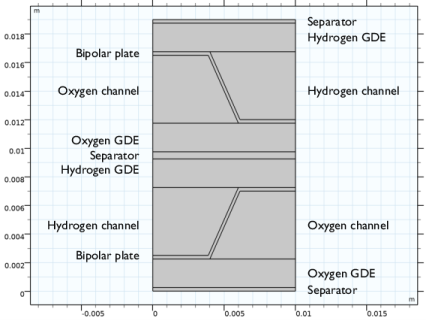
Figure 1: 2D-cross section of the two-cell unit cell.
Figure 1 shows a cross section of the model geometry, defining a two-cell unit cell within an electrolyzer stack. Each cell consists of a hydrogen electrolyte compartment, and an oxygen electrolyte compartment, separated by a bipolar steel plate and a separator (diaphragm). The 2 mm thick gas diffusion electrodes (GDEs) consist of porous nickel felt.
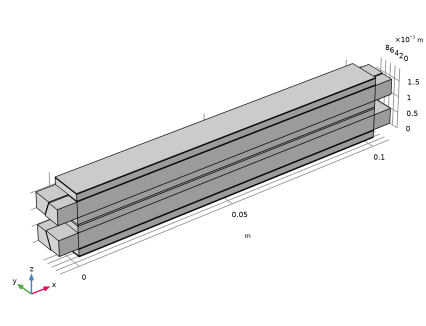
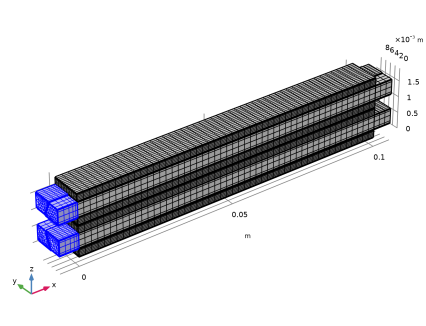
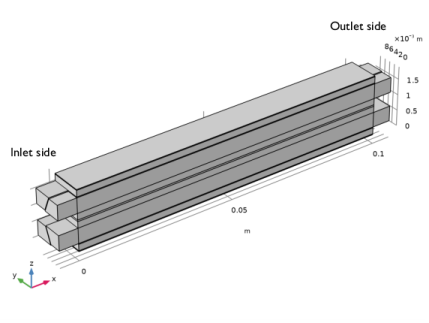
The cross section is extruded to form the 3D geometry as shown in Figure 2. The cell has a length of 10 cm, with additional 6 mm extrusions of the flow channels at the oxygen and hydrogen inlets and outlets.
Figure 2: Extruded 3D geometry.
Volume Fractions
The Phase Transport in Free and Porous Media interface solves for the relative gas volume fraction sg in the gas–electrolyte mixture. The relative liquid volume fraction is defined as
As gas is evolved in the electrodes and transported out to the gas–electrolyte channels, the volume fraction of electrolyte decreases, making room for the evolved gas.
In the GDEs, the electrolyte volume fraction εl is defined as
where εpor is the pore volume fraction relative to the total volume.
In the gas–electrolyte channels, the electrolyte volume fraction is defined as
Material Properties
The material properties for the steel bipolar plate and the 5 M KOH electrolyte are retrieved from the Built-in and Fuel Cell & Electrolyzer material libraries, respectively. User-defined values for the nickel felt GDEs are specified in a Parameters node. The Water and Electrolyzer interface is used to calculate the properties of the fully humidified H2 and O2 gas mixtures.
Volume-averaged properties, based on sg and sl, are used for the thermal conductivity, density and heat capacity of the gas-electrolyte mixture. These properties are defined on the GDE and channel domains by the use of Variables nodes.
Water Electrolyzer Interface
The current distribution and electrochemical reactions are defined using the Water Electrolyzer interface. The porous gas diffusion electrodes are modeled using Butler–Volmer kinetics. Ohmic losses in the electrode and electrolyte phases are included. Gas transport of the gas phase as a whole is included in the model, but any effects due to partial pressure gradients of the different species in the gas phase are neglected.
The effective electrolyte conductivity in the electrolyte compartment, GDEs, and the separator is set to depend on the electrolyte volume fraction according to
(1)
where σl,bulk is the bulk conductivity of 6 M KOH.
The cell voltage of the two-cell unit cell is set by the offset in the periodic condition (see the section below). Also, an electrolyte phase point condition is added in order to ground the model and ensure a unique solution for the potential variables.
Multiphase Flow In Free and Porous Media Multiphysics Interface
The two-phase flow model is defined by adding a Multiphase Flow in Free and Porous Media multiphysics interface to the model. This in turn adds the following physics interfaces to the model tree:
Darcy’s Law, solving for the liquid pressure in the GDEs
Laminar Flow, solving for the liquid pressure and velocity field in the channels
Phase Transport, solving for the gas phase volume fraction in the gas-liquid two-phase mixture
In addition, the following multiphysics nodes are also added by Multiphase Flow in Free and Porous Media:
Multiphase Flow in Porous Media, coupling Darcy’s law and Phase Transport in the GDEs
Free and Porous Media Flow Coupling, defining the boundary between the Laminar Flow and Darcy’s Law domains
Mixture Model, coupling Laminar Flow and Phase Transport in the channels
The gas and liquid mass sources, stemming from the electrode reactions defined by the Water Electrolyzer interface, are added as a Mass Source node in the Phase Transport interface. Turbulent Mixing is added in the channels to the Phase Transport interface in order to facilitate convergence.
Fully-developed flow conditions are defined on a common Inlet node in the Laminar Flow interface, with an average velocity of 1 cm/s set for all channels. A uniform outlet pressure of 25 atm is defined on the Outlet node in the same interface.
Heat Transfer in Solids and Fluids interface
Solid (bipolar plate), Fluid (channels) and Porous Medium (GDE and separator) nodes are used to define the heat transfer in the cell.
The heat sources related to the electrochemical reactions are added to the Heat Transfer interface by the use of an Electrochemical Heating multiphysics nodes.
The inlet temperature of the cell is set to 80°C.
Periodic Conditions
Periodicity between the topmost and bottommost separator boundaries in Figure 1 is defined by the use of a Periodic Condition node in Heat Transfer, which sets both the ingoing and outgoing heat fluxes, as well as the temperature, equal at the matching positions at the two boundaries. In the Water Electrolyzer interface, a periodic condition for the electrolyte phase potential is set up manually by the use of a Linear Extrusion operator, which also includes a potential offset of two times the cell voltage for the two-cell unit cell.
Study
Three consecutive study steps are used to solve the problem. For each step, the solution of the dependent variables solved for in the previous step are passed on as the corresponding initial values to the subsequent step.
A first Current Distribution Initialization step computes suitable initial values for the electrode and electrolyte phase potentials of the Water Electrolyzer interface. A second Stationary step then solves for the pressures and velocity fields of the Darcy’s Law and Laminar Flow interfaces only. The third and final step solves for the fully coupled problem, ramping up the cell voltage from 1.5 to 2.1 V using an Auxiliary Sweep.
Results and Discussion
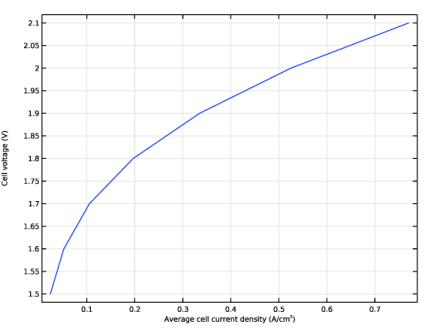
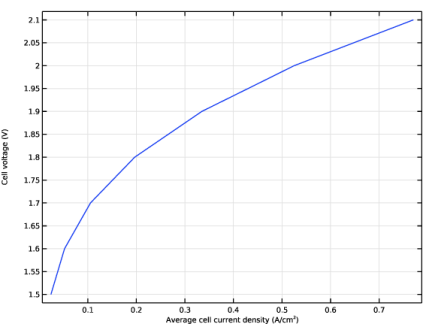
Figure 3 shows the polarization plot generated by the auxiliary sweep.
Figure 3: Polarization.
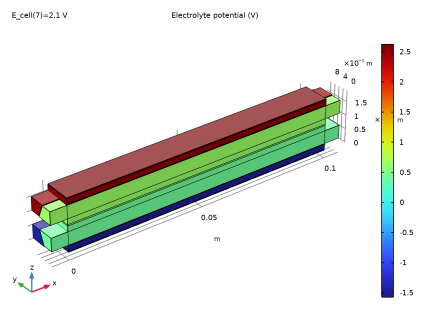
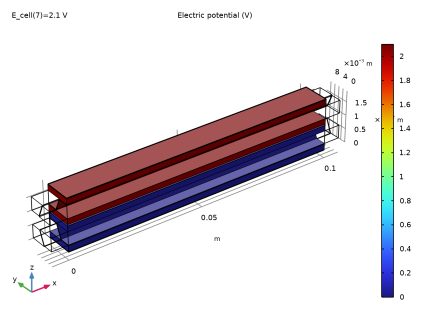
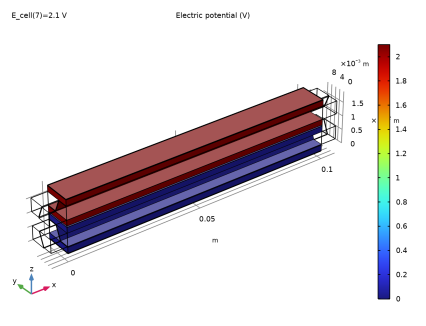
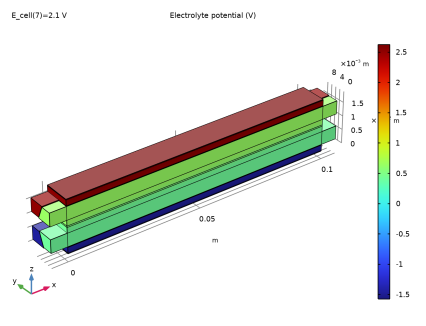
Figure 4 shows the electrolyte phase potential in the channels and GDEs for a cell voltage of 2.1 V, whereas Figure 5 shows the electrode phase potential in the GDEs and bipolar plates for the same cell potential.
Figure 4: Electrolyte phase potential.
Figure 5: Electrode phase potential.
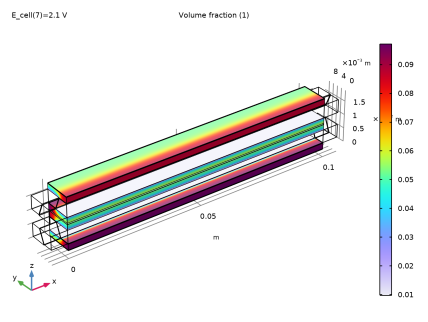
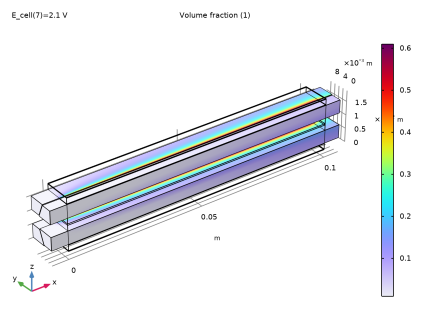
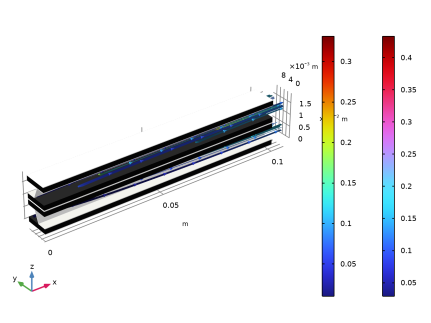
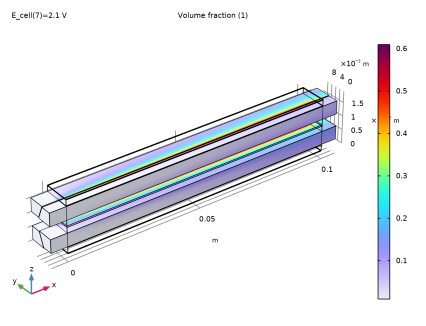
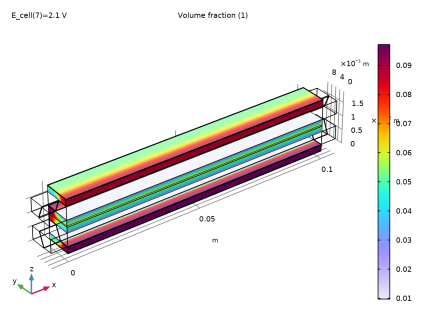
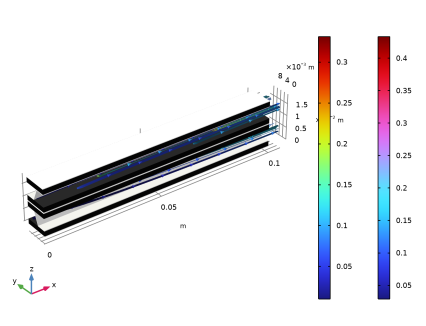
Figure 6 and Figure 7 show the gas volume fraction of the gas-electrolyte mixture in the GDEs and the channels, respectively, whereas Figure 8 shows the corresponding streamlines in the channels.
Figure 6: Gas volume fraction in the fluid mixture in the GDEs.
Figure 7: Gas volume fraction in the channels.
Figure 8: Gas streamlines and gas volume fraction.
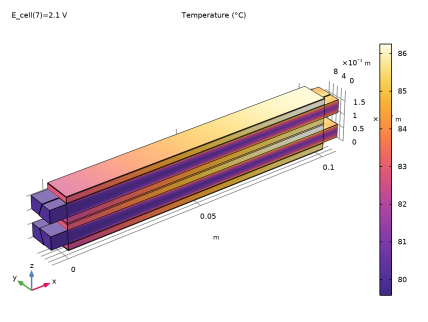
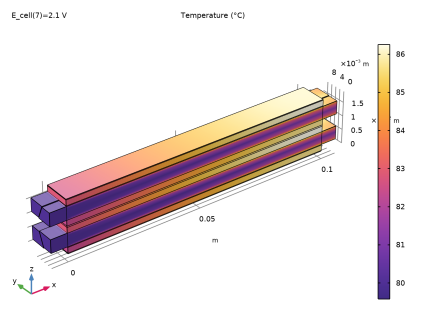
Figure 9: Temperature.
Figure 9 shows a plot of the temperature. The temperature increases toward the outlets.
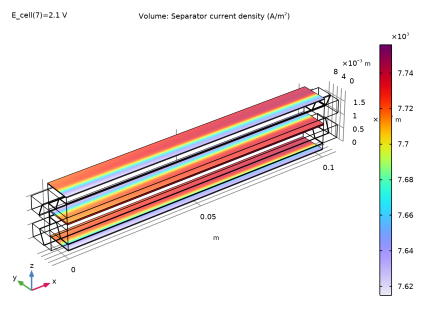
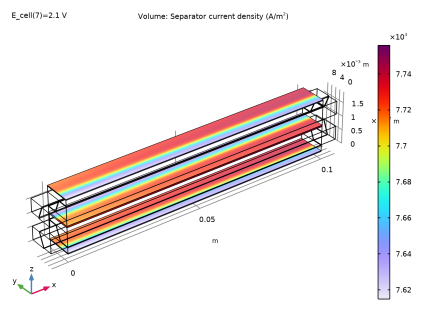
Figure 10: Separator current density.
Figure 10 shows a plot of the separator current density. The separator current density increases slightly toward the outlet of the cell. This is mainly an effect due to the increased temperature toward the outlet, which slightly lowers the cell equilibrium potential for electrolyzing water.
Application Library path: Fuel_Cell_and_Electrolyzer_Module/Electrolyzers/zero_gap_aec
Modeling Instructions
From the File menu, choose New.
New
In the New window, click  Model Wizard.
Model Wizard
1
In the Model Wizard window, click  3D.
2
In the Select Physics tree, select Electrochemistry > Water Electrolyzers > Alkaline (we).
3
Click Add.
4
In the Select Physics tree, select Fluid Flow > Porous Media and Subsurface Flow > Multiphase Free and Porous Media Flow.
5
Click Add.
6
In the Select Physics tree, select Heat Transfer > Heat Transfer in Solids and Fluids (ht).
7
Click Add.
8
Click  Study.
9
In the Select Study tree, select Preset Studies for Selected Physics Interfaces > Water Electrolyzer > Stationary with Initialization.
10
Geometry 1
Insert the geometry sequence from a file as follows:
1
In the Geometry toolbar, click Insert Sequence and choose Insert Sequence.
2
3
In the Geometry toolbar, click  Build All.
4
In the Model Builder window, under Component 1 (comp1) click Geometry 1.
5
In the Model Builder window, collapse the Geometry 1 node.
Global Definitions
Geometry Parameters
The geometry sequence you imported uses a number of parameters, which now appear in a Parameters node.
1
In the Model Builder window, under Global Definitions click Parameters 1.
2
In the Settings window for Parameters, type Geometry Parameters in the Label text field.
Physics Parameters
Add a second Parameters node for the physics parameters.
1
In the Home toolbar, click  Parameters and choose Add > Parameters.
2
In the Settings window for Parameters, type Physics Parameters in the Label text field.
Import the physics parameters from a text file.
3
Locate the Parameters section. Click  Load from File.
4
Materials
Add some material data from the material libraries as follows:
Add Material
1
In the Materials toolbar, click  Add Material to open the Add Material window.
2
Go to the Add Material window.
3
In the tree, select Built-in > Steel AISI 4340.
4
Right-click and choose Add to Component 1 (comp1).
Materials
Steel AISI 4340 (mat1)
1
In the Model Builder window, under Component 1 (comp1) > Materials click Steel AISI 4340 (mat1).
2
In the Settings window for Material, locate the Geometric Entity Selection section.
3
From the Selection list, choose Bipolar Plates.
Add Material
1
Go to the Add Material window.
2
In the tree, select Fuel Cell and Electrolyzer > Aqueous Alkali > Potassium Hydroxide, KOH.
3
Right-click and choose Add to Component 1 (comp1).
4
In the Materials toolbar, click  Add Material to close the Add Material window.
Materials
Potassium Hydroxide, KOH (mat2)
1
In the Settings window for Material, locate the Geometric Entity Selection section.
2
From the Selection list, choose Electrolyte Domains.
Definitions
Now add a number of Variables nodes. Note that the different nodes have different domain selections. In this way variables with the same name can be defined differently in different domains.
Variables - GDEs
1
In the Model Builder window, under Component 1 (comp1) right-click Definitions and choose Variables.
2
In the Settings window for Variables, type Variables - GDEs in the Label text field.
3
Locate the Geometric Entity Selection section. From the Geometric entity level list, choose Domain.
4
From the Selection list, choose GDEs.
5
Locate the Variables section. Click  Load from File.
6
Variables - Channels
1
In the Model Builder window, right-click Definitions and choose Variables.
2
In the Settings window for Variables, type Variables - Channels in the Label text field.
3
Locate the Geometric Entity Selection section. From the Geometric entity level list, choose Domain.
4
From the Selection list, choose Channels.
5
Locate the Variables section. Click  Load from File.
6
Some variable expressions you imported are indicating missing variable definitions. Change the name of the dependent variables in the phase transport interface in order to fix some of these issues.
Phase Transport in Free and Porous Media Flow (phtr)
1
In the Model Builder window, under Component 1 (comp1) click Phase Transport in Free and Porous Media Flow (phtr).
2
In the Settings window for Phase Transport in Free and Porous Media Flow, click to expand the Dependent Variables section.
3
In the Volume fractions (1) table, enter the following settings:
In this model s_l denotes the volume fraction of the liquid phase, and s_g denotes the volume fraction of the gas phase.
Water Electrolyzer (we)
Now start setting up the Water Electrolyzer physics interface. This interface will solve for the electrolyte and electrode phase potentials, and will define the properties of the gas phase.
1
In the Model Builder window, under Component 1 (comp1) click Water Electrolyzer (we).
2
In the Settings window for Water Electrolyzer, locate the H2 Gas Mixture section.
3
Find the Transport mechanisms subsection. Clear the Include gas phase diffusion checkbox.
4
Locate the O2 Gas Mixture section. Clear the Include gas phase diffusion checkbox.
Current Collector 1
1
In the Physics toolbar, click  Domains and choose Current Collector.
2
In the Settings window for Current Collector, locate the Domain Selection section.
3
From the Selection list, choose Bipolar Plates.
4
Locate the Electrode Charge Transport section. From the σs list, choose From material.
H2 Gas-Electrolyte Compartment 1
1
In the Physics toolbar, click  Domains and choose H2 Gas-Electrolyte Compartment.
2
In the Settings window for H2 Gas-Electrolyte Compartment, locate the Domain Selection section.
3
From the Selection list, choose Hydrogen Channels.
4
Locate the Effective Electrolyte Charge Transport section. In the εl text field, type epsl.
H2 Gas Diffusion Electrode 1
1
In the Physics toolbar, click  Domains and choose H2 Gas Diffusion Electrode.
2
In the Settings window for H2 Gas Diffusion Electrode, locate the Domain Selection section.
3
From the Selection list, choose Hydrogen GDEs.
4
Locate the Electrode Charge Transport section. In the σs text field, type sigma_Ni_eff.
5
Locate the Effective Electrolyte Charge Transport section. In the εl text field, type epsl.
H2 Gas Diffusion Electrode Reaction 1
1
In the Model Builder window, click H2 Gas Diffusion Electrode Reaction 1.
2
In the Settings window for H2 Gas Diffusion Electrode Reaction, locate the Stoichiometric Coefficients section.
3
In the νH2O text field, type 0.
4
In the νH2O(l) text field, type -1.
5
Locate the Electrode Kinetics section. In the i0,ref(T) text field, type i0_ref_her.
6
Locate the Active Specific Surface Area section. In the av text field, type Av.
Separator 1
1
In the Physics toolbar, click  Domains and choose Separator.
2
In the Settings window for Separator, locate the Domain Selection section.
3
From the Selection list, choose Separators.
4
Locate the Effective Electrolyte Charge Transport section. In the εl text field, type epsl_sep.
O2 Gas Diffusion Electrode 1
1
In the Physics toolbar, click  Domains and choose O2 Gas Diffusion Electrode.
2
In the Settings window for O2 Gas Diffusion Electrode, locate the Domain Selection section.
3
From the Selection list, choose Oxygen GDEs.
4
Locate the Electrode Charge Transport section. In the σs text field, type sigma_Ni_eff.
5
Locate the Effective Electrolyte Charge Transport section. In the εl text field, type epsl.
O2 Gas Diffusion Electrode Reaction 1
1
In the Model Builder window, click O2 Gas Diffusion Electrode Reaction 1.
2
In the Settings window for O2 Gas Diffusion Electrode Reaction, locate the Stoichiometric Coefficients section.
3
In the νH2O text field, type 0.
4
In the νH2O(l) text field, type -1.
5
Locate the Electrode Kinetics section. In the i0,ref(T) text field, type i0_ref_oer.
6
From the Edit menu, choose Undo O2 Gas Diffusion Electrode Reaction 1: Reference Exchange Current Density.
7
Locate the Active Specific Surface Area section. In the av text field, type Av.
O2 Gas-Electrolyte Compartment 1
1
In the Physics toolbar, click  Domains and choose O2 Gas-Electrolyte Compartment.
2
In the Settings window for O2 Gas-Electrolyte Compartment, locate the Domain Selection section.
3
From the Selection list, choose Oxygen Channels.
4
Locate the Effective Electrolyte Charge Transport section. In the εl text field, type epsl.
H2 Gas Phase 1
1
In the Model Builder window, click H2 Gas Phase 1.
2
In the Settings window for H2 Gas Phase, locate the Model Input section.
3
From the pA list, choose User defined. In the associated text field, type pA_gas.
4
Locate the Composition section. From the Mixture specification list, choose Humidified mixture.
5
In the Thum text field, type T.
6
In the pA,hum text field, type pA_gas.
7
Locate the Water Vapor Pressure section. From the pvap list, choose From material.
8
From the Hvap list, choose From material.
O2 Gas Phase 1
1
In the Model Builder window, click O2 Gas Phase 1.
2
In the Settings window for O2 Gas Phase, locate the Model Input section.
3
From the pA list, choose User defined. In the associated text field, type pA_gas.
4
Locate the Composition section. From the Mixture specification list, choose Humidified mixture.
5
In the Thum text field, type T.
6
In the pA,hum text field, type pA_gas.
7
Locate the Water Vapor Pressure section. From the pvap list, choose From material.
8
From the Hvap list, choose From material.
Periodic Condition 1
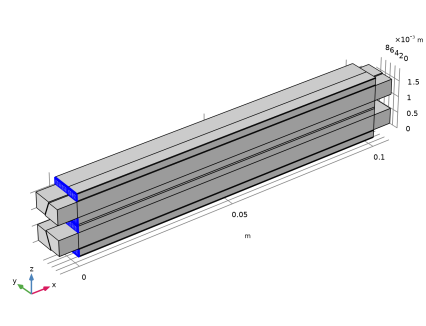
The model defines a two-cell unit-cell, assuming symmetry and periodic conditions on all external boundaries parallel to the xy and xz-planes.
1
In the Physics toolbar, click  Boundaries and choose Periodic Condition.
2
3
In the Settings window for Periodic Condition, locate the Periodic Condition section.
4
In the ϕl,src −ϕ l,dst text field, type -2*E_cell.
5
Clear the Apply for electronic conducting phase checkbox.
Electronic Conducting Phase 1
The potentials need to be grounded somewhere in the model (otherwise no unique solution for the potentials exists). Use a point feature Electric Ground to ground the electrode phase potential.
In the Model Builder window, click Electronic Conducting Phase 1.
Electric Ground 1
1
In the Physics toolbar, click  Attributes and choose Electric Ground.
2
3
In the Model Builder window, collapse the Water Electrolyzer (we) node.
Laminar Flow (spf)
The electrolyzer settings are now complete. Now set up the flow interfaces, starting with the laminar flow in the electrolyte-gas channels.
1
In the Model Builder window, under Component 1 (comp1) click Laminar Flow (spf).
2
In the Settings window for Laminar Flow, locate the Domain Selection section.
3
From the Selection list, choose Channels.
4
Locate the Physical Model section. In the pref text field, type p_out.
Fluid Properties 1
1
In the Model Builder window, under Component 1 (comp1) > Laminar Flow (spf) click Fluid Properties 1.
2
In the Settings window for Fluid Properties, locate the Model Input section.
3
From the c list, choose Common model input.
Inlet 1
1
In the Physics toolbar, click  Boundaries and choose Inlet.
2
In the Settings window for Inlet, locate the Boundary Selection section.
3
From the Selection list, choose Inlets.
4
Locate the Boundary Condition section. From the list, choose Fully developed flow.
5
Locate the Fully Developed Flow section. In the Uav text field, type v_in.
Outlet 1
1
In the Physics toolbar, click  Boundaries and choose Outlet.
2
In the Settings window for Outlet, locate the Boundary Selection section.
3
From the Selection list, choose Outlets.
Symmetry 1
1
In the Physics toolbar, click  Boundaries and choose Symmetry.
2
3
In the Model Builder window, collapse the Laminar Flow (spf) node.
Darcy’s Law (dl)
Now set up the Darcy’s Law interface, which defines the flow in the porous gas diffusion electrodes.
1
In the Model Builder window, under Component 1 (comp1) click Darcy’s Law (dl).
2
In the Settings window for Darcy’s Law, locate the Domain Selection section.
3
From the Selection list, choose GDEs.
4
Locate the Physical Model section. In the pref text field, type p_out.
5
Click to expand the Discretization section. From the Pressure list, choose Linear.
Porous Matrix 1
1
In the Model Builder window, under Component 1 (comp1) > Darcy’s Law (dl) > Porous Medium 1 click Porous Matrix 1.
2
In the Settings window for Porous Matrix, locate the Matrix Properties section.
3
From the εp list, choose User defined. In the associated text field, type eps_pores.
4
From the κ list, choose User defined. In the associated text field, type perm_GDE.
5
In the Model Builder window, collapse the Darcy’s Law (dl) node.
Phase Transport in Free and Porous Media Flow (phtr)
Now set up the Phase Transport interface, which solves for the volume fraction of the gases in the gas diffusion electrodes and the gas-electrolyte channels.
1
In the Model Builder window, under Component 1 (comp1) click Phase Transport in Free and Porous Media Flow (phtr).
2
In the Settings window for Phase Transport in Free and Porous Media Flow, locate the Domain Selection section.
3
From the Selection list, choose Channels and GDEs.
Fluid 1
1
In the Model Builder window, under Component 1 (comp1) > Phase Transport in Free and Porous Media Flow (phtr) click Fluid 1.
2
In the Settings window for Fluid, locate the Model Input section.
3
From the c list, choose Common model input.
Turbulent Mixing 1
1
In the Physics toolbar, click  Attributes and choose Turbulent Mixing.
The turbulent mixing is needed make the evolved gas move away from the gde-channel interface and to achieve convergence. The parameter values used for turbulent mixing should be regarded as empirical tuning parameters for this very model.
2
In the Settings window for Turbulent Mixing, locate the Turbulent Mixing Parameters section.
3
In the νT text field, type 1e-6.
4
In the ScT text field, type 1.
Porous Medium 1
1
In the Model Builder window, under Component 1 (comp1) > Phase Transport in Free and Porous Media Flow (phtr) click Porous Medium 1.
2
In the Settings window for Porous Medium, locate the Domain Selection section.
3
From the Selection list, choose GDEs.
Fluid 1
1
In the Model Builder window, click Fluid 1.
2
In the Settings window for Fluid, locate the Model Input section.
3
From the c list, choose Common model input.
4
Locate the Capillary Pressure section. In the pcsg text field, type dpc_dsg*s_g.
5
Locate the Phase 1 Properties section. From the Fluid s_l list, choose Potassium Hydroxide, KOH (mat2).
6
7
Locate the Phase 2 Properties section. From the ρsg list, choose Density of gas phase (we).
8
From the μsg list, choose Dynamic viscosity of gas phase (we).
9
Initial Values 1
1
In the Model Builder window, under Component 1 (comp1) > Phase Transport in Free and Porous Media Flow (phtr) click Initial Values 1.
2
In the Settings window for Initial Values, locate the Initial Values section.
3
In the s0,sg text field, type s_g_in.
Free-Porous Interface 1
1
In the Model Builder window, click Free-Porous Interface 1.
2
In the Settings window for Free-Porous Interface, locate the Phase 2 section.
3
From the Boundary condition list, choose Outflow, no flux below threshold saturation.
4
In the s0,sg text field, type s_g_in.
Volume Fraction 1
1
In the Physics toolbar, click  Boundaries and choose Volume Fraction.
2
In the Settings window for Volume Fraction, locate the Boundary Selection section.
3
From the Selection list, choose Inlets.
4
Locate the Volume Fraction section. Select the Phase s_g checkbox.
5
In the s0,sg text field, type s_g_in.
Outflow 1
1
In the Physics toolbar, click  Boundaries and choose Outflow.
2
In the Settings window for Outflow, locate the Boundary Selection section.
3
From the Selection list, choose Outlets.
Mass Source 1
1
In the Physics toolbar, click  Domains and choose Mass Source.
To define the mass sources of evolved gas, the reaction rates are based on the volumetric current density computed by the water electrolyzer interface, and Faraday’s second law of electrolysis.
2
In the Settings window for Mass Source, locate the Domain Selection section.
3
From the Selection list, choose GDEs.
4
Locate the Mass Source section. From the Qsg list, choose Mass source, gas phase (we).
5
In the Model Builder window, collapse the Phase Transport in Free and Porous Media Flow (phtr) node.
Heat Transfer in Solids and Fluids (ht)
Now set up the Heat Transfer interface.
Fluid 1
1
In the Model Builder window, under Component 1 (comp1) > Heat Transfer in Solids and Fluids (ht) click Fluid 1.
2
In the Settings window for Fluid, locate the Domain Selection section.
3
From the Selection list, choose Channels.
4
Locate the Model Input section. From the pA list, choose User defined. In the associated text field, type pA_liquid.
5
From the c list, choose Common model input.
6
Locate the Heat Convection section. From the u list, choose Velocity field (spf).
7
Locate the Heat Conduction, Fluid section. From the k list, choose User defined. In the associated text field, type kappa_two_phase_mix.
8
Locate the Thermodynamics, Fluid section. From the Fluid type list, choose Gas/Liquid.
9
From the ρ list, choose User defined. In the associated text field, type rho_mix.
10
From the Cp list, choose User defined. In the associated text field, type Cp_two_phase_mix.
11
From the γ list, choose User defined.
Initial Values 1
1
In the Model Builder window, click Initial Values 1.
2
In the Settings window for Initial Values, locate the Initial Values section.
3
In the T text field, type T0.
Porous Medium - Separators
1
In the Physics toolbar, click  Domains and choose Porous Medium.
2
In the Settings window for Porous Medium, type Porous Medium - Separators in the Label text field.
3
Locate the Domain Selection section. From the Selection list, choose Separators.
Fluid 1
1
In the Model Builder window, click Fluid 1.
2
In the Settings window for Fluid, locate the Model Input section.
3
From the pA list, choose User defined. From the c list, choose Common model input.
4
Locate the Thermodynamics, Fluid section. From the γ list, choose User defined.
Porous Matrix 1
1
In the Model Builder window, click Porous Matrix 1.
2
In the Settings window for Porous Matrix, locate the Matrix Properties section.
3
From the εp list, choose User defined. In the associated text field, type epsl_sep.
4
Locate the Heat Conduction, Porous Matrix section. From the kb list, choose User defined. In the associated text field, type kappa_sep.
5
Locate the Thermodynamics, Porous Matrix section. From the ρb list, choose User defined. In the associated text field, type rho_sep.
6
From the Cp,b list, choose User defined. In the associated text field, type Cp_sep.
Porous Medium - GDEs
1
In the Physics toolbar, click  Domains and choose Porous Medium.
2
In the Settings window for Porous Medium, type Porous Medium - GDEs in the Label text field.
3
Locate the Domain Selection section. From the Selection list, choose GDEs.
Fluid 1
1
In the Model Builder window, click Fluid 1.
2
In the Settings window for Fluid, locate the Model Input section.
3
From the pA list, choose User defined. In the associated text field, type pA_liquid.
4
From the c list, choose Common model input.
5
Locate the Heat Convection section. From the u list, choose Total Darcy velocity field (dl/porous1).
6
Locate the Heat Conduction, Fluid section. From the kf list, choose User defined. In the associated text field, type kappa_two_phase_mix.
7
Locate the Thermodynamics, Fluid section. From the ρf list, choose User defined. In the associated text field, type rho_mix.
8
From the Cp,f list, choose User defined. In the associated text field, type Cp_two_phase_mix.
9
From the γ list, choose User defined.
Porous Matrix 1
1
In the Model Builder window, click Porous Matrix 1.
2
In the Settings window for Porous Matrix, locate the Matrix Properties section.
3
From the εp list, choose User defined. In the associated text field, type eps_pores.
4
Locate the Heat Conduction, Porous Matrix section. From the kb list, choose User defined. In the associated text field, type kappa_Ni.
5
Locate the Thermodynamics, Porous Matrix section. From the ρb list, choose User defined. In the associated text field, type rho_Ni.
6
From the Cp,b list, choose User defined. In the associated text field, type Cp_Ni.
Periodic Condition 1
1
In the Physics toolbar, click  Boundaries and choose Periodic Condition.
2
Inflow 1
1
In the Physics toolbar, click  Boundaries and choose Inflow.
2
In the Settings window for Inflow, locate the Boundary Selection section.
3
From the Selection list, choose Inlets.
4
Locate the Upstream Properties section. In the Tustr text field, type T0.
Outflow 1
1
In the Physics toolbar, click  Boundaries and choose Outflow.
2
In the Settings window for Outflow, locate the Boundary Selection section.
3
From the Selection list, choose Outlets.
4
In the Model Builder window, collapse the Heat Transfer in Solids and Fluids (ht) node.
Multiphysics
All physics-interface settings are now complete. To finalize the physics setup, also the some settings on the multiphysics nodes are required. These nodes define couplings between the individual physics interfaces.
Mixture Model 1 (mfmm1)
1
In the Model Builder window, under Component 1 (comp1) > Multiphysics click Mixture Model 1 (mfmm1).
2
In the Settings window for Mixture Model, locate the Model Input section.
3
From the T list, choose Common model input.
4
Locate the Physical Model section. From the Dispersed phase list, choose Liquid droplets/bubbles.
5
Select the Include shear-induced migration checkbox.
6
Locate the Dispersed Phase 2 Properties section. From the ρsg list, choose Density of gas phase (we).
7
From the μsg list, choose Dynamic viscosity of gas phase (we).
Electrochemical Heating 1 (ech1)
In the Physics toolbar, click  Multiphysics Couplings and choose Domain > Electrochemical Heating.
Global Definitions
As a last step to finalize the physics settings, we will define the KOH concentration in the Default Model Inputs node. This concentration will be used for computing the KOH density in all nodes.
Default Model Inputs
1
In the Model Builder window, under Global Definitions click Default Model Inputs.
2
In the Settings window for Default Model Inputs, locate the Browse Model Inputs section.
3
In the tree, select General > Concentration (mol/m^3) - minput.c.
4
Find the Expression for remaining selection subsection. In the Concentration text field, type c_KOH.
Multiphysics
In the Model Builder window, collapse the Component 1 (comp1) > Multiphysics node.
Mesh 1
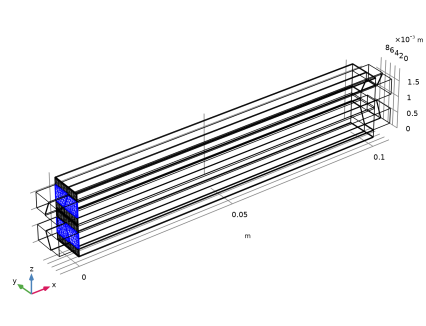
A user-defined mesh will be used in this model. The extruded channel geometry is suitable for using a swept mesh. First we define the surface meshes on the faces that are to be used for sweeping.
Mapped 1
1
In the Mesh toolbar, click  More Generators and choose Mapped.
2
In the Settings window for Mapped, locate the Boundary Selection section.
3
From the Selection list, choose Mapped Mesh Boundaries.
Distribution 1
1
Right-click Mapped 1 and choose Distribution.
2
Distribution 2
1
In the Model Builder window, right-click Mapped 1 and choose Distribution.
2
3
In the Settings window for Distribution, locate the Distribution section.
4
In the Number of elements text field, type 2.
Size 1
1
Right-click Mapped 1 and choose Size.
2
In the Settings window for Size, locate the Element Size section.
3
Click the Custom button.
4
Locate the Element Size Parameters section.
5
Select the Maximum element size checkbox. In the associated text field, type W_rib/10.
6
Click  Build Selected.
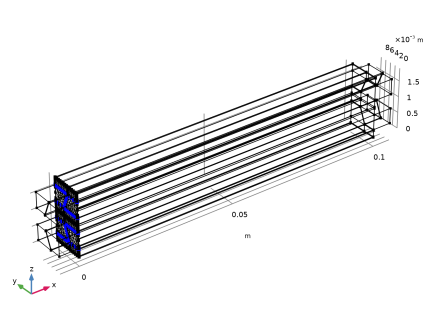
Free Triangular 1
1
In the Mesh toolbar, click  More Generators and choose Free Triangular.
2
In the Settings window for Free Triangular, locate the Boundary Selection section.
3
From the Selection list, choose Triangular Mesh Boundaries.
Size 1
1
Right-click Free Triangular 1 and choose Size.
2
In the Settings window for Size, locate the Element Size section.
3
Click the Custom button.
4
Locate the Element Size Parameters section.
5
Select the Maximum element size checkbox. In the associated text field, type H_ch/4.
6
Click  Build Selected.
7
Click the  Wireframe Rendering button in the Graphics toolbar.
Boundary Layers 1
1
In the Mesh toolbar, click  Boundary Layers.
2
In the Settings window for Boundary Layers, locate the Geometric Entity Selection section.
3
From the Geometric entity level list, choose Boundary.
4
From the Selection list, choose Triangular Mesh Boundaries.
Boundary Layer Properties
1
In the Model Builder window, click Boundary Layer Properties.
2
In the Settings window for Boundary Layer Properties, locate the Edge Selection section.
3
From the Selection list, choose All edges.
4
5
Locate the Layers section. In the Number of layers text field, type 2.
6
In the Stretching factor text field, type 1.5.
7
From the Thickness specification list, choose First layer.
8
In the Thickness text field, type H_ch/50.
9
Click  Build Selected.
Swept 1
In the Mesh toolbar, click  Swept.
Size 1
1
Right-click Swept 1 and choose Size.
2
In the Settings window for Size, locate the Element Size section.
3
Click the Custom button.
4
Locate the Element Size Parameters section.
5
Select the Maximum element size checkbox. In the associated text field, type W_ribch/10.
Distribution 1
1
In the Model Builder window, right-click Swept 1 and choose Distribution.
2
In the Settings window for Distribution, locate the Domain Selection section.
3
Click  Clear Selection.
4
5
Locate the Distribution section. From the Distribution type list, choose Predefined.
6
In the Element ratio text field, type 4.
7
Click  Build All.
8
Click the  Wireframe Rendering button in the Graphics toolbar.
Mesh 1
In the Model Builder window, collapse the Component 1 (comp1) > Mesh 1 node.
Study 1
The problem is solved in three steps. The first step initializes the current distribution of the electrolyzer interface. The second step computes the flow profiles, excluding phase transport. The final step computes the solution for all physics, ramping up the cell voltage.
Step 3: Stationary 2
In the Study toolbar, click  Stationary.
Stationary - Flow Initialization
1
In the Model Builder window, click Step 2: Stationary.
2
In the Settings window for Stationary, type Stationary - Flow Initialization in the Label text field.
3
Locate the Physics and Variables Selection section. In the Solve for column of the table, under Component 1 (comp1), clear the checkboxes for Water Electrolyzer (we), Phase Transport in Free and Porous Media Flow (phtr), and Heat Transfer in Solids and Fluids (ht).
Stationary 2- All Physics
1
In the Model Builder window, click Step 3: Stationary 2.
2
In the Settings window for Stationary, type Stationary 2- All Physics in the Label text field.
3
Click to expand the Study Extensions section. Select the Auxiliary sweep checkbox.
4
5
Solution 1 (sol1)
A fully coupled solver is suitable for this fairly small problem, and makes the simulation run faster.
1
In the Study toolbar, click  Show Default Solver.
2
In the Model Builder window, expand the Solution 1 (sol1) node.
3
Right-click Study 1 > Solver Configurations > Solution 1 (sol1) > Stationary Solver 3 and choose Fully Coupled.
Definitions
As a final step before solving, also add an average operator. It will be used later on when postprocessing the solution.
Average 1 (aveop1)
1
In the Definitions toolbar, click  Nonlocal Couplings and choose Average.
2
In the Settings window for Average, locate the Source Selection section.
3
From the Geometric entity level list, choose Boundary.
4
Study 1
1
In the Model Builder window, click Study 1.
2
In the Settings window for Study, locate the Study Settings section.
3
Clear the Generate default plots checkbox.
4
In the Study toolbar, click  Compute.
Proceed as follows to reproduce all remaining figures from the model documentation:
Results
Polarization Plot
1
In the Results toolbar, click  1D Plot Group.
2
In the Settings window for 1D Plot Group, type Polarization Plot in the Label text field.
Global 1
1
Right-click Polarization Plot and choose Global.
2
In the Settings window for Global, locate the y-Axis Data section.
3
4
Locate the x-Axis Data section. From the Parameter list, choose Expression.
5
In the Expression text field, type aveop1(-we.nIl).
6
In the Unit field, type A/cm^2.
Polarization Plot
1
In the Model Builder window, click Polarization Plot.
2
In the Settings window for 1D Plot Group, click to expand the Title section.
3
From the Title type list, choose None.
4
Locate the Plot Settings section.
5
Select the x-axis label checkbox. In the associated text field, type Average cell current density (A/cm<sup>2</sup>).
6
Locate the Legend section. Clear the Show legends checkbox.
Electrode Phase Potential
1
In the Results toolbar, click  3D Plot Group.
2
In the Settings window for 3D Plot Group, type Electrode Phase Potential in the Label text field.
Surface 1
1
Right-click Electrode Phase Potential and choose Surface.
2
In the Settings window for Surface, click Replace Expression in the upper-right corner of the Expression section. From the menu, choose Component 1 (comp1) > Water Electrolyzer > we.phis - Electric potential - V.
3
In the Electrode Phase Potential toolbar, click  Plot.
Electrolyte Phase Potential
1
In the Results toolbar, click  3D Plot Group.
2
In the Settings window for 3D Plot Group, type Electrolyte Phase Potential in the Label text field.
Surface 1
1
Right-click Electrolyte Phase Potential and choose Surface.
2
In the Electrolyte Phase Potential toolbar, click  Plot.
3
In the Model Builder window, click Surface 1.
Temperature
1
In the Results toolbar, click  3D Plot Group.
2
In the Settings window for 3D Plot Group, type Temperature in the Label text field.
Surface 1
1
Right-click Temperature and choose Surface.
2
In the Settings window for Surface, click Replace Expression in the upper-right corner of the Expression section. From the menu, choose Component 1 (comp1) > Heat Transfer in Solids and Fluids > Temperature > T - Temperature - K.
3
Locate the Expression section. From the Unit list, choose °C.
4
Locate the Coloring and Style section. From the Color table list, choose HeatCameraLight.
5
In the Temperature toolbar, click  Plot.
Gas Volume Fraction in Channels
1
In the Results toolbar, click  3D Plot Group.
2
In the Settings window for 3D Plot Group, type Gas Volume Fraction in Channels in the Label text field.
3
Click to expand the Selection section. From the Geometric entity level list, choose Domain.
4
From the Selection list, choose Channels.
Volume 1
1
Right-click Gas Volume Fraction in Channels and choose Volume.
2
In the Settings window for Volume, click Replace Expression in the upper-right corner of the Expression section. From the menu, choose Component 1 (comp1) > Phase Transport in Free and Porous Media Flow > s_g - Volume fraction - 1.
3
Locate the Coloring and Style section. From the Color table list, choose Prism.
4
In the Gas Volume Fraction in Channels toolbar, click  Plot.
Gas Volume Fraction in GDEs
1
In the Model Builder window, right-click Gas Volume Fraction in Channels and choose Duplicate.
2
In the Settings window for 3D Plot Group, type Gas Volume Fraction in GDEs in the Label text field.
3
Locate the Selection section. From the Selection list, choose GDEs.
4
In the Gas Volume Fraction in GDEs toolbar, click  Plot.
Gas Volume Fractions and Streamlines
1
In the Results toolbar, click  3D Plot Group.
2
In the Settings window for 3D Plot Group, type Gas Volume Fractions and Streamlines in the Label text field.
3
Click to expand the Title section. From the Title type list, choose None.
4
Locate the Plot Settings section. Clear the Plot dataset edges checkbox.
Streamline 1
1
Right-click Gas Volume Fractions and Streamlines and choose Streamline.
2
In the Settings window for Streamline, click Replace Expression in the upper-right corner of the Expression section. From the menu, choose Component 1 (comp1) > Phase Transport in Free and Porous Media Flow > phtr.Nx_s_g,...,phtr.Nz_s_g - Mass flux, phase s_g.
3
Locate the Streamline Positioning section. From the Positioning list, choose Magnitude controlled.
4
In the Maximum density level text field, type 11.6.
5
Locate the Coloring and Style section. Find the Line style subsection. From the Type list, choose Ribbon.
6
Find the Point style subsection. From the Type list, choose Arrow.
Color Expression 1
1
Right-click Streamline 1 and choose Color Expression.
2
In the Settings window for Color Expression, click Replace Expression in the upper-right corner of the Expression section. From the menu, choose Component 1 (comp1) > Phase Transport in Free and Porous Media Flow > s_g - Volume fraction - 1.
Selection 1
1
In the Model Builder window, right-click Streamline 1 and choose Selection.
2
In the Settings window for Selection, locate the Selection section.
3
From the Selection list, choose Oxygen Channels.
4
In the Gas Volume Fractions and Streamlines toolbar, click  Plot.
Streamline 2
Right-click Streamline 1 and choose Duplicate.
Color Expression 1
1
In the Model Builder window, expand the Streamline 2 node, then click Color Expression 1.
2
In the Settings window for Color Expression, locate the Coloring and Style section.
3
From the Color table list, choose Disco.
Selection 1
1
In the Model Builder window, click Selection 1.
2
In the Settings window for Selection, locate the Selection section.
3
From the Selection list, choose Hydrogen Channels.
4
In the Gas Volume Fractions and Streamlines toolbar, click  Plot.
Surface 1
1
In the Model Builder window, right-click Gas Volume Fractions and Streamlines and choose Surface.
2
In the Settings window for Surface, locate the Expression section.
3
In the Expression text field, type 1.
Selection 1
1
Right-click Surface 1 and choose Selection.
2
In the Settings window for Selection, locate the Selection section.
3
From the Geometric entity level list, choose Domain.
4
From the Selection list, choose Separators.
Material Appearance 1
1
In the Model Builder window, right-click Surface 1 and choose Material Appearance.
2
In the Settings window for Material Appearance, locate the Appearance section.
3
From the Appearance list, choose Custom.
Surface 2
Right-click Surface 1 and choose Duplicate.
Selection 1
1
In the Model Builder window, expand the Surface 2 node, then click Selection 1.
2
In the Settings window for Selection, locate the Selection section.
3
From the Selection list, choose GDEs.
Material Appearance 1
1
In the Model Builder window, click Material Appearance 1.
2
In the Settings window for Material Appearance, locate the Appearance section.
3
From the Material type list, choose Carbon (forged).
Surface 3
In the Model Builder window, under Results > Gas Volume Fractions and Streamlines right-click Surface 2 and choose Duplicate.
Selection 1
1
In the Model Builder window, expand the Surface 3 node, then click Selection 1.
2
In the Settings window for Selection, locate the Selection section.
3
From the Selection list, choose Bipolar Plates.
Material Appearance 1
1
In the Model Builder window, click Material Appearance 1.
2
In the Settings window for Material Appearance, locate the Appearance section.
3
From the Material type list, choose Steel.
4
In the Gas Volume Fractions and Streamlines toolbar, click  Plot.
Separator Current Density
1
In the Results toolbar, click  3D Plot Group.
2
In the Settings window for 3D Plot Group, type Separator Current Density in the Label text field.
3
Click to expand the Title section. From the Title type list, choose Manual.
4
In the Title text area, type Volume: Separator current density (A/m<sup>2</sup>).
5
Locate the Selection section. From the Geometric entity level list, choose Domain.
6
From the Selection list, choose Separators.
Volume 1
1
Right-click Separator Current Density and choose Volume.
2
In the Settings window for Volume, locate the Expression section.
3
In the Expression text field, type abs(we.Ilz).
4
Locate the Coloring and Style section. From the Color table list, choose Prism.
5
In the Separator Current Density toolbar, click  Plot.