










PDF

Molten Carbonate Transport
Introduction
This tutorial shows how to model transport of the individual ions in a salt melt comprising two binary salts, where the transport equations are defined using concentrated solution theory. The example model defines the electrolyte ion transport of a molten carbonate fuel cell (or electrolyzer), with a 1D-model geometry consisting of a separator, one negative (hydrogen) and one positive (oxygen) porous electrode.
The model is solved using a time-dependent solver, simulating changes in the ion distribution during a 1 h potentiostatic hold.
The model parameters are taken from a paper by Bodén and others (Ref. 1).
Model Definition
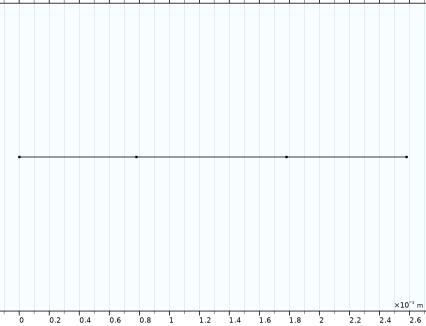
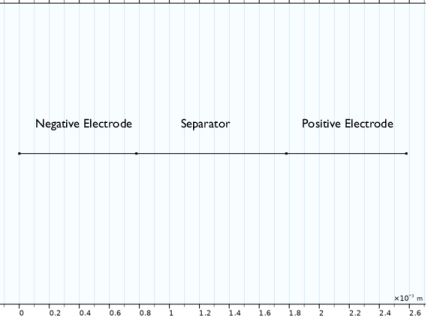
Figure 1 shows the model geometry. The electrodes are porous, where the solid matrix consists of Ni, alloyed with Cr or Al, on the negative side, and lithiated NiO on the positive side, respectively. The separator consists of a ceramic LiAlO2 matrix.
Figure 1: Model geometry.
The electrolyte consists of a Li+/K+/CO32- salt melt, and the aim of the model is to investigate the ion distribution in the cell during load. The absence of a neutral solvent, and the high concentration of the CO32- ions participating in the electrode reactions, makes the problem unsuitable to solve using the Nernst–Planck equations (which are used in the Tertiary Current Distribution, Nernst–Planck interfaces), which assume a diluted electrolyte, implying the presence of a solvent present at a high concentration in relation to all other species. The model is therefore defined using the Concentrated Electrolyte Transport interface, solving for an electrolyte phase potential variable and two neutral salt (Li2CO3 and K2CO3) fraction variables. The electrolyte transport equations in this interface make use of concentrated electrolyte theory, including the assumption of local electroneutrality (Ref. 2).
Charge transfer occurs at the electrode-electrolyte interface within the porous matrix of the negative and positive electrodes. The local current density, iloc, of the negative electrode hydrogen oxidation charge transfer reaction
is defined as
(1)
where β is a symmetry factor and the exchange current density i0,neg is defined as
(2),
where xi denote the molar fractions of the reacting gas species in the gas phase. These molar fractions are set as constant in the model. (The i0,ref exchange current density refers to the exchange current density for an imaginary reference state of unity molar fractions.)
Correspondingly, on the positive side, the local current density of the oxygen reduction reaction
is defined as
(3)
with
(4).
In the kinetic expressions above, the overpotential η is defined as
(5)
Here, the electrode phase potential ϕs is set to 0 V in the negative electrode and 0.75 V in the positive electrode. The cell voltage equals the difference between the positive and negative electrode phase potentials
(6)
By defining the Reference Electrode node stoichiometry to correspond to the oxidation of CO32-, the electrolyte phase potential ϕl is inherently defined to include CO32- ion concentration overpotentials.
The equilibrium potentials of the two electrode reactions are defined as
(7)
and
(8)
where the reference equilibrium potentials refer to the reference state of 1 atm for the partial pressures and the cell temperature 650°C.
Finally, the species sources, R (mol/m3s), for the CO32- ions are calculated using Faraday’s law of electrolysis according to
(9)
where Av (m2/m3) is the specific surface are of the electrodes.
A Species Sources domain node is used in the model to define the charge transfer reactions according to the above equations.
As CO32- is transferred between the electrolyte and electrode phases, current starts to flow in the cell. The transport in the electrolyte is characterized by the use of composition-dependent binary Maxwell-Stefan diffusivities, these are defined on the Diffusion Coefficients node, which is a child node to the Electrolyte domain node. One diffusivity for each ion-pair (Li+-K+, Li+-CO32-, and K+-CO32-) is required to define the transport.
The Maxwell–Stefan transport model computes diffusive–migrative fluxes of the electrolyte species with respect to the mass-averaged velocity, u (m/s), of the electrolyte. Instead of computing the velocity using a Fluid Flow interface such as Darcy’s Law, the velocity is approximated to be proportional to the electrolyte current vector, Il (A/m2), times the carbonate ion molar mass according to
(10)
The electrolyte density, ρ (kg/m3), will in reality depend on composition, but is treated as a constant in this tutorial.
For this cell, where the carbonate ion is the only ion (CO32-) participating in the charge transfer reaction, the above expression for the electrolyte mass-averaged velocity is valid for a stationary current distribution. However, it often serves as a fair approximation also for time-dependent problems.
All the three domains are porous and are defined using a common Separator node. By the use of a domain-specific porosity variable, the porosity is defined differently in each domain.
The model is solved in a Study comprising a Current Distribution Initialization step followed by a Time Dependent study step. The first step solves for the electrolyte phase potential dependent variable only, using a stationary solver, and the solution is then passed on as initial values the following time-dependent step.
Results and Discussion
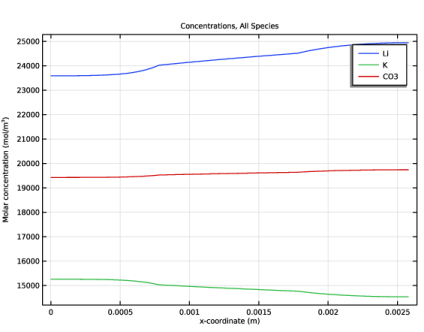
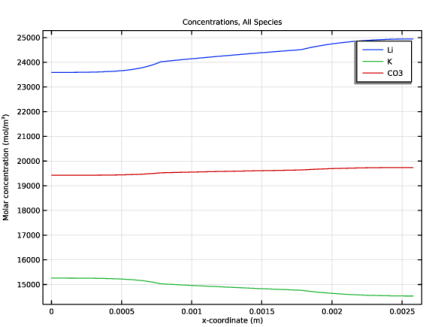
Figure 2 shows the individual ion concentrations at 1 h. As a result of electroneutrality, the concentration of CO32- equals half of the sum of Li+ and K+.
Interestingly, the concentration gradients of the two cations (Li+ and K+) are opposite to each other, and in addition it can be seen that the smaller ion Li+, which has a higher binary diffusivity value vs CO32-, is subject to higher concentration gradient magnitudes than the larger K+. This segregation effect is related to it being energetically more favorable to have Li+ fulfill electroneutrality when gradients in the CO32- concentration are induced by the electrode reactions. Binary diffusivity coefficients can be seen an as inverse proportionality constants for the friction forces between the electrolyte species — the higher the diffusivity, the lower the friction.
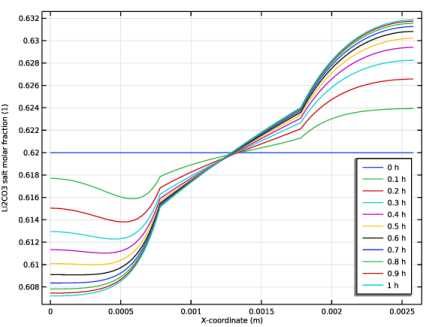
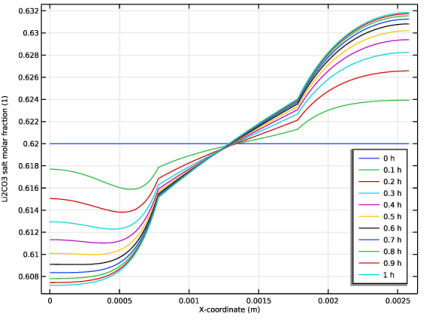
An alternative way of plotting composition changes in the cell is to plot the relative proportions of the two neutral salts (Li2CO3 and K2CO3) in relation to each other. Figure 3 plots the quantity xLi+/(xLi++xK+) as a measure of the fraction of Li2CO3.
Figure 2: Individual ion concentrations.
Figure 3: Li2CO3 salt fraction.
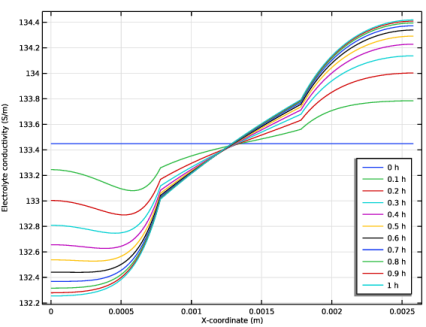
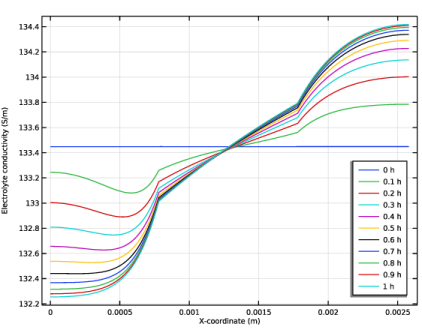
Figure 4 shows the electrolyte conductivity profile over time. As a result of the concentration changes, the conductivity varies. This is a result of the composition-dependent diffusivities deployed in the model.
Figure 4: Electrolyte conductivity.
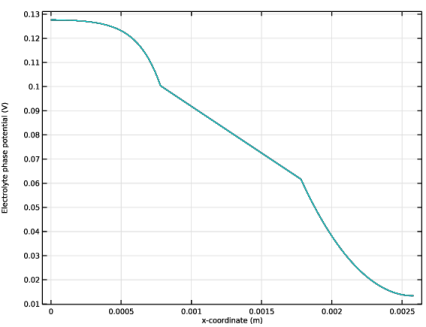
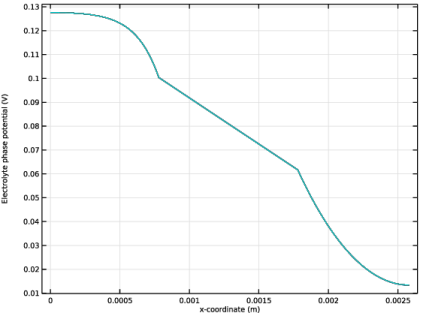
The electrolyte conductivity variations are fairly small. Figure 5 shows the electrolyte phase potential for all simulated times, ranging from 0 to 1 h in steps of 0.1 h. The variations in the potential profile are small and all line graphs more or less coincide.
Figure 5: Electrolyte phase potential.
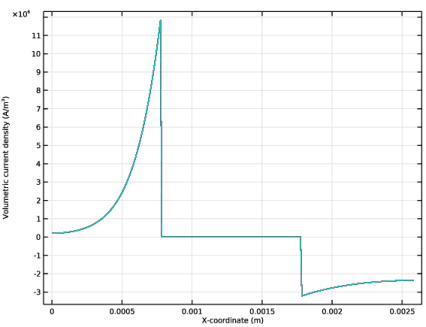
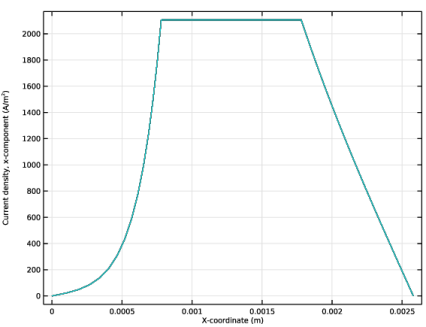
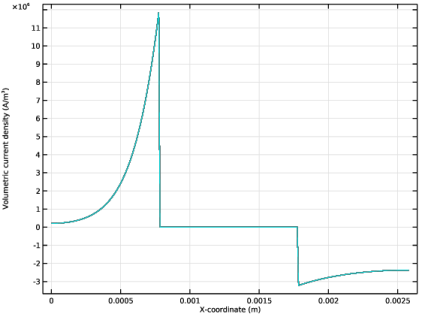
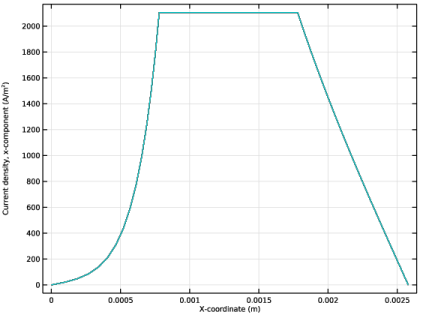
Figure 6 shows the volumetric current densities in the cell stemming from the charge transfer reactions, also here ranging from 0 to 1 h in steps of 0.1 h. These source terms give rise to the corresponding electrolyte current density profiles seen in Figure 7. As for Figure 5, variations over time are small and all line graphs more or less coincide.
It is known that the local composition of the electrolyte impacts the electrolyte wetting of the porous matrix of the electrodes. An extended model could incorporate this effect by defining the local electrolyte volume fraction as a function of the composition. Such a model would likely result in larger spatial and temporal variations in the current distribution.
Figure 6: Volumetric (reaction) current density.
Figure 7: Electrolyte current density in the x direction.
References
1. A. Bodén and G. Lindbergh, “A Model for Mass Transport of Molten Alkali Carbonate Mixtures Applied to the MCFC,” J. Electrochem. Soc., vol. 153, no. 111, pp. A2111–A2119, 2006.
2. A. Van-Brunt, P.E. Farrell, and C.W. Monroe, “Structural electroneutrality in Onsager–Stefan–Maxwell transport with charged species,” Electrochimica Acta, vol. 441, p. 141769, 2023, doi.org/10.1016/j.electacta.2022.141769.
Application Library path: Fuel_Cell_and_Electrolyzer_Module/Fuel_Cells/molten_carbonate_transport
Modeling Instructions
From the File menu, choose New.
New
In the New window, click  Model Wizard.
Model Wizard
1
In the Model Wizard window, click  1D.
2
In the Select Physics tree, select Electrochemistry > Concentrated Electrolyte Transport (cet).
3
Click Add.
4
Click  Study.
5
In the Select Study tree, select Preset Studies for Selected Physics Interfaces > Time Dependent with Initialization.
6
Global Definitions
Parameters 1
Load the model parameters from a text file.
1
In the Model Builder window, under Global Definitions click Parameters 1.
2
In the Settings window for Parameters, locate the Parameters section.
3
Click  Load from File.
4
Geometry 1
Create the model geometry as follows:
Interval 1 (i1)
1
In the Model Builder window, under Component 1 (comp1) right-click Geometry 1 and choose Interval.
2
In the Settings window for Interval, locate the Interval section.
3
From the Specify list, choose Interval lengths.
4
5
Click  Build Selected.
Concentrated Electrolyte Transport (cet)
The electrolyte consists of two cations (Li and K) and one anion (CO3)
1
In the Model Builder window, under Component 1 (comp1) click Concentrated Electrolyte Transport (cet).
2
In the Settings window for Concentrated Electrolyte Transport, locate the Species section.
3
Find the Cations subsection. In the table, enter the following settings:
4
5
6
Find the Anions subsection. In the table, enter the following settings:
7
Find the Neutral species subsection. Click to select the first row in the table.
8
Click  Delete.
Reference Electrode 1
1
In the Model Builder window, under Component 1 (comp1) > Concentrated Electrolyte Transport (cet) click Reference Electrode 1.
2
In the Settings window for Reference Electrode, locate the Stoichiometric Coefficients section.
3
In the sLi text field, type 0.
4
In the sCO3 text field, type 1.
Electrolyte 1
1
In the Model Builder window, click Electrolyte 1.
2
In the Settings window for Electrolyte, locate the Volumetric Equation of State section.
3
From the Define list, choose Density.
4
In the ρ text field, type rho.
Global Definitions
Default Model Inputs
Define the temperature variable under Default Model Inputs. This setting will be used by all model nodes.
1
In the Model Builder window, under Global Definitions click Default Model Inputs.
2
In the Settings window for Default Model Inputs, locate the Browse Model Inputs section.
3
In the tree, select General > Temperature (K) - minput.T.
4
Find the Expression for remaining selection subsection. In the Temperature text field, type T.
Definitions
Load a number of variable expressions from a text file. These variables expressions will be used when defining the diffusion coefficients and the electrode kinetics.
Variables 1
1
In the Model Builder window, under Component 1 (comp1) right-click Definitions and choose Variables.
2
In the Settings window for Variables, locate the Variables section.
3
Click  Load from File.
4
Check that no expressions are marked with curly yellow underlines, indicating unknown variables. If missing variables are indicated, you may have misspelled the species names (Li, K and CO3) that you defined earlier in the Concentrated Electrolyte Transport parent node.
Concentrated Electrolyte Transport (cet)
Diffusion Coefficients 1
1
In the Model Builder window, under Component 1 (comp1) > Concentrated Electrolyte Transport (cet) > Electrolyte 1 click Diffusion Coefficients 1.
2
In the Settings window for Diffusion Coefficients, locate the Maxwell–Stefan Diffusivities section.
3
In the DLi,K text field, type D_Li_K.
4
In the DLi,CO3 text field, type D_Li_CO3.
5
In the DK,CO3 text field, type D_K_CO3.
Initial Values 1
1
In the Model Builder window, under Component 1 (comp1) > Concentrated Electrolyte Transport (cet) click Initial Values 1.
2
In the Settings window for Initial Values, locate the Initial Values section.
3
Find the Electrolyte components subsection. From the Define list, choose Molar proportions, and in the corresponding text fields, type P_Li2CO3 and P_K2CO3, respectively.
Definitions
Add some additional variable nodes to define the local electrolyte volume fractions in the individual domains and the molar source rate of carbonate ions.
Variables 2 (Negative Electrode)
1
In the Model Builder window, under Component 1 (comp1) right-click Definitions and choose Variables.
2
In the Settings window for Variables, type Variables 2 (Negative Electrode) in the Label text field.
3
Locate the Geometric Entity Selection section. From the Geometric entity level list, choose Domain.
4
5
Locate the Variables section. In the table, enter the following settings:
Variables 3 (Separator)
1
Right-click Variables 2 (Negative Electrode) and choose Duplicate.
2
In the Settings window for Variables, type Variables 3 (Separator) in the Label text field.
3
Locate the Geometric Entity Selection section. Click  Clear Selection.
4
5
Locate the Variables section. In the table, enter the following settings:
Variables 4 (Positive Electrode)
1
Right-click Variables 3 (Separator) and choose Duplicate.
2
In the Settings window for Variables, type Variables 4 (Positive Electrode) in the Label text field.
3
Locate the Geometric Entity Selection section. Click  Clear Selection.
4
5
Locate the Variables section. In the table, enter the following settings:
Concentrated Electrolyte Transport (cet)
Separator (Porous Media)
1
In the Physics toolbar, click  Domains and choose Separator.
2
In the Settings window for Separator, type Separator (Porous Media) in the Label text field.
3
Locate the Domain Selection section. From the Selection list, choose All domains.
4
Locate the Separator section. In the εl text field, type epsl.
Species Sources 1
1
In the Physics toolbar, click  Domains and choose Species Sources.
2
In the Settings window for Species Sources, locate the Domain Selection section.
3
From the Selection list, choose All domains.
4
Locate the Species Sources section. In the RCO3 text field, type R_CO3.
Mesh 1
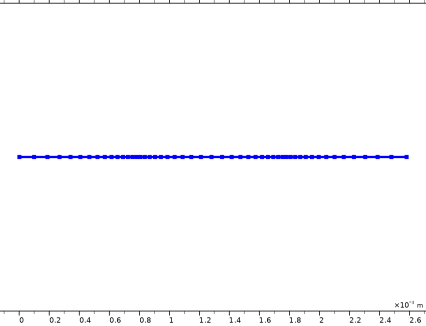
Define a mesh with an extra fine resolution at the separator–electrode boundaries as follows:
1
In the Model Builder window, under Component 1 (comp1) click Mesh 1.
2
In the Settings window for Mesh, locate the Sequence Type section.
3
From the list, choose User-controlled mesh.
Size 1
1
In the Model Builder window, right-click Edge 1 and choose Size.
2
In the Settings window for Size, locate the Geometric Entity Selection section.
3
From the Geometric entity level list, choose Boundary.
4
5
Locate the Element Size section. From the Predefined list, choose Extremely fine.
Edge 1
Right-click Edge 1 and choose Build All.
Study 1
Step 2: Time Dependent
The model is now ready for solving. Change the simulation time to 1 h as follows:
1
In the Model Builder window, under Study 1 click Step 2: Time Dependent.
2
In the Settings window for Time Dependent, locate the Study Settings section.
3
From the Time unit list, choose h.
4
In the Study toolbar, click  Compute.
Results
Electrolyte Potential (cet)
Inspect and modify the default plots as follows:
1
In the Settings window for 1D Plot Group, click to expand the Title section.
2
From the Title type list, choose None.
3
In the Electrolyte Potential (cet) toolbar, click  Plot.
Concentrations, All Species (cet)
1
In the Model Builder window, click Concentrations, All Species (cet).
2
In the Settings window for 1D Plot Group, locate the Data section.
3
From the Time selection list, choose Last.
4
Locate the Plot Settings section.
5
Select the y-axis label checkbox. In the associated text field, type Molar concentration (mol/m<sup>3</sup>).
Volumetric Current Density
Create a plot of the volumetric current density as follows:
1
In the Results toolbar, click  1D Plot Group.
2
In the Settings window for 1D Plot Group, type Volumetric Current Density in the Label text field.
3
Locate the Title section. From the Title type list, choose None.
Line Graph 1
1
Right-click Volumetric Current Density and choose Line Graph.
2
In the Settings window for Line Graph, locate the Selection section.
3
From the Selection list, choose All domains.
4
Click Replace Expression in the upper-right corner of the y-Axis Data section. From the menu, choose Component 1 (comp1) > Concentrated Electrolyte Transport > cet.ss1.iv - Volumetric current density - A/m³.
5
Locate the x-Axis Data section. From the Parameter list, choose Dataset space variable.
6
In the Volumetric Current Density toolbar, click  Plot.
The volumetric current density is proportional to the reaction rate in the electrodes.
Electrolyte Current Density
Create a plot of the electrolyte current density as follows:
1
In the Model Builder window, right-click Volumetric Current Density and choose Duplicate.
2
In the Settings window for 1D Plot Group, type Electrolyte Current Density in the Label text field.
Line Graph 1
1
In the Model Builder window, expand the Electrolyte Current Density node, then click Line Graph 1.
2
In the Settings window for Line Graph, click Replace Expression in the upper-right corner of the y-Axis Data section. From the menu, choose Component 1 (comp1) > Concentrated Electrolyte Transport > Electrolyte current densities > Current density - A/m² > cet.Ilx - Current density, x-component.
3
In the Electrolyte Current Density toolbar, click  Plot.
This plot shows the magnitude and direction of the current flowing in the electrolyte phase.
Electrolyte Conductivity
As a result of concentration changes over time in the electrolyte, the conductivity will change. Plot the electrolyte conductivity as follows:
1
In the Model Builder window, right-click Electrolyte Current Density and choose Duplicate.
2
In the Settings window for 1D Plot Group, type Electrolyte Conductivity in the Label text field.
Line Graph 1
1
In the Model Builder window, expand the Electrolyte Conductivity node, then click Line Graph 1.
2
In the Settings window for Line Graph, click Replace Expression in the upper-right corner of the y-Axis Data section. From the menu, choose Component 1 (comp1) > Concentrated Electrolyte Transport > Electrolyte properties > cet.sigmal - Electrolyte conductivity - S/m.
3
Click to expand the Legends section. Select the Show legends checkbox.
Electrolyte Conductivity
1
In the Model Builder window, click Electrolyte Conductivity.
2
In the Settings window for 1D Plot Group, locate the Legend section.
3
From the Position list, choose Lower right.
4
In the Electrolyte Conductivity toolbar, click  Plot.
Finally, plot the molar fraction of the Li2CO3 salt (in relation to the total salt concentration) as follows:
Li2CO3 Salt Fraction
1
Right-click Electrolyte Conductivity and choose Duplicate.
2
In the Settings window for 1D Plot Group, type Li2CO3 Salt Fraction in the Label text field.
Line Graph 1
1
In the Model Builder window, expand the Li2CO3 Salt Fraction node, then click Line Graph 1.
2
In the Settings window for Line Graph, click Replace Expression in the upper-right corner of the y-Axis Data section. From the menu, choose Component 1 (comp1) > Definitions > Variables > xA - Li2CO3 salt molar fraction - 1.
3
In the Li2CO3 Salt Fraction toolbar, click  Plot.