



PDF

Cyclic Voltammetry at a Macroelectrode in 1D
Introduction
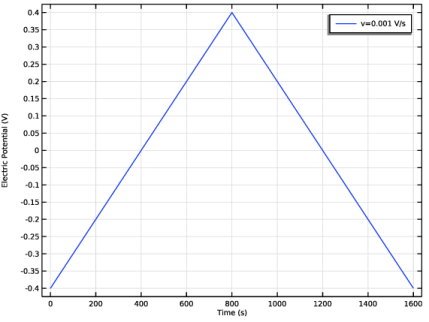
Cyclic voltammetry is a common analytical technique for investigating electrochemical systems. In this method, the potential difference between a working electrode and a reference electrode is swept linearly in time from a start potential to a vertex potential, and back again (see Figure 1). The resulting current at the working electrode is recorded and is plotted against the applied electrode potential in a voltammogram.
Figure 1: Potential of the working electrode during one voltammetric cycle. The potential is cycled between the vertex potentials 0.4 V and –0.4 V. The scan rate is 1 mV/s.
Voltammetry is a valuable technique because information about both the electrochemical reactivity and the transport properties of a system can be extracted simultaneously. For quantitative interpretation of voltammetry, however, we must use numerical methods to solve the physical equations that describe voltammetry. Then, unknown physical quantities in the system can be inferred by “fitting” to experimental data.
This example demonstrates the use of a common approximation in which a large electrode (macroelectrode) is assumed to have uniform transport behavior across its surface, so only physics occurring normal to the surface need to be considered. By simplifying the model to 1D, an efficient time-dependent analysis is possible.
In this model, a Parametric Sweep is used to compare voltammetry recorded at different voltammetric scan rates.
Model Definition
The model contains a single 1D domain of length L, which is the maximum extent of the diffusion layer over the duration of the voltammetry experiment. A conservative setting for L is set to greatly exceed the mean diffusion layer thickness:
Here, D is the diffusion coefficient of the reactant and tmax is the duration of the cyclic voltammogram.
DOMAIN EQUATIONS
We assume the presence of a large quantity of supporting electrolyte. This is inert salt that is added in electroanalytical experiments to increase the conductivity of the electrolyte without otherwise interfering with the reaction chemistry. Under these conditions, the resistance of the solution is sufficiently low that the electric field is negligible, and we can assume ϕl = 0.
The Electroanalysis interface implements chemical transport equations for the reactant and product species of the redox couple subject to this assumption. The domain equation is the diffusion equation (also known as Fick’s second law) to describe the chemical transport of the electroactive species A and B:
BOUNDARY EQUATIONS
At the bulk boundary (x = L), we assume a uniform concentration equal to the bulk concentration for the reactant. The product has zero concentration here, as in bulk.
At the electrode boundary (x = 0), the reactant species A oxidizes (loses one electron) to form the product B. By convention, electrochemical reactions are written in the reductive direction:
The stoichiometric coefficient is –1 for B, the “reactant” in the reductive direction, and +1 for A, the “product” in the reductive direction. This formulation is consistent even in examples such as this model where at certain applied potentials, the reaction proceeds favorably to convert A to B. The number of electrons transferred, n, equals one.
The current density, iloc, for this reaction is given by the electroanalytical Butler–Volmer equation for an oxidation:
in which k0 is the heterogeneous rate constant of the reaction, αc is the cathodic transfer coefficient, and η is the overpotential at the working electrode. This overpotential is the difference between the applied potential and the equilibrium potential (formal reduction potential) of the redox couple of species A and B.
According to Faraday’s laws of electrolysis, the flux of the reactant and product species are proportional to the current density drawn:
Here -nNi is the molar flux normal to the electrode surface and νi is the stoichiometric coefficient. This is expressed in the Electrode Surface boundary condition.
The applied triangular waveform for the cyclic voltammetry study is specified in the Electrode Surface boundary condition according to two vertex potentials — forming a potential window between –0.4 V and +0.4 V, either side of the equilibrium reduction potential — and a voltammetric scan rate, v (SI unit: V/s), which is the rate at which the applied potential is changed.
In the 1D approximation, the total current is related to the current density simply by multiplying by the electrode area A:
CYCLIC VOLTAMMETRY STUDY
In the cyclic voltammetry experiment, the potential applied to the working electrode surface is varied linearly as a function of time. A Parametric Sweep is used to compare the voltammetry recorded at different scan rates.
Results and Discussion
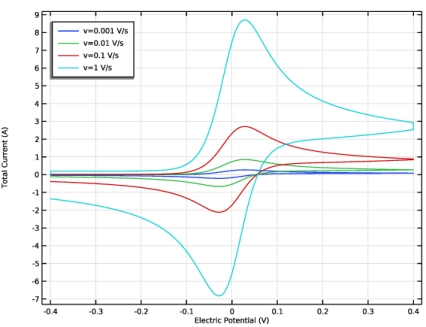
The shape of the cyclic voltammogram (Figure 2) shows the relation between electrode kinetics and chemical species transport (diffusion).
Figure 2: Cyclic voltammetry recorded at a macroelectrode.
Initially, at reducing potentials, the oxidation reaction is not driven and negligible current is drawn. As the potential moves toward the reduction potential of the redox couple, the oxidation reaction is accelerated and the current increases. Once the oxidation reaction has consumed the reactant at the electrode surface, the current becomes limited by the rate of transport of A toward the working electrode. Therefore, a peak current is observed, and at higher potentials, the voltammetric current falls off at a potential-independent rate; this region is termed “diffusion-controlled” or “transport-controlled”.
On sweeping back toward more reducing potentials, the reconversion of the product B into the original reactant A gives a negative (cathodic, reductive) current. Depletion of the reacting species B causes a negative peak current and reconversion thereafter proceeds at a diffusion-controlled rate.
The magnitude of the current on the forward peak, Ipf, is a common diagnostic variable in voltammetry. For fast electrode kinetics and at a macroelectrode under the 1D approximation, its value is given theoretically by the Randles–Ševcík equation (see Ref. 1 and Ref. 2 for a detailed discussion and derivation):
where A is the electrode area, c is the bulk concentration of the reactant, and D is the diffusion coefficient of the reactant.
The square-root relationship between peak current and scan rate is characteristic of macroelectrode cyclic voltammetry under the above conditions.
References
1. R.G. Compton and C.E. Banks, Understanding Voltammetry, 2nd ed., London, 2011.
2. A.J. Bard and L.R. Faulkner, Electrochemical Methods, Fundamentals and Applications, 2nd ed., Wiley, New York, 2001.
Application Library path: Fuel_Cell_and_Electrolyzer_Module/General_Electrochemistry/cyclic_voltammetry_1d
Modeling Instructions
From the File menu, choose New.
New
In the New window, click  Model Wizard.
Model Wizard
1
In the Model Wizard window, click  1D.
2
In the Select Physics tree, select Electrochemistry > Electroanalysis (tcd).
3
Click Add.
This model will solve for the two concentrations of a redox couple, change the default concentration variable names to cA and cB.
4
In the Concentrations (mol/m³) table, enter the following settings:
5
Click  Study.
6
In the Select Study tree, select Preset Studies for Selected Physics Interfaces > Cyclic Voltammetry.
7
Global Definitions
Parameters 1
Add the model parameters from a text file.
1
In the Model Builder window, under Global Definitions click Parameters 1.
2
In the Settings window for Parameters, locate the Parameters section.
3
Click  Load from File.
4
Geometry 1
Build the model geometry as a single interval, where the left boundary will later be defined as the electrode surface, and the right boundary will be the boundary toward the bulk.
Interval 1 (i1)
1
In the Model Builder window, under Component 1 (comp1) right-click Geometry 1 and choose Interval.
Set the interval length to L. The value of L is defined in the Parameters node. Note that L will vary with the Voltammetric scan rate parameter v, which is also defined in the Parameters node.
2
In the Settings window for Interval, locate the Interval section.
3
4
In the Home toolbar, click  Build All.
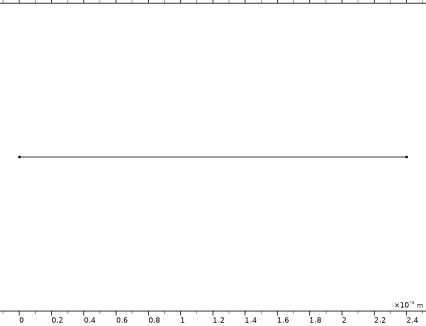
The completed geometry should now look like this:
5
In the Model Builder window, click Geometry 1.
Electroanalysis (tcd)
Electrolyte 1
Start defining the physics by setting the diffusion coefficients for the two species of the redox couple.
1
In the Model Builder window, under Component 1 (comp1) > Electroanalysis (tcd) click Electrolyte 1.
2
In the Settings window for Electrolyte, locate the Diffusion section.
3
In the DcA text field, type DA.
4
In the DcB text field, type DB.
Concentration 1
Set the boundary to the right to bulk concentration values.
1
In the Physics toolbar, click  Boundaries and choose Concentration.
2
3
In the Settings window for Concentration, locate the Concentration section.
4
Select the Species cA checkbox.
5
In the c0,cA text field, type c_bulk.
6
Select the Species cB checkbox.
Electrode Surface 1
Set up the electrode surface and the cyclic voltammetry settings on the left boundary.
1
In the Physics toolbar, click  Boundaries and choose Electrode Surface.
2
3
In the Settings window for Electrode Surface, locate the Electrode Phase Potential Condition section.
4
From the Electrode phase potential condition list, choose Cyclic voltammetry.
5
In the Linear sweep rate text field, type v.
The voltage will be cycled between the vertex potentials. When the start potential is not specified, the sweep will start at Vertex potential 2.
6
In the Vertex potential 1 text field, type E_vertex1.
7
In the Vertex potential 2 text field, type E_vertex2.
Electrode Reaction 1
Specify the electrode reaction as a Butler-Volmer reaction, which is concentration dependent as defined by the stoichiometric coefficients.
1
In the Model Builder window, click Electrode Reaction 1.
2
In the Settings window for Electrode Reaction, locate the Stoichiometric Coefficients section.
3
In the νcA text field, type 1.
4
In the νcB text field, type -1.
5
Locate the Electrode Kinetics section. In the i0,ref(T) text field, type i0ref.
Double-Layer Capacitance 1
1
In the Physics toolbar, click  Attributes and choose Double-Layer Capacitance.
2
In the Settings window for Double-Layer Capacitance, locate the Double-Layer Capacitance section.
3
In the Cdl text field, type Cdl.
Initial Values 1
Specify the initial concentration values. This will set the concentration values when the simulation starts at t = 0.
1
In the Model Builder window, under Component 1 (comp1) > Electroanalysis (tcd) click Initial Values 1.
2
In the Settings window for Initial Values, locate the Initial Values section.
3
In the cA text field, type c_bulk-cB0*(1-x/L).
4
In the cB text field, type cB0*(1-x/L).
Global Definitions
Default Model Inputs
Set up the temperature value used in the entire model.
1
In the Model Builder window, under Global Definitions click Default Model Inputs.
2
In the Settings window for Default Model Inputs, locate the Browse Model Inputs section.
3
In the tree, select General > Temperature (K) - minput.T.
4
Find the Expression for remaining selection subsection. In the Temperature text field, type T.
Study 1
Solve the problem for various sweep rates.
Parametric Sweep
1
In the Study toolbar, click  Parametric Sweep.
2
In the Settings window for Parametric Sweep, locate the Study Settings section.
3
4
5
In the Study toolbar, click  Compute.
Results
Cyclic Voltammograms (tcd)
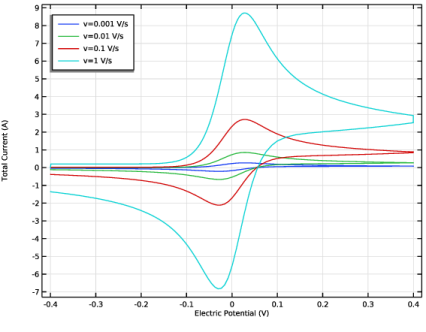
A number of plots are created by default. The first default plot shows the voltammograms created by the Cyclic Voltammetry feature in the Electrode Surface node.
1
In the Settings window for 1D Plot Group, locate the Legend section.
2
From the Position list, choose Upper left.
Global 1
1
In the Model Builder window, expand the Cyclic Voltammograms (tcd) node, then click Global 1.
2
In the Settings window for Global, click to expand the Legends section.
3
Find the Include subsection. Clear the Description checkbox.
4
In the Cyclic Voltammograms (tcd) toolbar, click  Plot.