PDF

Surface Dielectric Barrier Discharge
Introduction
Surface dielectric barrier discharges (SDBDs) are a class of non-thermal plasmas generated when a high voltage is applied across electrodes separated by a dielectric material, with at least one electrode exposed to the surrounding gas. They are widely studied for applications in flow control, ozone generation, and plasma-assisted combustion.
This model simulates SDBDs using the Electric Discharge interface. The formulation captures the key physical mechanisms governing the discharge, including charge transport, impact ionization, electron attachment, recombination, and surface charge accumulation, all self-consistently coupled through the Poisson equation.
The simulation outputs include the spatial distribution of the electric field and the time-dependent number densities of electrons, positive ions, and negative ions, providing detailed insight into discharge behavior near dielectric surfaces.
Model Definition
The Electric Discharge interface is used to simulate the SDBDs. The built-in charge transport model is used:
where
e, p, n denote electrons, positive ions, and negative ions
ni is the number density of the charge carrier (SI unit: 1/m3)
E is the electric field (SI unit: V/m)
zi denotes the carrier charge (SI unit: 1)
μi denotes the carrier mobility (SI unit: m2/(V·s))
wi is the drift velocity in the electric field (SI unit: m/s)
Di is the diffusion coefficient (SI unit: m2/s)
Ri is the reaction rate (SI unit: 1/(m3·s))
α is the ionization coefficient (SI unit: 1/m)
η is the attachment coefficient (SI unit: 1/m)
βep is the electron–ion recombination coefficient (SI unit: m3/s)
βpn is the ion–ion recombination coefficient (SI unit: m3/s)
The above transport equations are fully coupled with Poisson’s equation through the electric field and the space charge:
where e is the elementary charge.
The Gas–Solid interface is modeled with the dedicated Dielectric Interface, Surface Transport feature described in the Electric Discharge Module User’s Guide.
Results and Discussion
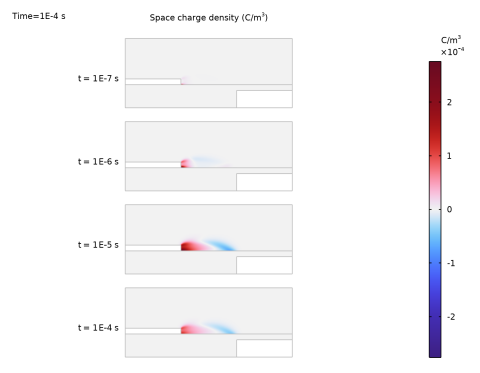
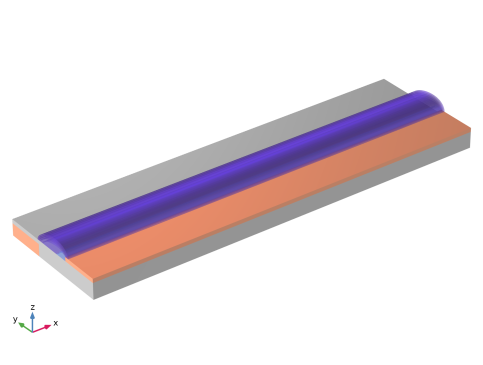
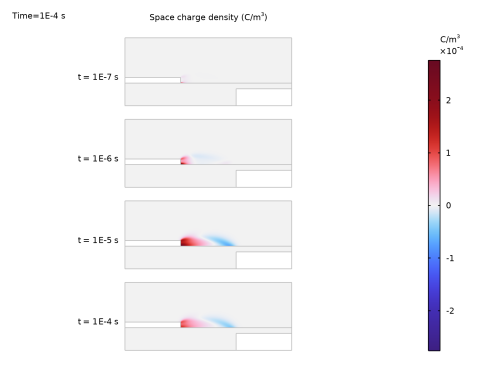
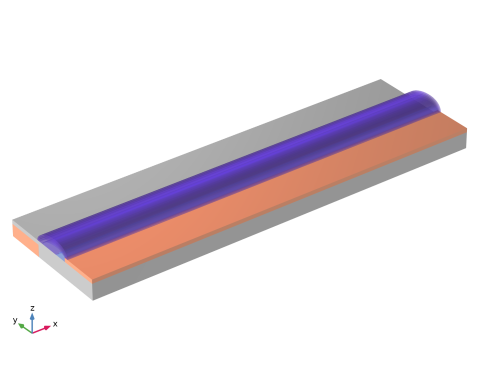
Figure 1 shows the space charge density at several time instants. Figure 2 shows the isosurface plot of positive ions density along dielectric surface in 3D.
Figure 1: The distribution of space charge density at several instants.
Figure 2: The distribution of positive ions in 3D.
Application Library path: Electric_Discharge_Module/Dielectric_Barrier_Discharges/sdbd
Modeling Instructions
From the File menu, choose New.
New
In the New window, click  Model Wizard.
Model Wizard
1
In the Model Wizard window, click  2D.
2
In the Select Physics tree, select Electric Discharge > Electric Discharge (edis).
3
Click Add.
4
Click  Study.
5
In the Select Study tree, select Preset Studies for Selected Physics Interfaces > Time Dependent with Initialization.
6
Geometry 1
1
In the Model Builder window, under Component 1 (comp1) click Geometry 1.
2
In the Settings window for Geometry, locate the Units section.
3
From the Length unit list, choose mm.
Global Definitions
Parameters 1
1
In the Model Builder window, under Global Definitions click Parameters 1.
2
In the Settings window for Parameters, locate the Parameters section.
3
Geometry 1
Rectangle 1 (r1)
1
In the Geometry toolbar, click  Rectangle.
2
In the Settings window for Rectangle, locate the Size and Shape section.
3
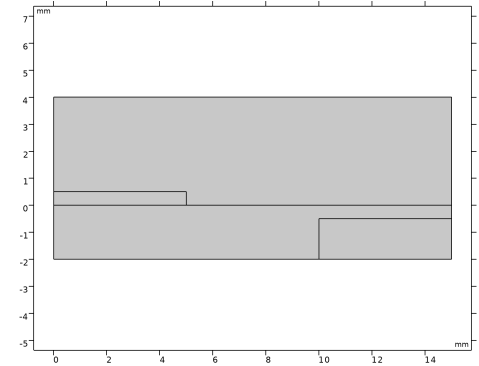
In the Width text field, type 15.
4
In the Height text field, type 6.
5
Locate the Position section. In the y text field, type -2.
6
Click to expand the Layers section. In the table, enter the following settings:
7
Click the  Zoom Extents button in the Graphics toolbar.
Rectangle 2 (r2)
1
In the Geometry toolbar, click  Rectangle.
2
In the Settings window for Rectangle, locate the Size and Shape section.
3
In the Width text field, type 5.
4
In the Height text field, type 0.5.
Rectangle 3 (r3)
1
In the Geometry toolbar, click  Rectangle.
2
In the Settings window for Rectangle, locate the Size and Shape section.
3
In the Width text field, type 5.
4
In the Height text field, type 1.5.
5
Locate the Position section. In the x text field, type 10.
6
In the y text field, type -2.
Line Segment 1 (ls1)
1
In the Geometry toolbar, click  More Primitives and choose Line Segment.
2
In the Settings window for Line Segment, locate the Starting Point section.
3
From the Specify list, choose Coordinates.
4
In the x text field, type 10.
5
Locate the Endpoint section. From the Specify list, choose Coordinates.
6
In the x text field, type 10.
7
In the y text field, type 0.5.
Mesh Control Edges 1 (mce1)
1
In the Geometry toolbar, click  Virtual Operations and choose Mesh Control Edges.
2
On the object fin, select Boundaries 10, 14, and 16 only.
3
In the Geometry toolbar, click  Build All.
4
Click the  Zoom Extents button in the Graphics toolbar.
Electric Discharge (edis)
Exclude the electrodes from the computation domains (with modeling the electrode boundaries only).
1
In the Model Builder window, under Component 1 (comp1) click Electric Discharge (edis).
2
3
In the Settings window for Electric Discharge, locate the Physical Model section.
4
In the dz text field, type z0.
Enable the isotropic diffusion stabilization.
5
Click the  Show More Options button in the Model Builder toolbar.
6
In the Show More Options dialog, select Physics > Stabilization in the tree.
7
8
9
In the Model Builder window, click Electric Discharge (edis).
10
In the Settings window for Electric Discharge, click to expand the Inconsistent Stabilization section.
11
Select the Isotropic diffusion checkbox.
12
Locate the Physical Model section. Select the Solid checkbox.
Solid 1
1
In the Model Builder window, under Component 1 (comp1) > Electric Discharge (edis) click Solid 1.
2
Add Material from Library
In the Home toolbar, click  Windows and choose Add Material from Library.
Add Material
1
Go to the Add Material window.
2
In the tree, select Electric Discharge > Gases > Air > Air [Kang et al. 2003].
3
Right-click and choose Add to Component 1 (comp1).
Materials
Air [Kang et al. 2003] (mat1)
1
In the Model Builder window, under Component 1 (comp1) > Materials click Air [Kang et al. 2003] (mat1).
2
Electric Discharge (edis)
Solid 1
1
In the Model Builder window, under Component 1 (comp1) > Electric Discharge (edis) click Solid 1.
2
In the Settings window for Solid, locate the Model Formulation section.
3
From the Material model list, choose Insulator.
4
Locate the Constitutive Relation D-E section. From the εr list, choose User defined. In the associated text field, type 3.2.
Gas 1
In the Model Builder window, click Gas 1.
Electrode 1
1
In the Physics toolbar, click  Attributes and choose Electrode.
2
3
In the Settings window for Electrode, locate the Terminal section.
4
In the V0 text field, type V0.
5
Locate the Charge Transport section. From the Boundary condition for electrons list, choose Number density.
6
From the Boundary condition for negative ions list, choose Number density.
Solid 1
In the Model Builder window, under Component 1 (comp1) > Electric Discharge (edis) click Solid 1.
Electrode 1
1
In the Physics toolbar, click  Attributes and choose Electrode.
2
3
In the Settings window for Electrode, locate the Terminal section.
4
In the V0 text field, type V0.
Solid 1
In the Model Builder window, click Solid 1.
Electrode 2
1
In the Physics toolbar, click  Attributes and choose Electrode.
2
Mesh 1
1
In the Model Builder window, under Component 1 (comp1) click Mesh 1.
2
In the Settings window for Mesh, locate the Sequence Type section.
3
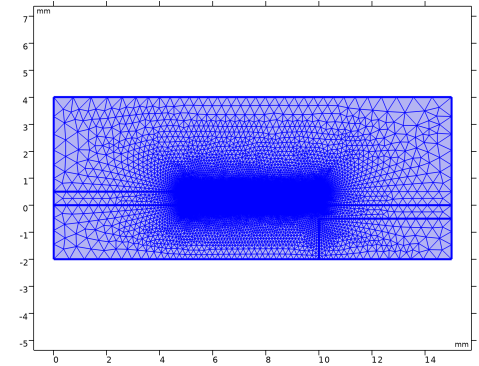
From the list, choose User-controlled mesh.
Mapped 1
1
In the Mesh toolbar, click  Mapped.
2
3
In the Settings window for Mapped, locate the Domain Selection section.
4
From the Geometric entity level list, choose Domain.
5
Distribution 1
1
Right-click Mapped 1 and choose Distribution.
2
3
In the Settings window for Distribution, locate the Distribution section.
4
From the Distribution type list, choose Predefined.
5
In the Number of elements text field, type 400.
6
In the Element ratio text field, type 5.
Distribution 2
1
In the Model Builder window, right-click Mapped 1 and choose Distribution.
2
3
In the Settings window for Distribution, locate the Distribution section.
4
From the Distribution type list, choose Predefined.
5
In the Number of elements text field, type 40.
6
In the Element ratio text field, type 5.
7
Click  Build Selected.
Size 1
1
In the Model Builder window, right-click Free Triangular 1 and choose Size.
2
In the Settings window for Size, locate the Element Size section.
3
Click the Custom button.
4
Locate the Element Size Parameters section.
5
Select the Maximum element growth rate checkbox. In the associated text field, type 1.1.
6
Click the  Zoom Box button in the Graphics toolbar.
Free Triangular 1
1
In the Model Builder window, click Free Triangular 1.
2
In the Settings window for Free Triangular, locate the Domain Selection section.
3
From the Geometric entity level list, choose Remaining.
4
Click to expand the Control Entities section. From the Smooth across removed control entities list, choose Off.
5
Click  Build All.
6
Click the  Zoom Extents button in the Graphics toolbar.
Study 1
Step 2: Time Dependent
1
In the Model Builder window, under Study 1 click Step 2: Time Dependent.
2
In the Settings window for Time Dependent, locate the Study Settings section.
3
In the Output times text field, type 0 10^{range(log10(1.0e-9),1/10,log10(1.0e-4))}.
Solution 1 (sol1)
1
In the Study toolbar, click  Show Default Solver.
2
In the Model Builder window, expand the Solution 1 (sol1) node.
Use lower of BDF solver to increase stability.
3
In the Model Builder window, under Study 1 > Solver Configurations > Solution 1 (sol1) click Time-Dependent Solver 1.
4
In the Settings window for Time-Dependent Solver, click to expand the Time Stepping section.
5
From the Minimum BDF order list, choose 1.
6
From the Maximum BDF order list, choose 2.
Use Anderson acceleration and split the solution of ions to speed up computation.
7
In the Model Builder window, under Study 1 > Solver Configurations > Solution 1 (sol1) > Time-Dependent Solver 1 click Segregated 1.
8
In the Settings window for Segregated, locate the General section.
9
From the Stabilization and acceleration list, choose Anderson acceleration.
10
Right-click Study 1 > Solver Configurations > Solution 1 (sol1) > Time-Dependent Solver 1 > Segregated 1 and choose Segregated Step.
11
Drag and drop Study  1 > Solver Configurations > Solution 1 (sol1) > Time-Dependent Solver 1 > Segregated 1 > Segregated Step 3below Segregated Step 1.
12
In the Model Builder window, under Study 1 > Solver Configurations > Solution 1 (sol1) > Time-Dependent Solver 1 > Segregated 1 click Segregated Step 1.
13
In the Settings window for Segregated Step, locate the General section.
14
In the Variables list, choose Natural Logarithm of the Number Density Multiplied by 1[cm^3] (comp1.edis.logn_p) and Natural Logarithm of the Number Density Multiplied by 1[cm^3] (comp1.edis.logn_n).
15
Under Variables, click  Delete.
16
In the Model Builder window, under Study 1 > Solver Configurations > Solution 1 (sol1) > Time-Dependent Solver 1 > Segregated 1 click Segregated Step 3.
17
In the Settings window for Segregated Step, locate the General section.
18
Under Variables, click  Add.
19
In the Add dialog, in the Variables list, choose Natural Logarithm of the Number Density Multiplied by 1[cm^3] (comp1.edis.logn_n) and Natural Logarithm of the Number Density Multiplied by 1[cm^3] (comp1.edis.logn_p).
20
21
In the Settings window for Segregated Step, locate the Method and Termination section.
22
From the Jacobian update list, choose Once per time step.
23
In the Study toolbar, click  Compute.
Results
Surface 1
1
In the Model Builder window, expand the 2D Plot Group 1 node, then click Surface 1.
2
In the Settings window for Surface, locate the Coloring and Style section.
3
From the Color table list, choose Wave.
4
From the Scale list, choose Linear symmetric.
5
Click the  Zoom Extents button in the Graphics toolbar.
Space Charge Density
1
In the Model Builder window, under Results click 2D Plot Group 1.
2
In the Settings window for 2D Plot Group, type Space Charge Density in the Label text field.
3
Click to expand the Plot Array section. From the Array type list, choose Linear.
4
From the Array axis list, choose y.
5
In the Relative padding text field, type -2.2.
Solution Array 1
1
In the Model Builder window, right-click Surface 1 and choose Solution Array.
2
In the Settings window for Solution Array, locate the Data section.
3
From the Time selection list, choose Interpolated.
4
In the Times (s) text field, type 10^{range(log10(1.0e-7),1,log10(1e-4))}.
Annotation 1
1
In the Model Builder window, right-click Space Charge Density and choose Annotation.
2
In the Settings window for Annotation, locate the Annotation section.
3
In the Text text field, type t = eval(t,s,3) s.
4
In the Space Charge Density toolbar, click  Plot.
Solution Array 1
In the Model Builder window, under Results > Space Charge Density > Surface 1 right-click Solution Array 1 and choose Copy.
Solution Array 1
In the Model Builder window, right-click Annotation 1 and choose Paste Solution Array.
Annotation 1
1
In the Settings window for Annotation, locate the Annotation section.
2
In the Text text field, type t = eval(t,s,3) s.
3
Locate the Coloring and Style section. Clear the Show point checkbox.
4
From the Anchor point list, choose Lower right.
5
Click to expand the Plot Array section. Select the Manual indexing checkbox.
Space Charge Density
1
In the Model Builder window, click Space Charge Density.
2
In the Settings window for 2D Plot Group, locate the Color Legend section.
3
Select the Show units checkbox.
4
Locate the Plot Settings section. From the Color list, choose Gray.
5
In the Space Charge Density toolbar, click  Plot.
6
Click the  Show Grid button in the Graphics toolbar.
Extrusion 2D 1
1
In the Results toolbar, click  More Datasets and choose Extrusion 2D.
2
In the Settings window for Extrusion 2D, locate the Extrusion section.
3
Find the Embedding subsection. From the Map plane to list, choose yz-plane.
4
In the z maximum text field, type z0.
Study 1/Solution 1 (3) (sol1)
In the Model Builder window, under Results > Datasets right-click Study 1/Solution 1 (sol1) and choose Duplicate.
Selection
1
In the Results toolbar, click  Attributes and choose Selection.
2
In the Settings window for Selection, locate the Geometric Entity Selection section.
3
From the Geometric entity level list, choose Domain.
4
5
Click the  Zoom Box button in the Graphics toolbar.
Extrusion 2D 2
1
In the Results toolbar, click  More Datasets and choose Extrusion 2D.
2
In the Settings window for Extrusion 2D, locate the Data section.
3
From the Dataset list, choose Study 1/Solution 1 (3) (sol1).
4
Locate the Extrusion section. In the z maximum text field, type z0.
5
Find the Embedding subsection. From the Map plane to list, choose yz-plane.
Study 1/Solution 1 (4) (sol1)
In the Model Builder window, under Results > Datasets right-click Study 1/Solution 1 (1) (sol1) and choose Duplicate.
Selection
1
In the Results toolbar, click  Attributes and choose Selection.
2
In the Settings window for Selection, locate the Geometric Entity Selection section.
3
From the Geometric entity level list, choose Domain.
4
Extrusion 2D 3
1
In the Results toolbar, click  More Datasets and choose Extrusion 2D.
2
In the Settings window for Extrusion 2D, locate the Data section.
3
From the Dataset list, choose Study 1/Solution 1 (4) (sol1).
4
Locate the Extrusion section. In the z maximum text field, type z0.
5
Find the Embedding subsection. From the Map plane to list, choose yz-plane.
3D Plot Group 2
1
In the Results toolbar, click  3D Plot Group.
2
In the Settings window for 3D Plot Group, locate the Plot Settings section.
3
Clear the Plot dataset edges checkbox.
Surface 1
1
Right-click 3D Plot Group 2 and choose Surface.
2
In the Settings window for Surface, locate the Data section.
3
From the Dataset list, choose Extrusion 2D 3.
4
Locate the Expression section. In the Expression text field, type 1.
5
Locate the Coloring and Style section. From the Coloring list, choose Uniform.
6
From the Color list, choose Custom.
7
8
Click Define custom colors.
9
10
Click Add to custom colors.
11
Click Show color palette only or OK on the cross-platform desktop.
12
Click the  Show Grid button in the Graphics toolbar.
Surface 2
1
In the Model Builder window, right-click 3D Plot Group 2 and choose Surface.
2
In the Settings window for Surface, locate the Data section.
3
From the Dataset list, choose Extrusion 2D 2.
4
Locate the Expression section. In the Expression text field, type 1.
5
Locate the Coloring and Style section. From the Coloring list, choose Uniform.
6
From the Color list, choose Custom.
7
8
Click Define custom colors.
9
10
Click Add to custom colors.
11
Click Show color palette only or OK on the cross-platform desktop.
3D Plot Group 2
1
In the Model Builder window, click 3D Plot Group 2.
2
In the Settings window for 3D Plot Group, click to expand the Title section.
3
From the Title type list, choose None.
Isosurface 1
1
Right-click 3D Plot Group 2 and choose Isosurface.
2
In the Settings window for Isosurface, locate the Expression section.
3
In the Expression text field, type edis.n_p.
4
In the Unit field, type 1/cm^3.
5
Locate the Levels section. From the Entry method list, choose Levels.
6
In the Levels text field, type 10^{range(log10(1e6),1/2,log10(1.0e9))}.
7
Locate the Coloring and Style section. From the Isosurface type list, choose Filled.
8
Clear the Fill volume outside of isosurface levels checkbox.
9
From the Color table list, choose WaveLight.
Transparency 1
1
Right-click Isosurface 1 and choose Transparency.
2
In the Settings window for Transparency, locate the Transparency section.
3
Find the Fresnel transmittance subsection. Set the Fresnel transmittance value to 0.5.
3D Plot Group 2
1
In the Model Builder window, under Results click 3D Plot Group 2.
2
In the Settings window for 3D Plot Group, locate the Color Legend section.
3
Clear the Show legends checkbox.
4
In the 3D Plot Group 2 toolbar, click  Plot.
5
Click the  Zoom Box button in the Graphics toolbar.