PDF

Electrohydrodynamic Flow in Dielectric Liquids
Introduction
Dielectric liquids are widely used in various technological applications due to their electrical insulating properties and ability to support high electric fields without breakdown. Unlike aqueous electrolytes, dielectric liquids lack free ions under normal conditions, making them ideal for applications such as electrophoretic displays, EHD pumps, electronic cooling, and high-voltage equipment. Their relatively low permittivity and conductivity, arising from impurity dissociation or ion injection under strong electric fields, allow controlled manipulation of charge carriers without the drawbacks of electrolysis and electrode degradation seen in conductive fluids.
Modeling electrohydrodynamic (EHD) flow in dielectric liquids is crucial for optimizing their performance in these applications. EHD flow in such media is governed not only by surface effects near electrodes but also by bulk space charge generated through ion dissociation. Accurately capturing the interplay between ion transport, charge generation, and fluid motion requires a comprehensive model that considers both electrostatic and hydrodynamic forces. Incorporating the field-enhanced ion dissociation, known as the Onsager effect, is particularly important for describing variations in local conductivity and the resulting Coulomb-driven flows.
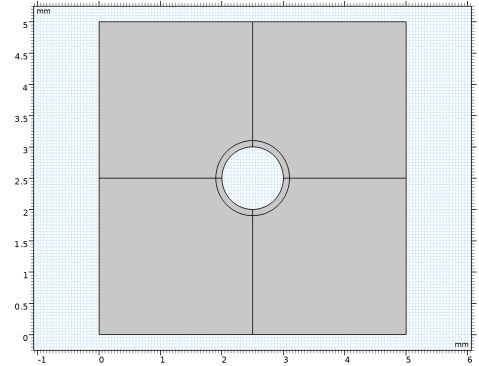
The numerical model developed in this work simulates EHD flow of a dielectric liquid around a wire electrode placed between two parallel plates. It solves the coupled Poisson–Nernst–Planck equations for ion transport and the Navier–Stokes equations for fluid dynamics. The Onsager effect is included to account for field-dependent ion generation, enabling more accurate predictions of space charge distribution and flow patterns. Simulation results show strong agreement with experimental data (Ref. 1).
Model Definition
The Electric Discharge interface is used to model the EHD flow in a dielectric liquid. The numerical model is described as follows:
where
p, and n denote positive ions and negative ions
ni is the number density of the charge carrier (SI unit: 1/m3)
E is the electric field (SI unit: V/m)
zi denotes the carrier charge (SI unit: 1)
μi denotes the carrier mobility (SI unit: m2/(V·s))
wi is the drift velocity in the electric field (SI unit: m/s)
Di is the diffusion coefficient (SI unit: m2/s)
Ri is the reaction rate (SI unit: 1/(m3·s))
βpn is the ion–ion recombination coefficient (SI unit: m3/s)
The above transport equations are fully coupled with Poisson’s equation through the electric field and the space charge:
The dissociation process is modeled as:
where
Sd denotes dissociation rate (generating free ions, SI unit: 1/(m3·s))
βpn is the ion–ion recombination coefficient (SI unit: m3/s)
n0 is the zero-field number density (SI unit: 1/m3)
σ0 is the zero-field electric conductivity (SI unit: S/m)
μp is the positive ion mobility (SI unit: m2/(V·s))
μn is the positive ion mobility (SI unit: m2/(V·s))
F is the Onsager function
I1 is the modified Bessel function of the first kind and order 1
lB is the Bjerrum length (SI unit: m)
lO is the Onsager length (SI unit: m)
Results and Discussion
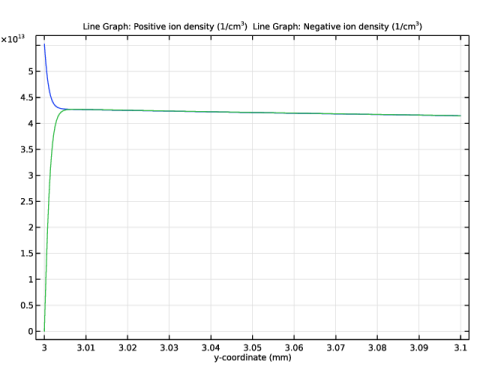
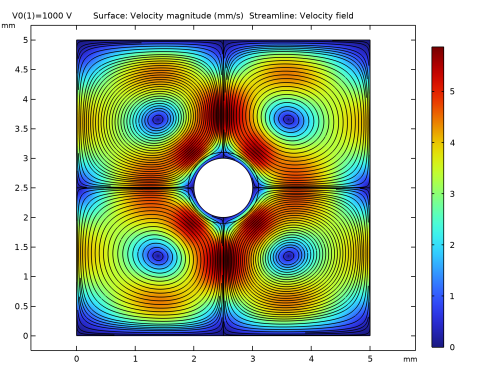
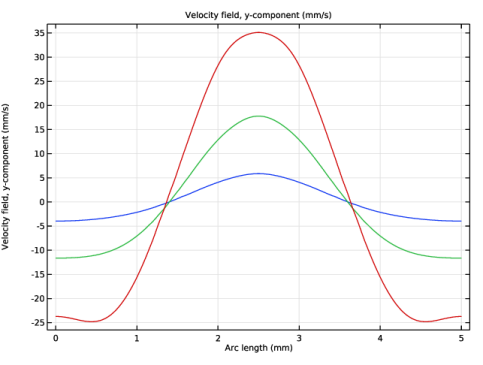
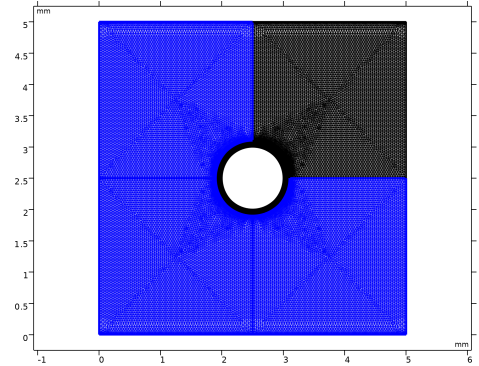
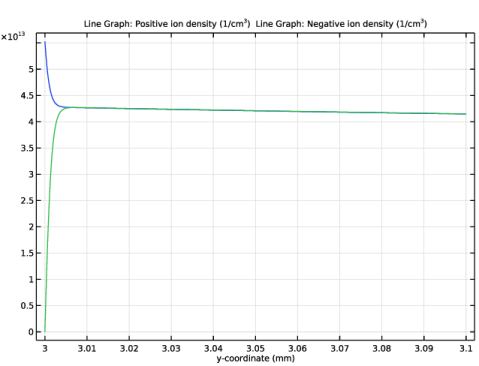
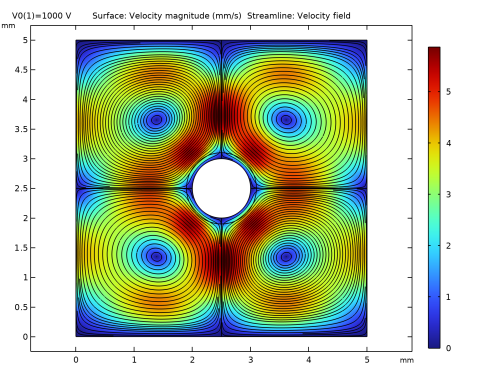
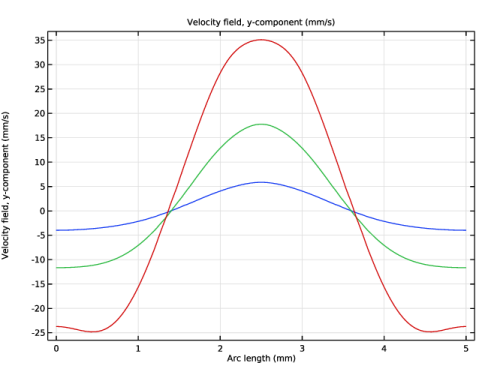
Figure 1 shows the profiles of positive and negative ions density close to the wire electrode. It is noted that the dissociation layer is as thin as 5 μm. Therefore, an extremely fine mesh is applied in the region close to the wire electrode. Figure 2 plots the flow field and the streamline of the flow with the applied voltage V0 = 1 kV. Figure 3 shows the vertical component of the flow velocity along a horizontal line at y = 0.75 mm, with V0 = 1, 1.5, and 2 kV.
Figure 1: The profiles of positive and negative ions close to the wire electrode.
Figure 2: The velocity magnitude and streamlines of the flow field.
Figure 3: The distribution of space charge density and electric field at t = 90 ns.
Reference
1. D.V. Fernandes, D.S. Cho, and Y.K. Suh, “Electrohydrodynamic flow of dielectric liquid around a wire electrode—effect of truncation of Onsager function,” IEEE Trans. Dielectr. Electr. Insul., vol. 21, no. 1, pp. 194–200, 2014.
Application Library path: Electric_Discharge_Module/Liquid_Dielectrics/ehd_flow_dielectric_liquid
Modeling Instructions
From the File menu, choose New.
New
In the New window, click  Model Wizard.
Model Wizard
1
In the Model Wizard window, click  2D.
2
In the Select Physics tree, select Electric Discharge > Electric Discharge (edis).
3
Click Add.
4
In the Select Physics tree, select Fluid Flow > Single-Phase Flow > Laminar Flow (spf).
5
Click Add.
6
Click  Study.
7
In the Select Study tree, select Preset Studies for Selected Physics Interfaces > Electric Discharge > Stationary with Initialization.
8
Geometry 1
1
In the Model Builder window, under Component 1 (comp1) click Geometry 1.
2
In the Settings window for Geometry, locate the Units section.
3
From the Length unit list, choose mm.
Square 1 (sq1)
1
In the Geometry toolbar, click  Square.
2
In the Settings window for Square, locate the Size section.
3
In the Side length text field, type 5.
4
Click to expand the Layers section. In the table, enter the following settings:
5
Click  Build All Objects.
6
Select the Layers to the left checkbox.
Circle 1 (c1)
1
In the Geometry toolbar, click  Circle.
2
In the Settings window for Circle, locate the Size and Shape section.
3
In the Radius text field, type 0.5+0.1.
4
Locate the Position section. In the x text field, type 2.5.
5
In the y text field, type 2.5.
6
Click to expand the Layers section. In the table, enter the following settings:
Union 1 (uni1)
1
In the Geometry toolbar, click  Booleans and Partitions and choose Union.
2
Click in the Graphics window and then press Ctrl+A to select both objects.
Delete Entities 1 (del1)
1
In the Model Builder window, right-click Geometry 1 and choose Delete Entities.
2
In the Settings window for Delete Entities, locate the Entities or Objects to Delete section.
3
From the Geometric entity level list, choose Domain.
4
On the object uni1, select Domains 5, 6, 9, and 10 only.
5
Click  Build All Objects.
Global Definitions
Parameters 1
1
In the Model Builder window, under Global Definitions click Parameters 1.
2
In the Settings window for Parameters, locate the Parameters section.
3
Electric Discharge (edis)
1
In the Model Builder window, under Component 1 (comp1) click Electric Discharge (edis).
2
In the Settings window for Electric Discharge, locate the Physical Model section.
3
Clear the Gas checkbox.
4
Select the Liquid checkbox.
5
In the dz text field, type 5[mm].
Liquid 1
1
In the Model Builder window, under Component 1 (comp1) > Electric Discharge (edis) click Liquid 1.
2
In the Settings window for Liquid, locate the Model Formulation section.
3
From the Charge carriers list, choose Positive and negative ions.
4
Locate the Transport Properties section. Find the Transport mechanisms subsection. Select the Convection checkbox.
5
Select the Diffusion checkbox.
6
Find the Convection subsection. From the u list, choose Velocity field (spf).
Electrode 1
1
In the Physics toolbar, click  Attributes and choose Electrode.
2
3
In the Settings window for Electrode, locate the Charge Transport section.
4
From the Boundary condition for negative ions list, choose Number density.
Liquid 1
In the Model Builder window, click Liquid 1.
Electrode 2
1
In the Physics toolbar, click  Attributes and choose Electrode.
2
3
In the Settings window for Electrode, locate the Terminal section.
4
In the V0 text field, type V0.
5
Locate the Charge Transport section. From the Boundary condition for positive ions list, choose Number density.
Liquid 1
In the Model Builder window, click Liquid 1.
Dissociation 1
In the Physics toolbar, click  Attributes and choose Dissociation.
Initial Values 1
1
In the Model Builder window, click Initial Values 1.
2
In the Settings window for Initial Values, locate the Initial Values section.
3
In the np text field, type n0.
4
In the nn text field, type n0.
Materials
Dielectric Liquid
1
In the Model Builder window, under Component 1 (comp1) right-click Materials and choose Blank Material.
2
In the Settings window for Material, type Dielectric Liquid in the Label text field.
3
Locate the Material Contents section. In the table, enter the following settings:
Laminar Flow (spf)
Volume Force 1
1
In the Physics toolbar, click  Domains and choose Volume Force.
2
In the Settings window for Volume Force, locate the Domain Selection section.
3
From the Selection list, choose All domains.
4
Locate the Volume Force section. From the F list, choose Electrohydrodynamic force (edis/liquid1).
Pressure Point Constraint 1
1
In the Physics toolbar, click  Points and choose Pressure Point Constraint.
2
Symmetry 1
1
In the Physics toolbar, click  Boundaries and choose Symmetry.
2
Mesh 1
1
In the Model Builder window, under Component 1 (comp1) click Mesh 1.
2
In the Settings window for Mesh, locate the Sequence Type section.
3
From the list, choose User-controlled mesh.
Corner Refinement 1
In the Model Builder window, under Component 1 (comp1) > Mesh 1 right-click Corner Refinement 1 and choose Delete.
Mapped 1
1
In the Mesh toolbar, click  Mapped.
2
Size 1
In the Model Builder window, right-click Size 1 and choose Delete.
Mapped 1
1
In the Settings window for Mapped, locate the Domain Selection section.
2
From the Geometric entity level list, choose Domain.
3
Distribution 1
1
Right-click Mapped 1 and choose Distribution.
2
3
In the Settings window for Distribution, locate the Distribution section.
4
In the Number of elements text field, type 100.
Distribution 2
1
Right-click Mapped 1 and choose Distribution.
2
3
In the Settings window for Distribution, locate the Distribution section.
4
From the Distribution type list, choose Predefined.
5
In the Number of elements text field, type 100.
6
In the Element ratio text field, type 200.
7
Select the Reverse direction checkbox.
Copy Domain 1
1
In the Model Builder window, right-click Mesh 1 and choose Copying Operations > Copy Domain.
2
3
In the Settings window for Copy Domain, locate the Destination Domains section.
4
Click to select the  Activate Selection toggle button.
5
Free Triangular 1
1
In the Model Builder window, click Free Triangular 1.
2
In the Settings window for Free Triangular, locate the Domain Selection section.
3
From the Geometric entity level list, choose Domain.
4
Size 1
1
Right-click Free Triangular 1 and choose Size.
2
In the Settings window for Size, locate the Element Size section.
3
Click the Custom button.
4
Locate the Element Size Parameters section.
5
Select the Maximum element size checkbox. In the associated text field, type 0.04.
Boundary Layers 1
1
In the Model Builder window, under Component 1 (comp1) > Mesh 1 click Boundary Layers 1.
2
In the Settings window for Boundary Layers, locate the Domain Selection section.
3
Click  Clear Selection.
4
Boundary Layer Properties 1
1
In the Model Builder window, expand the Boundary Layers 1 node, then click Boundary Layer Properties 1.
2
In the Settings window for Boundary Layer Properties, locate the Boundary Selection section.
3
Click  Clear Selection.
4
5
Locate the Layers section. In the Number of layers text field, type 30.
6
From the Thickness specification list, choose First layer.
7
In the Thickness text field, type 1e-5.
Copy Domain 2
In the Model Builder window, right-click Mesh 1 and choose Copying Operations > Copy Domain.
Free Triangular 1
Drag and drop below Copy Domain 1.
Copy Domain 2
1
In the Model Builder window, click Copy Domain 2.
2
In the Settings window for Copy Domain, locate the Source Domains section.
3
Click to select the  Activate Selection toggle button.
4
5
Locate the Destination Domains section. Click to select the  Activate Selection toggle button.
6
7
Click  Build All.
Electric Discharge Only
1
In the Model Builder window, click Study 1.
2
In the Settings window for Study, type Electric Discharge Only in the Label text field.
Step 2: Stationary
1
In the Model Builder window, under Electric Discharge Only click Step 2: Stationary.
2
In the Settings window for Stationary, locate the Physics and Variables Selection section.
3
In the Solve for column of the table, under Component 1 (comp1), clear the checkbox for Laminar Flow (spf).
4
In the Study toolbar, click  Compute.
Results
Dissociation Layer
1
In the Results toolbar, click  1D Plot Group.
2
In the Settings window for 1D Plot Group, type Dissociation Layer in the Label text field.
Line Graph 1
1
Right-click Dissociation Layer and choose Line Graph.
2
3
In the Settings window for Line Graph, locate the y-Axis Data section.
4
In the Expression text field, type edis.n_n.
5
In the Unit field, type 1/cm^3.
6
Locate the x-Axis Data section. From the Parameter list, choose Expression.
7
In the Expression text field, type y.
Line Graph 2
Right-click Line Graph 1 and choose Duplicate.
Line Graph 1
Locate the y-Axis Data section. In the Expression text field, type edis.n_p.
Dissociation Layer
1
Click the  Zoom Extents button in the Graphics toolbar.
2
In the Model Builder window, click Dissociation Layer.
3
In the Dissociation Layer toolbar, click  Plot.
Add Study
1
In the Home toolbar, click  Windows and choose Add Study.
2
Go to the Add Study window.
3
Find the Studies subsection. In the Select Study tree, select General Studies > Stationary.
4
Click the Add Study button in the window toolbar.
Fully Coupled
In the Settings window for Study, type Fully Coupled in the Label text field.
Solution 3 (sol3)
In the Study toolbar, click  Show Default Solver.
Step 1: Stationary
1
In the Model Builder window, under Fully Coupled click Step 1: Stationary.
2
In the Settings window for Stationary, locate the Study Settings section.
3
From the Tolerance list, choose User controlled.
4
In the Relative tolerance text field, type 1.0E-3.
5
Click to expand the Values of Dependent Variables section. Find the Initial values of variables solved for subsection. From the Settings list, choose User controlled.
6
From the Method list, choose Solution.
7
From the Study list, choose Electric Discharge Only, Stationary.
8
Click to expand the Study Extensions section. Select the Auxiliary sweep checkbox.
9
10
Solution 3 (sol3)
1
In the Model Builder window, expand the Fully Coupled > Solver Configurations > Solution 3 (sol3) > Stationary Solver 1 node.
2
Right-click Fully Coupled > Solver Configurations > Solution 3 (sol3) > Stationary Solver 1 and choose Segregated.
3
In the Settings window for Segregated, locate the General section.
4
From the Stabilization and acceleration list, choose Anderson acceleration.
5
In the Model Builder window, expand the Fully Coupled > Solver Configurations > Solution 3 (sol3) > Stationary Solver 1 > Segregated 1 node, then click Segregated Step.
6
In the Settings window for Segregated Step, locate the General section.
7
In the Variables list, choose Pressure (comp1.p) and Velocity Field (comp1.u).
8
Under Variables, click  Delete.
9
In the Model Builder window, under Fully Coupled > Solver Configurations > Solution 3 (sol3) > Stationary Solver 1 right-click Segregated 1 and choose Segregated Step.
10
In the Settings window for Segregated Step, locate the General section.
11
Under Variables, click  Add.
12
In the Add dialog, in the Variables list, choose Pressure (comp1.p) and Velocity Field (comp1.u).
13
14
In the Model Builder window, under Fully Coupled > Solver Configurations > Solution 3 (sol3) > Stationary Solver 1 click Direct (Merged).
15
In the Settings window for Direct, locate the General section.
16
From the Solver list, choose PARDISO.
17
In the Study toolbar, click  Compute.
Results
Velocity (spf)
1
In the Model Builder window, under Results click Velocity (spf).
2
In the Settings window for 2D Plot Group, locate the Data section.
3
From the Parameter value (V0 (V)) list, choose 1000.
4
In the Velocity (spf) toolbar, click  Plot.
Streamline 1
1
Right-click Velocity (spf) and choose Streamline.
2
In the Settings window for Streamline, locate the Streamline Positioning section.
3
From the Positioning list, choose Uniform density.
4
In the Density level text field, type 10.
Surface
1
In the Model Builder window, click Surface.
2
In the Settings window for Surface, locate the Expression section.
3
From the Unit list, choose mm/s.
4
In the Velocity (spf) toolbar, click  Plot.
1D Plot Group 6
In the Results toolbar, click  1D Plot Group.
Line Graph 1
1
Right-click 1D Plot Group 6 and choose Line Graph.
2
In the Settings window for Line Graph, click  Define Cut Line.
3
Locate the Data section. Click  Go to Source.
Cut Line 2D 1
1
In the Model Builder window, under Results > Datasets click Cut Line 2D 1.
2
In the Settings window for Cut Line 2D, locate the Line Data section.
3
In row Point 1, set x to 0.
4
In row Point 1, set y to 3.75.
5
In row Point 2, set x to 5.
6
In row Point 2, set y to 3.75.
Line Graph 1
1
In the Model Builder window, under Results > 1D Plot Group 6 click Line Graph 1.
2
In the Settings window for Line Graph, locate the y-Axis Data section.
3
In the Expression text field, type v.
4
From the Unit list, choose mm/s.
5
In the 1D Plot Group 6 toolbar, click  Plot.
Cut Line 2D 1
1
In the Model Builder window, under Results > Datasets click Cut Line 2D 1.
2
In the Settings window for Cut Line 2D, locate the Data section.
3
From the Dataset list, choose Fully Coupled/Solution 3 (sol3).
Velocity Profile
1
In the Model Builder window, under Results click 1D Plot Group 6.
2
In the Settings window for 1D Plot Group, type Velocity Profile in the Label text field.
3
In the Velocity Profile toolbar, click  Plot.