PDF

Electric Discharge with Self-Defined Discharge Chemistry
Introduction
The example shows how to generate a discharge model from the Reaction Engineering interface with a self-defined discharge chemistry. It reproduces the library model Double-Headed Streamer in Parallel-Plate Electrodes. The model investigates a double-headed streamer between parallel-plate electrodes. Initially, a cluster of electrons is positioned between two electrodes spaced 1 cm apart, subject to a 52 kV voltage, creating a background electric field of 52 kV/cm. Negative and positive streamers propagate toward the electrodes, exhibiting electric field and electron density consistent with simulation results in Ref. 1.
Model Definition
The discharge model is generated from the Reaction Engineering interface with a self-defined discharge chemistry. For more details about the physical model, see Double-Headed Streamer in Parallel-Plate Electrodes.
Results and Discussion
The results in this section are for a double-headed streamer propagating in a background gas kept at a constant density as obtained by the ideal gas law at atmospheric pressure and at a temperature of 293.15 K.
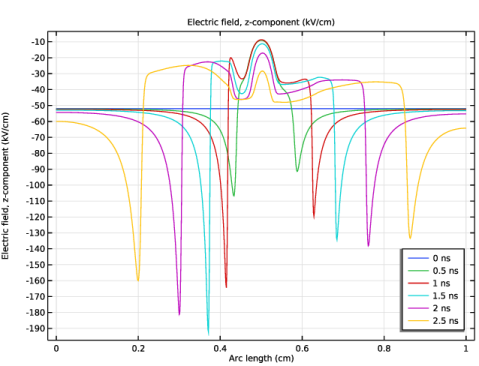
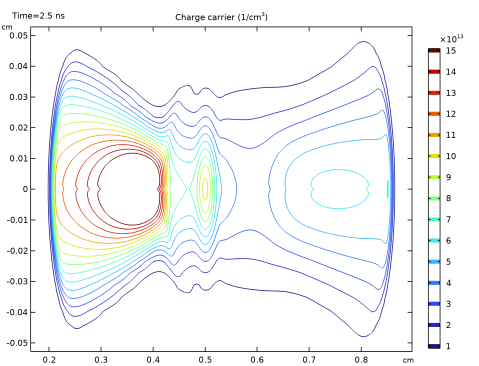
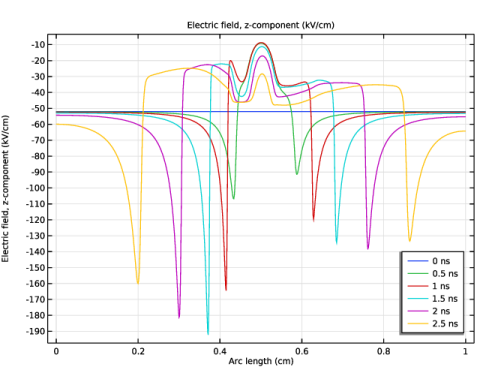
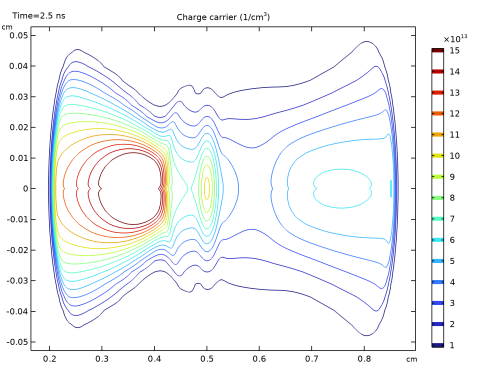
Figure 1 plots the z-component of the electric field for several instants during the streamer simulation. Figure 2 shows the electron density distribution at 2.5 ns. These results agree with that from the model Double-Headed Streamer in Parallel-Plate Electrodes and that from Ref. 1.
Figure 1: Spatial distribution along the axis of symmetry of the z-component of the electric field for several time instants during the streamer propagation. Compare with figure 7 of Ref. 1.
Figure 2: Contours of the electron number density at 2.5 ns. Compare with figure 6 of Ref. 1.
Reference
1. D. Bessières, J. Paillol, A. Bourdon, P. Segur, and E. Marode, “A new one-dimensional moving mesh method applied to the simulation of streamer discharges,” J. Phys. D: Appl. Phys., vol. 40, pp. 6559–6570, 2007.
Application Library path: Electric_Discharge_Module/Streamer_Discharges/double_headed_streamer_discharge_chemistry
Modeling Instructions
From the File menu, choose New.
New
In the New window, click  Model Wizard.
Model Wizard
1
In the Model Wizard window, click  0D.
2
In the Select Physics tree, select Chemical Species Transport > Reaction Engineering (re).
3
Click Add.
4
Click  Study.
5
Reaction Engineering (re)
Reaction 1
1
In the Reaction Engineering toolbar, click  Reaction.
2
In the Settings window for Reaction, locate the Reaction Formula section.
3
In the Formula text field, type e + M => p + 2 e.
4
Click Apply.
5
Locate the Rate Constants section. In the kf text field, type 0.
Species: e
1
In the Model Builder window, click Species: e.
2
In the Settings window for Species, locate the Chemical Formula section.
3
In the z text field, type -1.
Species: M
1
In the Model Builder window, click Species: M.
2
In the Settings window for Species, locate the Constant Concentration/Activity section.
3
Select the Keep concentration/activity constant checkbox.
Initial Values 1
1
In the Model Builder window, click Initial Values 1.
2
In the Settings window for Initial Values, locate the Volumetric Species Initial Values section.
3
Species: p
1
In the Model Builder window, click Species: p.
2
In the Settings window for Species, locate the Chemical Formula section.
3
In the z text field, type 1.
Generate Space-Dependent Model 1
1
In the Reaction Engineering toolbar, click  Generate Space-Dependent Model.
2
In the Settings window for Generate Space-Dependent Model, locate the Component Settings section.
3
From the Component to use list, choose 2Daxi: New.
4
Locate the Physics Interfaces section. Find the Chemical species transport subsection. From the list, choose Transport of Charge Carriers: New.
5
Select the Electrostatics checkbox.
6
Locate the Space-Dependent Model Generation section. Click Create/Refresh.
Component 2 (comp2)
In the Model Builder window, expand the Component 2 (comp2) node.
Geometry 1(2Daxi)
1
In the Model Builder window, expand the Component 2 (comp2) > Geometry 1(2Daxi) node, then click Geometry 1(2Daxi).
2
In the Settings window for Geometry, locate the Units section.
3
From the Length unit list, choose cm.
Rectangle 1 (r1)
1
In the Geometry toolbar, click  Rectangle.
2
In the Settings window for Rectangle, click to expand the Layers section.
3
Clear the Layers on bottom checkbox.
4
Select the Layers to the left checkbox.
5
6
Click  Build All Objects.
7
Click the  Zoom Extents button in the Graphics toolbar.
Electrostatics (es)
Space Charge Density 1
1
In the Model Builder window, expand the Component 2 (comp2) > Electrostatics (es) node, then click Space Charge Density 1.
2
Click in the Graphics window and then press Ctrl+A to select all domains.
3
Click the  Select All button in the Graphics toolbar.
Global Definitions
Parameters 1
1
In the Model Builder window, under Global Definitions click Parameters 1.
2
In the Settings window for Parameters, locate the Parameters section.
3
Analytic 1 (an1)
1
In the Home toolbar, click  Functions and choose Global > Analytic.
2
In the Settings window for Analytic, type alphaFun in the Function name text field.
3
Locate the Definition section. In the Expression text field, type 5.7*P/1[Torr]*exp(-260*P/1[Torr]/x).
4
Locate the Units section. In the Function text field, type cm^-1.
5
Chemistry (chem)
1: e + M => p + 2 e
1
In the Model Builder window, expand the Component 2 (comp2) > Chemistry (chem) node, then click 1: e + M => p + 2 e.
2
In the Settings window for Reaction, locate the Rate Constants section.
3
In the kf text field, type alphaFun(es.normE)*mu*es.normE/cM.
Species: e
1
In the Model Builder window, click Species: e.
2
In the Settings window for Species, locate the Chemical Formula section.
3
In the M text field, type 5.5e-7[kg/mol].
Species: M (Constant)
1
In the Model Builder window, click Species: M (Constant).
2
In the Settings window for Species, locate the Chemical Formula section.
3
In the M text field, type 0.029[kg/mol].
Species: p
1
In the Model Builder window, click Species: p.
2
In the Settings window for Species, locate the Chemical Formula section.
3
In the M text field, type 0.029[kg/mol].
Electrostatics (es)
1
In the Model Builder window, under Component 2 (comp2) click Electrostatics (es).
2
In the Settings window for Electrostatics, click to expand the Discretization section.
Ground 1
1
In the Physics toolbar, click  Boundaries and choose Ground.
2
Electric Potential 1
1
In the Physics toolbar, click  Boundaries and choose Electric Potential.
2
3
In the Settings window for Electric Potential, locate the Electric Potential section.
4
In the V0 text field, type V0.
Definitions (comp2)
Variables 1
1
In the Model Builder window, under Component 2 (comp2) right-click Definitions and choose Variables.
2
In the Settings window for Variables, locate the Variables section.
3
Transport of Charge Carriers (tcc)
Initial Values 1
1
In the Model Builder window, expand the Component 2 (comp2) > Transport of Charge Carriers (tcc) node, then click Initial Values 1.
2
In the Settings window for Initial Values, locate the Initial Values section.
3
In the nne text field, type n0.
4
In the nnp text field, type n0.
Transport Properties 1
1
In the Model Builder window, click Transport Properties 1.
2
In the Settings window for Transport Properties, locate the Drift section.
3
In the μne text field, type mu.
4
In the μnp text field, type 0.
5
Locate the Diffusion section. In the Dnp text field, type 0.
6
7
Specify the Dne matrix as
Mesh 1
Mapped 1
1
In the Mesh toolbar, click  Mapped.
2
In the Settings window for Mapped, locate the Domain Selection section.
3
From the Geometric entity level list, choose Domain.
4
Distribution 1
1
Right-click Mapped 1 and choose Distribution.
2
3
In the Settings window for Distribution, locate the Distribution section.
4
From the Distribution type list, choose Predefined.
5
In the Number of elements text field, type 20.
6
In the Element ratio text field, type 10.
7
Select the Reverse direction checkbox.
Distribution 2
1
In the Model Builder window, right-click Mapped 1 and choose Distribution.
2
3
In the Settings window for Distribution, locate the Distribution section.
4
In the Number of elements text field, type 800.
Free Triangular 1
1
In the Mesh toolbar, click  Free Triangular.
2
In the Settings window for Free Triangular, click  Build All.
Study 1
Step 2: Time Dependent
In the Study toolbar, click  Time Dependent.
Step 1: Stationary
1
In the Model Builder window, click Step 1: Stationary.
2
In the Settings window for Stationary, locate the Physics and Variables Selection section.
3
In the Solve for column of the table, under Component 2 (comp2), clear the checkboxes for Chemistry (chem) and Transport of Charge Carriers (tcc).
Step 2: Time Dependent
1
In the Model Builder window, click Step 2: Time Dependent.
2
In the Settings window for Time Dependent, locate the Physics and Variables Selection section.
3
In the Solve for column of the table, clear the checkbox for Component 1 (comp1).
4
Locate the Study Settings section. From the Time unit list, choose ns.
5
In the Output times text field, type range(0,0.5,2.5).
Solution 1 (sol1)
1
In the Study toolbar, click  Show Default Solver.
2
In the Model Builder window, expand the Solution 1 (sol1) node.
3
In the Model Builder window, expand the Study 1 > Solver Configurations > Solution 1 (sol1) > Stationary Solver 1 node.
4
In the Model Builder window, expand the Study 1 > Solver Configurations > Solution 1 (sol1) > Dependent Variables 1 node, then click Electric Potential (comp2.V).
5
In the Settings window for Field, locate the Scaling section.
6
From the Method list, choose Manual.
7
In the Scale text field, type 1e3.
8
In the Model Builder window, expand the Study 1 > Solver Configurations > Solution 1 (sol1) > Dependent Variables 2 node, then click Electric Potential (comp2.V).
9
In the Settings window for Field, locate the Scaling section.
10
From the Method list, choose Manual.
11
In the Scale text field, type 1e3.
12
In the Model Builder window, under Study 1 > Solver Configurations > Solution 1 (sol1) click Time-Dependent Solver 1.
13
In the Settings window for Time-Dependent Solver, click to expand the Time Stepping section.
14
From the Maximum step constraint list, choose Constant.
15
In the Maximum step text field, type 0.01[ns].
16
From the Maximum BDF order list, choose 3.
17
From the Minimum BDF order list, choose 2.
18
Find the Algebraic variable settings subsection. From the Error estimation list, choose Exclude algebraic.
19
In the Model Builder window, expand the Study 1 > Solver Configurations > Solution 1 (sol1) > Time-Dependent Solver 1 node, then click Direct 1.
20
In the Settings window for Direct, locate the General section.
21
From the Solver list, choose PARDISO.
22
In the Model Builder window, click Study 1.
23
In the Settings window for Study, locate the Study Settings section.
24
Clear the Generate default plots checkbox.
25
In the Study toolbar, click  Compute.
Results
Electric Field
1
In the Results toolbar, click  1D Plot Group.
2
In the Settings window for 1D Plot Group, type Electric Field in the Label text field.
3
Locate the Data section. From the Dataset list, choose Study 1/Solution 1 (2) (sol1).
4
Locate the Legend section. From the Position list, choose Lower right.
Line Graph 1
1
Right-click Electric Field and choose Line Graph.
2
3
In the Settings window for Line Graph, locate the y-Axis Data section.
4
In the Expression text field, type es.Ez.
5
In the Unit field, type kV/cm.
6
Click to expand the Legends section. Select the Show legends checkbox.
7
In the Electric Field toolbar, click  Plot.
8
Click the  Zoom Extents button in the Graphics toolbar.
2D Plot Group 2
In the Results toolbar, click  2D Plot Group.
Mirror 2D 1
In the Results toolbar, click  More Datasets and choose Mirror 2D.
Electron Density
1
In the Model Builder window, under Results click 2D Plot Group 2.
2
In the Settings window for 2D Plot Group, type Electron Density in the Label text field.
3
Locate the Data section. From the Dataset list, choose Mirror 2D 1.
Contour 1
1
Right-click Electron Density and choose Contour.
2
In the Settings window for Contour, locate the Expression section.
3
In the Unit field, type 1/cm^3.
4
Locate the Levels section. From the Entry method list, choose Levels.
5
In the Levels text field, type range(1.0e13,1.0e13,1.5e14).
Electron Density
1
In the Model Builder window, click Electron Density.
2
In the Settings window for 2D Plot Group, locate the Plot Settings section.
3
Clear the Plot dataset edges checkbox.
4
From the View list, choose View 1.
5
Click  Go to Source.
Definitions (comp2)
Axis
1
Click the  Zoom Extents button in the Graphics toolbar.
2
In the Model Builder window, expand the View 1 node, then click Axis.
3
In the Settings window for Axis, locate the Axis section.
4
In the r minimum text field, type 0.
5
In the r maximum text field, type 0.06.
6
In the z minimum text field, type 0.
7
In the z maximum text field, type 1.
8
From the View scale list, choose Automatic.
Results
Transformation 1
1
In the Model Builder window, right-click Contour 1 and choose Transformation.
2
In the Settings window for Transformation, locate the Transformation section.
3
Select the Rotate checkbox.
4
In the Angle text field, type -90.
5
In the Electron Density toolbar, click  Plot.
6
Click the  Zoom Extents button in the Graphics toolbar.