PDF

Dielectric Barrier Discharge in Air
Introduction
Dielectric barrier discharge (DBD) is a non-thermal plasma phenomenon that occurs between two electrodes separated by a dielectric layer. It is widely employed in applications such as ozone generation, surface modification, and plasma medicine. The presence of the dielectric barrier significantly influences the discharge process by altering the electric field distribution and controlling the motion of charged species. In particular, the accumulation and relaxation of surface charges at the dielectric interface play a crucial role in determining discharge dynamics.
This model simulates DBD in air under an applied AC voltage. As the voltage amplitude increases, the discharge becomes more intense, and the dominant contribution to the total current shifts from displacement current to conduction current.
Model Definition
The Electric Discharge interface is used to simulate the DBD. The built-in charge transport model is used:
where
e, p, n denote electrons, positive ions, and negative ions
ni is the number density of the charge carrier (SI unit: 1/m3)
E is the electric field (SI unit: V/m)
zi denotes the carrier charge (SI unit: 1)
μi denotes the carrier mobility (SI unit: m2/(V·s))
wi is the drift velocity in the electric field (SI unit: m/s)
Di is the diffusion coefficient (SI unit: m2/s)
Ri is the reaction rate (SI unit: 1/(m3·s))
α is the ionization coefficient (SI unit: 1/m)
η is the attachment coefficient (SI unit: 1/m)
βep is the electron–ion recombination coefficient (SI unit: m3/s)
βpn is the ion–ion recombination coefficient (SI unit: m3/s)
The above transport equations are fully coupled with Poisson’s equation through the electric field and the space charge:
where e is the elementary charge.
The Gas–Solid interface is modeled with the dedicated Dielectric Interface, Surface Transport feature described in the Electric Discharge Module User’s Guide.
Results and Discussion
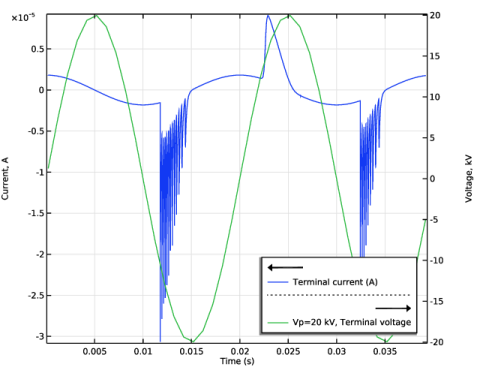
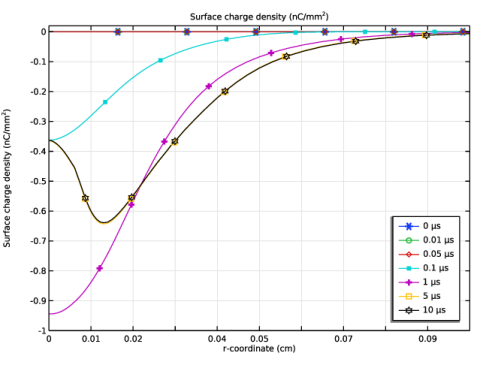
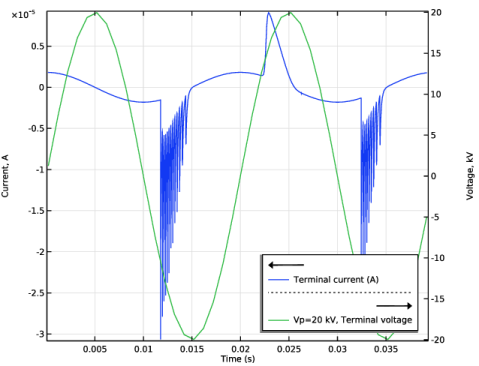
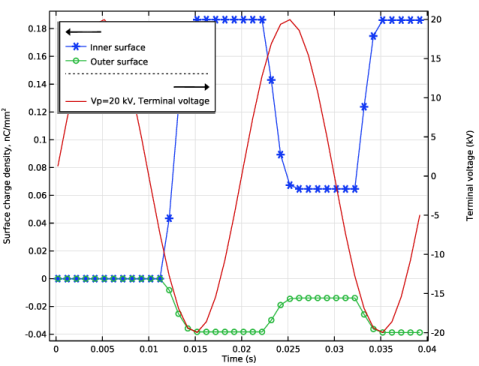
Figure 1 shows the discharge current as a function of time from the first study. The total current consists of the displacement current superimposed with the gas discharge current. Figure 2 shows the surface charge density at the inner and outer surfaces as a function of time.
Figure 1: The discharge current as a function of time.
Figure 2: The radial distributions surface charge density at several time instants of the first study.
Application Library path: Electric_Discharge_Module/Dielectric_Barrier_Discharges/dbd
Modeling Instructions
From the File menu, choose New.
New
In the New window, click  Model Wizard.
Model Wizard
1
In the Model Wizard window, click  1D Axisymmetric.
2
In the Select Physics tree, select Electric Discharge > Electric Discharge (edis).
3
Click Add.
4
Click  Study.
5
In the Select Study tree, select Preset Studies for Selected Physics Interfaces > Time Dependent with Initialization.
6
Geometry 1
1
In the Model Builder window, under Component 1 (comp1) click Geometry 1.
2
In the Settings window for Geometry, locate the Units section.
3
From the Length unit list, choose cm.
Global Definitions
Parameters 1
1
In the Model Builder window, under Global Definitions click Parameters 1.
2
In the Settings window for Parameters, locate the Parameters section.
3
Geometry 1
Interval 1 (i1)
1
In the Model Builder window, under Component 1 (comp1) right-click Geometry 1 and choose Interval.
2
In the Settings window for Interval, locate the Interval section.
3
4
Click  Build All Objects.
Electric Discharge (edis)
1
In the Model Builder window, under Component 1 (comp1) click Electric Discharge (edis).
2
In the Settings window for Electric Discharge, locate the Physical Model section.
3
Select the Solid checkbox.
Solid 1
1
In the Model Builder window, under Component 1 (comp1) > Electric Discharge (edis) click Solid 1.
2
3
In the Settings window for Solid, locate the Model Formulation section.
4
From the Material model list, choose Insulator.
5
Locate the Constitutive Relation D-E section. From the εr list, choose User defined. In the associated text field, type 3.5.
Add Material from Library
In the Home toolbar, click  Windows and choose Add Material from Library.
Add Material
1
Go to the Add Material window.
2
In the tree, select Electric Discharge > Gases > Air > Air [Morrow and Lowke, 1997].
3
Right-click and choose Add to Component 1 (comp1).
Materials
Air [Morrow and Lowke, 1997] (mat1)
1
In the Model Builder window, under Component 1 (comp1) > Materials click Air [Morrow and Lowke, 1997] (mat1).
2
In the Settings window for Material, locate the Geometric Entity Selection section.
3
4
Click  Remove from Selection.
5
Electric Discharge (edis)
Solid 1
In the Model Builder window, under Component 1 (comp1) > Electric Discharge (edis) click Solid 1.
Electrode 1
1
In the Physics toolbar, click  Attributes and choose Electrode.
2
3
In the Settings window for Electrode, locate the Terminal section.
4
In the V0 text field, type Va.
Solid 1
In the Model Builder window, click Solid 1.
Electrode 2
1
In the Physics toolbar, click  Attributes and choose Electrode.
2
Mesh 1
1
In the Model Builder window, under Component 1 (comp1) click Mesh 1.
2
In the Settings window for Mesh, locate the Sequence Type section.
3
From the list, choose User-controlled mesh.
Distribution 1
1
In the Model Builder window, right-click Edge 1 and choose Distribution.
2
3
In the Settings window for Distribution, locate the Distribution section.
4
From the Distribution type list, choose Predefined.
5
In the Number of elements text field, type 200.
6
In the Element ratio text field, type 5.
7
Select the Symmetric distribution checkbox.
Distribution 2
1
Right-click Edge 1 and choose Distribution.
2
3
In the Settings window for Distribution, locate the Distribution section.
4
In the Number of elements text field, type 10.
5
Click  Build All.
Study 1
Step 2: Time Dependent
1
In the Model Builder window, under Study 1 click Step 2: Time Dependent.
2
In the Settings window for Time Dependent, locate the Study Settings section.
3
In the Output times text field, type range(1/f/100,1/f/20,2/f).
Definitions
Global Variable Probe 1 (var1)
1
In the Definitions toolbar, click  Probes and choose Global Variable Probe.
2
In the Settings window for Global Variable Probe, locate the Expression section.
3
In the Expression text field, type edis.I0_0.
Study 1
Parametric Sweep
1
In the Study toolbar, click  Parametric Sweep.
2
In the Settings window for Parametric Sweep, locate the Study Settings section.
3
4
5
In the Model Builder window, click Study 1.
6
In the Settings window for Study, locate the Study Settings section.
7
Clear the Generate default plots checkbox.
8
In the Study toolbar, click  Compute.
Results
Global 1
1
In the Model Builder window, right-click Probe Plot Group 1 and choose Global.
2
In the Settings window for Global, locate the Data section.
3
From the Dataset list, choose Study 1/Parametric Solutions 1 (sol3).
4
From the Parameter selection (Vp) list, choose Last.
5
Locate the y-Axis Data section. In the table, enter the following settings:
6
Locate the x-Axis Data section. From the Axis source data list, choose Time.
Probe Plot Group 1
1
In the Model Builder window, click Probe Plot Group 1.
2
In the Settings window for 1D Plot Group, locate the Plot Settings section.
3
Select the Two y-axes checkbox.
4
Select the y-axis label checkbox. In the associated text field, type Current, A.
5
Select the Secondary y-axis label checkbox. In the associated text field, type Voltage, kV.
6
In the table, select the Plot on secondary y-axis checkbox for Global 1.
7
Locate the Legend section. From the Position list, choose Lower right.
8
Click to expand the Title section. From the Title type list, choose None.
9
In the Probe Plot Group 1 toolbar, click  Plot.
Surface Charge Density
1
In the Results toolbar, click  1D Plot Group.
2
In the Settings window for 1D Plot Group, type Surface Charge Density in the Label text field.
Point Graph 1
1
Right-click Surface Charge Density and choose Point Graph.
2
3
In the Settings window for Point Graph, locate the y-Axis Data section.
4
In the Expression text field, type edis.rhos.
5
In the Unit field, type nC/mm^2.
Global 1
In the Model Builder window, under Results > Probe Plot Group 1 right-click Global 1 and choose Copy.
Global 1
In the Model Builder window, right-click Surface Charge Density and choose Paste Global.
Surface Charge Density
1
In the Settings window for 1D Plot Group, locate the Title section.
2
From the Title type list, choose None.
3
Locate the Plot Settings section. Select the Two y-axes checkbox.
4
Select the y-axis label checkbox. In the associated text field, type Surface charge density, nC/mm<sup>2</sup>.
5
Select the Secondary y-axis label checkbox.
Point Graph 1
1
In the Model Builder window, click Point Graph 1.
2
In the Settings window for Point Graph, click to expand the Legends section.
3
Select the Show legends checkbox.
4
From the Legends list, choose Manual.
5
6
Click to expand the Coloring and Style section. Find the Line markers subsection. From the Marker list, choose Cycle.
Surface Charge Density
1
In the Model Builder window, click Surface Charge Density.
2
In the Settings window for 1D Plot Group, locate the Legend section.
3
From the Position list, choose Upper left.
4
In the Surface Charge Density toolbar, click  Plot.