






PDF

Electrocoating of a Car Door
Introduction
Electrocoating (also known as E-coating) is an electrophoretical method for depositing paint onto electrically conducting objects. The method is widely used in various industries (for instance, in the automotive industry), where electrocoating is broadly used to apply the first priming paint layer on car bodies. A salient feature of the electrocoating process is that the deposited paint layer is highly resistive. Due to this feature, it is possible to achieve fairly uniform paint layers, even for complex body shapes, since the local deposition rate decreases with increasing paint thickness.
This example models electrocoating of a car door where the electrolyte is a dispersion of colloidal paint particles and the paint particles are deposited on the cathode surface.
Model Definition
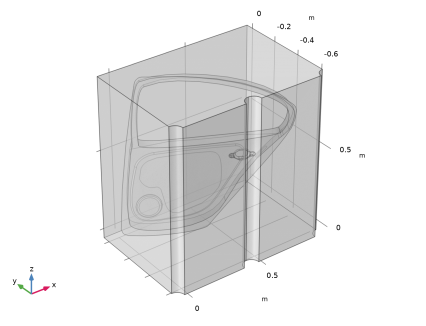
Figure 1 shows the model geometry. The geometry consists of one single electrolyte domain, with the electrodes being represented as boundaries. The quarter and semi-cylinder surfaces represent the anodes. The car door cathode is completely immersed in the electrolyte.
Figure 1: Model geometry. Car door (cathode) and three cylindrical anodes.
The car door geometry used in the model is a surface geometry (that is, a geometry with zero though-plane thickness), and the car door electrode surface is modeled using the Thin Electrode Surface node (see below).
Electrolyte charge transport
Ohm’s law is used in the electrolyte domain:
where ϕl (V) is the electrolyte potential, il is the electrolyte current density vector (A/m2) and σl (S/m) is the electrolyte conductivity. A uniform composition of the electrolyte is assumed, with an electrolyte conductivity of 0.28 S/m.
Electrode reactions
The applied cell voltage results in water electrolysis. Oxygen is evolved on the anodes according to
The equilibrium potential, Eeq,O2 (V), for this reaction is 1.23 V versus SHE.
On the cathodes, hydrogen is evolved according to
The equilibrium voltage for this reaction is Eeq,H2 = 0 V versus SHE.
Activation overpotentials are assumed to be negligible at both electrodes. The electrode kinetics expression of type Primary condition (thermodynamic equilibrium) is used in the model, to implement that assumption.
Film thickness and resistance
The consumption of protons at the cathode results in a locally increased pH. This in turn results in reduced solubility and deposition rate of the colloidal paint particles on the electrode. This model assumes a linear relation between the paint film formation rate and the local current density:
where s (m) is the thickness of the film, Ccap (kg/C) is the coulombic efficiency of the paint process and ρ (kg/m3) the density of the film. The index i represents the upside and downside of the cathode surface. Ccap is a lumped empirical parameter that needs to be measured for each processing bath. In the present model, a value of 60 g/C is used.
The depositing film results in a lowered electrolyte conductivity at the cathode. This is incorporated in the model by adding a potential drop at the cathode according to:
where Rfilm (Ω·m) is the film resistivity, set to 5 MΩ·m in this model.
Electrode Boundary Conditions
The cathode is grounded in the model. The following condition is used for the electrolyte potential at the car door cathode boundary
For the anodes the electrolyte voltage is set to
where Ecell (250 V) is the cell potential. The potential drop due to the ion-exchange membrane that covers the membrane-electrode anode cells is not included in the model.
The local current density of the charge transfer reactions, iloc (A/m2), which is used in the film thickness and resistance equations, is evaluated such that the above electrolyte potential conditions are satisfied at the cathode and anode boundaries, respectively.
All other surfaces use insulating boundary conditions.
Regarding the Usage of the Thin Electrode Surface node
The Thin Electrode Surface node is used to model the car door cathode surface in this tutorial. The Thin Electrode Surface node introduces “slitting” of the electrolyte potential and surface concentration dependent variables on the interior boundary, which means that they have different values on each side of the car door boundary. Alternatively, one could have modeled the car door geometry with a nonzero thickness in the geometry, removed the volume occupied by the car door domain from the physics selection, and used the Electrode Surface node on the resulting car door external boundaries. However, that approach would have resulted in far more mesh elements and a longer computation time.
Results and Discussion
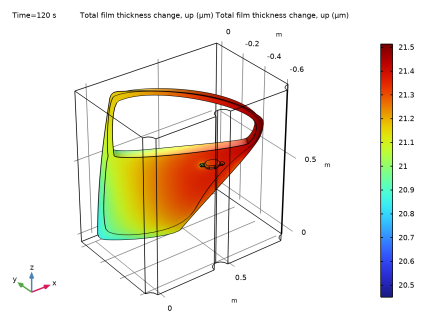
Figure 2 shows the paint thickness at the upside of the door after 120 s. The layer is around 21 μm thick. The thickness variation is less than 5%.
Figure 2: Paint thickness at the upside of the car door after 120 s.
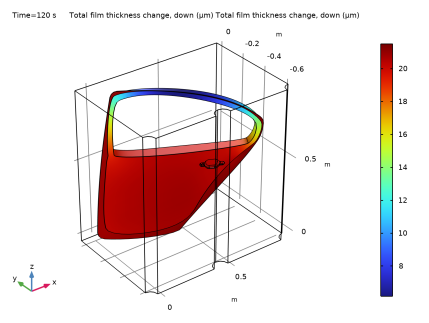
Figure 3 shows the paint thickness after 120 s on the downside of the door. Here the thickness variation is significant. Inside the window frame, the lowest thickness of 6.2 μm is much lower than on the more exposed parts, which have thicknesses close to 21 μm.
Figure 3: Paint thickness at the inside of the car door after 120 s.
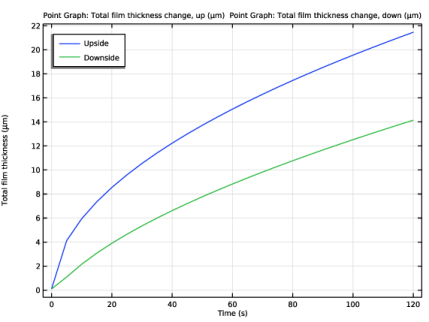
Finally, Figure 4 shows a thickness versus time comparison between the upside and downside of the window frame at a particular point.
Figure 4: Paint thickness comparison between the upside and downside of the window frame at a particular point.
A more elaborate model would include a more detailed description of the electrode reaction activation overpotentials. A further modification would be the inclusion of the transport of paint particles in the electrolyte solution and the paint deposition rate dependence on the local chemistry. Including these modifications would yield a Tertiary Current Distribution model.
Reference
1. F. Hess and U. Gonzalez, “Automotive E-Coat Paint Process Simulation Using FEA,” paper presented at the NAFEMS Ninth International Conference in Orlando, Florida, USA. May 29 2003.
Application Library path: Electrodeposition_Module/Tutorials/car_door
Modeling Instructions
From the File menu, choose New.
New
In the New window, click  Model Wizard.
Model Wizard
1
In the Model Wizard window, click  3D.
2
In the Select Physics tree, select Electrochemistry > Primary and Secondary Current Distribution > Primary Current Distribution (cd).
3
Click Add.
4
Click  Study.
5
In the Select Study tree, select General Studies > Time Dependent.
6
Geometry 1
The geometry sequence for this model takes some time to set up. To skip these steps you can instead import the geometry sequence from the saved model file in the application library.
To skip setting up the geometry sequence manually: Right click the Geometry node and choose Insert Sequence. Then choose the Electrodeposition_Module -> Tutorials -> car_door.mph file from the application library.
Import 1 (imp1)
If you inserted the whole geometry sequence you can now move on directly to the Global Definitions section below. Otherwise start setting up the geometry by importing the car_door_geom.mphbin CAD file as follows:
1
In the Geometry toolbar, click  Import.
2
In the Settings window for Import, locate the Source section.
3
Click  Browse.
4
5
Click  Import.
Block 1 (blk1)
1
In the Geometry toolbar, click  Block.
2
In the Settings window for Block, locate the Size and Shape section.
3
In the Height text field, type 0.7.
4
Locate the Position section. In the x text field, type -0.1.
5
In the y text field, type -0.03.
6
Click  Build Selected.
Cylinder 1 (cyl1)
1
In the Geometry toolbar, click  Cylinder.
2
In the Settings window for Cylinder, locate the Size and Shape section.
3
In the Radius text field, type 0.05.
4
Locate the Position section. In the x text field, type -0.1.
5
In the y text field, type -0.03.
6
In the z text field, type 0.7.
7
Locate the Axis section. From the Axis type list, choose y-axis.
8
Click  Build Selected.
Array 1 (arr1)
1
In the Geometry toolbar, click  Transforms and choose Array.
2
3
In the Settings window for Array, locate the Size section.
4
In the x size text field, type 3.
5
Locate the Displacement section. In the x text field, type 0.5.
6
Click  Build Selected.
Union 1 (uni1)
1
In the Geometry toolbar, click  Booleans and Partitions and choose Union.
2
Select the objects arr1(1,1,1), arr1(2,1,1), arr1(3,1,1), and blk1 only.
3
In the Settings window for Union, click  Build Selected.
Delete Entities 1 (del1)
1
In the Model Builder window, right-click Geometry 1 and choose Delete Entities.
2
In the Settings window for Delete Entities, locate the Entities or Objects to Delete section.
3
From the Geometric entity level list, choose Domain.
4
On the object uni1, select Domains 1 and 3–7 only.
5
Click  Build Selected.
Rotate 1 (rot1)
1
In the Geometry toolbar, click  Transforms and choose Rotate.
2
Click in the Graphics window and then press Ctrl+A to select all objects.
3
In the Settings window for Rotate, locate the Rotation section.
4
In the Angle text field, type 90.
5
From the Axis type list, choose x-axis.
Form Union (fin)
1
In the Model Builder window, click Form Union (fin).
2
In the Settings window for Form Union/Assembly, locate the Form Union/Assembly section.
3
From the Repair tolerance list, choose Relative.
4
In the Geometry toolbar, click  Build All.
5
Click the  Zoom Extents button in the Graphics toolbar.
6
Click the  Transparency button in the Graphics toolbar.
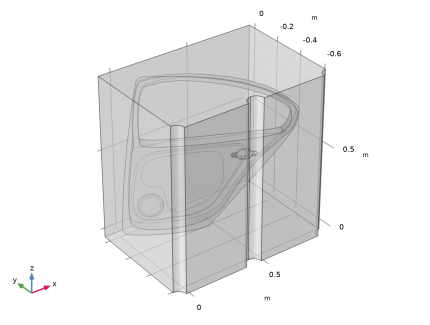
Your finished geometry should now look like this:
Disable the analysis of the geometry as the remaining small geometric details can be kept.
7
In the Model Builder window, click Geometry 1.
8
In the Settings window for Geometry, locate the Cleanup section.
9
Clear the Automatic detection of small details checkbox.
10
In the Geometry toolbar, click  Build All.
Global Definitions
Note: Start from this point if you chose to import the geometry sequence..
Load some model parameters from a text file.
Parameters 1
1
In the Model Builder window, under Global Definitions click Parameters 1.
2
In the Settings window for Parameters, locate the Parameters section.
3
Click  Load from File.
4
Definitions
Add some selections to the model.
Anodes
1
In the Definitions toolbar, click  Explicit.
2
In the Settings window for Explicit, locate the Input Entities section.
3
From the Geometric entity level list, choose Boundary.
4
5
In the Label text field, type Anodes.
Cathode
1
In the Definitions toolbar, click  Explicit.
2
In the Settings window for Explicit, locate the Input Entities section.
3
From the Geometric entity level list, choose Boundary.
4
5
In the Label text field, type Cathode.
Primary Current Distribution (cd)
Electrolyte 1
1
In the Model Builder window, under Component 1 (comp1) > Primary Current Distribution (cd) click Electrolyte 1.
2
In the Settings window for Electrolyte, locate the Electrolyte section.
3
From the σl list, choose User defined. In the associated text field, type sigma.
Electrode Surface 1
Set up the anodes.
1
In the Physics toolbar, click  Boundaries and choose Electrode Surface.
2
In the Settings window for Electrode Surface, locate the Boundary Selection section.
3
From the Selection list, choose Anodes.
4
Locate the Electrode Phase Potential Condition section. In the ϕs,ext text field, type E_cell.
Electrode Reaction 1
1
In the Model Builder window, click Electrode Reaction 1.
2
In the Settings window for Electrode Reaction, locate the Equilibrium Potential section.
3
In the Eeq text field, type Eeq_O2.
Thin Electrode Surface 1
Now set up the cathode, which is the car door in this model.
1
In the Physics toolbar, click  Boundaries and choose Thin Electrode Surface.
2
In the Settings window for Thin Electrode Surface, locate the Boundary Selection section.
3
From the Selection list, choose Cathode.
4
Click to expand the Dissolving–Depositing Species section. Click  Add.
5
6
Click to expand the Film Resistance section. From the Film resistance list, choose Thickness and conductivity.
7
In the s0 text field, type 0.1[um].
8
In the σfilm text field, type 1/R_film.
9
From the Δs list, choose Total film thickness change, up (cd/tes1).
10
From the Δs list, choose Total film thickness change, down (cd/tes1).
11
From the Boundary condition formulation list, choose Current density.
Electrode Reaction 1
1
In the Model Builder window, click Electrode Reaction 1.
2
In the Settings window for Electrode Reaction, locate the Stoichiometric Coefficients section.
3
In the Stoichiometric coefficients for dissolving–depositing species: table, enter the following settings:
Mesh 1
Now set up the mesh.
1
In the Model Builder window, under Component 1 (comp1) click Mesh 1.
2
In the Settings window for Mesh, locate the Physics-Controlled Mesh section.
3
From the Element size list, choose Coarse.
4
Click  Build All.
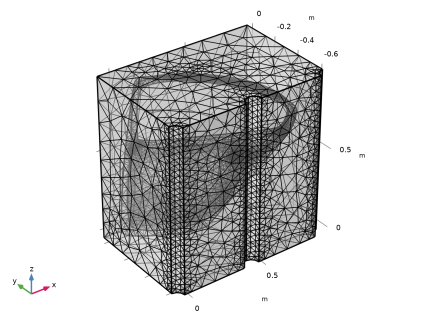
Your finished mesh should now look like this:
5
Click the  Transparency button in the Graphics toolbar.
Study 1
Step 1: Time Dependent
The problem is now ready for solving. Set up to the study to simulate the coating process during 2 minutes.
1
In the Model Builder window, under Study 1 click Step 1: Time Dependent.
2
In the Settings window for Time Dependent, locate the Study Settings section.
3
In the Output times text field, type range(0,5,120).
4
In the Study toolbar, click  Compute.
Results
A number of plots have been added by default. Now, create separate plots of the electrode potential versus adjacent reference plot for the upside and downside of the car door geometry.
Electrode Potential vs. Adjacent Reference, All Electrodes
1
In the Model Builder window, under Results click Electrode Potential with Respect to Adjacent Reference (cd).
2
In the Settings window for 3D Plot Group, type Electrode Potential vs. Adjacent Reference, All Electrodes in the Label text field.
Electrode Potential vs. Adjacent Reference, Cathode Upside
1
Right-click Electrode Potential vs. Adjacent Reference, All Electrodes and choose Duplicate.
2
In the Settings window for 3D Plot Group, type Electrode Potential vs. Adjacent Reference, Cathode Upside in the Label text field.
Surface Slit 1
1
In the Model Builder window, expand the Electrode Potential vs. Adjacent Reference, Cathode Upside node, then click Surface Slit 1.
2
In the Settings window for Surface Slit, locate the Expression on the Downside section.
3
In the Expression text field, type root.comp1.cd.Evsrefu.
4
Click to expand the Inherit Style section. From the Plot list, choose None.
Surface 1
1
In the Model Builder window, click Surface 1.
2
In the Settings window for Surface, click to expand the Inherit Style section.
3
Right-click Surface 1 and choose Disable.
Electrode Potential vs. Adjacent Reference, Cathode Upside
1
In the Model Builder window, click Electrode Potential vs. Adjacent Reference, Cathode Upside.
2
In the Electrode Potential vs. Adjacent Reference, Cathode Upside toolbar, click  Plot.
Electrode Potential vs. Adjacent Reference, Cathode Downside
1
Right-click Electrode Potential vs. Adjacent Reference, Cathode Upside and choose Duplicate.
2
In the Settings window for 3D Plot Group, type Electrode Potential vs. Adjacent Reference, Cathode Downside in the Label text field.
Surface Slit 1
1
In the Model Builder window, expand the Electrode Potential vs. Adjacent Reference, Cathode Downside node, then click Surface Slit 1.
2
In the Settings window for Surface Slit, locate the Expression on the Upside section.
3
In the Expression text field, type root.comp1.cd.Evsrefd.
4
Locate the Expression on the Downside section. In the Expression text field, type root.comp1.cd.Evsrefd.
5
In the Electrode Potential vs. Adjacent Reference, Cathode Downside toolbar, click  Plot.
Total Film Thickness, Cathode
1
In the Model Builder window, under Results click Total Electrode Thickness Change (cd).
2
In the Settings window for 3D Plot Group, type Total Film Thickness, Cathode in the Label text field.
The total film thickness at both the sides of the car door was plotted by default. Now create separate upside and downside plots.
Total Film Thickness, Cathode Upside
1
Right-click Total Film Thickness, Cathode and choose Duplicate.
2
In the Settings window for 3D Plot Group, type Total Film Thickness, Cathode Upside in the Label text field.
Surface Slit 1
1
In the Model Builder window, expand the Total Film Thickness, Cathode Upside node, then click Surface Slit 1.
2
In the Settings window for Surface Slit, locate the Expression on the Downside section.
3
In the Expression text field, type root.comp1.cd.sbtotu.
4
In the Total Film Thickness, Cathode Upside toolbar, click  Plot.
Total Film Thickness, Cathode Downside
1
In the Model Builder window, right-click Total Film Thickness, Cathode and choose Duplicate.
2
In the Settings window for 3D Plot Group, type Total Film Thickness, Cathode Downside in the Label text field.
Surface Slit 1
1
In the Model Builder window, expand the Total Film Thickness, Cathode Downside node, then click Surface Slit 1.
2
In the Settings window for Surface Slit, locate the Expression on the Upside section.
3
In the Expression text field, type root.comp1.cd.sbtotd.
4
In the Total Film Thickness, Cathode Downside toolbar, click  Plot.
Total Film Thickness Comparison
Finally, compare the total upside and downside film thickness at a specific point on the car door geometry.
1
In the Results toolbar, click  1D Plot Group.
2
In the Settings window for 1D Plot Group, type Total Film Thickness Comparison in the Label text field.
3
Locate the Plot Settings section.
4
Select the y-axis label checkbox. In the associated text field, type Total film thickness (\mu m).
Point Graph 1
1
In the Total Film Thickness Comparison toolbar, click  Point Graph.
2
3
In the Settings window for Point Graph, click Replace Expression in the upper-right corner of the y-Axis Data section. From the menu, choose Component 1 (comp1) > Primary Current Distribution > Dissolving–depositing species > cd.sbtotu - Total film thickness change, up - m.
4
Click to expand the Legends section. Locate the y-Axis Data section. From the Unit list, choose µm.
5
Locate the Legends section. Select the Show legends checkbox.
6
From the Legends list, choose Manual.
7
Point Graph 2
1
Right-click Point Graph 1 and choose Duplicate.
2
In the Settings window for Point Graph, locate the Selection section.
3
Click to select the  Activate Selection toggle button.
4
Click Replace Expression in the upper-right corner of the y-Axis Data section. From the menu, choose Component 1 (comp1) > Primary Current Distribution > Dissolving–depositing species > cd.sbtotd - Total film thickness change, down - m.
5
Locate the Legends section. In the table, enter the following settings:
Total Film Thickness Comparison
1
In the Model Builder window, click Total Film Thickness Comparison.
2
In the Settings window for 1D Plot Group, locate the Legend section.
3
From the Position list, choose Upper left.
4
In the Total Film Thickness Comparison toolbar, click  Plot.
Animation 1
1
In the Results toolbar, click  Animation and choose File.
2
In the Settings window for Animation, locate the Target section.
3
From the Target list, choose Player.
4
Locate the Scene section. From the Subject list, choose Total Film Thickness, Cathode Downside.
5
Click the  Play button in the Graphics toolbar.