PDF

Isoelectric Focusing
Introduction
This model simulates the separation phase during isoelectric focusing of seven carrier ampholytes in a closed column. Isoelectric focusing is a technique used to separate ampholytes (molecules with both acidic and basic functional groups) based on their isoelectric point (pI)—the pH at which the molecule has no net charge. The pI of the ampholytes uniformly span the interval 3.5–9.5, with ΔpK of 2 for each ampholyte The model reproduces results reported by Thormann and others (Ref. 1).
Model Definition
The model is set up in 1D using the Electrophoretic Transport interface, using seven Ampholyte domain nodes to define the transported species. The same mobility and the same uniform initial concentration values are used for all ampholytes.
The problem is solved in a time-dependent study for the time range 0 to 4 minutes.
Results and Discussion
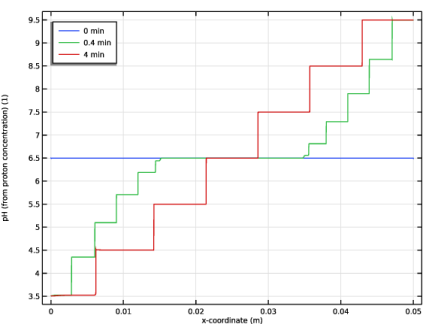
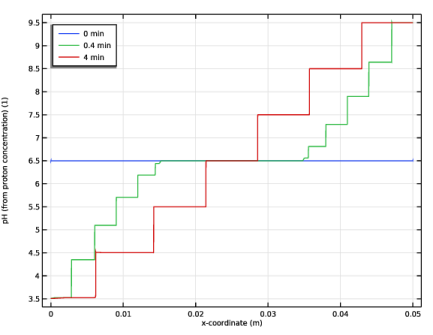
Figure 1 shows the pH in the column for different times during the simulation. After four minutes the pH profile features seven different plateaus.
Figure 1: pH of the separation column for various times.
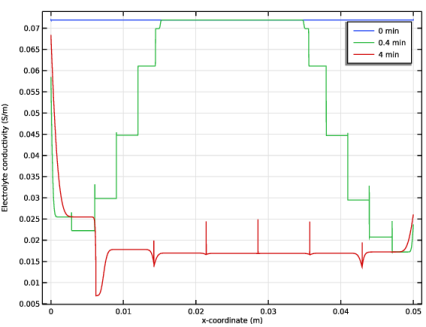
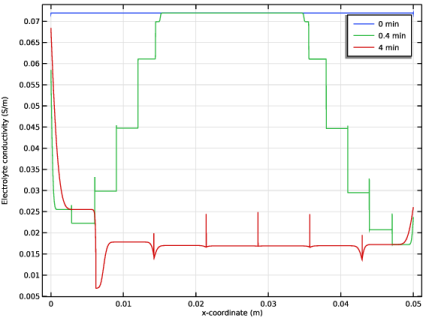
Figure 2 shows the corresponding conductivities in the column. The conductivity decreases as the separation process proceeds.
Figure 2: Electrolyte conductivity of the separation column at various times.
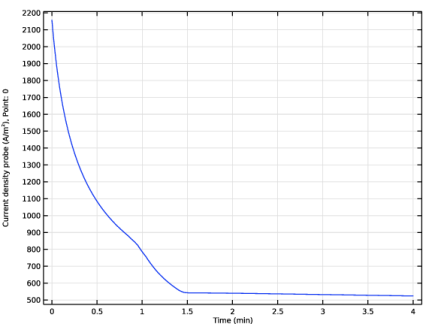
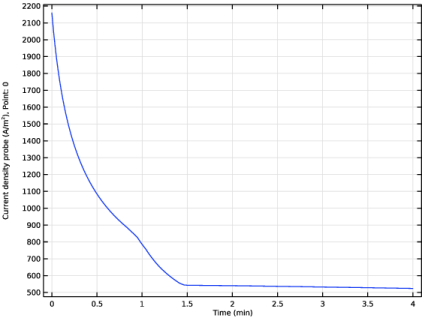
Figure 3 shows the current density vs time. The cell is operated at constant voltage conditions, and hence the current density decreases over time as a result of the lowered conductivity.
Figure 3: Anode current density (in A/m2) versus time.
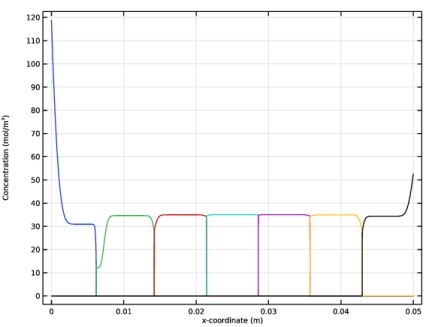
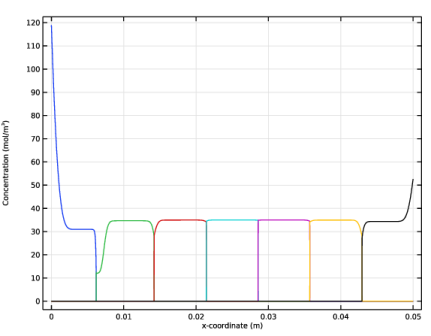
Figure 4 shows the concentration of the seven different ampholytes at t = 4 min. At this time, the sample has separated into seven well-separated regions, each one containing one ampholyte only. Steady-state has however not yet been reached (increase the simulation tome to 3000 s to reach the final concentration profile).
Figure 4: Concentration of the seven ampholytes at t = 4 min.
Reference
1. W. Thormann, M. Breadmore, J. Caslavska, and R. Mosher, “Dynamic computer simulations of electrophoresis: A versatile research and teaching tool,” Electrophoresis, vol. 31, pp. 726–754, 2010.
Application Library path: Electrochemistry_Module/Electrochemical_Engineering/isoelectric_focusing_1d
Modeling Instructions
From the File menu, choose New.
New
In the New window, click  Model Wizard.
Model Wizard
1
In the Model Wizard window, click  1D.
2
In the Select Physics tree, select Chemical Species Transport > Electrophoretic Transport (el).
3
Click Add.
4
Click  Study.
5
In the Select Study tree, select Preset Studies for Selected Physics Interfaces > Time Dependent with Initialization.
6
Global Definitions
Parameters 1
Load the model parameters from a text file.
1
In the Model Builder window, under Global Definitions click Parameters 1.
2
In the Settings window for Parameters, locate the Parameters section.
3
Click  Load from File.
4
Geometry 1
Interval 1 (i1)
1
In the Model Builder window, under Component 1 (comp1) right-click Geometry 1 and choose Interval.
2
In the Settings window for Interval, locate the Interval section.
3
4
Click  Build All Objects.
Electrophoretic Transport (el)
Potential 1
1
In the Physics toolbar, click  Boundaries and choose Potential.
2
Potential 2
1
In the Physics toolbar, click  Boundaries and choose Potential.
2
3
In the Settings window for Potential, locate the Electrolyte Potential section.
4
In the ϕl,bnd text field, type dV*L.
Ampholyte 1
1
In the Physics toolbar, click  Domains and choose Ampholyte.
2
In the Settings window for Ampholyte, locate the Ampholyte section.
3
4
Locate the Diffusion and Migration section. In the um text field, type mob.
Initial Concentration 1
1
In the Model Builder window, expand the Ampholyte 1 node, then click Initial Concentration 1.
2
In the Settings window for Initial Concentration, locate the Initial Concentration section.
3
In the c text field, type c0.
Ampholyte 2
1
In the Model Builder window, under Component 1 (comp1) > Electrophoretic Transport (el) right-click Ampholyte 1 and choose Duplicate.
2
In the Settings window for Ampholyte, locate the Ampholyte section.
3
Ampholyte 3
1
Right-click Ampholyte 2 and choose Duplicate.
2
In the Settings window for Ampholyte, locate the Ampholyte section.
3
Ampholyte 4
1
Right-click Ampholyte 3 and choose Duplicate.
2
In the Settings window for Ampholyte, locate the Ampholyte section.
3
Ampholyte 5
1
Right-click Ampholyte 4 and choose Duplicate.
2
In the Settings window for Ampholyte, locate the Ampholyte section.
3
Ampholyte 6
1
Right-click Ampholyte 5 and choose Duplicate.
2
In the Settings window for Ampholyte, locate the Ampholyte section.
3
Ampholyte 7
1
Right-click Ampholyte 6 and choose Duplicate.
2
In the Settings window for Ampholyte, locate the Ampholyte section.
3
Global Definitions
Default Model Inputs
Set up the temperature value used in the entire model.
1
In the Model Builder window, under Global Definitions click Default Model Inputs.
2
In the Settings window for Default Model Inputs, locate the Browse Model Inputs section.
3
In the tree, select General > Temperature (K) - minput.T.
4
Find the Expression for remaining selection subsection. In the Temperature text field, type T.
Mesh 1
Proceed as follows to create a user-defined mesh with a higher resolution toward the end boundaries:
1
In the Model Builder window, under Component 1 (comp1) click Mesh 1.
2
In the Settings window for Mesh, locate the Sequence Type section.
3
From the list, choose User-controlled mesh.
Size
1
In the Model Builder window, under Component 1 (comp1) > Mesh 1 click Size.
2
In the Settings window for Size, locate the Element Size section.
3
Click the Custom button.
4
Locate the Element Size Parameters section. In the Maximum element size text field, type 4e-6.
Size 1
1
In the Model Builder window, right-click Edge 1 and choose Size.
2
In the Settings window for Size, locate the Geometric Entity Selection section.
3
From the Geometric entity level list, choose Boundary.
4
From the Selection list, choose All boundaries.
5
Locate the Element Size section. Click the Custom button.
6
Locate the Element Size Parameters section.
7
Select the Maximum element size checkbox. In the associated text field, type 1e-6.
8
Click  Build All.
The model is now ready for solving. Add a probe to monitor the current density for each time step during the simulation.
Definitions
Domain Point Probe 1
1
In the Definitions toolbar, click  Probes and choose Domain Point Probe.
2
In the Settings window for Domain Point Probe, locate the Point Selection section.
3
Select the Snap to closest point checkbox.
Point Probe Expression 1 (ppb1)
1
In the Model Builder window, expand the Domain Point Probe 1 node, then click Point Probe Expression 1 (ppb1).
2
In the Settings window for Point Probe Expression, locate the Expression section.
3
In the Expression text field, type -el.nIl.
4
Select the Description checkbox. In the associated text field, type Current density probe.
Study 1
Step 2: Time Dependent
1
In the Model Builder window, under Study 1 click Step 2: Time Dependent.
2
In the Settings window for Time Dependent, locate the Study Settings section.
3
From the Time unit list, choose min.
4
In the Output times text field, type 0 0.4 4.
The initial transients of the focusing process will be very short. Modify the default solver to set a small initial time step as follows:
Solution 1 (sol1)
1
In the Study toolbar, click  Show Default Solver.
2
In the Model Builder window, expand the Solution 1 (sol1) node, then click Time-Dependent Solver 1.
3
In the Settings window for Time-Dependent Solver, click to expand the Time Stepping section.
4
Select the Initial step checkbox. In the associated text field, type 1e-5.
The model will take a few hours to solve.
5
In the Study toolbar, click  Compute.
Results
pH (el)
A number of plots are created by default.
1
In the Settings window for 1D Plot Group, click to expand the Title section.
2
From the Title type list, choose None.
3
Locate the Legend section. From the Position list, choose Upper left.
4
In the pH (el) toolbar, click  Plot.
Electrolyte Conductivity (el)
1
In the Model Builder window, click Electrolyte Conductivity (el).
2
In the Settings window for 1D Plot Group, locate the Title section.
3
From the Title type list, choose None.
4
In the Electrolyte Conductivity (el) toolbar, click  Plot.
Current Density vs. Time
1
In the Model Builder window, under Results click Probe Plot Group 1.
2
In the Settings window for 1D Plot Group, type Current Density vs. Time in the Label text field.
3
Locate the Legend section. Clear the Show legends checkbox.
4
In the Current Density vs. Time toolbar, click  Plot.
Molar Concentration - S (el)
Proceed as follows to create a plot of all ampholyte concentrations in the same figure:
Concentrations
1
In the Model Builder window, right-click Molar Concentration - S (el) and choose Duplicate.
2
In the Settings window for 1D Plot Group, type Concentrations in the Label text field.
3
Locate the Data section. From the Time selection list, choose Last.
4
Click to expand the Title section. From the Title type list, choose None.
Line Graph 1
1
In the Model Builder window, expand the Concentrations node, then click Line Graph 1.
2
In the Settings window for Line Graph, click to expand the Legends section.
3
Clear the Show legends checkbox.
Line Graph 2
1
Right-click Results > Concentrations > Line Graph 1 and choose Duplicate.
2
In the Settings window for Line Graph, locate the y-Axis Data section.
3
In the Expression text field, type el.c_S1.
Line Graph 3
1
Right-click Line Graph 2 and choose Duplicate.
2
In the Settings window for Line Graph, locate the y-Axis Data section.
3
In the Expression text field, type el.c_S2.
Line Graph 4
1
Right-click Line Graph 3 and choose Duplicate.
2
In the Settings window for Line Graph, locate the y-Axis Data section.
3
In the Expression text field, type el.c_S3.
Line Graph 5
1
Right-click Line Graph 4 and choose Duplicate.
2
In the Settings window for Line Graph, locate the y-Axis Data section.
3
In the Expression text field, type el.c_S4.
Line Graph 6
1
Right-click Line Graph 5 and choose Duplicate.
2
In the Settings window for Line Graph, locate the y-Axis Data section.
3
In the Expression text field, type el.c_S5.
Line Graph 7
1
Right-click Line Graph 6 and choose Duplicate.
2
In the Settings window for Line Graph, locate the y-Axis Data section.
3
In the Expression text field, type el.c_S6.
4
In the Concentrations toolbar, click  Plot.
Your final plot should look something like this: